
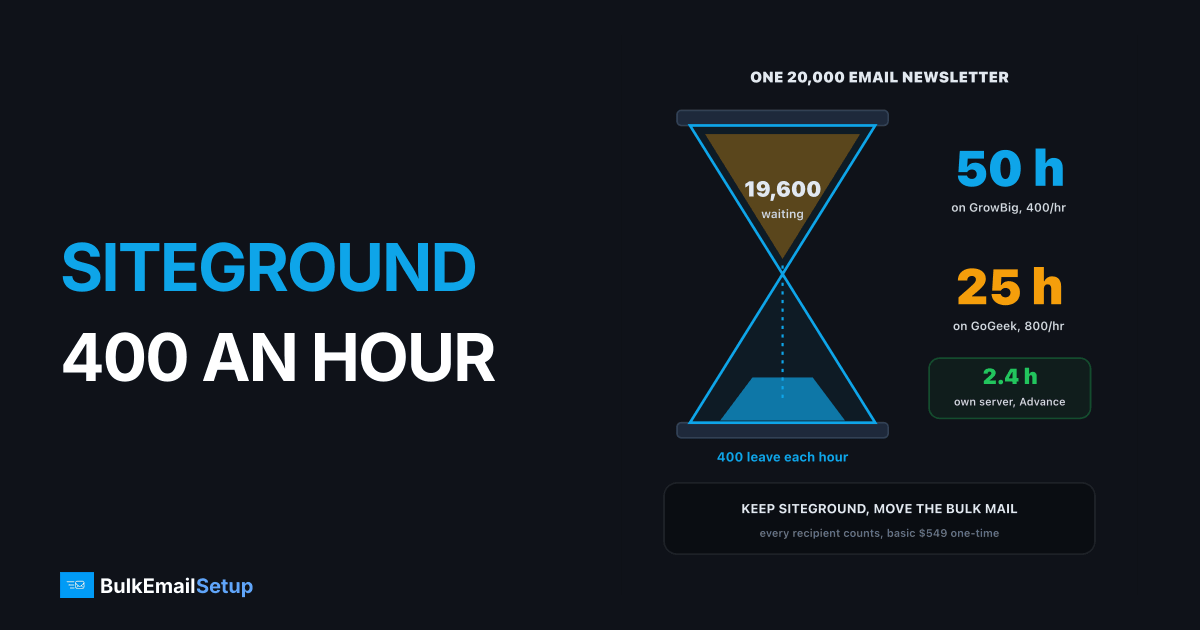
SiteGround caps sending at 400 emails an hour on StartUp, GrowBig, Ecommerce and Coderick plans, and 800 an hour on GoGeek and Cloud, with every recipient counted as one email. A 20,000 person newsletter therefore takes about 50 hours on GrowBig and 25 hours on GoGeek. Keep your site and mailboxes at SiteGround, and send campaigns through an SMTP server that is built for bulk.
What the SiteGround limit actually is
SiteGround publishes the rules in its acceptable use article for email. In plain terms:
| Plan | Emails per hour | Per day if you sent nonstop | Recipients per message |
|---|---|---|---|
| StartUp | 400 | 9,600 | up to 80 |
| GrowBig | 400 | 9,600 | up to 80 |
| Ecommerce, Coderick | 400 | 9,600 | up to 80 |
| GoGeek | 800 | 19,200 | up to 80 |
| Cloud | 800 | 19,200 | up to 80 |
The "per day" column is the ceiling if you sent every hour of the day with nothing else going out, including password resets and order emails. Nobody actually gets that, because your normal site mail shares the same allowance.
The rule that catches people: each recipient counts separately. A message to 80 people is 80 emails, not one.
400 an hour drains a 20,000 list in about 50 hours
What that means for a real newsletter
Here is how long one send takes at each SiteGround cap, compared with a dedicated server:
| List size | GrowBig (400/hr) | GoGeek (800/hr) | Own server, Basic (about 1,050/hr) | Own server, Advance (about 8,500/hr) |
|---|---|---|---|---|
| 2,000 | 5 hours | 2.5 hours | about 2 hours | under 15 minutes |
| 10,000 | 25 hours | 12.5 hours | about 9.5 hours | about 1.2 hours |
| 20,000 | 50 hours | 25 hours | about 19 hours | about 2.4 hours |
| 50,000 | 125 hours | 62.5 hours | 2 days at 25,000 a day | about 6 hours |
Two things go wrong at 25 to 50 hours. First, the newsletter arrives over two days, so "this week's offer" lands for half your list after it ended. Second, your order confirmations and password resets sit in the same queue behind it. A customer who resets a password during the send can wait hours for the link.
Does SiteGround allow newsletters at all?
The knowledge base does not ban marketing mail outright. It does say that for bulk mailing like email marketing, SiteGround recommends its separate Email Marketing product rather than the hosting mailbox. Read that as the host telling you where it wants bulk mail to go.
So the practical answer:
- Under about 2,000 subscribers, a few sends a month: fits under the cap, with patience.
- 5,000 to 20,000: works only if you are fine with sends that run all day and night.
- Past 20,000, or more than one send a week: the hosting mailbox is the wrong tool.
Your three options
| Option | Good when | Watch for |
|---|---|---|
| Stay on SiteGround mail, throttle the plugin | small list, occasional sends | slow sends, shared queue with order mail |
| An ESP (Mailchimp, Brevo, Mailgun) | small to mid list, want a hosted editor | per-contact or per-email bills that climb, shared IPs |
| Your own SMTP server | steady volume, list over 10,000 | you run warm-up and list hygiene |
Hosted ESPs are fine at small volume, but the bill grows with your list. If you are weighing that route, the free tier trap and what cPanel-style hourly caps do cover the same ceiling from other angles.
How to keep SiteGround and move only the bulk mail
You do not need to move the website. You split the mail into two lanes.
Mailboxes stay at SiteGround, campaigns take their own lane
- Leave MX at SiteGround. Mailboxes and incoming mail are unchanged.
- Add the new server to SPF. One
includeorip4entry in the existing record. - Publish the new server's DKIM key on your domain.
- Point the newsletter plugin at the new SMTP server, port 587 with login. In WordPress that is an SMTP plugin setting. Our WordPress bulk email guide walks through it.
- Warm up before the first full send. New IPs start at a few hundred a day per IP and grow about 30% every two days.
Your contact form and WooCommerce receipts can stay on SiteGround's mail, which now has the whole 400 or 800 an hour to itself.
The same limit at other hosts
SiteGround is not unusually strict. Shared hosts all cap outbound mail, because one customer's newsletter can get the whole server's IP blocklisted.
| Host | Typical cap | Our guide |
|---|---|---|
| SiteGround | 400 or 800 an hour | this page |
| Bluehost | 150 an hour on hosting accounts | Bluehost email limit |
| GoDaddy | about 500 a day per user on cPanel | GoDaddy sending limit |
| Hostinger | 1,000 to 3,000 a day per mailbox | Hostinger sending limit |
How BulkEmailSetup helps
We set up a dedicated SMTP server on a VPS you own, so your newsletters stop competing with your site's own mail for 400 slots an hour. You get dedicated IPs, SPF, DKIM, DMARC and PTR done, bounce handling, a campaign platform with lists, templates and stats, and a warm-up plan.
| Plan | One-time fee | Emails per day | About per hour | Dedicated IPs | Hosting you pay your host |
|---|---|---|---|---|---|
| Basic | $549 | 25,000 | 1,050 | 3 | about $11 a month |
| Advance | $1,199 | 200,000 | 8,500 | 15 | about $49 a month |
No monthly fee to us and no contact limit. There is a 15-day money-back guarantee, which applies until server access is handed over. See the Basic plan or compare all pricing.
Frequently asked questions
How many emails can SiteGround send per hour?
SiteGround's acceptable use article allows up to 400 emails an hour from a site on StartUp, GrowBig, Ecommerce and Coderick plans, and up to 800 an hour on GoGeek and Cloud. Every recipient counts as one email, so a message sent to 10 people uses 10 of the hourly allowance. A single message can carry up to 80 recipients.
Does SiteGround allow newsletters?
SiteGround's email service is built for normal business mail. For bulk mailing like email marketing, its own knowledge base points you to its separate Email Marketing product rather than the hosting mailbox. A small newsletter can fit under 400 an hour, but anything past a few thousand subscribers turns into a send that runs for a day or more.
Can I use my own SMTP on SiteGround?
Yes. A WordPress site on SiteGround can send through any external SMTP server with an SMTP plugin, using port 587 with a login. The hourly limit applies to mail SiteGround's own servers send, so routing newsletters through your own SMTP server takes them out of the 400 or 800 an hour count. Your website and mailboxes stay where they are.
What is the cheapest bulk email option for SiteGround sites?
For a few thousand emails a month, a free ESP tier is cheapest. For steady volume, a dedicated SMTP server is cheaper over time because there is no per-email or per-contact fee. BulkEmailSetup's Basic plan is $549 one-time for 3 dedicated IPs and 25,000 emails a day, plus about $11 a month of hosting you pay your own provider.
What happens if I go over the SiteGround email limit?
SiteGround's article states the limits but does not say exactly what happens past them. On shared hosting, mail over an hourly cap is normally held or refused until the next hour, and repeated overruns can lead the host to restrict sending from the account. Either way, a newsletter that needs 30 hours is not something a shared host will let you do every week.
Does an email to 50 people count as one email at SiteGround?
No. SiteGround counts each recipient separately against the hourly quota. One message with 50 addresses in it uses 50 of your 400 or 800. That is why mailing a list from a contact form plugin or a WordPress newsletter plugin hits the cap so fast, even when it looks like a single send.
Do I have to move my website away from SiteGround?
No. Keep the website, the domain's MX records and the staff mailboxes at SiteGround. Only the bulk sending moves. You add the new server to your SPF record, publish its DKIM key, and point the newsletter plugin at it. Day-to-day mail and the site are not touched.


