
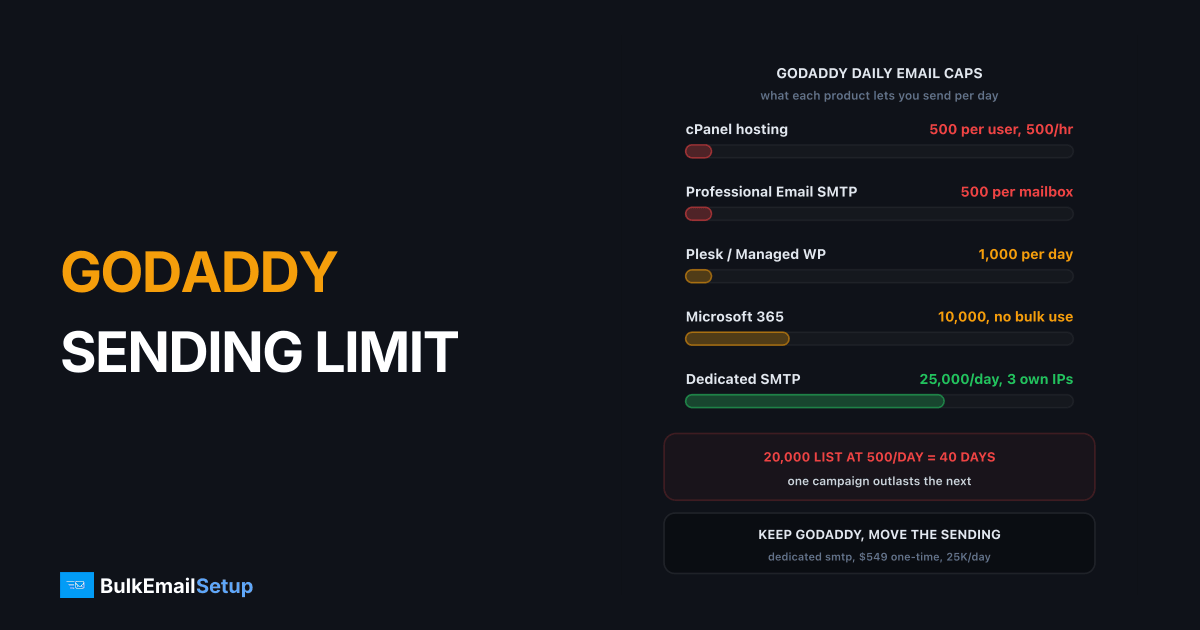
GoDaddy caps outgoing email at 500 a day on cPanel hosting (500 an hour across the whole account), 1,000 a day on Plesk and Managed WordPress, 500 a day per Professional Email mailbox over SMTP, and 10,000 recipients a day on Microsoft 365. None of these are built for bulk mail. Past a few thousand emails a day, the fix is to keep GoDaddy for your domain, website and mailboxes, and send campaigns through a dedicated SMTP server that you point at from GoDaddy DNS.
I see this every week: a WooCommerce store or a newsletter plugin on GoDaddy hosting runs fine for months, then the list passes 1,000 people and half the mail stops arriving. Nothing broke. The site hit a cap it never knew it had.
GoDaddy email sending limits by product
GoDaddy publishes separate limits for hosting relay and for each mailbox product. These are the figures from GoDaddy's own hosting email relay limits and Professional Email help pages.
| GoDaddy product | Daily limit | Other caps |
|---|---|---|
| Web Hosting (cPanel) | 500 per email user | 500 per hour for the whole account |
| Windows Hosting (Plesk) | 1,000 | per account |
| Managed WordPress | 1,000 | per account |
| Professional Email, via SMTP | 500 per mailbox | 100 recipients per message |
| Professional Email, via webmail | 1,500 per mailbox | 100 recipients per message |
| Microsoft 365 from GoDaddy | 10,000 recipients | 30 messages per minute, 500 recipients per message |
The cPanel line catches most people. The 500 an hour is shared by every mailbox and every script on the account, so a contact form, an order email plugin and a newsletter all draw from the same bucket.
Daily caps per GoDaddy product, next to a 25,000 a day dedicated server
Why GoDaddy caps outgoing mail
Shared hosting puts thousands of customers behind the same small set of outgoing IPs. If one account sends a burst of spam, Gmail and Microsoft block those IPs, and every other customer's order confirmations fail with it. The caps are GoDaddy protecting the pool.
Microsoft 365 is a different story with the same result. Microsoft's own Exchange Online limits set the 10,000 recipient daily cap, and the service terms say it is not for bulk mail. Push newsletters through it and the usual outcome is that the mailbox gets restricted from sending at all, which takes your normal business mail down too.
So raising the limit is not really on the table. The caps are tied to the product, and every product GoDaddy sells for email is a mailbox product.
How long your list takes at GoDaddy limits
This is the table that usually ends the discussion. One send to the whole list, at the daily cap, with no other mail going out that day.
| List size | At 500 a day | At 1,000 a day | At 10,000 a day (Microsoft 365) | At 25,000 a day (dedicated) |
|---|---|---|---|---|
| 2,000 | 4 days | 2 days | same day | same day |
| 5,000 | 10 days | 5 days | same day | same day |
| 20,000 | 40 days | 20 days | 2 days | same day |
| 50,000 | 100 days | 50 days | 5 days, against terms | 2 days |
A weekly newsletter to 5,000 people cannot run on a 500 a day cap. The send would still be going out when the next one is due. And Microsoft 365 only looks workable on paper, because using it for bulk risks the mailbox your team relies on.
Keep GoDaddy, move only the sending
You do not need to move your domain, website or mailboxes. Email sending is controlled by DNS records, and GoDaddy DNS can point at any sending server. The usual setup splits the work in two.
| Job | Where it runs | Why |
|---|---|---|
| Domain and DNS | GoDaddy | nothing changes |
| Website and contact forms | GoDaddy hosting | forms route through outside SMTP if needed |
| Staff mailboxes | Professional Email or Microsoft 365 | normal 1-to-1 mail, well under the caps |
| Newsletters and campaigns | Dedicated SMTP server | own IPs, no shared cap |
| Order and password emails | Dedicated SMTP server or a transactional service | stops form spikes from eating the mailbox cap |
Mailboxes stay at GoDaddy, bulk mail leaves from your own server
The DNS side is three records added in the GoDaddy DNS panel. Your SPF record gets the new server added next to GoDaddy's entry, so both are allowed to send for the domain:
example.com.  TXT  "v=spf1 include:secureserver.net ip4:203.0.113.10 ip4:203.0.113.11 ip4:203.0.113.12 -all"
mail._domainkey.example.com.  TXT  "v=DKIM1; k=rsa; p=MIIBIjANBgkq..."
_dmarc.example.com.  TXT  "v=DMARC1; p=none; rua=mailto:[email protected]"
Keep one SPF record only. Two SPF records on the same domain is a permanent error and both stop working. The full walk-through is in our SPF, DKIM and DMARC setup guide. If the bulk mail goes out on a subdomain such as news.example.com, which I recommend, your main domain's records stay untouched. See subdomain vs root domain for sending for why.
Your options past the GoDaddy cap
Here is where people usually land, by what they send.
| Option | Daily volume | Good for | Watch out for |
|---|---|---|---|
| Stay on GoDaddy caps | 500 to 1,000 | contact forms, small shops | one busy day stops all mail |
| Microsoft 365 | up to 10,000 recipients | staff mail | bulk use breaks the terms |
| Transactional API service | per-email pricing | password and order mail | marketing content often limited |
| Shared ESP (newsletter tool) | plan-based | small lists with a builder | per-contact bills grow with the list |
| Dedicated SMTP server | 25,000 to 1,000,000 | newsletters, stores, agencies | needs warm-up for the first weeks |
For a WordPress site, the switch is one plugin setting: point WP Mail SMTP or a similar plugin at the new server on port 587 with authentication. Our SMTP for WordPress bulk email post shows the settings. If your volume is closer to 10,000 a day, how to send 10,000 emails a day lays out the setup at that size.
What to do this week
- Check which GoDaddy product actually sends your mail. Look at the SMTP host in your plugin or mail client settings.
- Count your real daily volume, including order emails and form notifications.
- If that number is near 500, move bulk and automated mail off GoDaddy before the next campaign.
- Add the new SPF, DKIM and DMARC records in GoDaddy DNS. Leave MX records alone.
- Warm up the new IPs over 2 to 4 weeks, starting with your most engaged readers.
How BulkEmailSetup helps
We set up a dedicated SMTP server on a VPS you own, with your own IPs, SPF, DKIM, DMARC and PTR records, and an email marketing platform for campaigns. GoDaddy keeps your domain, website and mailboxes. We just give the bulk mail somewhere to go that has no shared cap.
The Basic plan is $549 one-time: 1 SMTP server, 3 dedicated IPs, 25,000 emails a day and unlimited contacts. After setup you pay only the hosting, about $11 a month, straight to the host. There is a 15-day money-back guarantee. See the Basic plan, or compare all plans on pricing.
Frequently asked questions
What is the GoDaddy email sending limit per day?
It depends on the product. cPanel web hosting allows 500 emails a day per email user, with a 500 per hour cap across the whole account. Windows (Plesk) and Managed WordPress hosting allow 1,000 a day. Professional Email allows 500 a day over SMTP and 1,500 through webmail. Microsoft 365 from GoDaddy allows 10,000 recipients per 24 hours.
Can I send bulk email from GoDaddy hosting?
Not in any real volume. Every GoDaddy hosting and mailbox product is capped between 500 and 10,000 messages a day, and the mailbox products are meant for person-to-person mail, not newsletters. A 20,000 contact list takes 40 days at the 500 a day cap. Keep GoDaddy for the domain and website and send bulk mail through a dedicated SMTP server.
Why does GoDaddy block my outgoing mail?
Usually because you hit a cap: 500 an hour across a cPanel account, 500 a day per Professional Email mailbox over SMTP, or 30 a minute on Microsoft 365. Shared hosting sends from IPs used by thousands of other customers, so GoDaddy throttles hard to stop one account from getting those IPs blocklisted. A spike from a contact form or newsletter plugin is the most common trigger.
What SMTP works with a GoDaddy domain?
Any SMTP service works, because sending is controlled by DNS, not by where the domain is registered. You add the new server's SPF entry, a DKIM key and a DMARC record in GoDaddy DNS, and mail from your domain passes authentication. A dedicated SMTP server such as BulkEmailSetup's Basic plan sends 25,000 a day from 3 dedicated IPs while GoDaddy keeps hosting the website and mailboxes.
Does GoDaddy block port 25?
On shared hosting you send through GoDaddy's own relay, so the relay caps apply whatever port your script uses. If you need more than the relay allows, the fix is a different sending server, not a different port. Use port 587 with authentication to an outside SMTP service, which also keeps your scripts working if the host changes rules.
Can I raise the GoDaddy email limit?
Within a product, not really. The caps are set per product in GoDaddy's relay limits table, so the way to more volume is a different product, and even Microsoft 365 stops at 10,000 recipients a day and bans bulk use in Microsoft's terms. For newsletters or campaigns, a separate bulk sending server is the usual answer.
Will moving bulk mail off GoDaddy affect my website email?
No. Your mailboxes, MX records and website stay on GoDaddy. Only outgoing bulk mail moves. You add one include or IP to your existing SPF record, publish a DKIM key for the new server, and set DMARC. Day-to-day mail from Outlook or webmail keeps going through GoDaddy exactly as before.


