
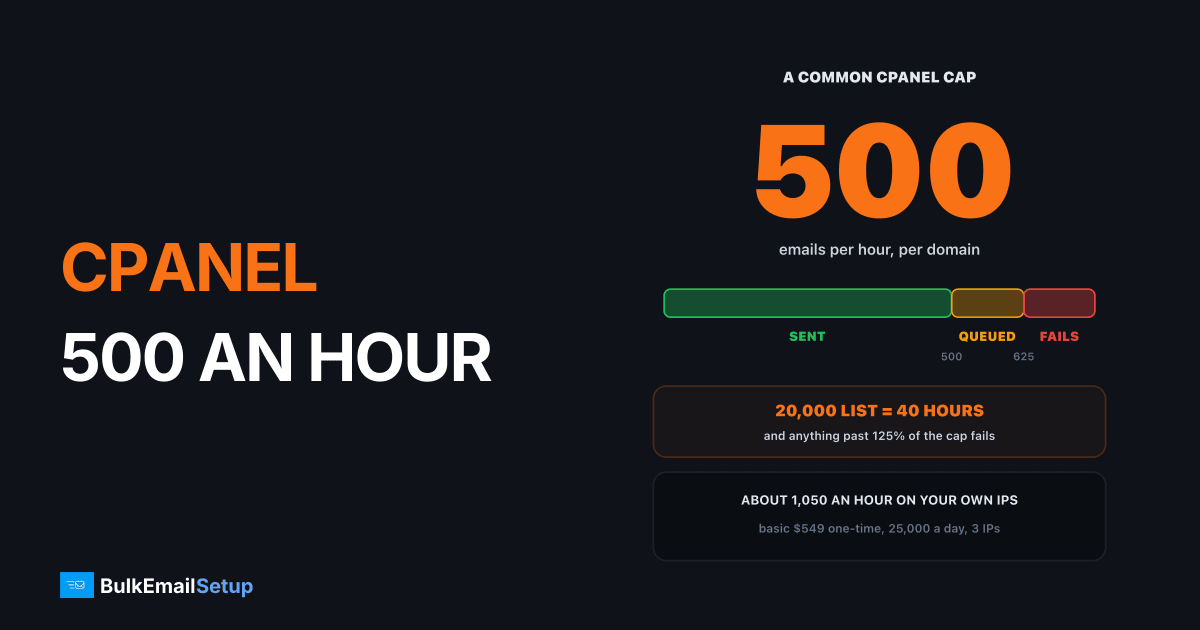
cPanel's "max emails per hour" is a per-domain cap on outgoing mail, and once you hit it your newsletter stops. Extra messages are queued for retry up to 125% of the cap by default, and anything beyond that fails. Shared hosts set the cap low, commonly a few hundred an hour, because every site on the server shares one sending IP. At 500 an hour, a 20,000 contact newsletter takes at least 40 hours. The fix is not a higher cap. It is sending campaigns from a separate SMTP server while cPanel keeps your mailboxes.
What does max emails per hour mean in cPanel?
There are three settings involved, and they stack. From cPanel's own Tweak Settings mail documentation:
| Setting | Where | Default | What it does |
|---|---|---|---|
| Max hourly emails per domain | WHM, Tweak Settings | unlimited | server-wide hourly cap per domain |
| Maximum Hourly Email by Domain Relayed | WHM, account or package | inherits | lower cap per account or plan |
| Queue and retry percentage | WHM, Tweak Settings | 125% | how far past the cap mail is queued before failing |
Two details matter. The cap counts remote deliveries only, so mail between mailboxes on the same server is free. And the package setting can only lower the server cap, never raise it. A host's plan limit is the number that applies to you.
Past 100% mail waits, past 125% it fails
What happens when you hit the limit
When a domain passes its cap, Exim writes a line like this to the log or the bounce:
Domain example.com has exceeded the max emails per hour (124/100 (124%)) allowed. Message will be reattempted later
Read the percentage:
| Where you are | What happens to the message |
|---|---|
| Under 100% | sent normally |
| 100% to 125% | queued, retried next hour |
| Over 125% | fails, the sender gets a bounce |
Newsletter plugins make this worse. WordPress mailers and many scripts hand the server the whole batch at once, so the first few hundred go out, the next slice queues, and the rest fail. Your plugin may still report "sent".
How long a newsletter takes under the cap
Same 20,000 list, very different finish times
| Hourly cap | 5,000 list | 20,000 list | 50,000 list |
|---|---|---|---|
| 100 an hour | 50 hours | 200 hours | 500 hours |
| 500 an hour | 10 hours | 40 hours | 100 hours |
| 1,050 an hour (dedicated, Basic plan) | about 5 hours | about 19 hours | about 48 hours |
Those are best cases with a queue that never stalls. In practice overflow above 125% fails, so a hosted send can lose part of the list on top of being slow.
Why does shared hosting cap outgoing email?
Because the IP is shared. A typical shared server hosts hundreds of sites behind one or two sending IPs.
| Risk the host is managing | What a low cap prevents |
|---|---|
| A hacked plugin sending spam | thousands of spam messages before anyone notices |
| A newsletter to a stale list | a spike in bounces that gets the IP blocklisted |
| One customer's complaints | every other customer's invoices going to spam |
The cap protects the host's IP reputation. It is not a judgment on your list. The same logic is behind the limits in our GoDaddy sending limit guide, where cPanel hosting caps at 500 an hour.
Can your host raise the cPanel email limit?
| Hosting type | Can the cap go up? | The real limit after that |
|---|---|---|
| Shared hosting | rarely, often only via an upgrade | shared IP reputation |
| Reseller hosting | within what the reseller package allows | still the shared server's IP |
| Your own VPS with WHM | yes, set it to anything | port 25 access, IP warm-up, PTR, blocklists |
Raising the cap on a VPS you run yourself removes cPanel's brake, not the inbox providers'. A fresh VPS IP sending 20,000 messages in an hour gets deferred by Gmail and Microsoft. You still need warm-up, authentication and bounce handling, which is the setup we describe in how to set up a bulk email server on a VPS.
What replaces cPanel email for bulk sending?
Split the jobs. cPanel keeps doing what it is good at, and campaigns go elsewhere.
Keep cPanel for mailboxes, send campaigns from your own IPs
| Job | Where it runs |
|---|---|
| Staff mailboxes and webmail | cPanel hosting, unchanged |
| Website contact forms | cPanel or a transactional relay |
| Newsletters and campaigns | dedicated SMTP server |
| WordPress bulk mail | plugin pointed at the dedicated server |
For WordPress sites the plugin side is covered in SMTP for WordPress bulk email. If your sends are in the low thousands a day, how to send 10,000 emails a day shows what that level needs.
How BulkEmailSetup helps
We set up a dedicated SMTP server that you own, so your campaigns stop competing with hundreds of other sites for one IP. Your cPanel hosting keeps the mailboxes and website. We add SPF and DKIM for the new server to your domain, configure PTR, bounce handling and a campaign panel, and give you a warm-up plan.
| Plan | One-time fee | Per hour | Per day | Dedicated IPs |
|---|---|---|---|---|
| Basic | $549 | about 1,050 | 25,000 | 3 |
| Advance | $1,199 | about 8,500 | 200,000 | 15 |
Hosting is paid to your own host, about $11 a month on Basic. There is no monthly fee to us and no contact limit. See Basic plan details or compare all pricing.
Frequently asked questions
What does max emails per hour mean in cPanel?
It is a per-domain cap on outgoing mail to other servers, set in WHM as Max hourly emails per domain or per account as Maximum Hourly Email by Domain Relayed. Once a domain reaches it, cPanel queues extra messages for retry up to 125% of the cap by default, then fails the rest. Mail to mailboxes on the same server does not count.
Can my host raise the cPanel email limit?
On shared hosting, sometimes a little, often not. The host sets the cap in the account package to protect a server shared with hundreds of other sites, and many will only raise it if you move to a VPS. On your own VPS with WHM you can set any value, but the cap was never the real limit there: your IP reputation and port 25 access are.
Why does shared hosting cap outgoing email?
Because every site on the server shares the same sending IP. One hacked WordPress plugin or one newsletter to a stale list can get that IP blocklisted, and then every customer's invoices and password resets bounce. A low hourly cap limits how much damage one account can do before the host notices. It protects the host, not your campaign.
What replaces cPanel email for bulk sending?
Keep cPanel for your mailboxes and website, and send campaigns through a separate SMTP service or your own sending server. Point the newsletter tool at that server's SMTP details and add its SPF and DKIM records to your domain. A dedicated server like BulkEmailSetup's Basic plan sends about 1,050 an hour, 25,000 a day, on 3 IPs for $549 one-time.
What does exceeded the max emails per hour allowed mean?
It is cPanel's Exim message when a domain passes its hourly cap. A line ending in message will be reattempted later means the message went into the retry queue because you are still under 125% of the cap. A discarded or failed message means you went past that band and the message is gone. Either way, sending resumes in the next hour.
How long does a 20,000 email newsletter take on cPanel?
At a 500 an hour cap, at least 40 hours if the queue runs non-stop, and longer in practice because overflow above 125% fails instead of waiting. At 100 an hour it takes more than 8 days. By then the first readers saw the offer two days before the last ones, which is why hosting email does not work for campaigns.


