
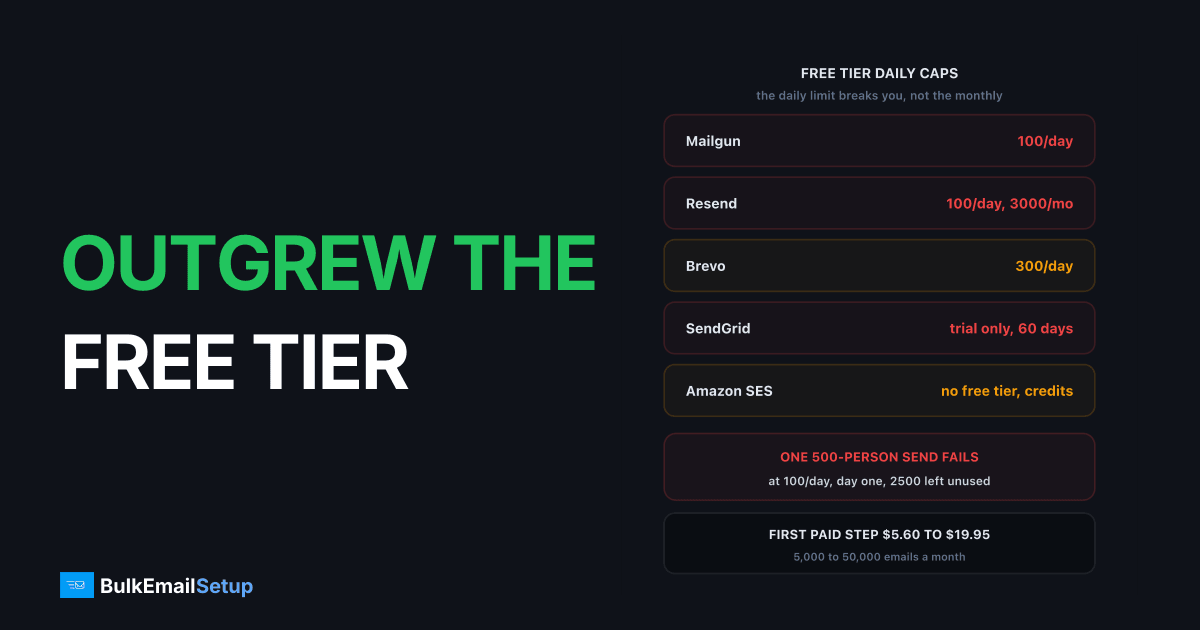
Free SMTP tiers now sit at roughly 100 to 300 emails a day: Mailgun 100/day, Brevo 300/day, Resend 3,000/month but capped at 100/day, SMTP2GO 1,000/month, MailerSend 500/month. SendGrid retired its permanent free plan in 2025 and Amazon SES no longer has a standing free allowance. The first paid step runs $5.60 to $19.95 a month for 5,000 to 50,000 emails. The jump is steeper than it looks, because the free tier taught you nothing about what you actually need.
What the free tiers give you now
I have run production mail through most of these. The numbers moved a lot between 2022 and now, and almost every move was downward.
| Provider | Free allowance | Daily cap | Card required |
|---|---|---|---|
| Mailgun | 100/day | 100 | no |
| Brevo | 300/day, contacts to 100,000 | 300 | no |
| Resend | 3,000/month | 100 | no |
| SMTP2GO | 1,000/month | check current | no |
| MailerSend | 500/month | 100 API calls/day | no |
| SendGrid | 60-day trial only, 100/day | 100 | no |
| Amazon SES | $200 new-account credits, 6 months | none | yes |
Two of those need explaining because they changed recently.
SendGrid is not free any more. Twilio started retiring the free Email API and Marketing Campaigns plans on 27 May 2025, with 60 days' notice to existing users. What you get today is a 60-day trial: 100 emails a day and 100 contacts, then you upgrade or you stop.
Amazon SES dropped the old EC2 allowance. The 62,000-emails-a-month-from-EC2 arrangement that everyone still quotes is gone. New AWS accounts get up to $200 in Free Tier credits usable across services, available for 6 months and spendable within 12. At $0.10 per 1,000 emails that is a lot of mail, but it is a credit balance running down, not a recurring free tier.
The limit that actually breaks you is the daily cap
This is the single most useful thing on this page. Look at Resend: 3,000 emails a month sounds workable for a small newsletter. The daily cap is 100.
A 500-person list means one campaign fails on day one, with 2,500 of your monthly allowance still sitting unused. The monthly number is marketing. The daily number is the product.
| Provider | Monthly free | Daily cap | Largest single campaign |
|---|---|---|---|
| Resend | 3,000 | 100 | 100 |
| Mailgun | ~3,000 | 100 | 100 |
| Brevo | ~9,000 | 300 | 300 |
| MailerSend | 500 | see API cap | 500 in theory |
| SMTP2GO | 1,000 | check current | 1,000 in theory |
The right question to ask before you pick anything is not "how many emails a month do I send" but "how big is my largest single send". Answer that first. A list of 4,000 that you mail once a month is 4,000 emails a month, and every free tier on this page fails it.
And what failure looks like matters. On most free tiers the send does not queue and drain overnight. It is rejected, which on some platforms marks the recipients as failed in your own reporting and leaves you unpicking which ones actually went.
The first paid step, priced
Here is what it costs to stop hitting the cap. These are entry plans, monthly billing.
| Provider | First paid plan | Price/month | Included emails |
|---|---|---|---|
| MailerSend | Hobby | $5.60 | 5,000 |
| Brevo | Starter | $9 | no daily limit |
| SMTP2GO | Starter | $10 | 10,000 |
| Mailgun | Basic | $15 | 10,000 |
| SendGrid | Essentials | $19.95 | from 50,000 |
| Amazon SES | pay as you go | ~$0.10/1,000 | unmetered |
That is a smaller number than most people fear. The problem is not the first step. It is the second one, because these plans scale by volume band and the price per email does not fall much as you climb. Going from 10,000 to 100,000 a month roughly multiplies the bill, and going to 500,000 multiplies it again. There is a full ladder in what it costs to send 25,000 emails a month.
Amazon SES is the outlier and worth being honest about. Per email it is cheaper than everything else by a wide margin. It also gives you no campaign tooling, no template editor worth using, a strict reputation dashboard that will pause you, and a sandbox you must apply out of. You are buying an SMTP pipe, not a product.
What free tiers quietly leave out
The email allowance is the part everyone compares. These are the parts that bite later.
| Constraint | On the free tier | Why it matters |
|---|---|---|
| Dedicated IP | never included | you share the free-account pool |
| Log retention | 1 day on Mailgun free and Basic | no way to debug last week |
| Support | community or none | a block takes days to resolve |
| Over the cap | sending stops | mail is rejected, not queued |
| Deliverability tools | usually stripped | no seed testing, no reputation view |
The shared IP pool is the one I would flag hardest. Free accounts are, by definition, the least vetted senders on any provider's network, and they sit on the same IP ranges as each other. Someone else's bought list affects your delivery, and you have no visibility into it and no recourse.
The 1-day log retention is the practical killer. A recipient says they never got Tuesday's email, you look on Thursday, and there is nothing there. You cannot tell whether it bounced, was deferred, or was delivered and deleted.
Which route by monthly volume
Free tiers are fine for testing and for genuinely tiny sending. Past that, pick by volume and by whether reputation control matters to you.
| Monthly volume | Route | Rough cost |
|---|---|---|
| Under 10,000 | free tier or cheapest paid plan | $0 to $10/mo |
| 10,000 to 50,000 | paid relay, shared IPs | $15 to $60/mo |
| 50,000 to 250,000 | compare relay vs dedicated | $60 to $400/mo |
| Over 250,000 | dedicated SMTP server | one-time build |
Under 10,000 a month. Stay on a relay. Building infrastructure at this volume is a hobby, not a decision. If a free tier's daily cap is the only thing breaking you, the $9 to $15 step fixes it.
10,000 to 50,000. Paid relay on shared IPs. You still do not send enough to warm a dedicated IP properly, because an IP needs steady volume to hold a reputation and an idle IP goes cold.
50,000 to 250,000. The band where you should actually run the numbers. Add up the plan cost, plus any dedicated IP fee (SES charges $24.95 per standard dedicated IP per month), plus the deliverability tooling you are paying for separately. Compare it to a one-time build. The SMTP cost calculator by list size does this arithmetic for you.
Over 250,000. Per-email pricing dominates and a flat one-time cost wins clearly. At this volume you also need your own IPs for reputation reasons regardless of price.
When a one-time server beats a monthly plan
The crossover is not a single number, it is where three lines meet.
Price. A relay at 250,000 emails a month costs somewhere between $200 and $500 depending on provider and features. Twelve months of that is $2,400 to $6,000, every year, and it rises with your list.
Reputation. On any shared pool, your delivery depends on strangers. On your own IPs, the only sender who can damage your reputation is you. That is worth something well before it becomes cheaper.
Policy. Shared pools ban categories that are perfectly legal, because one customer's complaint rate lands on everyone else's IP. Cold outreach and affiliate offers are the usual ones. Dedicated IPs remove that conflict, though they do not remove Gmail's rules or the law.
The cost you are taking on is warm-up. New IPs start cold no matter what your sending history was elsewhere, so plan 4 to 8 weeks ramping about 30% every two days per IP. That is the honest trade: you save the monthly fee and you own the ramp.
What Gmail expects wherever you land
None of this changes the receiver rules, and free-tier senders often have never read them because the provider handled it.
Google's sender guidelines require SPF, DKIM and DMARC on your sending domain once you send more than 5,000 messages a day to Gmail addresses, plus one-click unsubscribe on marketing mail. The spam complaint rate must stay under 0.30%, and Google's own advice is to aim below 0.10%.
| Requirement | Applies from |
|---|---|
| SPF and DKIM | 5,000/day to Gmail |
DMARC published, p=none minimum | 5,000/day to Gmail |
| One-click unsubscribe | all marketing mail |
| Spam complaints under 0.30% | all senders |
| Matching forward and reverse DNS | all senders |
Complaint rate is measured against your sending domain, not your provider. It follows you across every migration you will ever do.
Migrating off a free tier is the easy one
Good news to end on. This is the least painful migration in email, because there is almost nothing to bring.
- Export what exists. Contacts and suppression lists. That is usually it. Log retention of a day or two means there is no history to move.
- Rebuild templates. Free tiers hold a handful. An afternoon.
- Set up a sending subdomain. Do not send bulk from your root domain. Keep invoices and password resets insulated from campaign reputation.
- Publish SPF, DKIM, DMARC and PTR on the new path before the first send. Start DMARC at
p=none, read reports for two weeks, then tighten. - Warm up if you moved to your own IPs. Start with your most engaged segment, ramp roughly 30% every two days.
Step 5 is the only long one, and it only applies if you went dedicated. Moving free tier to paid relay is a same-day job.
If your ceiling was a mailbox product rather than a relay, the shape is a little different: see outgrew Gmail SMTP limits and outgrew Microsoft 365 sending limits, where the caps are product boundaries with no upgrade path at all.
How BulkEmailSetup helps
We build the dedicated route: your own server, your own IPs, full SPF/DKIM/DMARC/PTR configuration on your sending subdomain, MTA tuning, bounce handling and a warm-up plan. No daily cap, no shared free-account pool, no log retention measured in hours.
Basic is $549 one-time, covering 1 SMTP server, 3 dedicated IPs, 25,000 emails/day and unlimited contacts, which is 83x Brevo's free daily limit on day one. Higher tiers scale to 15 IPs and 200,000 emails/day. See pricing, or the SMTP cost calculator by list size to check where your volume lands.
Frequently asked questions
What are the current free SMTP tier limits?
Mailgun gives 100 emails a day, Brevo 300 a day, Resend 3,000 a month capped at 100 a day, SMTP2GO 1,000 a month, and MailerSend 500 a month. SendGrid retired its permanently free plan in 2025 and now offers a 60-day trial at 100 emails a day. Amazon SES has no standing free tier either, only $200 in new-account AWS credits.
Why does my campaign fail when I am under the monthly free limit?
Because almost every free tier enforces a daily cap on top of the monthly one. Resend allows 3,000 emails a month but only 100 a day, so a single 500-recipient campaign fails on day one even though you have used 17% of the month. The daily cap, not the monthly total, is the limit people actually hit.
Is SendGrid still free?
No. Twilio began retiring the free Email API and Marketing Campaigns plans on 27 May 2025, giving existing users 60 days before an upgrade was required. New signups get a 60-day trial of 100 emails a day and 100 contacts, then must move to a paid plan. Essentials starts at $19.95 a month.
What is the cheapest first paid SMTP plan?
MailerSend Hobby at $5.60 a month for 5,000 emails, then Brevo Starter at $9 a month and SMTP2GO Starter at $10 a month for 10,000. Mailgun Basic is $15 a month for 10,000, and SendGrid Essentials is $19.95. Amazon SES stays cheapest per email at $0.10 per 1,000 but you build everything around it yourself.
What do free SMTP tiers not include?
No dedicated IP, log retention measured in days rather than months (Mailgun keeps 1 day on free and Basic), no phone or priority support, and sending that stops rather than queues when you hit the cap. You also share IP pools with every other free account, which is the worst pool on any provider's network.
At what volume does a dedicated SMTP server beat a monthly plan?
Usually somewhere between 100,000 and 250,000 emails a month. Below 50,000 a month a $10 to $30 plan is cheaper than anything you would build. Above 250,000, per-email pricing and dedicated IP fees at $24.95 per IP per month add up faster than a one-time server build costs.
How hard is it to migrate off a free tier?
Easier than any other migration you will do. Free tiers hold little worth exporting, log retention is often 1 day so there is no history to move, and templates are usually a handful of files. The real work is DNS: new SPF, DKIM, DMARC and PTR records, plus a warm-up if you move to your own IPs.


