
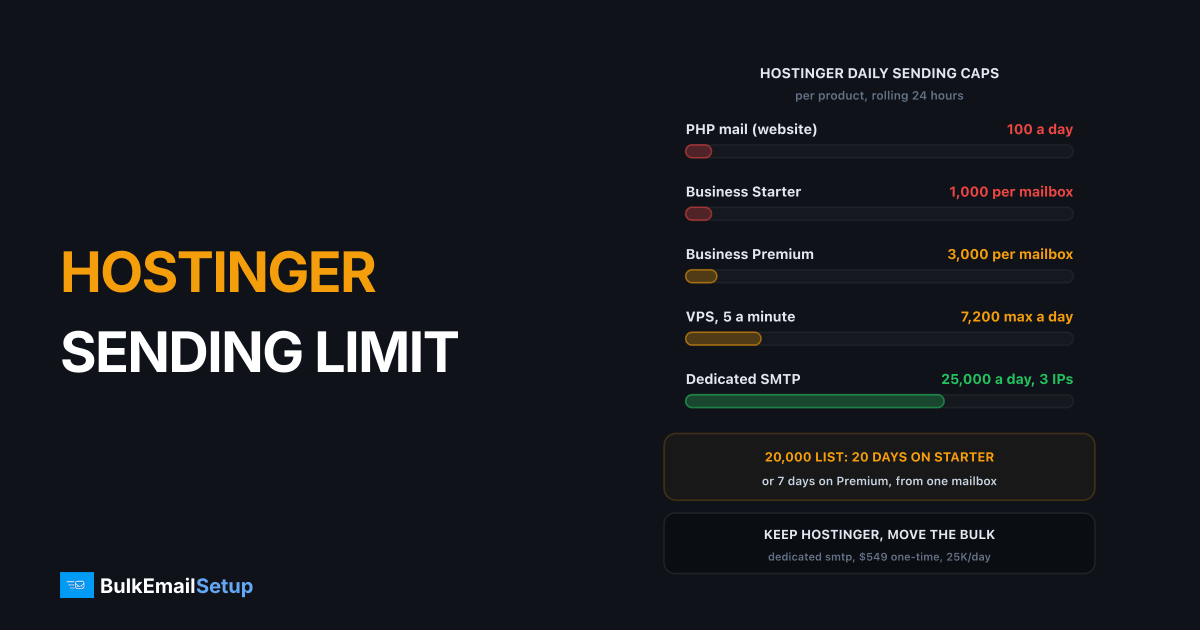
Hostinger caps email by product: Business Email at 1,000 messages a day per mailbox on Starter and 3,000 on Standard and Premium, PHP mail from a website at 100 a day, and a VPS at 5 emails a minute. Every daily limit runs on a rolling 24 hours. None of these is built for a newsletter: a 20,000 subscriber send takes 7 to 20 days from one mailbox. The practical fix is to keep Hostinger for your website and mailboxes, and send bulk mail through a separate SMTP path.
Hostinger's sending limits, by product
| Product | Sending limit | Recipients per message | Notes |
|---|---|---|---|
| Business Email, Starter | 1,000 a day per mailbox | 100 | rolling 24 hours |
| Business Email, Standard | 3,000 a day per mailbox | 100 | rolling 24 hours |
| Business Email, Premium | 3,000 a day per mailbox | 100 | rolling 24 hours |
| Free email trial | 100 a day | 100 | lifted when you upgrade |
| PHP mail on web hosting | 10 a minute, 100 a day | n/a | eases as sending slows |
| VPS | 5 emails a minute | n/a | port 25 is not blocked |
The figures come from Hostinger's own pages on Business Email limits and port 25 on VPS. Hostinger notes it can change limits, so check the Emails section in hPanel for your account.
Each Hostinger product has its own cap
What the caps mean for a real newsletter
Limits sound fine until you divide a list by them.
| Send path | Daily capacity | Time to reach 20,000 subscribers |
|---|---|---|
| PHP mail from the website | 100 | 200 days |
| One Business Starter mailbox | 1,000 | 20 days |
| One Business Premium mailbox | 3,000 | 7 days |
| VPS at 5 a minute, nonstop | 7,200 | about 3 days |
| Dedicated SMTP, Basic plan | 25,000 | 1 day |
Spreading the send across several mailboxes does not really fix it. Each mailbox still has the 100 recipient limit, the sends look like what they are, and if one mailbox gets flagged for bulk sending your staff email takes the hit too. The same trap exists at GoDaddy, covered in the GoDaddy email sending limit.
The VPS question: port 25 is open, but
Many hosts block outbound port 25 on cheap servers (see why port 25 is blocked). Hostinger says it does not. It does something else: it limits VPS sending to 5 emails a minute.
Port 25 is open. The per-minute cap is the real limit.
Five a minute is 300 an hour at most. A bulk server on our Basic plan sends about 1,050 an hour, and Advance about 8,500. So a Hostinger VPS is fine for app alerts and a contact form, and the wrong host for a bulk sending server. Pick a VPS host that allows port 25 with no per-minute cap.
Fixing website email on Hostinger first
If your problem is WordPress or a web app not sending, the cause is usually PHP mail hitting its 10 a minute, 100 a day cap.
- Install an SMTP plugin, such as WP Mail SMTP, or set SMTP in your app's mail settings.
- Send through an authenticated mailbox for low volume, or an external SMTP service for more.
- Use port 587 with TLS.
- Check
.logs/exim.login File Manager to see which scripts send the most.
For a store or a membership site with real volume, see SMTP for WordPress bulk email.
Keep Hostinger, move only the bulk mail
You do not have to leave Hostinger. Split the jobs:
| Job | Where it runs |
|---|---|
| Website | Hostinger hosting |
| Staff mailboxes | Hostinger Business Email |
| Newsletters and campaigns | separate SMTP server or service |
| DNS | Hostinger DNS zone, with SPF and DKIM for both senders |
Use a subdomain such as news.yourdomain.com for bulk mail. Publish the new sender's DKIM key and add it to SPF. If a campaign draws complaints, your staff mailboxes on the main domain keep their reputation. Our guide on subdomain vs root domain for sending explains why.
The DNS records for two senders
Everything happens in the Hostinger DNS zone. Your root domain keeps Hostinger's mail records untouched. The bulk subdomain gets its own set, pointing at the new server.
news.yourdomain.com. TXT "v=spf1 ip4:203.0.113.10 ip4:203.0.113.11 ip4:203.0.113.12 -all"
s1._domainkey.news.yourdomain.com. TXT "v=DKIM1; k=rsa; p=MIIBIjANBgkq..."
_dmarc.news.yourdomain.com. TXT "v=DMARC1; p=none; rua=mailto:[email protected]"
The IPs above are examples. Use the three dedicated IPs of your own server, and ask the server host to set each IP's reverse DNS (PTR) to a name like mail1.news.yourdomain.com. Start DMARC at p=none, read the reports for two weeks, then move to quarantine.
| Record | Root domain (Hostinger mail) | news subdomain (bulk server) |
|---|---|---|
| MX | Hostinger, unchanged | only if you receive bounces there |
| SPF | Hostinger's include, unchanged | the bulk server's IPs |
| DKIM | Hostinger's key | the bulk server's key |
| DMARC | your existing policy | its own policy, starting at none |
| PTR | not yours to set | one per sending IP, set at the server host |
One mistake to avoid: do not add the bulk server's IPs to the root domain's SPF record. That links the two reputations again and can push the root record past SPF's 10 lookup limit. For a fresh server, warm the IPs up over 4 to 8 weeks before full volume; our IP warm-up schedule has the steps.
How BulkEmailSetup helps
We set up a dedicated SMTP server you own, on a host that allows port 25 without a per-minute cap, with a campaign platform, SPF, DKIM, DMARC and PTR, bounce handling and a warm-up plan. Your website and mailboxes stay at Hostinger.
| Plan | One-time fee | Emails per day | Per hour | Dedicated IPs | Hosting you pay your host |
|---|---|---|---|---|---|
| Basic | $549 | 25,000 | 1,050 | 3 | about $11 a month |
| Advance | $1,199 | 200,000 | 8,500 | 15 | about $49 a month |
No monthly fee to us and no contact limit. See the Basic plan or compare all pricing.
Frequently asked questions
How many emails can I send per day on Hostinger?
It depends on the product. Hostinger Business Email allows 1,000 messages a day per mailbox on Business Starter and 3,000 on Business Standard and Premium, with up to 100 recipients per message. PHP mail from a website on shared hosting is capped at 10 a minute and 100 a day. A Hostinger VPS is limited to 5 emails a minute. All daily limits run on a rolling 24 hours.
Does Hostinger allow bulk email?
Not in any practical sense. Business Email is built for normal mailbox use, and its per-mailbox daily caps and 100 recipient limit make a 20,000 subscriber newsletter take 7 to 20 days from one mailbox. Hostinger itself recommends a dedicated email solution for large volumes. Keep Hostinger for your website and mailboxes, and send bulk mail through a separate SMTP service or server.
Can a Hostinger VPS run an SMTP server?
It can run one, but not for bulk. Hostinger says it does not block port 25 on VPS plans, yet it limits sending to 5 emails a minute to stop abuse. That is 300 an hour at most, far below what a bulk server needs. BulkEmailSetup's Basic setup, for example, sends about 1,050 an hour, so it needs a host without a per-minute cap.
What is the best bulk email option for Hostinger users?
Keep Hostinger for the website and staff mailboxes, and add a separate sending path for newsletters: an ESP for small lists, or a dedicated SMTP server for regular volume. Point your sending subdomain's SPF and DKIM at the new path. BulkEmailSetup's Basic plan is $549 one-time for 3 dedicated IPs and 25,000 emails a day, with hosting around $11 a month.
Why are my WordPress emails not sending on Hostinger?
Most often the website is using PHP mail, which Hostinger caps at 10 emails a minute and 100 a day on shared hosting. Once the cap is hit, PHP sending pauses until activity slows. Install an SMTP plugin such as WP Mail SMTP and send through an authenticated mailbox or an external SMTP service instead. Hostinger keeps a send log at .logs/exim.log in File Manager.
Can I use an external SMTP server with Hostinger hosting?
Yes. Your website or app connects to the external server over SMTP on port 587, and your Hostinger mailboxes keep working as normal. Add the new provider to the SPF record, publish its DKIM key in your Hostinger DNS zone, and use a subdomain such as news.yourdomain.com for bulk mail so it cannot affect your staff mailboxes.
Do Hostinger's limits reset at midnight?
No. Hostinger calculates daily limits over a rolling 24-hour period, so a mailbox that sent 1,000 messages between 10 and 11 in the morning gets that capacity back gradually from 10 the next morning. Incoming and outgoing mail are counted separately, and the limits apply to each mailbox on its own rather than to the whole domain.


