
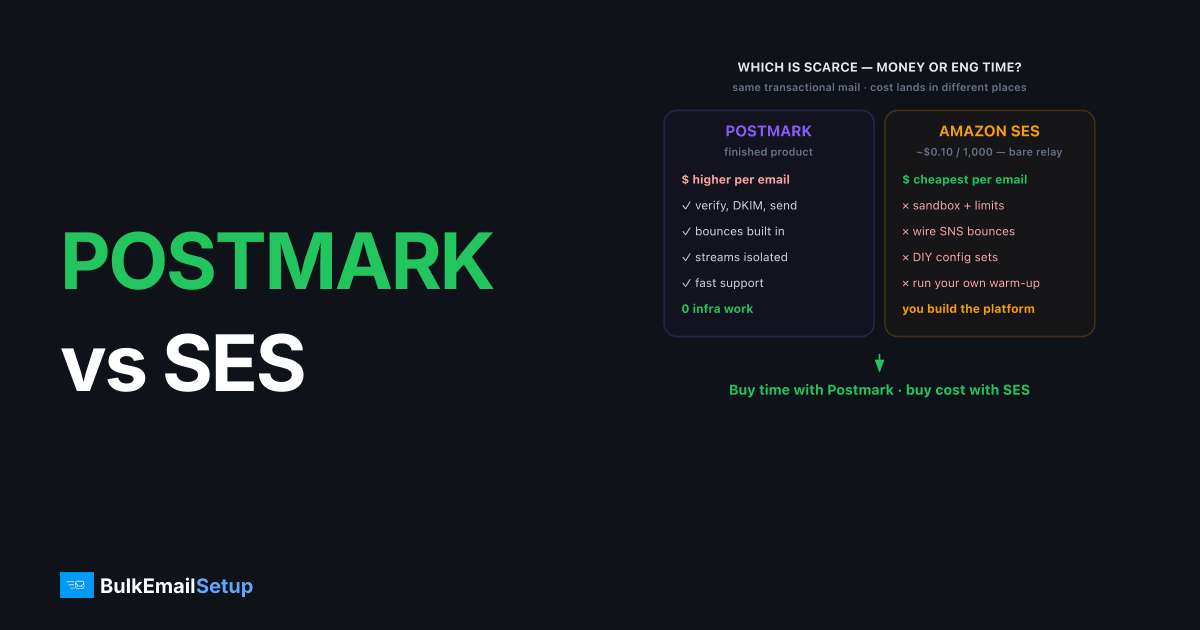
Postmark wins for teams that want fast, reliable transactional email with zero infrastructure work, while Amazon SES wins on raw cost for senders willing to build their own tooling. Postmark charges a higher per-email rate but bundles deliverability features, fast support, and stream separation. SES charges roughly $0.10 per 1,000 emails but ships as a bare relay: you handle bounces, complaints, warm-up, and dedicated IPs yourself. The right pick depends on whether your scarce resource is money or engineering time.
Postmark vs Amazon SES: the comparison
The core difference is packaging. Postmark is a finished product priced at a premium. SES is a low-level AWS service priced like a commodity. Both can deliver transactional mail well, but the work and cost land in different places.
| Factor | Postmark | Amazon SES |
|---|---|---|
| Price per 1,000 emails | Higher (tiered, premium) | ~$0.10 |
| Pricing model | Per email, plan tiers | Pure per-email, pay-as-you-go |
| Dedicated IP | Add-on (~$50/mo) | Add-on, standard or managed |
| Setup effort | Low (verify, DKIM, send) | High (sandbox, SNS, limits) |
| Bounce/complaint handling | Built in | You build it (SNS topics) |
| Stream separation | Yes (transactional vs broadcast) | DIY (configuration sets) |
| Support | Fast, included | Paid AWS support tiers |
| Best for | Teams valuing time | Cost-driven, engineering-heavy teams |
When should you choose Postmark over SES?
Choose Postmark when reliable transactional delivery matters more than per-email cost, and when you do not want to build deliverability tooling yourself. Postmark's pool is policed for transactional traffic, support answers fast, and the transactional and broadcast streams stay isolated by default, which protects password resets from marketing problems.
Postmark fits SaaS teams sending receipts, password resets, and notifications where a delayed email is a support ticket. The premium price buys you escape from infrastructure work: no SNS wiring, no sandbox requests, no bounce parser to maintain. If your volume is moderate and engineering time is expensive, Postmark's higher per-email rate is often cheaper than the hours SES setup consumes.
The stream separation matters more than it sounds. Postmark keeps transactional and broadcast traffic on distinct message streams by default, so a marketing send that draws complaints cannot drag down the IP that carries password resets. On SES you can achieve the same isolation with configuration sets and separate dedicated IPs, but you build and maintain it yourself. For a transactional-first team, having that protection out of the box is a real part of the value, not a luxury.
When does Amazon SES win?
Amazon SES wins on cost at scale and on flexibility for teams already inside AWS, since at roughly $0.10 per 1,000 emails it is one of the cheapest relays available. A sender pushing several million emails a month pays a fraction of Postmark's rate, which matters when volume is high and margins are thin.
The catch is everything SES does not include. You move out of the sandbox manually, request rate-limit increases, wire bounce and complaint feedback through SNS topics, and run dedicated-IP warm-up yourself unless you pay for managed dedicated IPs. SES is a relay, not a platform. For a deeper look at where it sits against other tools, see Amazon SES alternatives and the cost-focused Amazon SES vs Mailgun breakdown.
The sandbox catches new teams off guard. A fresh SES account can only send to verified addresses until you request production access, and your daily sending quota starts low and grows as you build a clean history. That is sensible abuse prevention, but it means SES is not truly instant-on the way Postmark is. Budget a day or two for account approval, limit increases, and wiring the feedback loop before you depend on it in production. The team that skips the SNS feedback wiring is the one we hear from after a quiet hard-bounce pileup, SES drops accounts whose bounce rate crosses 10 percent or complaints cross 0.1 percent, and without the SNS topic feeding a suppression list, those bounces keep firing until the account review lands.
What do they cost at 100K, 500K, and 1M emails?
The cost gap between Postmark and SES widens fast with volume, because Postmark prices for the included tooling while SES prices like a commodity. At roughly $0.10 per 1,000 emails, SES is one of the cheapest relays in the market. Postmark's premium per email buys support and built-in features instead of the lowest unit cost.
Treat these as model shapes, not quotes, since Postmark's tiers and your SES add-ons move the totals.
| Monthly volume | Amazon SES (per-email + add-ons) | Postmark (premium tiers) | Where each wins |
|---|---|---|---|
| 100K | Very low base, you build tooling | Higher, but zero setup | Postmark on convenience |
| 500K | Still cheap, SNS work scales | Premium climbs steadily | Toss-up: time vs money |
| 1M | Cheapest by a wide margin | Premium is significant | SES on raw cost |
The honest read: at 100K, Postmark's included tooling and support often justify the premium because the per-email difference is small in absolute dollars. By 1M emails, SES is cheaper by a wide margin, but only if you have already built the bounce handling, suppression, and warm-up that Postmark hands you for free. The real comparison is never just price per email. It is price per email plus the cost of the engineering hours SES expects you to spend.
Where each one wins: a decision table
The choice comes down to your scarcest resource, money or engineering time, plus how much of email you want to own. Use this to match the tool to your actual constraint rather than chasing the lowest sticker price.
| Your situation | Best pick | Why |
|---|---|---|
| Small team, transactional-first, time-poor | Postmark | Zero infra work, fast support, streams isolated |
| Already on AWS, have engineers | Amazon SES | Slots into IAM, SNS, CloudWatch at lowest cost |
| Very high volume, margins thin | Amazon SES | Commodity per-email rate wins at scale |
| Want a dedicated IP you fully control | Dedicated SMTP server | Flat cost, own the IP and MTA |
| Mixed transactional + marketing streams | Postmark or own server | Native or self-built stream separation |
How do they compare on deliverability tooling?
Postmark gives you more deliverability tooling out of the box, while SES gives you raw signals you assemble yourself. Postmark surfaces bounce and complaint activity, spam-trap hits, and message-level event history in its dashboard, plus fast human support when something looks wrong. For a small team, that visibility is the difference between catching a problem in an hour and noticing it in a week.
SES exposes the same underlying data through CloudWatch metrics and SNS notifications, but you build the dashboards and alerting. You also manage your own suppression list logic, deciding when a soft bounce becomes a hard suppression. Neither approach changes the fundamentals: keeping complaint rates under the 0.3% that Gmail's bulk sender rules set, authenticating with SPF, DKIM, and DMARC, and maintaining list hygiene decide whether you reach the inbox. The tools just change how quickly you see trouble coming. Our how to monitor email deliverability guide covers the metrics that matter regardless of platform.
How to migrate between them without a deliverability dip
Moving between Postmark and SES, in either direction, only risks deliverability if you skip warm-up, because IP reputation does not transfer. Your domain reputation, including SPF, DKIM, DMARC, and sending history, travels with the domain. The sending IPs on the new platform start fresh and have to earn their standing.
Run a gradual cutover rather than a hard switch. Keep the old platform live, route a slice of traffic through the new one, and ramp from roughly 50-100 emails/day over 4-6 weeks while watching bounce and complaint rates. For transactional mail this matters double, since a delayed password reset is an instant support ticket. Confirm SPF stays under the 10-DNS-lookup limit, DKIM signs at 2048-bit, and DMARC sits at quarantine or reject before you move a single message. Push too fast and Gmail answers with 421 4.7.28 rate-limit deferrals, the clearest sign to slow the ramp.
Where a dedicated SMTP server fits
A dedicated SMTP server sits beyond both when you want a dedicated IP you fully control and flat pricing instead of per-email metering. Neither Postmark nor SES gives you root-level MTA access; both run your mail through their platform. At consistent volume above roughly 50K-100K/month, owning the sending infrastructure changes the economics and the control.
With your own SMTP server, you separate transactional and marketing streams across multiple dedicated IPs, tune connection limits, and diagnose problems in your own logs instead of a vendor dashboard. The trade is responsibility: you own warm-up, blocklist monitoring, and authentication. Get the records right first using our SPF, DKIM, and DMARC guide, and if you are unsure whether your volume justifies it, when you need a dedicated SMTP server walks through the threshold.
How BulkEmailSetup helps
If you have outgrown shared transactional pools and want a dedicated IP you control with flat monthly pricing, a dedicated SMTP server removes per-email overage and gives you full MTA access. We configure SPF, DKIM, DMARC, and PTR correctly, run the 4-6 week warm-up, and monitor reputation so transactional mail keeps hitting the inbox. See plans on our pricing page.
Frequently asked questions
Is Postmark or Amazon SES cheaper?
Amazon SES is far cheaper per email, roughly $0.10 per 1,000 emails as of early 2026. Postmark costs more per email but includes deliverability tooling, fast support, and separate transactional and broadcast streams that SES makes you build yourself.
Is Postmark better for deliverability than SES?
Postmark keeps a tightly policed pool focused on transactional mail, which often gives strong inbox placement out of the box. SES depends heavily on your own setup. Neither guarantees inbox; authentication, list hygiene, and complaint rates decide placement.
Does Amazon SES include a dedicated IP?
Not by default. SES uses shared IPs unless you buy dedicated IPs as an add-on (standard or managed). Managed dedicated IPs handle warm-up automatically but cost more per month, on top of per-email charges.
Which is easier to set up, Postmark or SES?
Postmark is easier. You verify a domain, add DKIM and a Return-Path, and send. SES requires AWS account setup, moving out of the sandbox, requesting limit increases, and wiring up bounce and complaint handling via SNS.


