
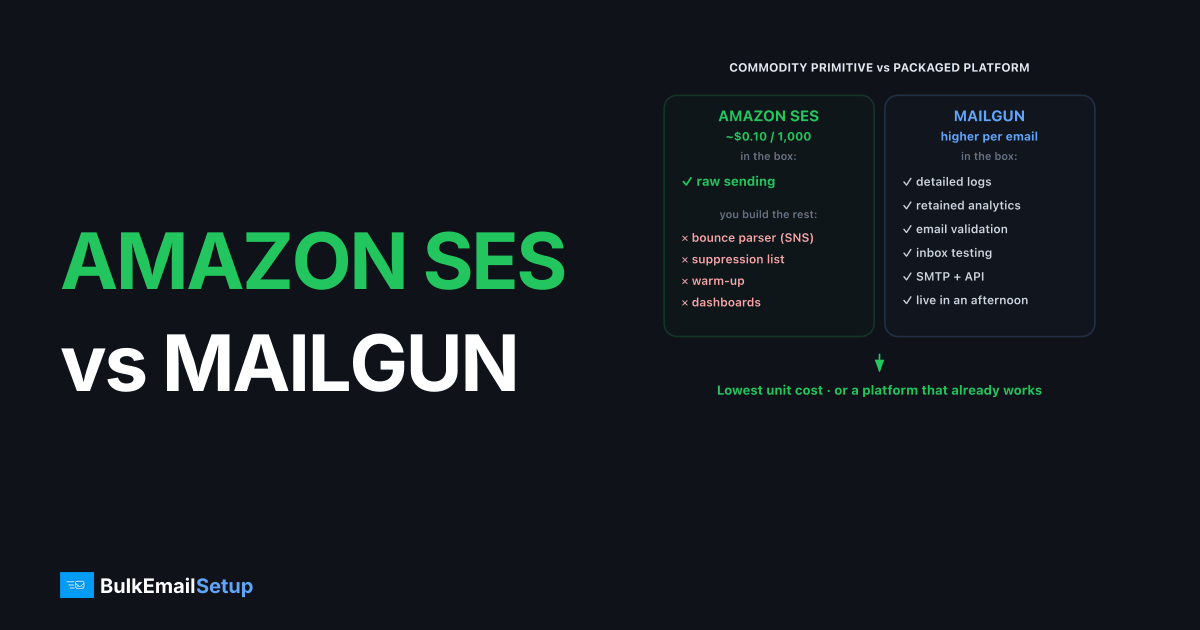
Amazon SES wins on raw cost while Mailgun wins on built-in tooling and ease of setup. SES sends at roughly $0.10 per 1,000 emails but ships as a bare relay: you wire up bounces, complaints, warm-up, and analytics yourself. Mailgun costs more per email but bundles logs, validation, deliverability analytics, and a faster path to sending. Pick SES if engineering time is cheap and you want the lowest unit cost. Pick Mailgun if you want a working platform without building infrastructure.
Amazon SES vs Mailgun: the comparison
The split is the familiar one between a commodity cloud primitive and a packaged email platform. SES is part of AWS and priced like infrastructure. Mailgun is a developer-focused email service priced like a product.
| Factor | Amazon SES | Mailgun |
|---|---|---|
| Price per 1,000 emails | ~$0.10 | Higher (plan tiers) |
| Pricing model | Pure pay-as-you-go | Plan + overage |
| Setup effort | High (sandbox, SNS, limits) | Low (verify, DNS, send) |
| Dedicated IP | Add-on (standard/managed) | Add-on (higher plans) |
| Bounce/complaint handling | DIY via SNS | Built in |
| Logs & analytics | CloudWatch, basic | Detailed, retained |
| Email validation | No | Yes (add-on) |
| Best for | Lowest cost, AWS-native teams | Devs wanting tooling fast |
When does Amazon SES win on cost?
Amazon SES wins on cost whenever your volume is high and your team can build the surrounding tooling, because at roughly $0.10 per 1,000 emails nothing mainstream undercuts it. A sender pushing several million emails a month pays a fraction of Mailgun's rate, and if you already run on AWS, SES slots into your existing IAM, SNS, and CloudWatch setup.
The savings are real only if you account for the build. SES gives you sending and little else: you parse bounces and complaints from SNS, manage your own suppression list, and run dedicated-IP warm-up unless you pay for managed IPs. For teams that have engineers and want the lowest unit cost, that is a fair trade. For a wider view, Amazon SES alternatives maps the options.
One nuance often missed: SES bills on a few axes beyond the headline per-email rate. Data transfer, attachments measured in extra increments, and dedicated IP add-ons all stack on top. The base rate is still low, but "roughly $0.10 per 1,000" is the floor, not the all-in number for a real workload. Model your actual message sizes and IP needs before assuming SES is a tenth of a competitor's price. It usually is cheaper at high volume, just rarely by quite as much as the sticker suggests.
When does Mailgun win?
Mailgun wins when you want a deliverability platform working in an afternoon rather than a sending primitive you assemble over weeks. Mailgun bundles detailed logs, retained analytics, email validation, and inbox testing, so problems are visible without building dashboards. Setup is a domain verification plus DNS records, then you send over SMTP or API.
That convenience costs more per email, which is why Mailgun fits teams whose scarce resource is engineering time, not budget. It is also a cleaner fit if you want validation and analytics built in rather than stitched together. If Mailgun's pricing is the sticking point, Mailgun alternatives and the detailed Mailgun pricing breakdown are worth a read.
Mailgun also leans developer-first in ways that matter day to day. The API and SMTP relay are both first-class, the logs are searchable and retained long enough to debug a delivery complaint from last week, and the email validation service catches typo and trap addresses before they bounce. For a team shipping product, those features replace a meaningful amount of in-house work. The question is whether that work is worth the per-email premium at your volume, which is exactly the calculation that flips as you scale up.
What do they cost at 100K, 500K, and 1M emails?
The cost gap between SES and Mailgun widens with volume, because SES prices like a commodity and Mailgun prices for the tooling it bundles. At roughly $0.10 per 1,000 emails, SES is the cheapest mainstream relay. Mailgun's plan-plus-overage model costs more per email but replaces engineering work with built-in logs, validation, and analytics.
Treat these as model shapes, not quotes, since Mailgun's tiers and your SES add-ons change the totals.
| Monthly volume | Amazon SES (per-email + build) | Mailgun (plan + overage) | Where each wins |
|---|---|---|---|
| 100K | Very low base, you build tooling | Mid plan, tooling included | Mailgun on convenience |
| 500K | Cheap, SNS and suppression scale | Plan climbs, overage possible | Toss-up: time vs money |
| 1M | Cheapest by a wide margin | Premium is significant | SES on raw cost |
The build cost is the deciding factor. At 100K, the per-email difference is small in absolute dollars, so Mailgun's ready tooling usually justifies the premium. At 1M, SES is far cheaper, but only after you have built and now maintain bounce handling, suppression, and warm-up. The fair comparison is SES per-email cost plus engineering hours against Mailgun's all-in price. That sum flips toward SES as volume climbs and toward Mailgun when engineers are scarce.
Where each one wins: a decision table
The choice comes down to your scarcest resource and how much email infrastructure you want to own. Match the tool to the constraint that actually hurts, not the lowest headline rate.
| Your situation | Best pick | Why |
|---|---|---|
| Already on AWS, have engineers | Amazon SES | Slots into IAM, SNS, CloudWatch at lowest cost |
| Want a platform working this afternoon | Mailgun | Verify domain, add DNS, send with tooling |
| Very high volume, margins thin | Amazon SES | Commodity per-email rate wins at scale |
| Need validation, logs, analytics built in | Mailgun | Bundled, no dashboards to build |
| Want a dedicated IP you fully control | Dedicated SMTP server | Flat cost, own the IP and MTA |
How do they handle bounces and complaints?
Mailgun handles bounces and complaints for you, while SES makes you build the handling yourself through SNS. This is one of the biggest hidden differences. Mailgun categorizes hard bounces, soft bounces, and complaints, maintains suppression automatically, and shows it all in the dashboard. You can act on a rising complaint rate before it crosses the 0.3% line that Gmail and Yahoo enforce.
SES sends bounce and complaint events to SNS topics that you subscribe to and process. You decide what counts as a permanent failure, when to suppress an address, and how to surface trends. It is flexible and it is free of charge, but it is code you own forever. Skip it and you risk repeatedly mailing addresses that hard-bounce, which damages your sender reputation fast. For the mechanics of getting this right, see our email bounce handling best practices.
The trap we see most often on raw SES is a team that wires SNS for bounces but never enforces the suppression list against their own database, so the same hard-bouncing address gets mailed every send. SES enforces its own account-level bounce and complaint thresholds, and we've watched a sender drift toward the warning band purely from re-mailing dead addresses their app never suppressed. Mailgun would have dropped those automatically. On SES, that automation is a thing you build and then remember to actually call.
How to migrate between them without a deliverability dip
Moving between SES and Mailgun, in either direction, only risks deliverability if you skip warm-up, because IP reputation does not transfer. Domain reputation, including SPF, DKIM, DMARC, and sending history, travels with the domain. The new platform's sending IPs start cold and have to build standing from zero.
Run the cutover gradually. Keep the old platform live, route a slice of traffic to the new one, and ramp from roughly 50-100 emails/day over 4-6 weeks while watching bounce and complaint rates on the new IPs. Confirm your records first: SPF under the 10-DNS-lookup limit (or you get PermError), DKIM at 2048-bit, DMARC at quarantine or stronger with passing alignment. For a large list, send your most engaged recipients through the new IPs first, since their opens build positive reputation fastest, then layer in the rest as the IPs warm. Push too fast and Gmail returns 421 4.7.28 deferrals, your cue to slow down.
Where a dedicated SMTP server changes the math
A dedicated SMTP server changes the math when you want a dedicated IP you control and flat pricing instead of per-email metering, typically above 50K-100K emails/month sent consistently. Both SES and Mailgun meter per email and lock dedicated IPs behind add-ons or higher plans. Owning the server removes both: you pay flat and the IP is yours.
The trade is operational ownership. You run warm-up, monitor blocklists, and keep authentication correct, or use a managed provider that does it for you. The DNS work is the same either way: SPF aligned and under the 10-lookup limit, DKIM at 2048-bit, DMARC at least at quarantine. Our SPF, DKIM, and DMARC guide and the cost per email of SMTP vs ESP breakdown show where the lines cross.
How BulkEmailSetup helps
If SES is too much assembly and Mailgun's per-email pricing is eating your margin at volume, a dedicated SMTP server gives you a flat plan and a dedicated IP you control with full SMTP access. We configure SPF, DKIM, DMARC, and PTR, run the 4-6 week warm-up, and watch reputation so your mail keeps reaching the inbox. See plans on our pricing page.
Frequently asked questions
Is Amazon SES cheaper than Mailgun?
Yes, on raw per-email cost. SES runs roughly $0.10 per 1,000 emails as of early 2026, while Mailgun's plans cost more per email but include analytics, log retention, validation, and easier setup. SES is cheaper if you build your own tooling.
Which is easier to set up, SES or Mailgun?
Mailgun is easier. You verify a domain, add DNS records, and send through SMTP or API. SES requires AWS account setup, leaving the sandbox, requesting limit increases, and wiring bounce and complaint handling through SNS topics yourself.
Do SES and Mailgun offer dedicated IPs?
Both do. SES offers standard and managed dedicated IPs as add-ons; managed IPs automate warm-up. Mailgun offers dedicated IPs on higher plans. In both cases you send through the vendor platform, not a server you control end to end.
Which has better deliverability tooling?
Mailgun ships more out of the box: detailed logs, email validation, deliverability analytics, and inbox testing. SES gives you raw sending plus CloudWatch and SNS, leaving you to assemble the rest. Actual inbox placement still depends on your sending practices.


