
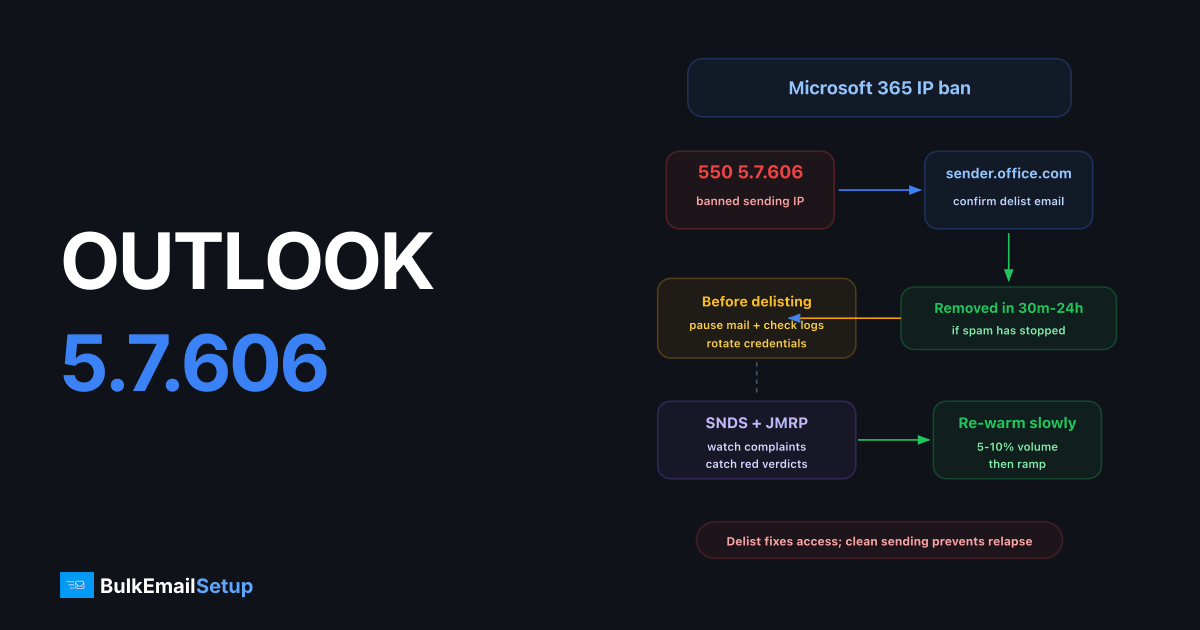
Outlook's 550 5.7.606 Access denied, banned sending IP means Microsoft has put your IP address on its internal block list, and every Microsoft 365 / Exchange Online server will refuse your connections. The fix is to request removal at the Microsoft delist portal (https://sender.office.com, the URL is in the bounce itself), which usually clears within 24 hours, and then fix whatever got the IP banned.
The exact bounce
550 5.7.606 Access denied, banned sending IP [203.0.113.10]. To request
removal from this list please visit https://sender.office.com/ and
follow the directions. For more information please go to
http://go.microsoft.com/fwlink/?LinkID=526655 AS(1430)
This rejection happens at connection time, before Microsoft even looks at your message content. Authentication, content, and list quality are irrelevant until the IP is delisted, nothing gets through.
Why Microsoft banned the IP
| Cause | How it happens |
|---|---|
| Spam complaints from M365 users | Recipients clicking "Report phishing/junk" feeds Microsoft's filters directly |
| Spam-trap hits | Old or purchased lists contain recycled Microsoft trap addresses |
| Sudden volume spike | A cold or quiet IP suddenly sending thousands of messages |
| Compromised server | A hijacked account or open relay pumping spam through your IP |
| Bad IP history | You inherited a previously-abused IP from your host or cloud provider |
The last one matters: if you just provisioned a VPS and got 5.7.606 on your first send, the previous tenant burned the IP. Check before building reputation on it, or start from pre-warmed, clean IPs instead.
Step 1: Verify it's only Microsoft
Check public blacklists to see if the problem is wider than Microsoft's internal list:
# Spamhaus ZEN check (returns 127.0.0.x if listed)
dig +short 10.113.0.203.zen.spamhaus.org

# Quick connectivity test against an M365 MX
telnet yourdomain-com.mail.protection.outlook.com 25
If Spamhaus or other DNSBLs also list you, deal with those separately. Microsoft's portal only handles Microsoft's list.
Step 2: Stop the bleeding before delisting
Submitting a delist request while spam is still flowing from the IP gets you denied, and repeated denials make manual review harder. Before touching the portal:
- Pause all campaigns from the affected IP.
- Check
mailq/ your MTA logs for traffic you didn't send, compromised webforms and stolen SMTP credentials are the top two culprits. - Rotate SMTP passwords and lock down submission ports.
- Remove hard-bounced and unengaged addresses from your lists.
Step 3: The delist portal
- Go to https://sender.office.com/ (the Office 365 Anti-Spam IP Delist Portal).
- Enter your email address and the banned IP, complete the captcha.
- Click the confirmation link Microsoft emails you.
- If the IP qualifies for automatic removal, the portal confirms it; propagation takes up to 24 hours across Microsoft's datacenters.
If the portal says the IP doesn't qualify, your request escalates (or you escalate it) to Microsoft sender support, the "New support request" path linked from the same bounce's go.microsoft.com URL. In that ticket include: the full bounce text, the IP, your sending domain, volumes, and what you fixed. Generic "please unblock" tickets get template denials; specific remediation details get action.
Step 4: Enroll in SNDS and JMRP
Microsoft gives senders direct visibility that most people never use:
| Program | URL | What it gives you |
|---|---|---|
| SNDS (Smart Network Data Services) | https://sendersupport.olc.protection.outlook.com/snds/ | Per-IP view: complaint rates, trap hits, filter verdict (green/yellow/red) |
| JMRP (Junk Mail Reporting Program) | Enrolled via SNDS | A feedback loop, copies of messages your recipients marked as junk |
Register every sending IP in SNDS the day you start using it. A red verdict in SNDS is the early warning that a 5.7.606 ban is coming; JMRP complaints tell you exactly which campaign caused it.
Step 5: Re-warm after delisting
A freshly delisted IP has fragile reputation with Microsoft. Going straight back to full volume is the fastest way to a second ban, and second delist requests face more scrutiny. Restart at roughly 5-10% of normal Microsoft-bound volume and double every 2-3 days, the same curve as a standard IP warm-up schedule. For the full re-warm timeline, see how long the ramp typically takes.
Also confirm SPF, DKIM, and DMARC all pass before resuming; unauthenticated mail accelerates the next ban. Microsoft applies the same baseline requirements as Google for high-volume senders (Outlook.com enforces SPF+DKIM+DMARC for 5,000+/day senders since May 2025).
Know which Microsoft list you're actually on
Microsoft runs separate filtering stacks, and the delisting path differs. Match the bounce to the stack before filing anything:
| Bounce signature | Stack | Delist path |
|---|---|---|
550 5.7.606 ... banned sending IP | Exchange Online (M365 business) | sender.office.com portal |
550 5.7.511 Access denied, banned sender | Exchange Online, sender address banned, not IP | Support request via the bounce's link |
550 SC-001/550 OU-002 or (S3150) mentions | Outlook.com / Hotmail consumer | Outlook.com sender support form (linked from postmaster.live.com) |
Filing a consumer-side support request for a 5.7.606 (or vice versa) wastes days, the teams don't cross-handle. The error code in your bounce is the routing slip; use it.
If the ban keeps coming back
Recurring 5.7.606 on a clean operation usually means one of three things: a neighbor problem (you're on a shared IP with a spammer), an undetected compromise, or list quality that's worse than you think. Audit in that order. If you're on shared infrastructure, this is the point where a dedicated IP, where you alone control the reputation, stops being optional. See our notes on choosing a dedicated SMTP provider.
How BulkEmailSetup helps
We set up dedicated SMTP servers on your own IPs, ready for you to enrol in SNDS from day one, so Microsoft bans are prevented rather than delisted after the fact. Authentication and a warm-up plan are included, from $549 one-time plus about $11 a month hosting; see pricing.
Frequently asked questions
What does Outlook error 550 5.7.606 mean?
Microsoft has placed your sending IP on its internal block list, so Exchange Online rejects every connection from it. The bounce itself includes the delist URL: sender.office.com.
How long does Microsoft delisting take?
The portal emails a confirmation link immediately; after you confirm, removal typically completes within 30 minutes to 24 hours. Microsoft states it can take up to 24 hours to propagate across all datacenters.
Why was my delist request denied?
Microsoft denies requests when the IP has recent spam activity, very poor SNDS data, or repeated prior delistings. Stop all sending from the IP for 48-72 hours, fix the cause, and try again.
Is 550 5.7.606 the same as being on Spamhaus?
No. It's Microsoft's own internal block list, separate from public DNSBLs. You can be clean on every public blacklist and still get 5.7.606, and vice versa.
Does 5.7.606 affect Outlook.com and Hotmail too?
5.7.606 specifically comes from Exchange Online (Microsoft 365 business mailboxes). Consumer Outlook.com/Hotmail uses different bounce codes (typically S3150) but a related delisting process, and both reputations are influenced by the same SNDS data.


