
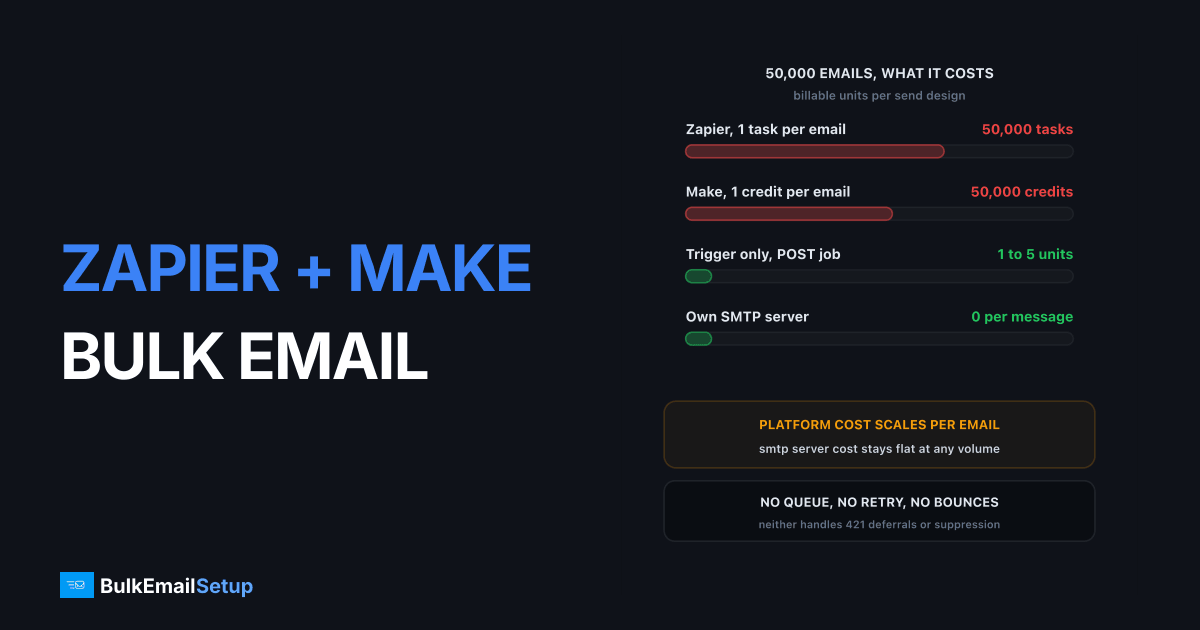
Zapier and Make both bill per unit of work, so bulk email through them costs one task or one credit per recipient, and neither platform is a mail queue. Zapier's Free plan includes 100 tasks a month with paid plans starting at $29.99/month billed monthly, and Make's Free plan includes 1,000 credits with Pro at $9/month for 5,000. A 50,000-message campaign at one task per email needs a 50,000-unit tier on either. The fix is architectural: use the automation platform as a trigger, and hand the actual sending to an SMTP server that charges nothing per message.
I built this the wrong way twice. Both times it looked fine at 300 recipients and fell apart at 30,000.
Why the per-task model breaks bulk email
The pricing model is the whole problem. Zapier's docs say a task is counted whenever Zapier successfully completes a unit of work, so every step that does something counts. Make uses credits, where each module action in a scenario counts as one credit.
Neither platform charges for triggers, polling, or built-in helpers like Zapier's Formatter, Paths and Filters. What you pay for is the doing, and sending an email is doing.
So a loop over 50,000 contacts with one send step is 50,000 billable units minimum. Add a lookup step and the same campaign is 100,000. Meanwhile the SMTP server next to it would have moved those messages for the cost of the VPS.
| Design | Billable units for 50,000 emails | What the platform does |
|---|---|---|
| Loop, one send step per recipient | 50,000 | Sends every message itself |
| Loop, send plus a lookup step | 100,000 | Sends and enriches |
| Trigger, POST to your mailer | 1 to 5 | Kicks off the job only |
| Trigger, write segment ID to queue | 1 to 5 | Hands off, walks away |
Same campaign, four orders of magnitude apart in platform cost.
What a 50,000-message send actually costs
Here is the worked example against what each vendor publishes. Zapier Professional starts at $29.99/month billed monthly and scales by task tier, from 750 tasks up to 2,000,000. Make Pro starts at $9/month for 5,000 credits and scales the same way. Both give roughly 15% off for annual billing, and both allow overage past the included allowance.
| Approach | Platform units used | Plan tier you need | Rough monthly platform cost |
|---|---|---|---|
| Zapier, one task per email | 50,000 | A 50,000-task Professional tier | Hundreds, well above the $29.99 entry |
| Make, one credit per email | 50,000 | A 50,000-credit Pro tier | Tens to low hundreds, above the $9 entry |
| Either, as a trigger only | Under 100 | Free or the entry paid plan | $0 to $29.99 |
| Own SMTP server | 0 | Not applicable | VPS and setup, flat |
Tier prices move with the slider on each vendor's page. The shape is the point. Platform cost scales with recipient count, SMTP cost is flat. At 5,000 messages a month that gap is noise. At 500,000 it is the whole budget, as our cost to send 100,000 emails a month breakdown shows.
Email by Zapier vs Make's Email module
The two platforms are not equivalent here, and this is the biggest practical difference between them.
| Factor | Email by Zapier | Make Email module |
|---|---|---|
| Uses your own SMTP | No | Yes, host, port, user, password |
| From address | Zapier's shared sending address | Your domain |
| SPF and DKIM alignment | None on your domain | Yours, if your SMTP is set up |
| Intended use | A few notification messages | General purpose sending |
| Daily cap | Low, deliberately | Your SMTP server's limit |
| Cost per message | One task | One credit |
Email by Zapier is a convenience action, built so a Zap can ping you when a form comes in. It sends from Zapier's infrastructure, so the message carries no DKIM signature on your domain and no SPF alignment. Google's sender guidelines require authentication from anyone sending in volume, so mail like this fails before content matters.
Make's Email module is a proper SMTP client. Give it your host, port 587, username, password and TLS and it sends as you. That fixes authentication. It does not fix the per-credit cost, and it does not turn Make into a queue.
Wiring your own SMTP into each platform
If you are going to send small volumes directly, at least do it authenticated.
Make. Add the Email module, choose "Send an email", create a new connection and fill in the SMTP details.
| Setting | Value |
|---|---|
| Host | smtp.yourdomain.com |
| Port | 587 |
| Secure | STARTTLS |
| Username | your SMTP user |
| Password | your SMTP password |
| From | [email protected] |
Zapier. There is no first-party "send via my SMTP" action, so Webhooks by Zapier POSTs to your own endpoint, and that endpoint speaks SMTP. The curl equivalent:
curl -X POST https://api.yourapp.com/send \
  -H "Authorization: Bearer $TOKEN" \
  -d '{"campaign_id":"oct-newsletter","segment":"active-90d"}'
That POST is one Zapier task and it triggers a send of any size. Both platforms offer the same escape hatch: stop asking them to send, ask them to start something that sends.
The architecture that actually works
Every workable version of this looks the same. The automation platform detects the event. Your mail system does the sending.
Trigger (form, CRM update, schedule)
        |
        v
Zapier / Make          <- 1 to 5 billable units
        |
        v  POST campaign_id + segment
Your app or mailer API
        |
        v  reads recipients, applies suppression list
SMTP server (queue, rate limit, retry)
        |
        v
Recipients
Three properties fall out that a per-recipient loop never gives you.
- Cost stops scaling with list size. One trigger, any volume.
- The queue is real. Your MTA retries a 4xx deferral on its own schedule. A failed Zapier step does not.
- Suppression happens in one place. Bounces and unsubscribes get checked at send time, not scattered across scenario branches.
If your trigger source is a CRM, this is the pattern described in SMTP for CRM and marketing automation. If you would rather self-host the automation layer too, n8n SMTP bulk email setup removes the per-task bill entirely.
Rate limiting and retries neither platform gives you
An automation scenario has no backpressure. It fires as fast as its execution model allows, and a scenario iterating 10,000 rows opens connections until something breaks.
The receiver breaks first. Gmail and Microsoft answer volume spikes with 421 4.7.0 and similar temporary rejections. The right response is to slow down and retry in a few minutes, which an MTA does automatically. A scenario treats it as a failed module run and either halts or silently drops that recipient.
| Behaviour | Automation platform | SMTP server with a queue |
|---|---|---|
| 4xx deferral handling | Step fails or errors out | Auto retry with backoff |
| Per-hour throttle | None, unless you build it | Configured per destination |
| Ordering after a failure | Lost | Preserved in the queue |
| Concurrency control | Scenario-level at best | Per-IP, per-domain |
| Replay a partial send | Manual, error-prone | Re-queue the deferred set |
During warm-up, 500 to 2,000 messages an hour per IP is a sane ceiling, and no automation platform holds you to it. See email queue and retry explained.
Bounces and unsubscribes are entirely your problem
This is where teams get suspended. Neither Zapier nor Make reads your bounce mailbox, parses SMTP reply codes, or keeps a suppression list. A scenario sending to a dead address will keep sending to it forever.
Where the lines sit:
| Metric | Danger line | Who enforces it |
|---|---|---|
| Spam complaint rate | over 0.3% | Gmail, for bulk senders |
| Hard bounce rate | over 5% | Effectively every receiver |
| One-click unsubscribe | Required at volume | Gmail and Yahoo, since 2024 |
| Repeat sends to hard bounces | Treated as list abuse | Blocklists and your provider |
You need three things the platform does not supply: a mailbox or webhook that receives bounces, logic that classifies hard versus soft, and a suppression table checked before every send. Build them once in your mailer and they cover every campaign. Build them inside a scenario and you are writing a mail server in a flowchart. Rules are in email bounce handling best practices.
Unsubscribe is the same story. A List-Unsubscribe header with a working one-click endpoint is required for bulk senders at Gmail and Yahoo, and neither platform adds it for you.
Zapier vs Make vs a self-hosted mailer
Judged only on the job of moving a bulk campaign.
| Factor | Zapier | Make | Self-hosted SMTP |
|---|---|---|---|
| Entry price | $29.99/mo monthly billing | $9/mo Pro | One-time server and setup |
| Billing unit | Per task | Per credit | Per server, not per message |
| Own SMTP credentials | Via webhook only | Yes, Email module | Native |
| SPF and DKIM on your domain | No, with built-in email | Yes | Yes |
| Queue and retry | No | No | Yes |
| Bounce processing | No | No | Yes, if configured |
| Suppression list | No | No | Yes |
| Rate limiting per receiver | No | No | Yes |
| Best role | Trigger and glue | Trigger, glue, small sends | The sender |
| Sensible ceiling as sender | A few hundred a month | A few thousand a month | Millions |
Neither platform is bad. Both are excellent at connecting systems that do not otherwise talk. Sending 50,000 messages is running a mail server, and they price every message as a separate integration because from their side it is.
Decision guide
Pick by monthly volume and by whether the mail is one-off or campaign shaped.
| Your situation | Do this |
|---|---|
| Under 500 messages a month, internal alerts | Make's Email module with your SMTP, or Email by Zapier for pure notifications |
| 500 to 5,000 a month, transactional, from your domain | Make Email module pointed at your SMTP server |
| Any campaign over 5,000 recipients | Trigger only, POST to your mailer, send over SMTP |
| Over 50,000 a month | Dedicated SMTP server with your own IPs, automation stays as glue |
| Cold outreach or affiliate content | Dedicated IPs, since shared relay policy bans it anyway |
The real threshold is around 5,000 messages a month. Below it, sending straight from a scenario is worth the per-unit cost and the missing queue. Above it, costs and failure modes climb faster than the value, and every hour rebuilding retry logic in a visual scenario is an hour reinventing an MTA badly.
The volume that makes a per-task model painful is the same volume that makes shared relay pools scrutinise you. Crossing 50,000 a month is two decisions at once, and taking them together saves a migration later. SMTP for WordPress bulk email covers the same handoff from a different trigger.
How BulkEmailSetup helps
We build the sending half: your own SMTP server, your own IPs, full SPF, DKIM, DMARC and PTR setup, MTA tuning with real queues and retry, bounce handling and a warm-up plan. Zapier or Make keeps firing one webhook when something happens, and the server absorbs the volume without charging per message.
Basic is $549 one-time, covering 1 SMTP server, 3 dedicated IPs, 25,000 emails/day and unlimited contacts. Higher tiers scale to 15 IPs and 200,000 emails/day. See pricing for the tiers, or read SMTP for CRM and marketing automation if your trigger source is a CRM rather than a scenario.
Frequently asked questions
Can Zapier send bulk email?
Not economically. Zapier bills per task, and a loop that sends one email per recipient burns one task per message. Zapier's Free plan includes 100 tasks a month and paid plans start around $29.99/month billed monthly, so a 50,000-recipient send needs a 50,000-task tier. Use Zapier as the trigger and let an SMTP server send the batch.
Does Make have an SMTP module?
Yes. Make's Email module connects to your own SMTP server: you supply host, port 587, username, password and TLS, and Make sends through it. That solves authentication and reputation, but every send still costs one credit, and Make's Free plan includes 1,000 credits a month with Pro starting at $9/month for 5,000 credits.
What is the cheapest way to send bulk email from Zapier or Make?
Fire one task or credit, not thousands. Have the automation POST the campaign or the segment ID to your own mailer or an SMTP-backed script, then let that system loop over recipients. One Zapier task can trigger a 100,000-message send instead of 100,000 tasks.
What are Email by Zapier's sending limits?
Email by Zapier is a convenience action for a handful of notification messages, not a bulk sender. It sends from Zapier's own shared address, has a low daily cap, and gives you no SPF or DKIM alignment on your domain, so recipients see mail that is not authenticated as yours. Any real campaign needs your own SMTP credentials.
Do Zapier and Make handle bounces and unsubscribes?
No. Neither platform reads your bounce mailbox, parses 5.x.x codes, or maintains a suppression list. You must handle that yourself, and Gmail requires one-click unsubscribe plus a spam complaint rate under 0.3% for bulk senders. Sending through automation without suppression logic will push your bounce rate past the 5% danger line.
Is Make cheaper than Zapier for email automation?
For raw volume, yes. Make Pro starts at $9/month for 5,000 credits against Zapier Professional at $29.99/month billed monthly, and Make's Email module accepts your own SMTP credentials while Zapier's built-in action does not. Neither is cheap at 50,000 messages, because both charge per operation and an SMTP server charges nothing per message.
How many emails per hour should I send through an automation platform?
Cap it well below your SMTP server's ceiling, usually 500 to 2,000 an hour per IP during warm-up. Automation platforms have no queue and no backpressure, so a scenario that fires 10,000 sends in a few minutes will collect 421 deferrals from Gmail and Microsoft and give you no way to replay them in order.


