
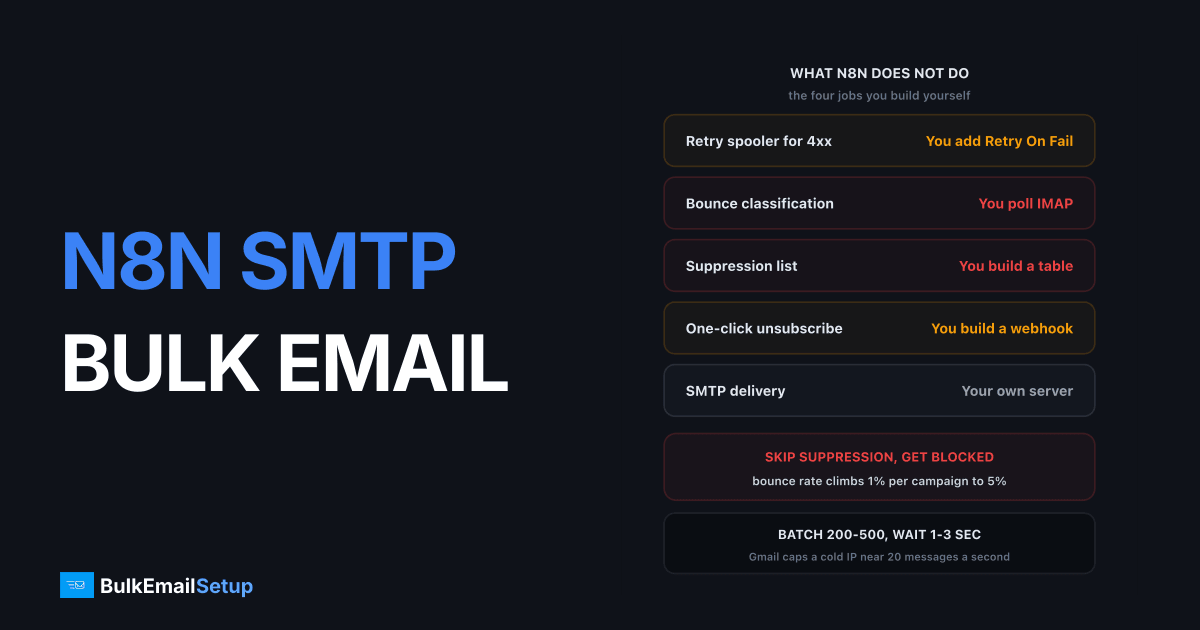
n8n can run bulk email through your own SMTP server using the Send Email node on port 587 with STARTTLS, but it gives you none of the safety rails an ESP provides. No queue, no retry spooler, no bounce processing, no suppression list, no unsubscribe handling. You build those yourself, in nodes, before your first real send. Skip the suppression list and a 100,000 send hard-bounces past a 5% bounce rate, and your IPs are blocked inside a week.
I have built this stack for clients who wanted campaign logic their ESP could not express. It works. It also fails in ways an ESP would have absorbed quietly, so here is the whole build.
What n8n actually gives you, and what it does not
n8n is orchestration. Not a mail transfer agent, and not a queue.
| Job | n8n | An ESP like SendGrid or Brevo |
|---|---|---|
| Deciding who gets what | Yes, excellent | Limited to their segment builder |
| SMTP delivery | Via your server | Their pool |
| Retry spooler for 4xx | No, you add Retry On Fail | Built in, hours of retry |
| Bounce classification | No | Automatic |
| Suppression list | No, you build a table | Automatic and enforced |
| One-click unsubscribe | No, you build a webhook | Automatic |
| Reputation management | Yours entirely | Theirs, shared |
| Per-email cost at 100K/mo | $0 from n8n itself | $80 to $150 |
The row that hurts is suppression. SendGrid silently refuses to send to an address it recorded as a hard bounce. n8n re-sends to that dead address every campaign until a receiver decides you are harvesting.
Setting up the SMTP credential
Add a Send Email node and create an SMTP credential. The n8n documentation covers the node; these values matter for bulk.
| Field | Value | Why |
|---|---|---|
| Host | your SMTP hostname | must match the PTR record on the sending IP |
| Port | 587 | submission port, STARTTLS upgrade |
| User | your SMTP username | per-workflow user, not a shared one |
| Password | from n8n credentials store | never inline in a node |
| SSL/TLS toggle | off | port 587 upgrades via STARTTLS, not implicit TLS |
| Client host name | your sending hostname | some MTAs reject a default EHLO |
Turning the SSL/TLS toggle on with port 587 is the most common n8n SMTP failure. That toggle means implicit TLS, which belongs on port 465. On 587 the handshake hangs and the node times out.
Set the From address to a mailbox on the domain your SPF record covers and your DKIM key signs. Gmail rejects unauthenticated bulk mail with 550 5.7.26, whatever sent it.
Test with one recipient first:
swaks --to [email protected] --from [email protected] \
  --server smtp.yourdomain.com:587 --tls \
  --auth-user YOUR_USER --auth-password-file /root/.smtppass
If swaks delivers and n8n does not, the credential is wrong.
Batching and rate control
This is where most n8n bulk builds break. The Loop Over Items node (older versions call it Split In Batches) sends as fast as your SMTP server accepts, far faster than Gmail wants it. The pattern:
- Get contacts from your database or sheet.
- Suppression check against your suppressed table, filter out matches.
- Loop Over Items, batch size 200 to 500.
- Send Email node inside the loop.
- Wait node, 1 to 3 seconds, before the loop continues.
The Wait node is not optional. Without it you open hundreds of SMTP connections a second and Gmail answers 421 4.7.0 Try again later. At that rate you look like a compromised host.
| Setting | Conservative | Aggressive | Notes |
|---|---|---|---|
| Batch size | 200 | 500 | larger batches hold more in memory |
| Wait between batches | 3 sec | 1 sec | tune to your provider's per-second cap |
| Concurrent SMTP connections | 10 | 20 | per receiving domain, not total |
| Effective throughput | ~70/sec | ~300/sec | before receiver throttling |
| 100,000 emails wall clock | ~24 min | ~6 min | in theory, not in practice |
You will not hit those numbers, because receivers throttle you independently of what your MTA pushes. Gmail accepts a few hundred a second from a warmed IP, roughly 20 from a cold one. Our guide on email throttling explains the ceilings.
n8n also holds every item of an execution in memory. One run carrying 100,000 contacts with HTML bodies can push the container past 2GB and get OOM-killed mid-send, with no record of who already received the mail. Schedule hourly runs of 10,000 instead.
Retry logic: 4xx yes, 5xx never
The rule is simple, and almost everyone gets it backwards.
| Response class | Meaning | What n8n should do |
|---|---|---|
| 2xx (250) | Accepted | log, move on |
| 4xx (421, 450, 451) | Temporary, try later | Retry On Fail, 3 tries, 60 sec wait |
| 5xx (550, 551, 553) | Permanent | never retry, write to suppression |
Enable Retry On Fail with Max Tries 3 and Wait Between Tries 60000 ms. That covers greylisting and deferrals.
n8n will not separate the two classes for you. A failed node is just a failed node. Set On Error to "Continue (using error output)" and route the error branch into an IF node reading the status code for a 5 prefix. 5xx goes to suppression. 4xx that survived three retries goes to a retry-tomorrow queue.
Let 5xx failures fall through untracked and every campaign re-sends to every dead address. That is how a list drifts past the 5% hard bounce rate that gets IPs blocked. See bounce handling best practices.
Processing bounces
Not every bounce is an SMTP error. Many receivers accept the message and bounce it by email minutes later, so the Send Email node reports success on mail that was never delivered.
IMAP polling. Create [email protected], set it as the Return-Path, and point an n8n IMAP Trigger at it. Parse the DSN for the failed recipient and status code, then write hard bounces to suppression. Poll every 5 to 15 minutes. No MTA access needed.
MTA webhook. If you run your own Postfix or Postal server, have it POST bounce events to an n8n Webhook node. Faster and structured, but needs MTA control.
Classify what arrives:
| Bounce type | Example code | Action |
|---|---|---|
| Hard, mailbox gone | 550 5.1.1 | suppress permanently |
| Hard, domain gone | 550 5.1.2 | suppress permanently |
| Soft, mailbox full | 452 4.2.2 | retry, suppress after 5 in a row |
| Soft, greylisting | 451 4.7.1 | retry in 15 min, do not count |
| Blocked, reputation | 550 5.7.1 | stop the whole campaign, investigate |
That last row deserves its own alert. A 550 5.7.1 from Gmail across many recipients means you are blocked, not that the addresses are bad. Stop the run.
The suppression list, the part everyone skips
The most important table in an n8n email build, and the one people leave out because n8n never prompts for it.
Create a table with four columns: email, reason, source, suppressed_at. Write to it from three places.
- Hard bounces from the 5xx error branch.
- Hard bounces parsed from the IMAP bounce mailbox.
- Unsubscribes from your unsubscribe webhook.
Then read it before every send. A Postgres or MySQL node running SELECT email FROM suppressed into a Merge node in "Keep Non-Matches" mode is the whole implementation. Ten minutes of work.
The alternative is what I find in most inherited workflows: a Google Sheet of contacts, no suppression, a bounce rate climbing about 1% per campaign. By campaign eight they are over 5%, which every receiver reads as a purchased or abandoned list.
Suppression is a legal requirement too. CAN-SPAM gives you 10 business days to honour an unsubscribe, and a table checked before send is the only reliable way.
List-Unsubscribe and one-click
Google and Yahoo require one-click unsubscribe for bulk senders. Both headers go on marketing mail, set in the Send Email node's header options:
List-Unsubscribe: <https://yourdomain.com/u/{{$json.token}}>, <mailto:[email protected]>
List-Unsubscribe-Post: List-Unsubscribe=One-Click
The HTTPS URL must accept a POST with no confirmation page and no login. Point it at an n8n Webhook node that looks up the token, writes the address to suppression, and returns 200. Gmail sends that POST the moment someone clicks unsubscribe.
Get this wrong and recipients use the spam button instead. Google's sender guidelines set a 0.30% hard limit on spam complaints, 0.10% as the target. A visible unsubscribe link in the body is still required; the header does not replace it.
What this costs at 100,000 a month
n8n is free if you self-host. The sending is where money goes.
| Option | Monthly at 100K | Setup | Bounce and suppression work |
|---|---|---|---|
| Amazon SES | ~$10 plus $3 to $25 per IP | free tier, review required | you build all of it in n8n |
| SendGrid Essentials | ~$90 | instant | provider handles it, n8n just triggers |
| Managed dedicated server | ~$0 after one-time build | $549 one-time | you build it in n8n, IPs are yours |
| Self-hosted VPS plus Postfix | $20 to $60 VPS | 15 to 30 hours of your time | you build all of it, including the MTA |
SES is the usual n8n pairing and the cheapest per message, but you still write every suppression and bounce node yourself, and SES pauses accounts whose bounce rate passes 5% or complaints pass 0.1%. Full numbers in what 100,000 emails a month costs.
The comparison people get wrong: SendGrid at $90 looks expensive next to SES at $10, until you count the 20 hours building bounce classification, suppression and unsubscribe handling in n8n. The n8n build pays off only if you need campaign logic the ESP cannot express, or your volume makes per-email pricing dominate.
Checklist before any bulk run
Four minutes, every time. It has saved several clients an IP block.
- SPF, DKIM and DMARC pass on a test send to a Gmail address, checked in Show Original.
- PTR record on the sending IP matches the HELO hostname.
- Suppression check node is wired in and returned a plausible count, not zero.
- Loop Over Items batch size is set, and the Wait node is inside the loop.
- Retry On Fail is on, 3 tries, 60 seconds.
- On Error is "Continue (using error output)", with the error branch wired to suppression.
- List-Unsubscribe and List-Unsubscribe-Post headers are on the message.
- The unsubscribe webhook answers a POST with 200, tested with curl.
- The IMAP bounce trigger is active and the mailbox is empty before you start.
- Send to a 500-address seed segment first, wait 30 minutes, check the bounce mailbox.
Step 10 catches everything else. Five hundred addresses surface a broken suppression join or a bad From address before you burn an IP on 100,000.
Sending transactional mail from an app too? The same SMTP server handles both: see SMTP for Django, Laravel and Rails apps.
How BulkEmailSetup helps
We build the sending layer n8n does not have: a dedicated SMTP server with your own IPs, SPF, DKIM, DMARC and PTR configured, MTA tuning, bounce routing to a mailbox your IMAP Trigger can poll, and a warm-up plan so your first campaign does not hit a cold IP at full volume. You keep n8n for the workflow logic, which is what it is good at.
Basic is $549 one-time, covering 1 SMTP server, 3 dedicated IPs, 25,000 emails/day and unlimited contacts. Higher tiers scale to 15 IPs and 200,000 emails/day. See pricing for the full breakdown.
Outreach on BulkEmailSetup servers follows our anti-spam policy: lawful B2B email to business contacts you researched yourself, a working opt-out honoured within 10 business days, your physical address in every message, and complaints under 0.1%. Bought, rented or scraped lists are not allowed.
Frequently asked questions
How do I set up SMTP in n8n?
Add a Send Email node, create an SMTP credential with your host, port 587, your username and password, and leave SSL/TLS off so the connection upgrades with STARTTLS. Set the From address to a mailbox on the domain your SPF and DKIM cover. Test with a single recipient before wiring the node into any loop.
Can n8n send 100,000 emails?
Yes, but not in one execution. Split the list with Loop Over Items at 200 to 500 per batch and put a Wait node between batches so you stay under your provider's per-second limit. At 20 messages per second a 100,000 send takes about 83 minutes of wall clock, and n8n holds the whole run in memory, so most people schedule the workflow in hourly chunks instead.
Does n8n handle bounces and unsubscribes?
No. n8n has no bounce processing, no suppression list and no unsubscribe handling built in. You build all three yourself: an IMAP Trigger polling a bounce mailbox, a database table of suppressed addresses, and an n8n Webhook that receives one-click unsubscribe POSTs from the List-Unsubscribe header.
Why is my n8n bulk send getting deferred or blocked?
Usually rate, not content. n8n's Loop Over Items node fires as fast as the SMTP server accepts, and hitting a receiver with hundreds of connections a second triggers 421 deferrals from Gmail and Yahoo. Add a Wait node of 1 to 3 seconds per batch and cap concurrent SMTP connections at 10 to 20.
Do I still need an SMTP provider if I use n8n?
Yes. n8n is the orchestration layer, not a mail transfer agent. It has no queue, no retry spooler and no reputation. You point the Send Email node at a real MTA, either a relay or your own server with dedicated IPs, and n8n decides who gets what and when.
What retry logic should an n8n Send Email node use?
Retry only on 4xx SMTP codes, which are temporary, using n8n's Retry On Fail with 3 tries and a 60 second wait. Never retry a 5xx code such as 550 5.1.1, because the address is permanently invalid and retrying it counts as another hard bounce against your reputation. Route 5xx failures straight to your suppression table.


