
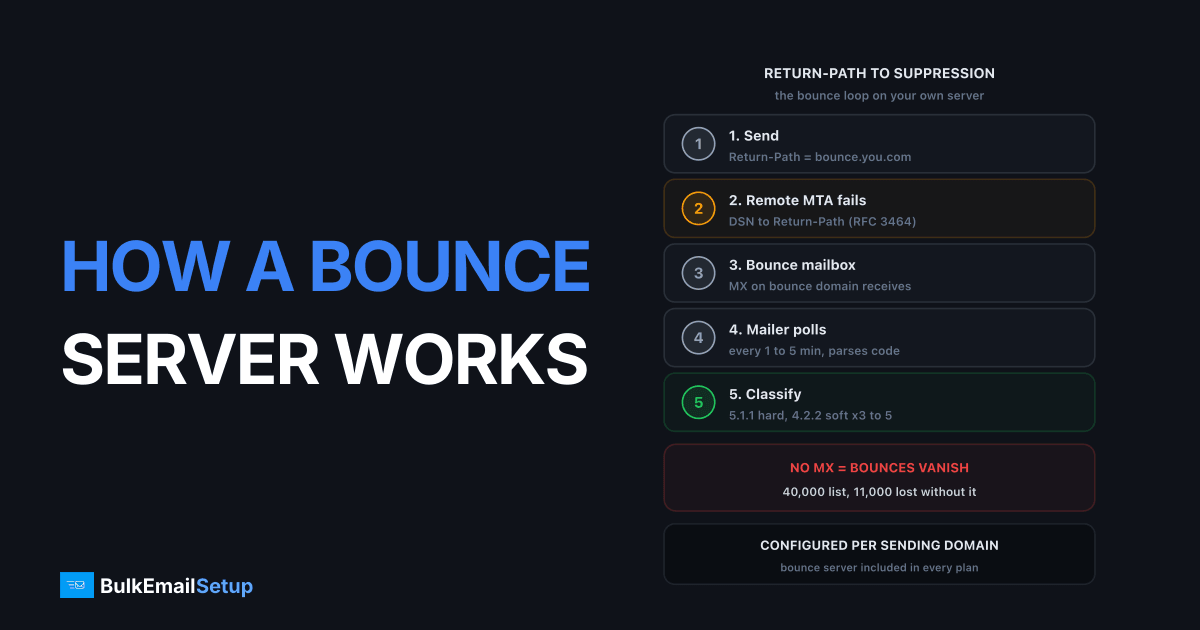
A bounce server is a mailbox on your sending domain that receives delivery-failure messages. When a recipient's mail server cannot deliver your email, it sends a Delivery Status Notification (DSN) to the Return-Path address in the SMTP envelope, not to the From address people see. Your mailer polls that mailbox over IMAP or POP3, parses each DSN, reads the enhanced status code (5.1.1, 4.2.2 and so on), and marks the contact as hard or soft bounced in a suppression list. On a self-hosted SMTP setup you build and run this loop yourself: one bounce subdomain, one MX record, one mailbox, one parser.
I've run this on servers pushing 200,000 messages a day, and the bounce mailbox is the part most people get wrong first. The sending side gets all the attention. The receiving side, where the failures come back, gets forgotten until the bounce rate is already over 5% and Gmail is throttling. This article covers the mechanism. For the policy side (retry windows, bounce thresholds) see email bounce handling best practices.
What is the difference between Return-Path and From?
Every email has two sender addresses. The header From: is what the recipient sees in their mail client. The envelope-from, set by the MAIL FROM command during the SMTP session, is where failures go. RFC 5321 calls it the reverse-path. When the receiving server accepts the message it writes that value into a Return-Path: header at the top.
So a campaign might look like this on the wire:
MAIL FROM:<[email protected]>
RCPT TO:<[email protected]>
DATA
From: Kuldeep <[email protected]>
To: [email protected]
Subject: October update
Jane sees [email protected]. If her mailbox is gone, the failure goes to [email protected]. That separation is the whole point. It lets you point replies at a human inbox and failures at a machine-read one.
How does the bounce flow work end to end?
The loop has five steps. Each one can break independently, which is why I debug them in order.
- Your MTA sends with
MAIL FROMset to the bounce address. - The receiving MTA fails delivery. It either rejects during the SMTP session (a synchronous bounce your MTA logs directly) or accepts and fails later (an asynchronous bounce).
- For asynchronous failures, it generates a DSN in the format defined by RFC 3464: a
multipart/reportmessage with a human-readable part, a machine-readablemessage/delivery-statuspart, and usually the original headers. - The DSN is delivered to the bounce mailbox via the MX record on the bounce domain.
- Your mailer polls the mailbox every 1 to 5 minutes, parses the
Status:field, and updates the contact.
The message/delivery-status part is what the parser cares about. A real one looks like this:
Reporting-MTA: dns; mx.example.com
Final-Recipient: rfc822; [email protected]
Action: failed
Status: 5.1.1
Diagnostic-Code: smtp; 550 5.1.1 The email account does not exist
Action: failed plus Status: 5.1.1 is unambiguous. The parser never has to read English.
Where VERP fits in
The problem with the plain flow is identifying who bounced. Some DSNs omit Final-Recipient. Some forward through aliases, so the failed address isn't the one you mailed. VERP (Variable Envelope Return Path) fixes this by encoding the recipient into the envelope-from itself:
MAIL FROM:<[email protected]>
The @ in the recipient becomes =, and the whole thing sits after a + tag. When the DSN arrives, the To: header of the bounce is [email protected]. The mailer decodes that and knows exactly which contact failed, with zero body parsing. Postfix supports this natively with recipient_delimiter = + and a catch-all on the bounce domain. Every serious mailer (Mautic, Sendy, Mailwizz, our own platform) generates VERP addresses by default once a bounce mailbox is configured.
Bounce messages come in dozens of formats from legacy systems that ignore RFC 3464. VERP means those formats stop mattering. The envelope tells you who; the status code tells you why.
How does the mailer classify hard vs soft bounces?
The mailer reads the enhanced status code from RFC 3463. The first digit sets the class: 5 is permanent, 4 is transient, 2 is success (a delayed delivery notice, not a failure). The second and third digits name the subject and detail. The table below is the classifier I use. It is deliberately conservative on 5.7.x codes because those are usually about you, not the recipient.
| Status code | Typical text | Class | What the mailer should do |
|---|---|---|---|
| 5.1.1 | User unknown, no such mailbox | Hard | Suppress immediately |
| 5.1.2 | Domain does not exist, bad MX | Hard | Suppress immediately |
| 5.1.3 | Bad destination mailbox syntax | Hard | Suppress, flag as malformed |
| 5.2.1 | Mailbox disabled | Hard | Suppress immediately |
| 5.4.4 | Unable to route (DNS failure) | Hard | Suppress after 2 occurrences |
| 4.2.2 | Mailbox full, over quota | Soft | Retry; suppress after 3 to 5 consecutive |
| 4.4.1 | Connection timed out, no answer | Soft | Retry 24 to 72 hours; keep contact |
| 4.7.0 | Too many connections, rate limited | Soft | Slow sending; do not touch contact |
| 5.7.1 | Delivery not authorised, policy block | Block | Do not suppress; check SPF, DKIM, blocklists |
| 5.3.0 | Mail system failure, often blocklist | Block | Do not suppress; investigate sending IP |
The two block rows matter most. A 5.7.1 from Outlook or Yahoo is almost never about the recipient. If your parser suppresses every 5.7.1 as a hard bounce, a one-day blocklist hit will quietly delete thousands of valid contacts. I've seen a 40,000-contact list lose 11,000 addresses in one afternoon that way. The bounce code classes article has the full code map; soft bounce vs hard bounce covers the retry policy.
The suppression list
Once classified, a hard bounce goes to a suppression list keyed on the normalised address. Every future send checks that list before the message is even queued. Soft bounces increment a counter per contact; when the counter crosses your threshold (I use 4 within 30 days) the contact is promoted to suppressed. The list should be shared across every sending domain you run, because a dead address is dead regardless of which brand mails it.
What DNS does a bounce server need?
The bounce domain needs three things: an MX record so DSNs can be routed to it, SPF so the envelope-from passes authentication, and a PTR on the sending IP. Without the MX record, nothing else matters.
; MX for the bounce subdomain
bounce.yourdomain.com.    IN  MX  10  mail.yourdomain.com.

; A record for the host the MX points at
mail.yourdomain.com.      IN  A   203.0.113.25

; SPF on the bounce subdomain (this is the domain SPF actually checks)
bounce.yourdomain.com.    IN  TXT "v=spf1 ip4:203.0.113.25 -all"
Three details people miss:
- SPF checks the envelope-from domain, not the From header. So the SPF record must live on
bounce.yourdomain.com. A perfect SPF record onyourdomain.comdoes nothing for a message whoseMAIL FROMis on the subdomain. - DMARC alignment. DMARC in relaxed mode (the default) treats
bounce.yourdomain.comas aligned with a From ofyourdomain.combecause they share an organisational domain. Strict mode (aspf=s) breaks that. Keep relaxed unless you have a specific reason. - PTR on the sending IP. The reverse DNS on
203.0.113.25should resolve to a hostname that resolves back to the same IP. Receivers like Outlook refuse connections without it. Details in what is a PTR record.
Verify the MX with dig MX bounce.yourdomain.com +short and then actually send a test to a non-existent address at Gmail. If a DSN lands in the mailbox within 60 seconds, the loop works.
Why use a separate bounce subdomain?
A separate subdomain contains reputation damage. Mailbox providers track reputation per domain, and the envelope-from domain is one of the domains they score. If you run a campaign to a dirty list and 8% of it hard-bounces, that history attaches to bounce.yourdomain.com. Your main domain, which carries your transactional mail and your staff's Outlook accounts, keeps its record clean.
It also isolates the mailbox. On a 100,000-contact send with a 3% bounce rate, 3,000 DSNs arrive in under an hour. You do not want that in the same IMAP account as customer replies. A dedicated subdomain with a dedicated catch-all mailbox means the parser can delete every message it reads, which keeps the mailbox at zero between campaigns.
The one argument against a subdomain is that some strict receivers score a mismatch between From domain and envelope-from domain as slightly suspicious. In practice I've never measured a difference with relaxed DMARC alignment in place, and the containment benefit is worth far more.
What goes wrong with bounce servers in practice?
Most bounce server failures are silent. The sending works, the dashboard looks fine, and the bounce rate reads 0.2% because nothing is being counted. Here are the ones I hit most.
No MX on the Return-Path domain. The most common one. Someone sets MAIL FROM to [email protected] but never adds the MX. Every DSN is undeliverable, the receiving MTA drops it, and the mailer reports a clean list that is actually rotting. Symptom: a bounce rate near zero on a list you know is old.
Mailbox fills up. A 2 GB mailbox quota sounds large until a 500,000-contact list bounces at 4%. That is 20,000 DSNs, each 5 to 15 KB with the original headers, so around 200 MB per campaign. Two months without the parser deleting processed mail and the mailbox is full. New DSNs then bounce themselves, which is a genuinely confusing log to read. Fix: parser deletes after processing, plus a cron that purges anything older than 7 days.
Auto-replies parsed as bounces. Out-of-office messages, "I've moved to a new address" replies, and challenge-response systems all land in the bounce mailbox because they reply to the Return-Path. A naive parser that keys on the word "undeliverable" or "failure" in the subject will mark living people as dead. Only trust message/delivery-status parts with Action: failed. Everything else gets logged and ignored. The Auto-Submitted: auto-replied header catches most of them.
Microsoft failures that never produce a DSN. Outlook.com and Microsoft 365 reject a lot of mail synchronously with 550 5.7.1 during the session, so nothing arrives in the mailbox. Worse, when your IP reputation is poor they accept the message and route it to junk or drop it silently. The bounce server sees nothing. The only visibility is SNDS for IP-level data and JMRP for complaints. Our Microsoft SNDS guide covers the signup. Your mailer should ingest the MTA log for synchronous rejections alongside the mailbox for asynchronous ones.
Polling too slowly. If the mailer checks the mailbox once an hour and your campaign sends 50,000 messages in that hour, you will keep mailing addresses that already bounced in the first minute. Poll every 1 to 5 minutes during a send.
Bounce server vs ESP bounce webhooks
If you use an ESP like SendGrid or Postmark, you never see any of this. They run the bounce domain, parse the DSNs, and POST a JSON event to your webhook. Here is how the two approaches compare on a self-hosted setup.
| Factor | Self-hosted bounce server | ESP bounce webhook |
|---|---|---|
| Who owns the Return-Path domain | You | The ESP (or a CNAME to them) |
| Where classification happens | Your parser, your rules | Their parser, their rules |
| Synchronous rejections | Read from your own MTA log | Included in the event |
| Latency from bounce to suppression | 1 to 5 minutes (poll interval) | Seconds |
| Visibility into raw DSN | Full message, every header | Usually a summary string |
| Cost at 500,000 sends per month | Included in server cost | Part of the ESP's per-message price |
| Failure mode | Silent (no MX, full mailbox) | Loud (webhook 4xx/5xx, retries logged) |
| Control over 5.7.x handling | Complete | Whatever the ESP decided |
The honest trade-off: webhooks are easier and fail loudly. A bounce server gives you the raw data and full control over classification, but you have to monitor it. The check I run weekly is simple. Count DSNs received in the last 7 days. If a sending domain pushed 100,000 messages and the count is zero, something is broken, because no real list bounces at 0.00%.
How BulkEmailSetup helps
Every plan includes a configured bounce server for each sending domain you add: the bounce subdomain, the MX record, the SPF entry, a dedicated catch-all mailbox, and VERP addressing enabled in the MTA. The platform polls the mailbox automatically, classifies by RFC 3463 status code using the conservative rules above, and maintains the suppression list across all your domains. You do not have to build the loop or watch for a full mailbox. See what's included on each plan on our pricing page.
Frequently asked questions
What is a bounce server in email?
A bounce server is a mailbox on your sending domain that receives delivery-failure messages (DSNs). Receiving mail servers send those failures to the Return-Path address, not the From address. Your mailer polls that mailbox over IMAP or POP3, parses each DSN, and marks the contact as hard or soft bounced.
Does a bounce server need its own MX record?
Yes. The domain in your Return-Path address must have an MX record pointing at a server that accepts mail. Without it the receiving MTA cannot route the DSN anywhere, the bounce is dropped, and your mailer never learns the address was dead.
What is VERP and why does a bounce server use it?
VERP (Variable Envelope Return Path) encodes the recipient address into the Return-Path, for example [email protected]. When the DSN arrives, the mailer reads the recipient straight from the To header instead of parsing the failure body, which is unreliable across providers.
Can I use my normal inbox as the bounce mailbox?
You can, but you should not. Bounce volume on a 100,000-contact list can hit several thousand DSNs per campaign. Mixing that with human mail makes parsing error-prone and fills the inbox. Use a dedicated mailbox on a bounce subdomain such as bounce.yourdomain.com.
Why do some Microsoft bounces never reach my bounce server?
Outlook.com and Microsoft 365 often reject at SMTP time with a 550 5.7.1 and generate no DSN at all, or they drop mail silently when IP reputation is poor. Those failures only show up in your MTA log and in SNDS, so you need both sources, not just the mailbox.


