
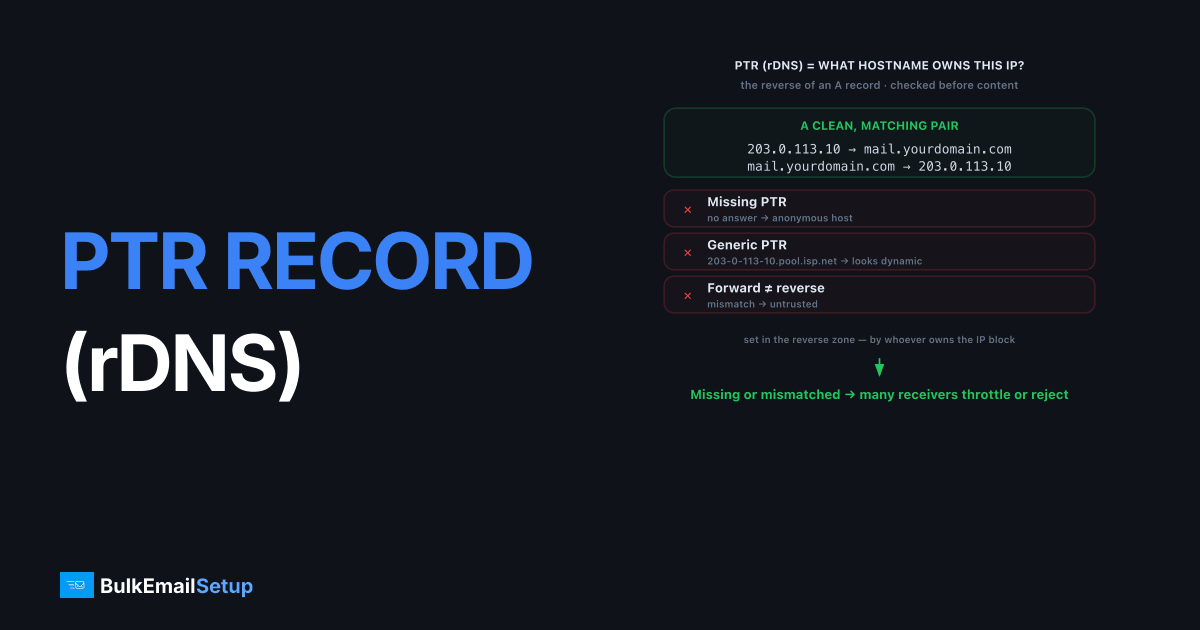
A PTR record (also called reverse DNS or rDNS) is a DNS entry that maps a sending IP address back to a hostname, the reverse of a normal A record that maps a hostname to an IP. It matters for email because receiving mail servers check it to confirm your sending IP resolves to a real, matching hostname. If the PTR record is missing, generic, or does not match your forward DNS, many major receivers throttle or reject your mail outright, often before they even look at your content or authentication.
What does a PTR record actually do?
A PTR record answers the question "what hostname owns this IP?" When your server connects to send mail from, say, 203.0.113.10, the receiver can look up the reverse DNS and expect an answer like mail.yourdomain.com. A real, identifiable hostname signals a legitimate, accountable sender. A missing answer, or a generic one like 203-0-113-10.pool.example-isp.net, signals an anonymous or possibly compromised host.
PTR records live in the reverse DNS zone, which is controlled by whoever owns the IP block, not by your domain registrar. That is the part senders trip over. You ask your hosting or server provider to set the reverse DNS for your IP. The forward setup, by contrast, lives in your own DNS, covered in how to set up a PTR record.
Here is what a clean reverse lookup looks like from the command line:
$ dig -x 203.0.113.10 +short
mail.yourdomain.com.

$ dig +short mail.yourdomain.com
203.0.113.10
The first command asks "what hostname owns this IP?" and gets a real answer. The second confirms that hostname resolves back to the same IP. Both directions agree, so this passes. Now compare a generic, provider-default PTR:
$ dig -x 198.51.100.42 +short
198-51-100-42.static.example-cloud.net.
That hostname screams "anonymous cloud box." It belongs to the provider, not to you, and it does not match the domain your mail claims to come from. Many receivers downgrade or reject mail from a connecting IP whose reverse DNS looks like this, even when SPF and DKIM are perfect.
Why do receivers reject mail without valid rDNS?
Receivers reject or penalize mail without valid rDNS because it is one of the cheapest, hardest-to-fake spam signals available. Gmail's bulk sender guidelines explicitly list a valid PTR record as a baseline expectation. Compromised machines and botnets rarely have clean, matching reverse DNS, so its absence is a reliable filter.
PTR is the check that happens before everything else. SPF, DKIM, and DMARC describe the message; rDNS describes the connecting machine. A receiver can drop a connection on bad reverse DNS before reading a single header, which is why a missing PTR produces blunt rejections like 550 5.7.1 rather than a spam-folder placement. Your perfect authentication never gets evaluated.
You can see the rejection in a raw SMTP exchange. When a server with no valid PTR connects, the receiver often refuses at the greeting or right after the envelope:
220 mx.recipient.com ESMTP ready
EHLO 203.0.113.10
250 mx.recipient.com
MAIL FROM:<[email protected]>
250 2.1.0 Ok
RCPT TO:<[email protected]>
550 5.7.1 Client host rejected: cannot find your reverse DNS
That 550 5.7.1 with a reverse-DNS reason is final. The message body never gets sent. The exact wording we see most from this failure is 550 5.7.1 Client host rejected: cannot find your reverse DNS from Postfix receivers, and a near-identical Client host [IP] blocked variant from corporate gateways, both refusing before a single header is read. Notice the EHLO here announces a bare IP instead of a hostname, which is itself a red flag. Receivers expect the name in EHLO to match the PTR, and a mismatch between the two compounds the problem.
What does forward-confirmed reverse DNS mean?
Forward-confirmed reverse DNS (FCrDNS) means the chain matches in both directions: the IP's PTR record points to a hostname, and that hostname's A record points back to the same IP. Receivers verify this round trip, not just that a PTR exists. A PTR that points to a hostname resolving to a different IP, or to nothing, fails the check.
| Step | Record | Example |
|---|---|---|
| Forward | A record | mail.yourdomain.com → 203.0.113.10 |
| Reverse | PTR record | 203.0.113.10 → mail.yourdomain.com |
| Match? | Both agree | Pass (FCrDNS) |
We have seen senders set a PTR record correctly but forget the matching A record, so the reverse lookup pointed to a hostname that resolved nowhere. Mail still got rejected. Both halves have to agree. The hostname in your PTR should also ideally match the hostname your server announces in the SMTP HELO/EHLO greeting.
Three common failure shapes show up in practice, and each fails FCrDNS for a different reason:
| Scenario | PTR result | Forward (A) result | Outcome |
|---|---|---|---|
| No PTR set | (empty) | n/a | Fail, no reverse DNS at all |
| PTR points to a hostname with no A record | mail.yourdomain.com | resolves nowhere | Fail, forward does not confirm |
| PTR hostname resolves to a different IP | mail.yourdomain.com | 203.0.113.99 | Fail, IPs do not match |
| PTR and A agree | mail.yourdomain.com | 203.0.113.10 | Pass |
Only the last row passes. The middle two are the sneaky ones, because a quick reverse lookup returns a nice-looking hostname and you assume it is fine, while the forward half quietly breaks the chain. Always test both directions, never just the PTR.
How do you check and fix your PTR record?
Check your PTR record with a reverse DNS lookup on your sending IP, then confirm the returned hostname resolves back to that same IP. Command-line tools (dig -x <ip> or host <ip>) and any online rDNS checker work. If it is missing or mismatched, fixing it has a clear path:
- Pick a hostname under a domain you control, like
mail.yourdomain.com. - Create the A record for that hostname pointing to your sending IP, in your DNS.
- Request the PTR from your IP provider, pointing the IP to that hostname.
- Verify FCrDNS by checking both directions resolve and match.
PTR sits alongside the other records receivers expect. For the full authentication picture it complements, see SPF vs DKIM vs DMARC. If reverse DNS issues are causing outright blocks, the rejection patterns are in Gmail 550 5.7.1 message blocked fix. Because the PTR is tied to who owns the IP, this is also a core reason senders weigh a dedicated IP against a shared one: on a dedicated IP you control the reverse DNS, on a shared pool you do not.
How BulkEmailSetup helps
Reverse DNS is one of the most common reasons self-hosted senders get rejected, because the PTR lives with the IP owner, not the domain. On our dedicated SMTP servers, the IP is ours to configure, so we set forward-confirmed reverse DNS correctly from day one, alongside SPF, DKIM, and DMARC. No mismatched-hostname rejections. See plans on our pricing page.
Frequently asked questions
What is a PTR record?
A PTR record, also called reverse DNS or rDNS, maps an IP address back to a hostname. It is the reverse of an A record. Mail servers use it to check that a sending IP resolves to a legitimate, matching hostname.
Why do mail servers check PTR records?
Receivers check PTR records to verify that a sending IP belongs to a real, identifiable host rather than a random or compromised machine. Missing or generic reverse DNS is a strong spam signal, so many servers reject or penalize mail without it.
Does a PTR record need to match forward DNS?
Yes. The PTR record should point to a hostname that itself resolves back to the same sending IP via an A record. This forward-confirmed reverse DNS (FCrDNS) match is what receivers actually verify, and a mismatch can cause rejection.
Who sets up the PTR record?
Your IP owner sets the PTR record, usually the hosting or server provider that controls the IP block, not your DNS registrar. You request the desired hostname from them, and they publish the reverse DNS entry for your IP.


