
A bounce message is an automated report telling you that an email could not be delivered, and it usually arrives back in your inbox or shows up in your sending logs. Formally called a Non-Delivery Report (NDR), it names the recipient address that failed and carries an SMTP status code explaining why. The code is everything. It tells you whether the failure is permanent (a hard bounce you must stop emailing) or temporary (a soft bounce that will retry), and it points at the exact cause, from a missing mailbox to a spam block. Decoding bounces is how you keep a list clean and a reputation intact.
What does a bounce message contain?
A bounce contains the failed address, a human-readable reason, and the machine-readable codes that matter most. A typical bounce body includes a line like this:
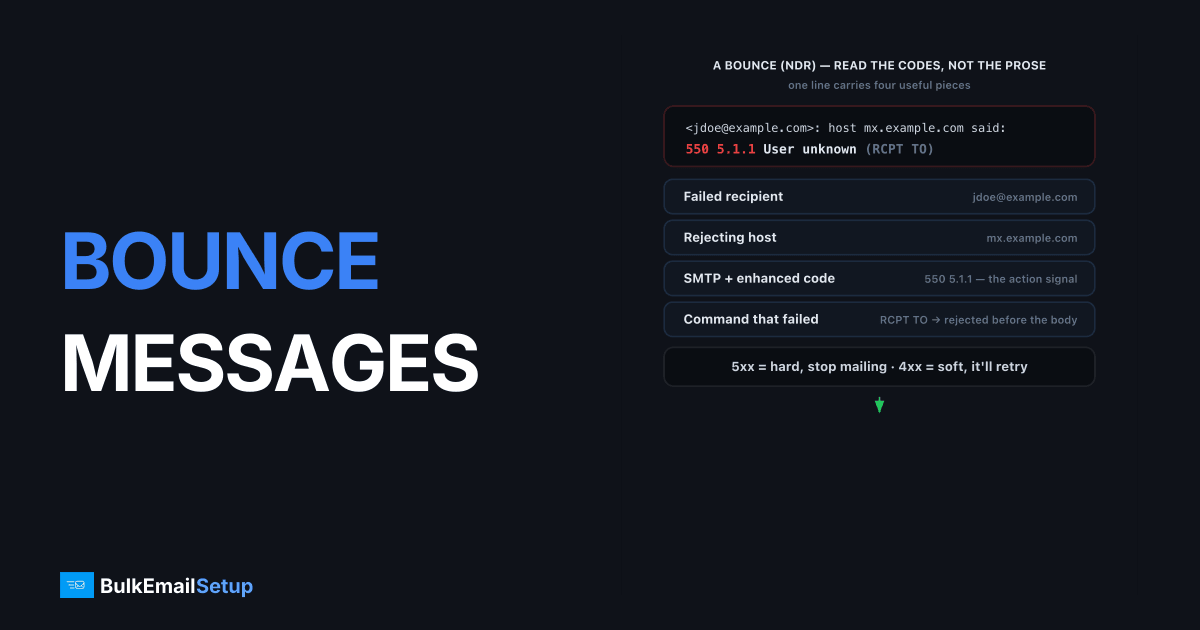
<[email protected]>: host mx.example.com said:
550 5.1.1 User unknown (in reply to RCPT TO command)
That single line carries four useful pieces: the recipient that failed, the host that rejected it, the basic SMTP code (550), and the enhanced status code (5.1.1). Good bounce messages also tell you which command triggered the failure, here RCPT TO, the recipient command defined in RFC 5321, which means the recipient server rejected the address before the message body was even sent. Some bounces include the original message headers too. Your job is to read the codes, classify the bounce, and act, not to read the prose, which varies wildly between providers.
A complete bounce is usually a multipart report. Skip the friendly intro and go straight to the machine-readable message/delivery-status part, which looks like this:
Reporting-MTA: dns; mx.sender.com
Final-Recipient: rfc822; [email protected]
Action: failed
Status: 5.1.1
Diagnostic-Code: smtp; 550 5.1.1 User unknown
Decode it field by field. Final-Recipient is the address that failed. Action: failed confirms this is a permanent give-up, not a delay (Action: delayed would mean still retrying). Status: 5.1.1 is the enhanced code, and Diagnostic-Code quotes the exact reply the remote server gave. Together they say: this mailbox does not exist, stop sending to it. That is all you need to suppress the address.
How do you read SMTP bounce codes?
Every bounce carries two codes, and reading both together gives you the full diagnosis. The basic code is three digits where the first digit sets the class. The enhanced code (RFC 3463) adds three dot-separated numbers for precise detail.
| Code | Class | Meaning |
|---|---|---|
| 4xx | Temporary (soft) | Try again later, mailbox full, server busy, greylisted |
| 5xx | Permanent (hard) | Stop, address bad, blocked, or rejected |
| 5.1.1 | Permanent | User unknown, mailbox does not exist |
| 5.2.2 | Permanent | Mailbox full (some providers treat as soft) |
| 4.7.1 | Temporary | Greylisting or policy deferral, retry shortly |
| 5.7.1 | Permanent | Blocked by policy, often spam or relay denial |
| 5.7.23 | Permanent | SPF check failed |
| 5.7.26 | Permanent | Message not authenticated (missing DKIM/SPF) |
The first digit is the fastest read: 4 means wait, 5 means stop. The enhanced code tells you what to fix. A 5.1.1 means remove the address from your list. A 5.7.23 means fix your SPF record. A 5.7.1 from Gmail means you triggered a spam or policy block, covered in the Gmail 550 5.7.1 fix. For the full taxonomy, see SMTP bounce code classes.
What is the difference between hard and soft bounces?
A hard bounce is a permanent failure you must never retry, while a soft bounce is a temporary failure that usually resolves on its own. The class digit tells you which: 5xx is hard, 4xx is soft. This distinction drives everything about how you handle the address.
Hard bounces (5xx) mean the address is bad, blocked or rejected for good. The most common is 5.1.1 user unknown, a mailbox that does not exist, often a typo or an abandoned account. Remove these immediately. Continuing to mail addresses that hard-bounce is one of the fastest ways to wreck sender reputation, because mailbox providers read it as a sign you do not maintain your list.
Soft bounces (4xx) are temporary: a full mailbox, a server timeout, greylisting, or a rate limit. Your mail server retries these automatically over hours or days following its queue and retry logic. You do not remove a soft-bounced address on the first failure. But if the same address soft-bounces repeatedly over several sends, treat it as effectively dead and suppress it. The full hard-versus-soft breakdown lives in soft bounce vs hard bounce.
How should you act on bounces?
Process bounces automatically, because acting on them is what protects your reputation. The rule is simple: suppress hard bounces on the first occurrence, suppress repeat soft bounces after a few tries, and keep your total bounce rate low. Aim to keep hard bounces under roughly 2 percent of each send; consistently higher signals a dirty or purchased list.
A practical workflow:
- Parse every bounce for its enhanced code, not just the prose.
- Add any
5.1.1,5.1.xaddress to a permanent suppression list. - Track soft bounces per address; suppress after three or four in a row.
- Watch for
5.7.xcodes, which signal authentication or blocking problems with your setup, not the recipient. - Never re-import suppressed addresses into a fresh campaign.
A cluster of 5.7.1 or 5.7.26 bounces is a warning about your own configuration, not your list. It means a blocklist hit or broken authentication is affecting many recipients at once, and the fix is on your end. The pattern we watch for in logs is the shape of the failure: scattered 5.1.1 bounces across many domains is a list-hygiene problem, but a sudden wall of 5.7.26 against Gmail alone, all in the same minute, is almost always a DKIM key that stopped signing or a DNS record that got edited, not the recipients. Reducing bounces overall starts with list hygiene, the practices in how to reduce email bounce rate.
How BulkEmailSetup helps
A dedicated SMTP server from BulkEmailSetup gives you direct access to your bounce logs with the full SMTP codes, so you can suppress hard bounces and spot 5.7.x configuration problems early instead of finding out from a blocklist. We configure SPF, DKIM and DMARC correctly so authentication-related bounces like 5.7.23 and 5.7.26 do not happen in the first place. See plans on our pricing page.
Frequently asked questions
What is a bounce message?
A bounce message, also called a Non-Delivery Report or NDR, is an automated email sent back to the sender when a message cannot be delivered. It contains the failed recipient address and an SMTP status code explaining why delivery failed.
What is the difference between a hard bounce and a soft bounce?
A hard bounce is a permanent failure, like a nonexistent mailbox, signaled by a 5xx code. You should never email that address again. A soft bounce is a temporary failure, like a full mailbox or server timeout, signaled by a 4xx code, and the message is usually retried automatically.
How do I read an SMTP bounce code?
An SMTP bounce code has a basic code and an enhanced code. The first digit shows the class: 4xx is temporary, 5xx is permanent. The enhanced code like 5.1.1 adds detail, where 5.1.1 means the user is unknown. Read both together to know the cause.
Why do bounce rates matter for deliverability?
High bounce rates signal to mailbox providers that you send to bad addresses, which damages sender reputation and pushes more mail to spam. Keeping hard bounces under roughly 2 percent by removing bad addresses promptly protects your inbox placement.


