
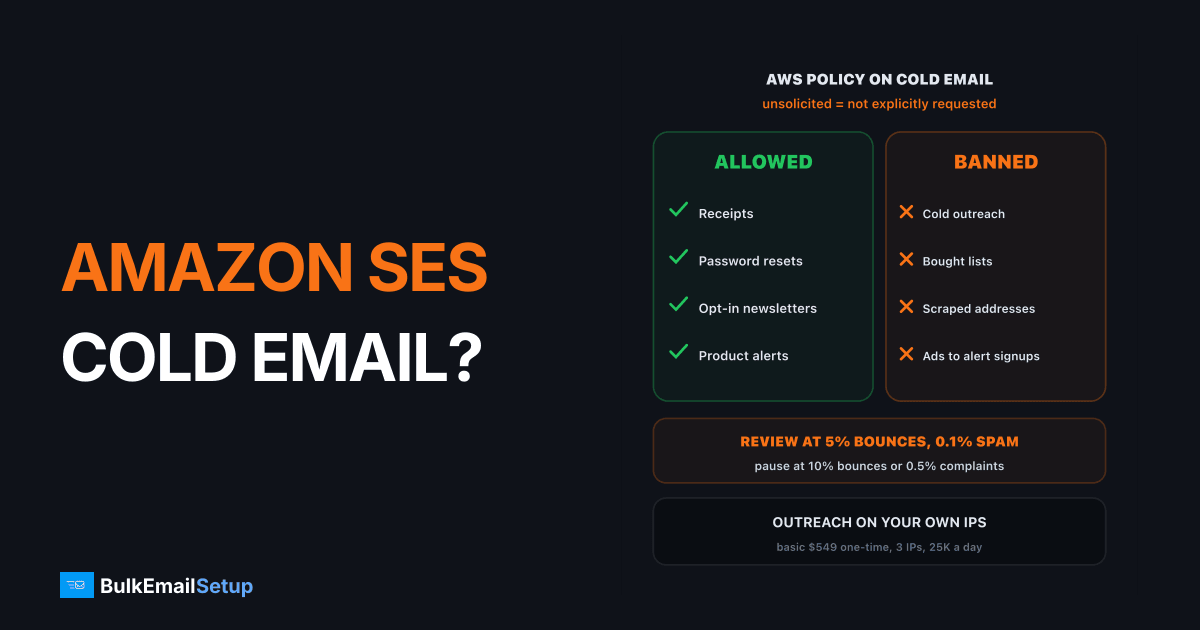
No, Amazon SES does not allow cold email. The AWS Acceptable Use Policy bans unsolicited mass email, and the SES enforcement FAQ defines unsolicited mail as anything the recipient did not explicitly ask to receive. Cold outreach fits that exactly. AWS also publishes the review lines: 5% bounces or 0.1% complaints put you under review, and 10% bounces or 0.5% complaints can pause sending. If you run outreach, it needs infrastructure where no platform policy bans it, and where only your own sending affects your reputation.
What the AWS policy actually says
Three AWS documents cover this, and they agree.
| Source | What it says | What it means for cold email |
|---|---|---|
| AWS Acceptable Use Policy | no unsolicited mass email, promotions or solicitations | outreach is banned |
| SES enforcement FAQ | unsolicited means the recipient did not explicitly ask | "they might be interested" is not asking |
| Same FAQ, list guidance | do not buy, rent or share addresses | bought B2B lists are out |
The definition is the part people miss. It is not about whether the mail is legal or relevant. A perfectly lawful, well-targeted B2B email to someone who never signed up is still unsolicited under AWS's wording.
What SES accepts, and what it treats as unsolicited
The exact review and pause lines
AWS is unusually open about its numbers. From the SES enforcement FAQ:
| Metric | Recommended | Under review | Sending can be paused |
|---|---|---|---|
| Bounce rate (hard bounces) | under 2% | 5% or more | 10% or more |
| Complaint rate (feedback loops) | under 0.1% | 0.1% or more | 0.5% or more |
| Spam trap hits | none | not disclosed | not disclosed |
Cold lists trip both lines. A typical scraped B2B list bounces 5% to 15% on first send, and people who never asked for mail report it as spam far more often. So even if no one reads the policy, the metrics flag the account within a few campaigns.
SES review and pause lines, from AWS's own FAQ
Rates are not calculated over a fixed window. AWS uses a representative volume of your recent sending, so one bad campaign on a low-volume account moves the numbers fast.
What a review asks you
When AWS reviews an account for unsolicited mail, it asks for specific answers in the support case:
- Was every message requested by the recipient? For cold email, the honest answer is no.
- How did you get each address? Other than the person interacting with you or your site and asking for mail.
- How do subscribe and unsubscribe work? With the actual opt-in and opt-out links.
- What did you change? Only steps already done count, not plans.
If you cannot answer the first two cleanly, the review will not go your way. Accounts reviewed several times for the same issue can be paused without a review first. Our guide to an SES account under review covers the case from the inside.
Why people still try it
SES costs $0.10 per 1,000 emails on the SES pricing page. A 50,000 email cold campaign costs $5. That price is the whole attraction, and it hides the real cost.
| Cost | Typical scale |
|---|---|
| Send fees | $5 per 50,000 emails |
| Account paused | product email on the same account stops too |
| Domain reputation | complaints follow the domain to any provider |
| Rebuild | new domain, new warm-up, 4 to 8 weeks |
The second row is the dangerous one. If your password resets and receipts run on the same SES account, a cold campaign can stop your product email.
Where cold email can run instead
Outreach needs infrastructure with no platform ban, kept apart from your main domain. These are the realistic options:
| Option | Policy risk | Notes |
|---|---|---|
| Amazon SES | banned | review lines published, pause likely |
| SendGrid, Mailgun, Postmark | banned on shared pools | see does SendGrid allow cold email |
| Cold email tool + Google or Microsoft inboxes | allowed by the tool, capped by inbox limits | small volume per inbox |
| Your own SMTP server, own IPs | no platform policy, only the law | you own warm-up and hygiene |
On your own server, the rules that remain are the law and the inbox providers. In the US that is CAN-SPAM: honest headers and subject lines, a physical address, and a working opt-out honored within 10 business days. Other countries are stricter. Gmail's 0.3% spam ceiling applies to everyone. Best SMTP that allows cold email compares the options in depth.
Outreach belongs where no platform policy bans it
A setup that keeps your product email safe
- Separate domain for outreach. Never your main domain. A lookalike such as getyourbrand.com.
- Separate infrastructure. Your own SMTP server, not the SES account your app uses.
- Verify the list first. Remove invalid addresses so bounces stay under 2%.
- Small daily volume per IP. Warm up over weeks, see the IP warm-up schedule.
- Honor opt-outs fast. Suppress on the same day, across every domain.
If an ESP already banned you for outreach, what to do after an ESP bans cold email covers recovery.
How BulkEmailSetup helps
We set up a dedicated SMTP server you own, with its own IPs, so no platform acceptable use policy decides your outreach. Each setup includes SPF, DKIM, DMARC and PTR, bounce handling, a campaign platform and a warm-up plan. You stay responsible for the law and for list quality.
| Plan | One-time fee | Emails per day | Dedicated IPs | Hosting you pay your host |
|---|---|---|---|---|
| Basic | $549 | 25,000 | 3 | about $11 a month |
| Advance | $1,199 | 200,000 | 15 | about $49 a month |
No monthly fee to us and no contact limit. Keep SES for product email if it works for you, and send outreach from your own IPs. See the Basic plan or all pricing.
Outreach on BulkEmailSetup servers follows our anti-spam policy: lawful B2B email to business contacts you researched yourself, a working opt-out honoured within 10 business days, your physical address in every message, and complaints under 0.1%. Bought, rented or scraped lists are not allowed.
Frequently asked questions
Is cold email allowed on Amazon SES?
No. The AWS Acceptable Use Policy bans unsolicited mass email, and the SES enforcement FAQ defines unsolicited email as mail the recipient did not explicitly ask to receive. Cold outreach is that by definition. Some senders run small cold campaigns on SES for a while, but once complaints or a manual review find it, the account goes under review or gets paused.
What bounce rate gets SES accounts reviewed?
AWS publishes the numbers. A bounce rate of 5% or more puts your account under review, and 10% or more can pause sending. For complaints, 0.1% or more starts a review and 0.5% or more can pause you. AWS recommends staying under 2% bounces. Rates are measured over a representative volume of your sending, not a fixed time window.
Does SES check how you collected your list?
Yes, when it reviews you. For unsolicited mail cases, AWS asks whether every message was requested by the recipient, how you acquired each address, and how your subscribe and unsubscribe processes work, including the opt-in and opt-out links. Its guidance also says not to buy, rent or share email addresses. A scraped or bought list has no good answer to those questions.
What is a cold-email-friendly alternative to SES?
Infrastructure where no platform policy bans outreach: your own dedicated SMTP server with your own IPs, or a cold email tool connected to your own mailboxes. The law still applies, so follow CAN-SPAM or your local rules, and keep complaints under Gmail's 0.3% ceiling. BulkEmailSetup's Basic setup is $549 one-time for 3 IPs and 25,000 emails a day.
Can I use SES for transactional mail and run cold email elsewhere?
Yes, and that split is common. Keep receipts, password resets and opt-in newsletters on SES, where they fit the policy. Run outreach from a separate domain and separate infrastructure, so a cold campaign's complaints never touch the domain and account your product email depends on. Mixing both on one SES account risks the whole account.
What happens to other AWS services if SES pauses my account?
Your other AWS services keep running. The SES FAQ says you can still use them while SES is under review or paused, but a quota increase request for another service that sends outbound messages, such as Amazon SNS, may be denied until the SES review is lifted. Repeat reviews for the same issue can lead to a pause without warning.


