
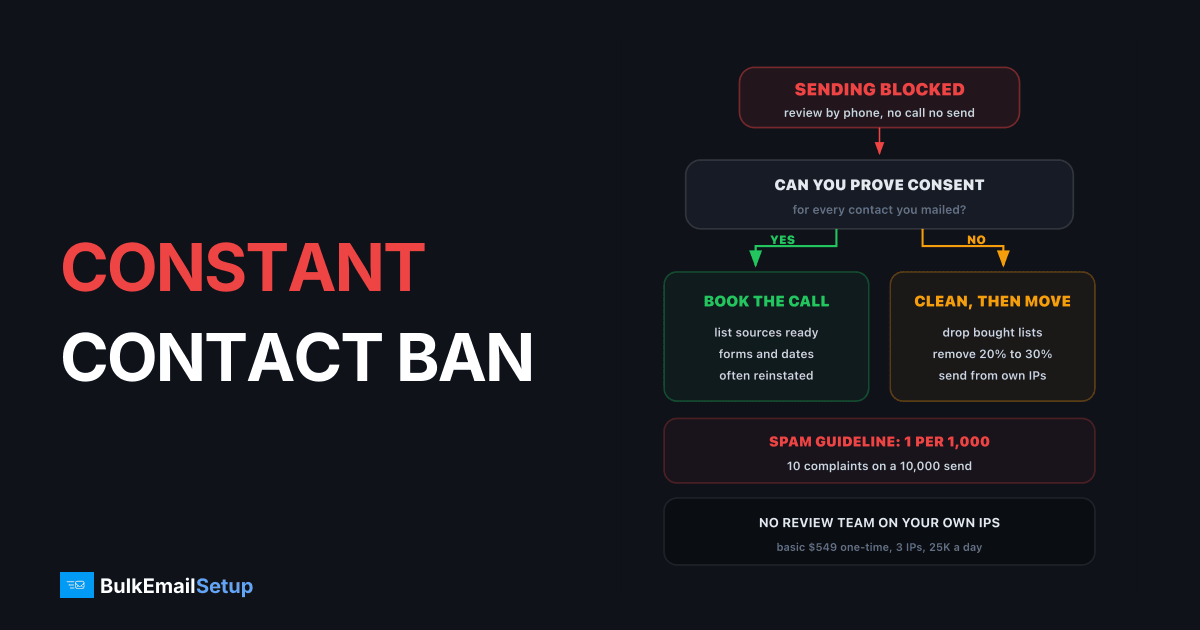
Constant Contact suspends sending when its review team flags your account, and the only way back is a phone call with that team. Its own FAQ names the triggers: a large list upload, contacts from a source that breaks its permission policy, a spike of spam reports or unsubscribes on one email, abuse complaints, or banned content. The spam guideline it works to is 1 complaint per 1,000 emails delivered. If the account was canceled for compliance, it is unlikely to come back, so the realistic job is moving your sending somewhere you control.
What a Constant Contact suspension means
Constant Contact uses a few states. They lead to very different outcomes.
| State | What happened | Way back |
|---|---|---|
| Account review | a trigger fired, sending is blocked | phone call with the review team |
| List review | you passed a contact count for your account | short call about how you collect contacts |
| Suspended contacts | single addresses that bounced twice | not your account, those addresses only |
| Canceled for compliance | a final decision | unlikely, per Constant Contact |
People often confuse the third row with the first. A "suspended" contact in your reports is an address that bounced as non-existent twice. That is normal list decay, not an account problem.
A review blocks sending until you finish the call
What triggered the review
Match your last few weeks against the triggers Constant Contact lists in its account review FAQ.
| Trigger | Typical cause | What to bring to the call |
|---|---|---|
| Large list upload | 5,000 new contacts on a 2,000-contact account | where every new contact came from |
| Import from a bad source | trade show badges, bought or rented list | proof of opt-in, or remove them |
| Spam reports on one email | 10+ complaints on a 10,000 send | the segment and why it was mailed |
| Abuse complaints | recipients writing to Constant Contact | your sign-up form and confirmation email |
| Prohibited content | a restricted industry or offer | whether your use case is allowed at all |
The spam guideline is tighter than most senders expect. One complaint per 1,000 emails means 10 complaints on a 10,000 email send. That is one annoyed person in a thousand.
The five triggers Constant Contact lists for an account review
How to prepare for the review call
The call is a conversation about how you collect contacts. A vague answer ends badly. A specific one usually gets you sending again.
- Export everything first. Contacts, unsubscribes, bounce reports. A review blocks sending, not your login.
- Name every list source. Website form, checkout, event sign-up with a box ticked. Write down the date each list was collected.
- Remove what you cannot defend. Bought, rented or scraped contacts go before the call, not after.
- Quarantine the silent. No open or click in 12 months? Leave them out of the next sends. On most lists that is 20% to 30% of contacts.
- Have your form ready. The team may ask how people sign up and what they are told they will get.
If you cannot reach the team by phone, the FAQ says to email the social support address with your username and a callback number. Trial accounts cannot request a callback.
Why Constant Contact is this strict
You share sending infrastructure with every other Constant Contact customer. One account mailing a bought list pulls down IPs everyone else uses. Gmail's sender guidelines set a 0.3% spam ceiling with 0.1% as the target. Constant Contact's 1 in 1,000 guideline sits right at that 0.1% target, so there is little room for a bad send.
| Rule | Gmail | Constant Contact |
|---|---|---|
| Spam complaints | 0.3% ceiling, 0.1% target | 1 per 1,000 delivered (0.1%) |
| Who decides | the inbox provider | the platform's review team |
| How you appeal | fix and wait | phone call |
There is one more twist. When an address bounces as non-existent twice, Constant Contact suspends it across every account on the platform. So bad data spreads beyond the sender who caused it, which is part of why the team reviews big uploads so closely.
If you cannot get reinstated
Constant Contact's own FAQ says an account canceled for compliance is unlikely to use the system again. Do not try a fresh signup with the same domain. Pick one of these instead:
| Option | Good when | Watch out for |
|---|---|---|
| Another shared ESP | list is small and now clean | same 0.1% style limits, same review risk |
| Your own SMTP server | ongoing volume, consent you can prove | you handle warm-up and hygiene yourself |
| Split setup | you want a CRM elsewhere | send campaigns through your own IPs |
Moving an uncleaned list to Mailchimp or Brevo is the mistake we see most. It gets the second account locked within weeks. The Constant Contact alternatives post compares the shared options, and a cheaper alternative to Constant Contact runs the cost side.
Clean first, then pick infrastructure where only your sending counts
The 30-day plan after a suspension
Days 1 to 3: export contacts, unsubscribes and bounces. Find the send that tripped the review. Set up Google Postmaster Tools for your domain.
Days 4 to 7: remove bought and unproven contacts, then anyone silent for 12 months. Our email list cleaning guide has the steps.
Days 8 to 14: book the review call if you still have a chance. Set up the new sending path in parallel on a subdomain, with SPF, DKIM, DMARC and a PTR record.
Days 15 to 45: warm up new IPs with your most engaged contacts, a few hundred a day per IP, growing about 30% every two days. See the IP warm-up schedule.
The same pattern plays out on other platforms. HubSpot's suspension and SendGrid's work the same way, with different limits.
How BulkEmailSetup helps
We set up a dedicated SMTP server that you own, with its own IPs, so a review team at a shared platform no longer decides when you can send. Every setup includes SPF, DKIM, DMARC and PTR, bounce handling, a campaign platform and a warm-up plan.
| Plan | One-time fee | Emails per day | Dedicated IPs | Hosting you pay your host |
|---|---|---|---|---|
| Basic | $549 | 25,000 | 3 | about $11 a month |
| Advance | $1,199 | 200,000 | 15 | about $49 a month |
No monthly fee to us and no contact limit. Your list still has to be clean, because Gmail and Microsoft judge your own IPs too, but nobody else's sending can block yours. See the Basic plan or all pricing.
Frequently asked questions
Why did Constant Contact suspend my account?
Constant Contact blocks sending when its review team flags the account. Its own FAQ lists the common triggers: a large list upload compared to your history, contacts imported from sources that break its permission policy, many unsubscribes or spam reports on one email, abuse complaints from recipients, and content on its prohibited list. A bought or old list usually trips two of these at once.
What bounce rate triggers a Constant Contact review?
Constant Contact does not publish a bounce number. What it publishes is a spam guideline of 1 complaint per 1,000 emails delivered, measured through feedback loops. Bounces still matter: an address that bounces as non-existent goes on a 15-day hold, and on a second bounce it is suspended for good, across every Constant Contact account. Keep hard bounces under 2% per send to stay clear.
How do I appeal a Constant Contact suspension?
By phone. The review must be finished on a call with the review team. If you cannot call, email the social support address named in Constant Contact's community FAQ with your username and phone number and ask for a callback. Have your list sources, sign-up forms and the segment you sent to ready before the call. Trial accounts cannot request callbacks.
Where can I send if Constant Contact will not reinstate me?
Clean the list first, because another shared platform will judge it the same way. Then choose between a different ESP with similar rules, or your own dedicated SMTP server where only your own sending affects your IPs. BulkEmailSetup's Basic setup is $549 one-time for 3 dedicated IPs and 25,000 emails a day, plus about $11 a month in hosting.
Can I open a new Constant Contact account after a cancellation?
Unlikely to work. Constant Contact's FAQ says an account canceled for compliance reasons is unlikely to be able to use the system again, mostly because the domains and addresses tied to it carry a bad reputation that cannot be separated from the account. A new signup with the same domain and list is the fastest way to a second cancellation.
Can I export my contacts from a suspended Constant Contact account?
Usually yes. A review blocks sending, not your login, so you can still export contacts, unsubscribes and bounce reports. Do it on day one. Keep the unsubscribe and bounce lists with the export, because mailing those addresses again from a new platform repeats the problem that caused the suspension and adds legal risk.
How long does a Constant Contact review take?
It depends on how fast you get the call done. Sending stays blocked until the review is complete, and nothing moves until you speak to the team. Senders who call the same day with their list sources ready often finish quickly. Plan for at least a few days without email, and longer if the team asks you to change sign-up forms first.


