
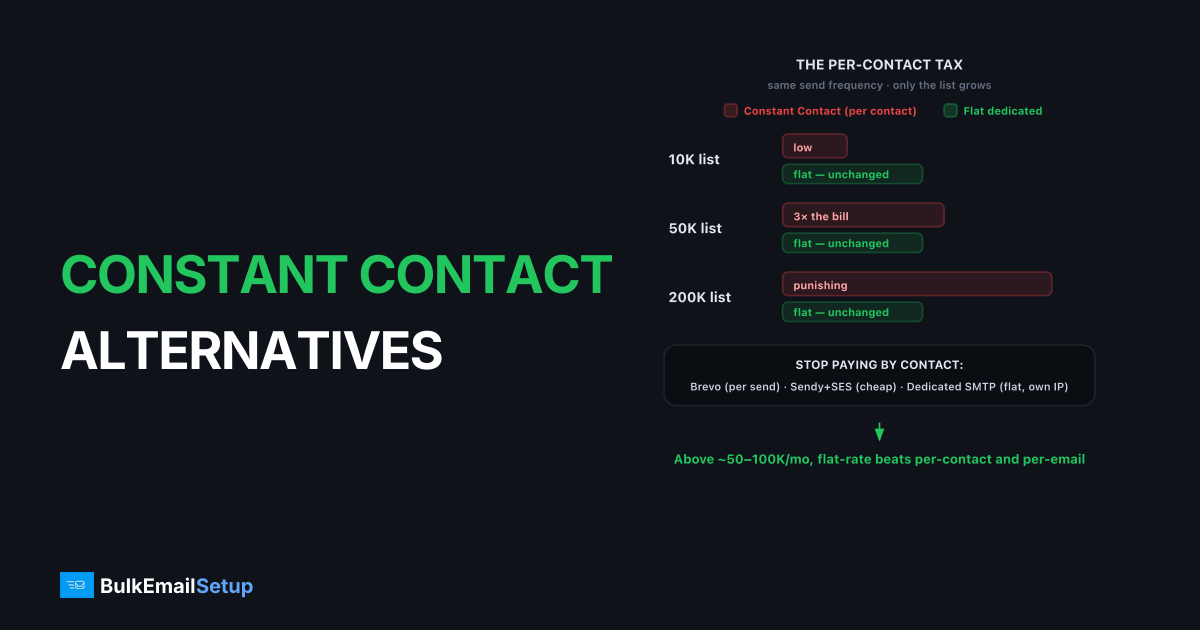
The best Constant Contact alternative for volume email is usually one that stops charging by contact count. Constant Contact bills per contact, so a growing list costs more even if your send frequency stays flat. For high-volume senders, usage-based tools like Brevo or a flat-rate dedicated SMTP server cut the bill sharply. Above roughly 50,000-100,000 emails a month, a dedicated SMTP server gives you flat pricing plus a dedicated IP you control, which beats both per-contact and per-email models. Here are the real options compared, with honest pricing as of early 2026.
Why volume senders outgrow Constant Contact
Constant Contact is built for small businesses, and its per-contact pricing reflects that. The model is fine when your list is small and you send rarely. It punishes you the moment your list grows, because you pay for every contact stored, not every email delivered, regardless of how often you mail them.
The second issue is infrastructure. Constant Contact runs shared sending aimed at low-volume users, with limited dedicated IP control and minimal SMTP access. For a sender pushing serious volume who wants to own a reputation and tune deliverability, that's a ceiling.
Constant Contact alternatives compared
Prices below are approximate as of early 2026 and depend on list size and send volume. Treat them as ranges, not quotes.
| Option | Billing model | Dedicated IP | Best for | SMTP access |
|---|---|---|---|---|
| Constant Contact | Per contact | Limited | Small business newsletters | No |
| Brevo | Per email sent | Add-on (~$45-60/mo) | Growing lists, automation | Limited |
| Mailchimp | Per contact (tiered) | High tiers only | Brand-led marketing | Limited |
| ActiveCampaign | Per contact + features | Higher tiers | CRM + automation | Limited |
| Self-hosted (Sendy + SES) | Per email (cheap) | Add-on (~$25/mo) | Technical newsletter teams | High |
| Dedicated SMTP server | Flat monthly | Included, you own it | Consistent high volume | Full |
How to choose a Constant Contact alternative
Pick an alternative by matching your real bottleneck, not the loudest feature list. Most senders leaving Constant Contact are hitting one of three walls: the contact-count bill, weak deliverability control, or no dedicated IP. The right replacement depends on which wall you hit first.
Run your candidates through five questions:
- Billing model. Are you charged per contact, per email, or a flat rate? Per-contact pricing punishes big lists; per-email rewards infrequent senders; flat-rate rewards high, steady volume.
- Deliverability control. Can you see and tune your own reputation, or are you trapped in a shared pool you can't inspect?
- Dedicated IP access. Is a dedicated IP available, what does it cost, and do you actually control its warm-up?
- SMTP access. Can you point an external campaign tool at the delivery layer, or are you locked into the vendor's builder?
- Migration effort. Can you keep your templates and segments, or is this a full rebuild?
Score each option against those five. The cheapest sticker price rarely wins once deliverability and migration time are priced in.
How much does per-contact pricing actually cost?
The trap is that per-contact pricing ignores send frequency. A 250,000-contact list on a per-contact plan can run several hundred to over a thousand dollars a month, whether you send once or twenty times. Switch to usage-based or flat-rate sending and the same list emailed weekly often costs a fraction of that.
That's why list-heavy senders look at cheaper alternatives to Constant Contact and at separating the design tool from the delivery layer. Keep your campaign builder, route the actual sending through cheaper infrastructure, and the bill drops without changing your workflow.
Work a quick example. A 250,000-contact list emailed four times a month sends one million emails monthly. On a per-contact plan, you pay for all 250,000 contacts every month regardless, often several hundred to over a thousand dollars. Route those same one million sends through a flat-rate dedicated SMTP server and the cost stays fixed whether you mail the list once or eight times. The per-contact model charges you for storage; the flat model charges you for capacity. At high frequency, capacity is far cheaper.
How do you migrate off Constant Contact?
Migrating off Constant Contact is mostly a sending-layer swap, not a full platform rebuild, if you keep your design tool. The work is finite and front-loaded, then the lower bill compounds every month. Plan it before a quiet period, never the week of a big campaign, because a new dedicated IP needs warm-up time.
The concrete steps:
- Export your contacts and segments from Constant Contact as CSV, then clean the list before importing anywhere new. A stale list will tank a fresh IP fast.
- Choose the delivery layer. A dedicated SMTP server gives you a dedicated IP and flat pricing; an external campaign tool can keep your template workflow.
- Publish authentication for your sending domain: SPF, DKIM, and DMARC plus a valid PTR record.
- Warm the new IP over 4-6 weeks, ramping from roughly 50-100 sends a day to full volume.
- Monitor bounce codes and complaint rates through the transition, watching for
550 5.7.1blocks that signal reputation trouble.
The honest caveat: the migration itself doesn't improve deliverability. Clean lists and correct authentication do. A bad list moved to a dedicated IP just fails faster, with your name on it. We watched one team skip the list-clean step and import a three-year-old Constant Contact export straight onto a fresh dedicated IP. Their first send hit roughly a 9 percent bounce rate, the new IP picked up a 550 5.7.1 block at one provider inside 48 hours, and we ended up pausing them to re-warm from scratch. The export was the problem, not the infrastructure.
When dedicated infrastructure wins
Past roughly 50,000-100,000 emails a month sent consistently, a dedicated SMTP server beats both per-contact and per-email models on cost and control. Billing is flat, so your bill doesn't jump when a campaign goes out. You get a dedicated IP whose reputation is yours alone, full SMTP access to isolate streams, and authentication you control.
The honest caveat: a dedicated IP needs a 4-6 week warm-up, and your inbox rate still depends on list hygiene and complaint rates under 0.3%. Pair clean practices with correct SPF, DKIM, and DMARC and the dedicated setup outperforms a shared small-business pool. The volume math is in our cost to send 500,000 emails per month breakdown.
Does switching off Constant Contact hurt deliverability?
Switching providers doesn't help or hurt deliverability by itself; your sending behavior does. A common fear is that leaving an established platform means starting reputation from scratch. That's only half true. On a dedicated IP you do warm up fresh, but you also gain a reputation nobody else can damage, which is an upgrade for a clean sender stuck in a shared small-business pool.
The mechanics that decide your inbox rate are the same on any provider. Gmail and Yahoo's 2024-plus rules apply once you send over 5,000 a day: SPF, DKIM, and DMARC are required, one-click unsubscribe (RFC 8058) is required, and your spam complaint rate must stay under 0.3%, ideally under 0.1%. A dedicated SMTP server gives you full control to meet all of those cleanly. A shared small-business platform often hides the levers you'd need to tune.
So the deliverability question isn't "Constant Contact versus the alternative." It's "am I running a clean list with correct authentication?" Answer that well, and a dedicated setup outperforms. Answer it badly, and no provider saves you.
Mistakes to avoid when you switch
The biggest switching mistake is dumping full volume onto a fresh dedicated IP on day one. A new IP has no reputation, so a sudden 200,000-send blast reads as a spam attack and gets throttled or blocked, often with a 421 4.7.28 rate-limit deferral at Gmail. Warm up over 4-6 weeks instead, ramping from roughly 50-100 a day.
The other common errors:
- Migrating a stale list. An old, unverified list bounces hard and spikes complaints, listing your new IP fast. Clean before you import.
- Skipping authentication. Moving sending without publishing SPF, DKIM, and DMARC for the new domain guarantees spam folder placement.
- Forgetting the PTR record. A missing or generic reverse-DNS entry trips policy filters at major providers.
- Switching during a launch. Warm-up and a high-stakes campaign don't mix. Move during a quiet stretch.
Avoid those five and a switch off Constant Contact is smooth. Hit them and you'll blame the new provider for problems your migration created.
How BulkEmailSetup helps
If Constant Contact's per-contact bill is climbing faster than your revenue, a dedicated SMTP server gives you flat pricing, a dedicated IP you own, and full SMTP access while you keep whatever campaign tool you like. We provision the server, run the warm-up, and monitor reputation. See plans on our pricing page.
Frequently asked questions
Why is Constant Contact expensive at volume?
Constant Contact bills by contact count, not emails sent. A large list costs the same whether you email it once or ten times a month, so senders with big lists and frequent sends pay a premium that usage-based or flat-rate alternatives avoid.
What is the best Constant Contact alternative for large lists?
For lists in the hundreds of thousands sending regularly, a dedicated SMTP server usually wins on cost because billing is flat, not per contact. You pair it with any campaign tool that supports custom SMTP and get a dedicated IP you control.
Can I keep my email designer and switch sending?
Often yes. Many marketing tools and self-hosted platforms let you plug in an external SMTP server for delivery while keeping your template builder. That separates the design layer from the sending layer, which is where the cost and deliverability gains live.
Does Constant Contact offer a dedicated IP?
Constant Contact runs primarily on shared infrastructure aimed at small businesses, so dedicated IP control is limited. Senders who need their own IP and reputation typically move to a dedicated SMTP server or an ESP that offers dedicated IPs as an add-on.


