
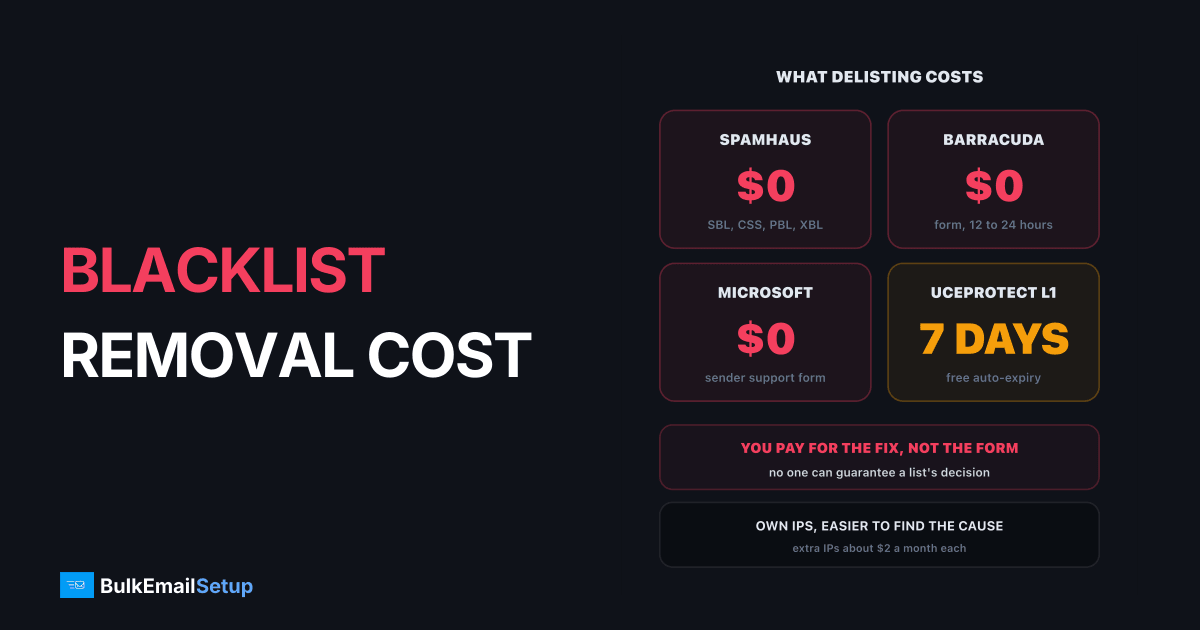
Getting off almost every blacklist that matters costs nothing. Spamhaus, Barracuda and Microsoft delist for free, and UCEPROTECT Level 1 expires on its own after 7 days. A paid blacklist removal service sells something else: finding out why your IP was listed and fixing it so it stays off. That diagnosis is worth paying for when you cannot find the cause yourself. Paying someone to submit a free form is not.
What you are actually paying for
Every delisting has two parts. The request is short and free. The fix (finding the bad list segment, the hacked account or the spam trap) is where the hours go.
The removal itself is free on the lists that matter
| Part of the job | Cost | Who should do it |
|---|---|---|
| Checking which lists you are on | free tools | you |
| Submitting the removal request | $0 on major lists | you |
| Finding the cause | hours of log reading | you, or a paid expert |
| Fixing the cause | depends on the cause | you, your ESP, or a setup provider |
| Monitoring afterwards | free tools, 15 minutes a week | you |
What each major list charges
| List | Delisting cost | How it works | Typical time |
|---|---|---|---|
| Spamhaus SBL | $0 | ticket, usually raised by the network owner | depends on evidence |
| Spamhaus CSS | $0 | self-service once spam stops | short |
| Spamhaus PBL | $0 | self-service form | minutes |
| Barracuda BRBL | $0 | removal request form | 12 to 24 hours |
| Microsoft (Outlook) | $0 | sender support request | often a day or two |
| SpamCop | $0 | expires when reports stop | about 24 hours |
| UCEPROTECT Level 1 | $0 after 7 days, or paid express | auto-expiry | 7 days |
Spamhaus is clear on this: removal through its IP and domain checker is free, and it is not affiliated with any paid removal service. Our step-by-step guides cover the main lists in detail: Spamhaus delisting, Barracuda removal and UCEPROTECT.
Which listings need real work
Not every listing deserves the same effort. Some hurt delivery badly, some barely matter. Some clear by themselves, some need a proper fix first.
Spend effort where impact is high and the fix is real
The top-left box is where a paid expert can earn their fee. An SBL listing usually means a pattern of spam from your range, and it will not clear until the network owner can show the source is gone. Everything else on the matrix is mostly free and fast once you know the cause.
When a paid service is worth it
Pay for help when one of these is true:
- You cannot find the cause. You checked complaints, bounces and sources and nothing stands out.
- You keep getting relisted. Two listings in a month means the fix did not hold.
- A whole range is listed. Your host's network is the problem and you need to move IPs or providers.
- Revenue is on the line today. A day of blocked mail costs more than the expert.
Do not pay for help when the job is filling in Barracuda's form, waiting out a UCEPROTECT Level 1 listing, or removing a PBL entry. Those take minutes. And be wary of anyone who:
| Red flag | Why |
|---|---|
| "Guaranteed removal" | no one can guarantee a list's decision |
| "We have contacts at Spamhaus" | Spamhaus works with no paid middlemen |
| Charges per list for free forms | you pay for a few minutes of typing |
| No question about your sending | they are not fixing the cause |
How to stop getting relisted
A listing is a symptom. The removal only lasts if the cause is gone.
- Find the source. Sort bounces and complaints by list segment and signup source. Old purchased or scraped contacts are the usual answer.
- Clean the list. Remove hard bounces and anyone inactive for 12 months. See our list cleaning guide.
- Close the holes. Hacked mailboxes, open signup forms without double opt-in and compromised web servers all send spam from your IPs.
- Keep the numbers low. Complaints under 0.1%, bounces under 2% per campaign.
- Separate streams. Put bulk mail on its own IPs or subdomain so one bad campaign does not take down receipts and password resets.
- Monitor weekly. Check each sending IP and domain on a blocklist checker and in Google Postmaster Tools.
Removal without a fix is a loop
If you are mid-campaign right now, our emergency playbook for an IP blacklisted mid-campaign covers the first hour.
Cost of a listing vs cost of the fix
The listing is not expensive. The blocked mail is. A realistic picture for a sender doing 25,000 emails a day:
| Cost | Typical scale |
|---|---|
| Delisting fees | $0 on the major lists |
| Your time to find and fix | 2 to 10 hours |
| Mail blocked while listed | 1 to 7 days of campaigns |
| Re-warming a burned IP | 4 to 8 weeks to full volume |
The biggest number on that table is the warm-up, and it only applies if you keep using an IP that was badly burned. Sometimes the cheapest fix is a fresh IP plus the cleanup, rather than fighting for an old one.
How BulkEmailSetup helps
We build dedicated SMTP servers where the IPs are yours alone, so a listing can only come from your own sending, which makes the cause far easier to find. Each build includes SPF, DKIM, DMARC and PTR, automatic bounce handling, and a warm-up plan, which removes most of the common listing causes before the first campaign.
| Plan | One-time fee | Emails per day | Dedicated IPs |
|---|---|---|---|
| Basic | $549 | 25,000 | 3 |
| Advance | $1,199 | 200,000 | 15 |
| Custom | $2,997 | 1,000,000 | 60 |
Extra IPs cost about $2 a month each from your host, so retiring a burned IP is cheap. See the Advance plan or all pricing.
Frequently asked questions
How much does a blacklist removal service cost?
The delisting itself costs $0 on Spamhaus, Barracuda and Microsoft. UCEPROTECT Level 1 clears free after 7 days, or you can pay for express removal. Paid services sell diagnosis and cleanup rather than the form, usually as a one-off fee or hourly rate. Pay only for finding and fixing the cause, never for submitting a free request.
Can anyone guarantee blacklist removal?
No. Spamhaus delists for free and is not affiliated with any paid removal service, and every serious list reviews the evidence itself. A service that guarantees removal is either submitting a free form for you or overpromising. What a good service can guarantee is a correct diagnosis and a cleaned-up setup, which is what actually keeps you off the list.
Which blacklists can I remove myself for free?
All of the important ones. Spamhaus (SBL, CSS, PBL, XBL), Barracuda, Microsoft's sender support and SpamCop are free. PBL and CSS are self-service, Barracuda's form usually clears in 12 to 24 hours, and SpamCop and UCEPROTECT Level 1 expire on their own once the spam stops. Most removals take under an hour of your time.
How do I stop getting relisted?
Fix what caused the listing before you request removal. That usually means removing bought or old contacts, suppressing hard bounces, keeping complaints under 0.1%, securing any hacked account or open form, and separating transactional from bulk mail. Then monitor your IPs weekly. On your own IPs, such as BulkEmailSetup's 3-IP Basic plan at $549 one-time, every listing traces to your own sending. A relisting within days of removal makes the next request slower and harder.
Is UCEPROTECT express delisting worth paying for?
Rarely. Level 1 listings expire free 7 days after the last detected spam, and few major mailbox providers block on UCEPROTECT alone. Paying only skips the wait, and Level 2 and 3 listings cover your provider's whole network, so your payment does not fix them. Spend the money on finding the source instead.
How long does blacklist removal take?
From minutes to a few days. Spamhaus PBL and CSS self-service removals are near instant once the cause stops, Barracuda typically takes 12 to 24 hours, and SBL tickets depend on your ISP and evidence. The longest part is usually the cleanup before you ask, not the list's response afterwards.


