
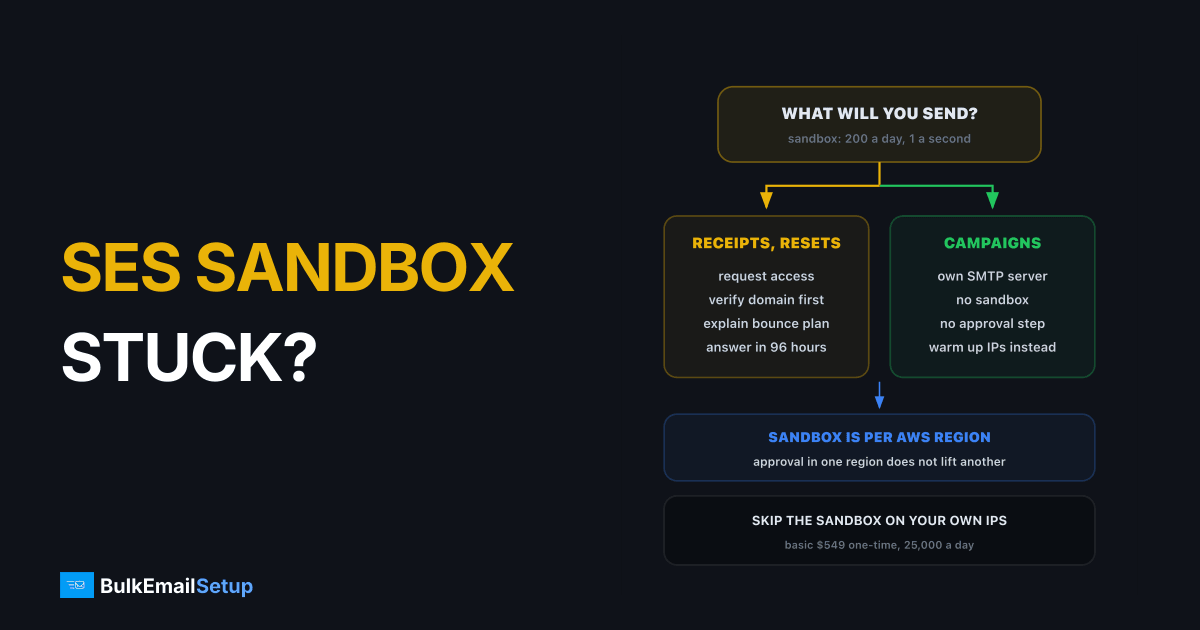
Every new Amazon SES account starts in the sandbox: you can only email verified addresses, at most 200 messages a day and 1 a second. Getting out means a production access request from the SES console, which AWS reviews by hand and answers within 96 hours. Most requests pass when the domain is verified, the website matches the mail, and the request explains how people sign up and how you handle bounces and complaints. If yours stalls or is denied, you have two choices: fix the request and reapply, or send from infrastructure that does not need AWS's approval.
What the SES sandbox actually limits
From AWS's own production access documentation:
The four walls of the SES sandbox
| Limit | In the sandbox | After production access |
|---|---|---|
| Recipients | verified addresses, domains, mailbox simulator | anyone |
| Daily quota | 200 per 24 hours | set per account, grows with good sending |
| Send rate | 1 per second | set per account |
| Suppression list bulk actions | disabled | enabled |
| From addresses | must be verified | still must be verified |
The region row trips people up. Sandbox status is per AWS Region, so approval in one region does nothing for another. Decide where you will send from before you apply.
How to get out of the Amazon SES sandbox
The request is short, and that is the problem. You get a few fields to convince a reviewer, so every one counts.
One request, three possible answers
- Verify your sending domain first. AWS says requesting with a verified domain is a best practice that helps approval go faster.
- Open Account dashboard → View Get set up page → Request production access.
- Pick the mail type honestly. Marketing (one-to-many) or Transactional (one-to-one, user-triggered). Choose the type most of your mail will be.
- Website URL. It should be live and clearly related to the mail you will send. A placeholder page is a common reason for a no.
- Additional contacts. Up to 4 addresses for AWS to reach you.
- Tick the acknowledgement. You confirm you only email people who asked and have a process for bounces and complaints.
- Submit and wait. You cannot edit the request while it is under review.
If you have room to add detail in the support case, add it: how people sign up, an example message, expected daily volume, and how you process bounce and complaint notifications.
Why does AWS deny SES production access?
AWS rarely gives a detailed reason. The patterns are consistent, though.
Tip the scale before you submit
| Weak request | Strong request |
|---|---|
| "We will send emails to our customers" | "Order receipts and password resets for our store, about 800 a day" |
| Website is a landing page | Website shows the product the mail is about |
| No word on the list | "Customers who create an account, double opt-in for the newsletter" |
| No bounce plan | "SNS notifications feed our suppression list" |
| Marketing to a list from elsewhere | Only addresses that signed up with you |
If you were denied once, see SES sending limit increase denied, which covers the same review team and what to change on a second try.
How long does SES production access take?
AWS's documentation says the support team gives an initial response within 96 hours, and grants the request in that window when it can. Follow-up questions add time.
| Outcome | Typical wait |
|---|---|
| Approved first time | within 96 hours |
| More information requested | a few more days per round |
| Denied, then reapplied with detail | a week or more in total |
Do not build a launch date on the 96 hours. A product launch that depends on SES approval should apply at least two weeks ahead.
What can you use while stuck in the sandbox?
| Need | Use |
|---|---|
| Testing templates and code | SES sandbox: verified addresses and the mailbox simulator |
| A few real transactional emails a day | a free tier, such as Mailgun at 100 a day or SMTP2GO at 1,000 a month |
| Campaigns or thousands a day | a dedicated SMTP server |
Our SMTP free trials comparison lists every free tier and what each one really allows. For a wider view of where SES fits, see Amazon SES alternatives.
Get out or move on?
SES is cheap once you are in. AWS lists sending at $0.10 per 1,000 emails on its SES pricing page. That is why people wait. But the sandbox is the first of several reviews: an account that is approved can still be put under review later if bounces or complaints climb, as we cover in SES account under review.
| Stay with SES if | Move on if |
|---|---|
| mostly transactional mail | mostly campaigns to your own list |
| you have engineers to build bounce and complaint handling | you want a campaign panel, not an API project |
| you are fine with AWS reviewing your sending | you want sending that no platform can pause |
The full cost and control comparison is in Amazon SES vs a dedicated SMTP server.
How BulkEmailSetup helps
We set up a dedicated SMTP server you own, so there is no sandbox and no production access request. We configure SPF, DKIM, DMARC and PTR, bounce handling and a campaign panel, and give you a warm-up plan. New IPs still need warming up, which is how every inbox provider learns to trust you, but nobody can refuse to let you start.
| Plan | One-time fee | Emails per day | Dedicated IPs | Hosting you pay your host |
|---|---|---|---|---|
| Basic | $549 | 25,000 | 3 | about $11 a month |
| Advance | $1,199 | 200,000 | 15 | about $49 a month |
There is no monthly fee to us, no contact limit and a 15-day money-back guarantee. See Basic plan details or compare all pricing.
Frequently asked questions
How do I get out of the Amazon SES sandbox?
In the SES console, open the Account dashboard, choose View Get set up page, then Request production access. Pick Marketing or Transactional, add your website URL and up to 4 contact addresses, tick the box confirming you only email people who asked and handle bounces and complaints, and submit. Verify your sending domain first, since AWS says that helps approval go faster.
Why does AWS deny SES production access?
AWS reviews each request by hand to keep unsolicited mail off SES, and it rarely explains a denial in detail. Requests most often fail when the website is thin or unrelated to the mail, the use case is vague, the list source is not explained, or there is no plan for bounces and complaints. Marketing requests from brand-new accounts get the closest look.
How long does SES production access take?
AWS documentation says the support team gives an initial response within 96 hours, and it grants requests inside that window when it can. If AWS asks follow-up questions the review takes longer, and you cannot edit the request while it is under review. Plan for 1 to 4 days, and longer if you need a second round.
What can I use while stuck in the sandbox?
For testing, SES itself still works: send to verified addresses and the SES mailbox simulator. For real users, a small free tier elsewhere covers low volume, for example Mailgun at 100 a day or SMTP2GO at 1,000 a month. For campaigns or anything over a few hundred a day, a dedicated SMTP server, such as BulkEmailSetup's Basic plan at $549 one-time for 25,000 emails a day, avoids the approval question entirely.
What are the Amazon SES sandbox limits?
In the sandbox you can only send to verified email addresses and domains or the SES mailbox simulator, at most 200 messages per 24 hours and 1 message per second. Bulk suppression list actions are disabled. The sandbox applies per AWS Region, so getting production access in one region does not lift the sandbox in another.
Is the SES sandbox per region?
Yes. Each AWS Region has its own sandbox status for your account. If you were approved in us-east-1 and then start sending from eu-west-1, the new region starts in the sandbox with the same 200 a day limit, and you must request production access again. Pick your sending region before you apply.
Can I reapply after SES denies production access?
Yes, you can reply to the support case or submit a new request with more detail. Answer what the first request left out: how people sign up, an example message, how you process bounces and complaints, and your expected volume. Repeating the same request word for word rarely works. If marketing to a cold or bought list is the plan, SES is the wrong tool.


