
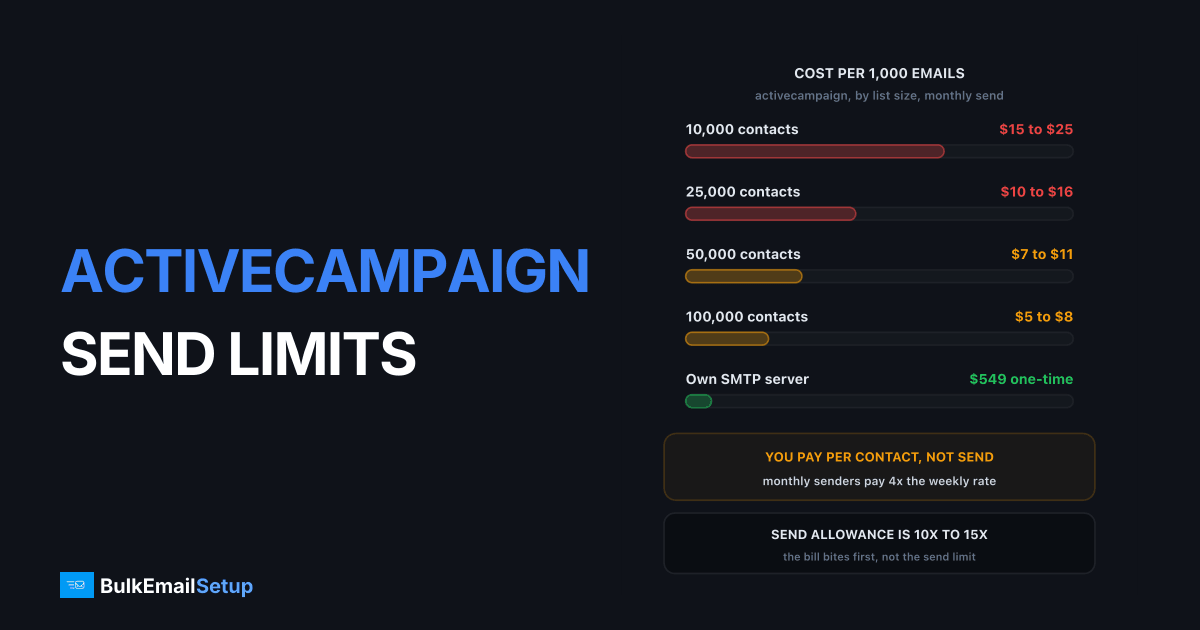
ActiveCampaign's monthly allowance is rarely what stops a campaign. The hourly throttle is. Sends are metered out of shared IP pools to protect everyone on them, so a large campaign is released gradually rather than all at once. The second constraint is pricing: it charges per stored contact, so a 100,000-contact list costs $500 to $800 a month whether you send once or twenty times.
The two limits that actually matter
| Limit | What it is | When it bites |
|---|---|---|
| Monthly allowance | usually ~10x contact count | rarely, unless you send very often |
| Hourly throttle | unpublished, varies by standing | on every large campaign |
| Contact pricing | per stored contact | every month, regardless of sends |
| Automation caps | per-plan feature limits | as workflows grow |
The hourly throttle is the one people misread as a bug. A campaign that takes six hours to go out has not failed, it is being metered. Newer accounts, a recent complaint spike, or a sudden volume jump all tighten it.
The monthly allowance is published. ActiveCampaign's pricing page states the email send limit as a multiple of your contact tier, and the multiple rises with the plan:
| Plan | Send allowance | Sends on a 50,000-contact tier |
|---|---|---|
| Starter | 10x contact limit | 500,000/month |
| Plus | 10x contact limit | 500,000/month |
| Pro | 12x contact limit | 600,000/month |
| Enterprise | 15x contact limit | 750,000/month |
Ten sends a month to your whole list is more than most senders manage, which is why the allowance is rarely the wall. The prices on that page render through JavaScript and are shown as a configurator rather than a fixed table, so pull your own tier's figure from the live page before you budget against it.
Why the throttle exists
On shared infrastructure your sending affects every other customer on the same IPs. If ActiveCampaign let one account push 200,000 messages into Gmail in ten minutes, Gmail would throttle the whole IP and every other customer's mail would slow with it.
That is the trade of shared pools: you get instant setup and no warm-up, and in exchange the provider controls your send rate. It is a reasonable deal until your volume makes it the bottleneck.
The deliverability review, and what triggers a hold
Separate from the throttle, ActiveCampaign holds some campaigns for a human to look at before any of it leaves. The campaign shows as scheduled or sending and nothing moves. It is a review, not a rejection, and it is the single most common reason a first big send does not go out on time.
| Trigger | Typical threshold | What the review looks at |
|---|---|---|
| First large send on a new account | anything over ~10,000 | where the list came from |
| Sudden volume jump | 3x or more over your normal send | why the list grew |
| Complaint rate | at or near Gmail's 0.30% | recent campaign complaints |
| Hard bounce rate | over roughly 5% | list age and verification |
| Purchased or scraped list signals | any | consent evidence |
| Payment or account change | new card, new domain | account ownership |
Two practical consequences. First, a review clears in hours during business hours and sits over a weekend, so a first large campaign scheduled for Friday 6pm is a Monday campaign. Second, the fix for a repeat hold is list quality, not support tickets. Get the bounce rate under 2% and the complaint rate under 0.10% and the holds stop.
Those numbers are not ActiveCampaign's invention. Google requires bulk senders to keep spam complaints under 0.30% and targets 0.10%, per Google's email sender guidelines. ActiveCampaign polices to the same line because its shared IPs are judged by it. More detail in Gmail's 0.30% spam complaint rate.
What ActiveCampaign actually costs by contact count
Pricing is per stored contact and it does not care how often you send. That is the whole economic argument.
| Contacts | Approximate monthly cost | Cost if you send once a month | Cost if you send weekly |
|---|---|---|---|
| 10,000 | $150 to $250 | $15 to $25 per 1,000 emails | $3.75 to $6.25 per 1,000 |
| 25,000 | $250 to $400 | $10 to $16 per 1,000 | $2.50 to $4.00 per 1,000 |
| 50,000 | $350 to $550 | $7 to $11 per 1,000 | $1.75 to $2.75 per 1,000 |
| 100,000 | $500 to $800 | $5 to $8 per 1,000 | $1.25 to $2.00 per 1,000 |
| 250,000 | $1,000 to $1,800 | $4 to $7.20 per 1,000 | $1.00 to $1.80 per 1,000 |
Treat those monthly figures as the observed range on marketing plans, not a quote. ActiveCampaign gates the numbers behind a configurator, so confirm your tier on its pricing page.
The two right-hand columns are the point. A 100,000-contact list mailed once a month costs $5 to $8 per thousand emails. The same list mailed weekly costs $1.25 to $2.00. Nothing about the product changed; you just spread a fixed contact bill over more sends. Infrequent senders with big lists pay the worst rate in email, which is why they are the ones who move. Compared against flat infrastructure in cheaper than ActiveCampaign and cost per email, SMTP vs ESP.
The three legitimate routes past it
1. Upgrade the tier. Simplest, and the right answer if you are close to the line and the automation is earning its cost. It does not remove the hourly throttle, only raises the ceiling.
2. Cut the contact count. This one is underrated because it fixes both problems at once. Removing hard bounces and 12-month non-openers lowers your bill and improves your standing, which loosens the throttle. Most lists carry 20 to 30% dead weight. Start with email list cleaning.
3. Split the sending. Keep ActiveCampaign for automation and move large campaign sends to your own infrastructure. This is what most senders past 100,000 contacts end up doing.
What does not work
Multiple accounts. Spreading volume across accounts to dodge the throttle breaches the terms. ActiveCampaign links accounts by payment method, domain and sending pattern, and closures arrive for all of them together.
Custom SMTP for campaigns. Unlike GoHighLevel, ActiveCampaign does not offer a custom SMTP relay for marketing sends. You cannot point it at your own server, which is why the split above uses separate software rather than reconfiguring ActiveCampaign.
Sending in smaller batches. The throttle is per account, not per campaign, so splitting one campaign into five does not make it go faster.
The split in practice
ActiveCampaign keeps: lifecycle automation, CRM-triggered mail, behavioural sequences. Low volume, high value, genuinely hard to rebuild.
Your own infrastructure takes: the monthly newsletter, product announcements, any send to the full list. High volume, low automation, exactly where per-contact pricing and hourly throttles hurt most.
Authenticate both, and use separate subdomains so a campaign problem cannot damage your automated mail. Details in subdomain vs root domain for email sending.
Split by stream, and the decision for each one is obvious once you write it down:
| Stream | Stays on ActiveCampaign | Moves to your own SMTP | Why |
|---|---|---|---|
| Welcome and onboarding series | yes | no | triggered, low volume, hard to rebuild |
| Abandoned cart and behavioural | yes | no | depends on site and CRM events |
| Deal-stage and sales mail | yes | no | tied to the CRM, tiny volume |
| Monthly newsletter to all contacts | no | yes | highest volume, simplest logic |
| Product announcements | no | yes | one send, whole list |
| Re-engagement to 12-month dormant | no | yes | worst complaint risk, keep it off the automation IP |
The last row is the one people get wrong. Dormant re-engagement is the highest-complaint mail you send, and running it on the same IP as your onboarding series is how a good automation stream gets slowed down. Put it on its own IP. See re-engagement email campaign guide.
Contact sync is the plumbing question. ActiveCampaign has an API and every self-hosted campaign tool reads a CSV, so most teams sync engaged segments out nightly rather than mirroring the whole database. Keep the CRM as the source of truth and let the sending layer hold a copy of who is currently mailable.
What the split actually costs you in effort
The build is not hard. The warm-up is long. Plan around that rather than the other way round.
| Task | Effort | Elapsed |
|---|---|---|
| Provision server and IPs, PTR records | half a day | day 1 |
| SPF, DKIM, DMARC on the sending subdomain | 1 to 2 hours | day 1, plus DNS spread |
| Install campaign software (MailWizz, Mautic, Sendy) | half a day | day 2 |
| Export and import the mailable segment | 2 hours | day 2 |
| Rebuild templates | 1 to 3 days | week 1 |
| IP warm-up to full volume | ongoing monitoring | 4 to 8 weeks |
| Run both stacks in parallel | none, just the bill | the warm-up period |
Two weeks of real work, then a warm-up you cannot compress. During those weeks you pay ActiveCampaign and the new server, so budget one to two months of overlap. The mistake is cancelling ActiveCampaign on day one and then trying to push 100,000 messages through a cold IP, which produces deferrals from Gmail and Microsoft for a fortnight. Schedule in IP warm-up schedule for email.
Templates are the hidden cost. ActiveCampaign's builder output does not transfer cleanly, so budget rebuild time for the two or three templates you actually use and drop the rest.
When the move is worth it
| Contacts | Sending frequency | Verdict |
|---|---|---|
| Under 50K | any | stay, automation earns its cost |
| 50K - 100K | weekly or more | stay, you are getting value |
| 50K - 100K | monthly or less | consider the split |
| Over 100K | any | split, the bill is the problem |
The pattern: infrequent senders with large lists pay the most per email and benefit most from moving bulk sends off a per-contact platform.
Run the arithmetic before you commit. At 100,000 contacts you are paying roughly $6,000 to $9,600 a year to ActiveCampaign. A dedicated server build is a one-time $549 plus hosting of roughly $40 to $80 a month, so the break-even lands inside the first quarter and everything after that is the difference. That calculation is worked in full in break-even point for a dedicated SMTP.
Below 50,000 contacts the sums stop favouring the move. You would be trading $250 to $400 a month for a server you have to warm, monitor and keep off blacklists, and the automation you would be giving up is worth more than the saving. Stay.
When to stay on ActiveCampaign
Three cases where the answer is simply no.
The automation is the product. If your revenue depends on behavioural sequences firing off site events and CRM properties, you are not rebuilding that on MailWizz. Pay the contact bill.
Nobody owns deliverability. A dedicated server needs someone watching bounce logs, blacklist status and 4xx deferral rates. Without that person, shared infrastructure with a provider watching for you is the better trade even at a higher price.
You send weekly or more. At weekly cadence a 100,000-contact plan works out at $1.25 to $2.00 per thousand emails, which is competitive with any relay. The per-contact model only looks bad when you underuse it.
How BulkEmailSetup helps
We build the sending half of that split: your own server, your own IPs, full SPF/DKIM/DMARC/PTR configuration, MTA tuning, bounce handling and a warm-up plan. No hourly throttle, because the IPs are yours and there is nobody else on them to protect.
Basic starts at $549 one-time, covering 1 SMTP server, 3 dedicated IPs, 25,000 emails/day and unlimited contacts. Higher tiers scale to 15 IPs and 200,000 emails/day. See pricing, or cheaper than ActiveCampaign for the direct cost comparison.
Frequently asked questions
What are ActiveCampaign's email sending limits?
The monthly allowance is typically a multiple of your contact count, often 10x on marketing plans, but the limit that bites first is the hourly send rate applied to protect shared IP reputation. That rate is not published as a fixed number and varies by account standing, so a large campaign gets metered out over hours rather than sent at once.
Why is my ActiveCampaign campaign sending so slowly?
It is being throttled rather than failing. ActiveCampaign meters sends from shared IP pools to protect the reputation of everyone on them, so a 200,000-recipient campaign is released gradually. Newer accounts, recent complaint spikes and sudden volume jumps all tighten the throttle further.
Can you use your own SMTP server with ActiveCampaign?
Not for campaign sending. ActiveCampaign delivers through its own infrastructure and does not offer a custom SMTP relay for marketing email, unlike platforms such as GoHighLevel. If you need to control the sending path, you send those campaigns from separate software pointed at your own SMTP server.
How do you get around ActiveCampaign sending limits?
Legitimately, three ways: upgrade the plan tier, reduce contact count through list hygiene so both the price and the throttle improve, or move high-volume campaign sends to your own infrastructure while keeping ActiveCampaign for automation. Creating multiple accounts to spread volume breaches the terms and gets all of them closed.
Is ActiveCampaign expensive at high contact counts?
It gets steep. Pricing is per stored contact, so a 100,000-contact list runs roughly $500 to $800 a month on marketing plans regardless of how often you send. Senders mailing infrequently pay the most per email, which is usually what triggers the move to flat-cost infrastructure.
What is the ActiveCampaign email send limit per plan?
ActiveCampaign publishes the allowance as a multiple of your contact tier on its pricing page: 10x on Starter and Plus, 12x on Pro and 15x on Enterprise. A 50,000-contact Plus plan therefore carries 500,000 sends a month. Prices render through JavaScript on that page, so check the live figure for your contact tier.
What triggers an ActiveCampaign deliverability review?
A sudden volume jump, a complaint rate near or above Gmail's 0.30% threshold, a bounce rate over roughly 5%, or a first large send from a new account. The campaign is held rather than rejected and a human looks at the list source. Reviews typically clear in hours, but a first send scheduled for a Friday evening can sit until Monday.
Does ActiveCampaign offer a dedicated IP?
Yes, on higher tiers and usually as a paid add-on, subject to a volume floor of roughly 100,000 sends a month. Below that volume a dedicated IP hurts rather than helps, because there is not enough traffic to hold a warm reputation. Ask for the current add-on price, since it is not published.
How long does it take to move campaigns off ActiveCampaign?
Budget two weeks of build and 4 to 8 weeks of IP warm-up running in parallel with your existing sends. The export itself is an afternoon. The slow part is warming new IPs, which is why you keep ActiveCampaign live until the new path carries full volume.


