
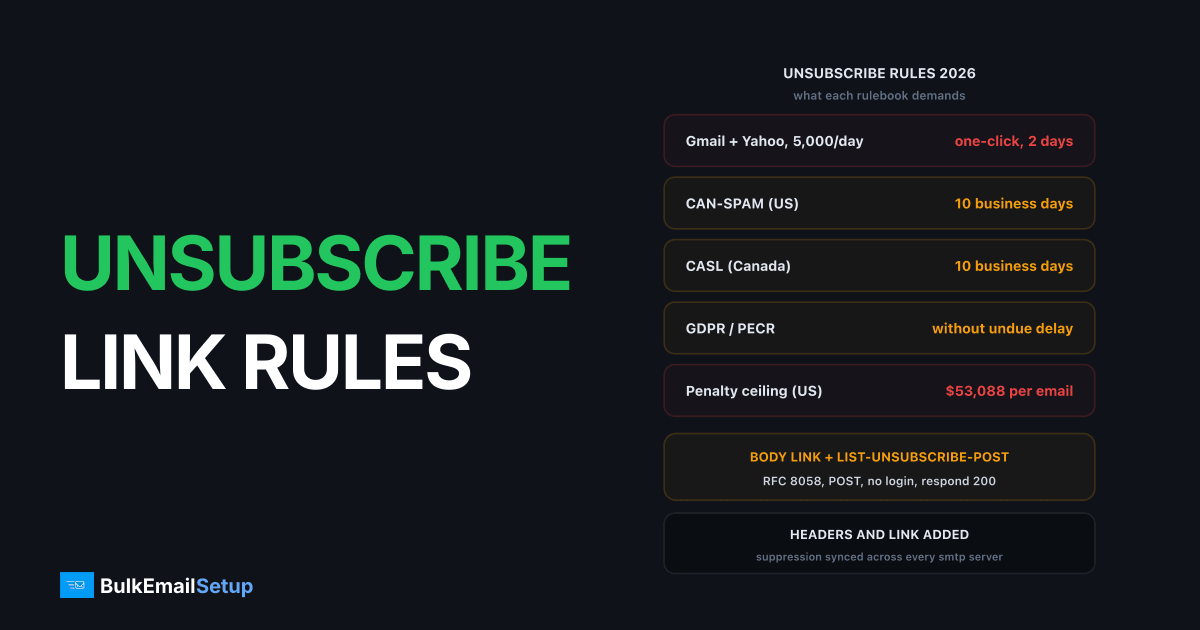
An unsubscribe link in bulk email in 2026 means two things, not one. You need a visible link in the message body, and you need the List-Unsubscribe plus List-Unsubscribe-Post headers so Gmail and Yahoo can process a one-click opt-out under RFC 8058. Anyone sending 5,000 or more messages a day to either provider must have both and must honor the request within two days. The legal floor is looser (CAN-SPAM gives you 10 business days), but the mailbox providers decide whether your mail lands, so their deadline is the real one.
What does Gmail and Yahoo's unsubscribe rule actually say?
Google's bulk sender guidelines and Yahoo's sender requirements line up almost word for word on this point. If you send 5,000 or more messages a day to their users, every marketing or subscribed message must:
- Carry a
List-Unsubscribeheader with an HTTPS URL (mailto alone is not enough for one-click). - Carry a
List-Unsubscribe-Post: List-Unsubscribe=One-Clickheader. - Include a clearly visible unsubscribe link in the body.
- Process the opt-out within two days.
- Keep spam complaints under 0.3 percent, with 0.1 percent as the target.
These rules went live in February 2024 and enforcement tightened through 2025. I've watched domains that skipped the headers go from inbox to spam folder inside a week once their Gmail volume crossed the 5,000 mark. The headers are not a nice-to-have at that volume. The full checklist for each provider is in Gmail bulk sender requirements 2026 and Yahoo sender requirements 2026.
Transactional mail (receipts, password resets) is exempt from the header requirement. Everything else you send to a list is not.
What do CAN-SPAM, GDPR, and CASL require for the unsubscribe link?
The law sets a floor under the provider rules. Three regimes matter for most senders, and they disagree on timing and penalty size.
| Requirement | CAN-SPAM (US) | GDPR / PECR (EU, UK) | CASL (Canada) |
|---|---|---|---|
| Where the opt-out must be | Clear and conspicuous in every commercial message | Every direct marketing message must give a way to opt out; withdrawing consent must be as easy as giving it | In every commercial electronic message, clearly and prominently |
| Time to honor | 10 business days | Without undue delay; stop before the next send | 10 business days |
| How long the link must work | 30 days after sending | No fixed window; the right to object never expires | 60 days after sending |
| Can you require a login or fee | No | No | No |
| Penalty ceiling | $53,088 per email (FTC 2025 adjustment) | 20 million EUR or 4 percent of global turnover (GDPR); 500,000 GBP (PECR, ICO) | CAD 10 million per violation for a business |
Sources: the FTC's CAN-SPAM compliance guide, the ICO's direct marketing guidance, and the Canadian government's CASL overview. We cover the US law line by line on our CAN-SPAM Act page.
The practical read: build for the strictest rule. A link that works instantly, stays live for 60 days, and needs no login satisfies all three laws and both mailbox providers at once. Building to the 10-day CAN-SPAM floor and then bolting on Gmail compliance later costs more than doing it once.
How do I format the List-Unsubscribe header?
Two headers, both in the message header block, both covered by your DKIM signature. RFC 8058 requires the message to be DKIM-signed and requires both headers to be inside the signed set. If your DKIM h= tag does not list them, Gmail ignores them.
| Header | Defined in | Value format | Purpose |
|---|---|---|---|
List-Unsubscribe | RFC 2369 (1998) | One or more URIs in angle brackets, comma separated | Tells the mail client where an opt-out can be sent |
List-Unsubscribe-Post | RFC 8058 (2017) | Exactly List-Unsubscribe=One-Click | Declares that the HTTPS URI accepts a one-click POST with no further steps |
The combined form that passes Gmail, Yahoo, and Microsoft:
List-Unsubscribe: <mailto:[email protected]?subject=unsub-7f3a9c>, <https://mail.example.com/u/7f3a9c>
List-Unsubscribe-Post: List-Unsubscribe=One-Click
Rules that trip people up:
- The HTTPS URI must be HTTPS, not HTTP. Plain HTTP is rejected by RFC 8058.
- The token (
7f3a9cabove) must identify one recipient on one list. It cannot be the raw email address, because anyone could forge an opt-out for anyone else. - The
mailtoentry is optional but worth keeping. Older clients and Apple Mail use it. - Only one
List-Unsubscribe-Postheader, and only that exact value. Adding parameters breaks parsing. - The URI must not be wrapped by a click tracker. More on that below.
What must the one-click POST endpoint do?
The endpoint behind the HTTPS URI is where most home-grown setups fail. Gmail does not click your link like a human. It sends an HTTP POST with the body List-Unsubscribe=One-Click and expects a success code. That is the entire exchange.
The endpoint must:
- Accept
POSTon the exact URI from the header. A redirect to a GET page is a failure. - Require no login, no cookie, no CSRF token, and no JavaScript.
- Show no confirmation page, no "are you sure" step, no survey.
- Mark the recipient unsubscribed immediately, then respond
200 OK(any 2xx works). - Respond in under a few seconds. Gmail gives up on slow endpoints and treats the header as broken.
- Also serve a human-readable
GETon the same URI, since the body link and some clients still use GET.
One detail we learned the hard way: the POST arrives with content type application/x-www-form-urlencoded and no Referer. If your web framework rejects form posts without an origin header, the unsubscribe silently fails and your complaint rate climbs for no visible reason. Whitelist the route.
Where should the unsubscribe link go in the body, and what should it say?
Footer, plain text, the word "Unsubscribe" as the link text, same font size as the surrounding text, and a colour with real contrast. That is the whole spec. The FTC's "clear and conspicuous" test and Gmail's "clearly visible" wording both come down to the same thing: a reader scanning the message should find it in under three seconds.
What fails that test:
- 8px grey text on a white background.
- Link text like "manage your communication settings" or "click here" with no mention of unsubscribing.
- The link buried after a 300-word legal paragraph.
- An image-only link, which disappears when images are blocked.
- "Reply with STOP" as the only method. It is legal under CAN-SPAM but it is not one-click, and it lands in a mailbox someone has to process.
I put the link in the first line of the footer, before the postal address, and I keep the text literal. "Unsubscribe" beats "opt out" and both beat "preferences" because the reader is looking for one word. The link should hit the same token as the header, so one record is updated no matter which path the person used.
What are the most common unsubscribe link mistakes?
Six patterns account for nearly every broken unsubscribe we've debugged. Each one either fails the provider rule outright or pushes people toward the spam button, which costs more than the lost subscriber. The complaint rate vs bounce rate breakdown explains why complaints are the metric that gets you blocked.
| Mistake | Why it breaks | Fix |
|---|---|---|
| Link behind a login | CAN-SPAM, CASL, and Gmail all forbid requiring credentials to opt out | Token in the URL, no account needed |
| Preferences page with 5 steps | Gmail and Yahoo treat anything beyond one action as non-compliant | One-click opt-out first; offer preferences after, as an option |
| Opt-out takes 10 days | Legal under CAN-SPAM, fails the 2-day provider rule, and the person gets 3 more sends in the meantime | Suppress at click time, before the next send |
| Tracking-wrapped unsubscribe URL | The header URI redirects through a click tracker, so the POST hits a 302 and never reaches the endpoint | Exclude the header URI from link tracking entirely |
| One unsubscribe for all lists | A person who leaves your weekly digest gets removed from order confirmations too, or the reverse | One token per recipient per list, with a global opt-out also available |
| No suppression sync across SMTP servers | Opt-out recorded on server A, server B keeps sending because it has its own copy of the list | One central suppression list every server checks before every send |
The last one is the quiet killer for anyone running more than one sending server. We've seen a two-server setup where the unsubscribe landed on the right database but the second server pulled its list from a nightly export. Every unsubscribed address got one more email the next morning, and Gmail's complaint graph showed exactly that spike. Suppression has to be checked at send time, not at list-build time. The broader cleanup routine is in what is list hygiene.
How do I test that the unsubscribe link and headers work?
Three checks, five minutes.
- Send to a Gmail address and look at the sender line. When the headers are correct and DKIM covers them, Gmail shows a small "Unsubscribe" link next to the From name in the message header. If it does not appear on a domain with a few weeks of history, the headers are wrong, unsigned, or the message failed DMARC alignment. Brand-new domains sometimes see no button for the first days of sending regardless, so test on a warmed domain.
- Run the message through mail-tester.com. It lists both headers under the "Mailing list" section and flags a missing
List-Unsubscribe-Post. It also confirms which headers your DKIM signature covers, which catches the unsigned-header case. - POST to your own endpoint from a terminal. Paste the HTTPS URI from a real sent message and run:
curl -X POST -d "List-Unsubscribe=One-Click" https://mail.example.com/u/7f3a9c -i
You want HTTP/2 200 back with no redirect, and the address marked suppressed in your database within a second. Then send one more message to that address and confirm it is skipped.
Repeat the test any time you change your ESP, your tracking domain, or your DKIM selector. Each of those has broken one-click for someone I know without any change to the template. Keeping complaints under the 0.3 percent Gmail ceiling is far easier when the opt-out path is tested rather than assumed.
How BulkEmailSetup helps
Every message sent through our platform carries the List-Unsubscribe and List-Unsubscribe-Post headers, signed under your DKIM, with a one-click endpoint that accepts the POST and returns 200 in milliseconds. The body footer link is inserted automatically with the same token. Opt-outs are written to one suppression list that every SMTP server in your account checks before each send, so a person who leaves on server one never hears from server two. See plans on our pricing page.
Frequently asked questions
Is a List-Unsubscribe header required for bulk email?
Yes if you send 5,000 or more messages a day to Gmail or Yahoo. Both require the List-Unsubscribe and List-Unsubscribe-Post headers (RFC 8058 one-click) plus a visible link in the body, and the opt-out must be processed within two days. Below 5,000 a day the headers are still strongly recommended.
What is the difference between List-Unsubscribe and List-Unsubscribe-Post?
List-Unsubscribe (RFC 2369) carries the mailto or https address the mailbox provider can use to opt someone out. List-Unsubscribe-Post (RFC 8058) tells the provider it may send a single HTTPS POST to that address with no human steps. You need both for one-click to work.
How fast do I have to honor an unsubscribe?
Gmail and Yahoo want it within two days. CAN-SPAM allows 10 business days, CASL allows 10 business days, and GDPR says without undue delay. Treat two days as the ceiling and instant as the goal, because every day of lag turns unsubscribes into spam complaints.
Why does Gmail not show the Unsubscribe button for my emails?
Usually one of four reasons: the headers are missing or malformed, the headers are not covered by your DKIM signature, the message is not DKIM-aligned with your From domain, or your domain has too little sending history. Gmail hides the button for senders with no reputation yet.
Can the unsubscribe link go to a preferences page?
The body link can offer preferences, but the opt-out itself must take one action and no login. The header endpoint cannot show a page at all; it must accept the POST and return 200. If your only path is a five-step preferences page, Gmail and Yahoo count that as non-compliant.


