
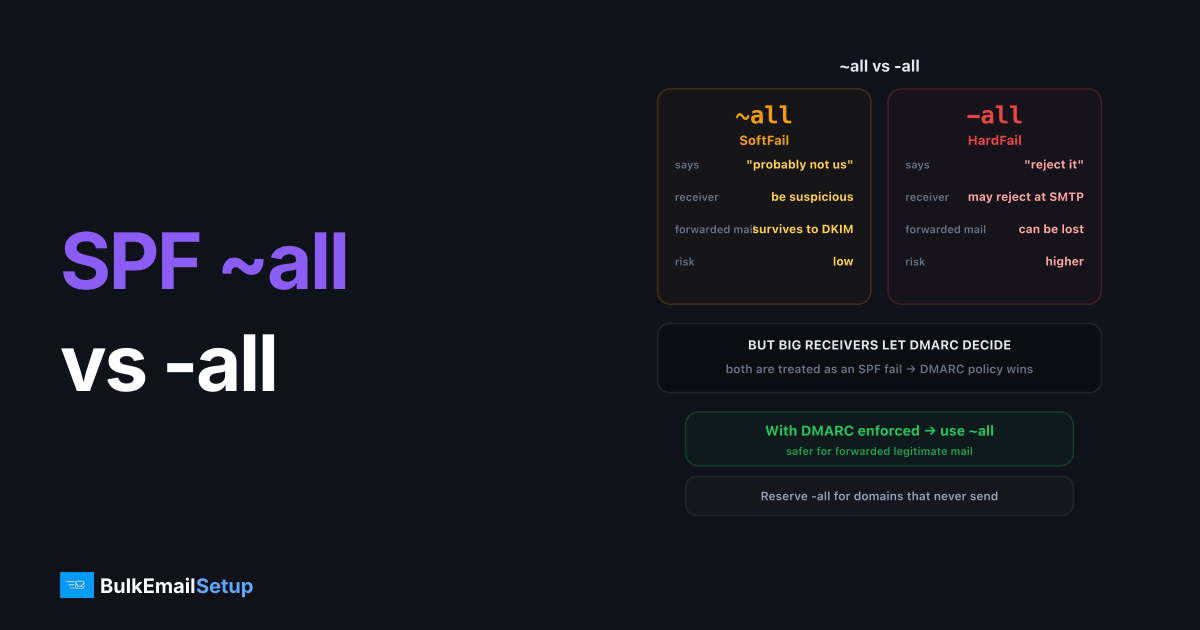
~all (softfail) tells receivers "mail from other IPs is probably illegitimate, be suspicious," while -all (hardfail) says "no other IP is authorized, reject it." In practice, big receivers treat both as an SPF fail and let DMARC decide the outcome, so for domains with DMARC at enforcement, ~all is the safer recommendation: it avoids edge cases where forwarded legitimate mail gets rejected at SMTP time before DKIM can rescue it. Reserve -all for domains that never send mail at all.
What the qualifiers mean
The all mechanism matches every IP not matched earlier in the record. Its qualifier sets the result for those IPs:
| Record ending | SPF result | RFC meaning |
|---|---|---|
+all | Pass | Everyone is authorized, never use |
?all | Neutral | No assertion either way |
~all | SoftFail | Probably not authorized; don't reject solely on this |
-all | Fail | Not authorized; rejection is appropriate |
v=spf1 ip4:203.0.113.10 include:_spf.google.com ~all
v=spf1 ip4:203.0.113.10 include:_spf.google.com -all
What receivers actually do
The RFC text and receiver behavior diverged years ago:
| Receiver behavior | SoftFail (~all) | HardFail (-all) |
|---|---|---|
| Gmail | Signal into filtering; DMARC decides disposition | Same, fail feeds DMARC, rarely rejected on SPF alone |
| Microsoft 365 | Marks as spam-suspicious (configurable) | Historically junked or rejected more aggressively |
| Smaller MTAs / on-prem | Usually accept, score in filter | Some reject at SMTP time (550 SPF check failed) |
| DMARC evaluation | SPF fail, alignment cannot pass | SPF fail, identical to softfail |
The last row is the one that matters: DMARC treats softfail and hardfail identically. Neither passes. The qualifier only changes what happens at receivers that act on raw SPF before or without DMARC.
The forwarding problem is why ~all wins
When someone forwards your mail (university address → Gmail, a distribution alias, an old domain redirect), the forwarder's IP isn't in your SPF record. SPF fails by design, forwarding always breaks SPF.
With ~all, the message survives to be evaluated on DKIM, which travels intact through forwarders, and DMARC passes via aligned DKIM. With -all, an old-school receiving MTA may slam the door at SMTP time, 550, and DKIM never gets a vote. You lose legitimate forwarded mail and gain nothing, because spoofing protection was already DMARC's job.
This is also why "set -all for maximum security" advice from generic checklists misfires: the enforcement layer with teeth is your DMARC policy, not the SPF qualifier.
Decision table
| Situation | Publish | Why |
|---|---|---|
| Sending domain, DMARC at quarantine/reject | ~all | DMARC enforces; softfail avoids forwarding casualties |
| Sending domain, DMARC still at p=none | ~all, and finish the DMARC rollout | -all without DMARC is partial protection with real downside |
| Domain that never sends mail | -all | Nothing legitimate to lose; strongest assertion correct |
| Migrating mail systems this week | ~all | Don't combine a cutover with hard rejection |
| Any situation | never +all, avoid ?all | One is an open relay declaration, the other is a shrug |
For a parked, non-sending domain, lock down all three:
yourdomain.com.              TXT  "v=spf1 -all"
*._domainkey.yourdomain.com. TXT  "v=DKIM1; p="
_dmarc.yourdomain.com.       TXT  "v=DMARC1; p=reject"
Check what you're publishing now
dig +short TXT yourdomain.com | grep spf1
While you're in there, confirm there's exactly one SPF record, duplicates cause PermError, and that you're under the 10-DNS-lookup limit. A PermError makes the ~all/-all question moot, since evaluation never reaches the all mechanism.
If SPF, DKIM, or DMARC isn't fully set up yet, start with the complete email authentication guide, qualifier tuning is the last 5% of the job.
How BulkEmailSetup helps
Dedicated SMTP servers from BulkEmailSetup ship with a single-IP SPF record, aligned DKIM, and a managed DMARC rollout, so the softfail/hardfail question is answered correctly for your exact mail flows, not by a generic checklist. See pricing.
Frequently asked questions
What is the difference between ~all and -all in SPF?
~all (softfail) tells receivers that non-listed IPs are probably not legitimate, treat with suspicion but don't reject on SPF alone. -all (hardfail) asserts that no other IP is authorized, inviting outright rejection.
Does -all guarantee spoofed mail gets rejected?
No. Most large receivers, including Gmail, treat SPF fail as one signal among many and rely on DMARC for the actual disposition decision. Some smaller servers do reject on -all at SMTP time.
Which should I use with DMARC?
With DMARC at enforcement, ~all is the safer choice: both qualifiers count as SPF fail for DMARC, but -all can get forwarded legitimate mail rejected before DKIM and DMARC are even evaluated.
Is ?all or +all ever acceptable?
?all (neutral) provides no protection and reads as an unfinished setup. +all explicitly authorizes the entire internet to send as your domain, never publish it; some filters treat it as a spam signal by itself.
What should a non-sending domain publish?
v=spf1 -all, plus an empty DKIM policy and DMARC p=reject. A domain that never sends mail has no forwarding traffic to protect, so the strictest assertion is correct.


