
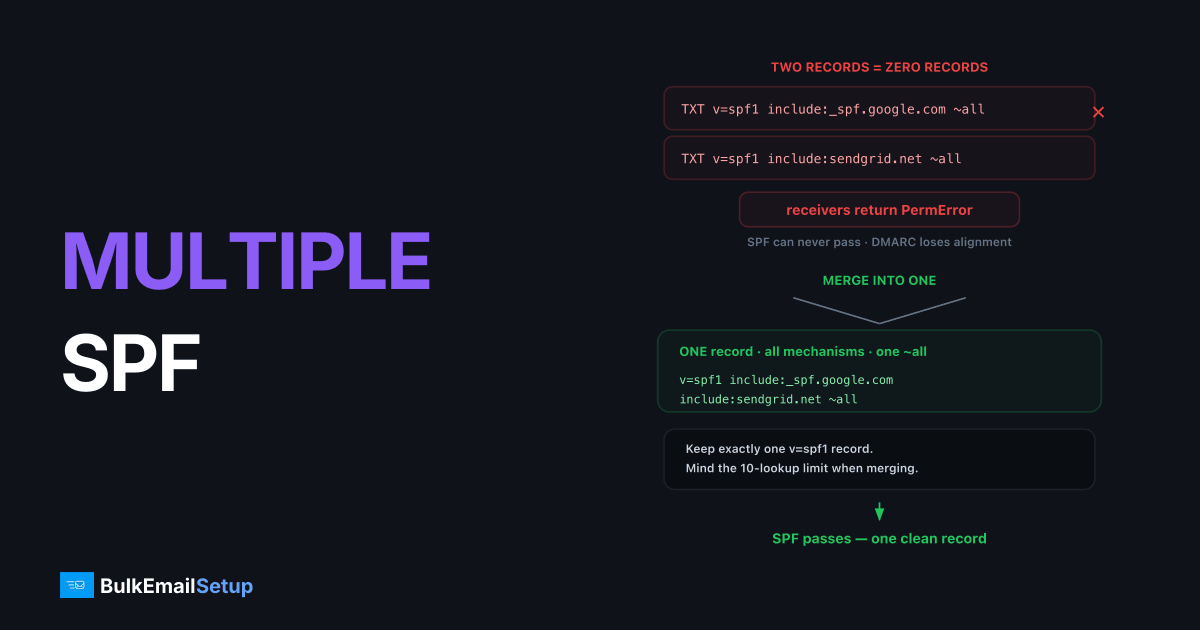
A domain can have exactly one SPF record, one TXT record beginning with v=spf1. Publish two, and RFC 7208 section 4.5 requires receivers to return PermError: not "use the first one," not "combine them," but treat SPF as permanently broken for every message you send. The fix is mechanical: merge all mechanisms into a single record, keep one all at the end, delete the duplicates.
Why two records means zero records
SPF evaluation starts with "fetch the TXT records for this name and find the SPF record." The spec is explicit: if that lookup returns more than one record starting with v=spf1, the result is PermError, the receiver cannot know which record represents your policy, so it refuses to guess.
PermError is worse than fail. Since February 2024, Google's sender guidelines require SPF and DKIM on mail from anyone sending 5,000 or more messages a day to Gmail, so a broken SPF record now costs more than it used to. A fail at least exercises your all qualifier as designed; PermError means SPF can never pass, your DMARC loses SPF alignment on every message, and at p=quarantine/p=reject your own mail starts landing in spam wherever DKIM doesn't cover you.
How it happens
The classic sequence: your domain already has SPF for Google Workspace, then a new tool's onboarding doc says "add this TXT record to your DNS," and whoever does it clicks Add record instead of editing the existing one:
; What's now in the zone - broken
yourdomain.com.  TXT  "v=spf1 include:_spf.google.com ~all"
yourdomain.com.  TXT  "v=spf1 include:sendgrid.net ~all"
DNS itself is fine with this, multiple TXT records per name are normal. Only SPF's one-record rule makes it fatal, and no DNS panel warns you.
Detect it
dig +short TXT yourdomain.com | grep -c spf1
Anything other than 1 is a problem. 0 means no SPF at all; 2+ means PermError. Run the same check on every name you send from, including subdomains and the bounce (Return-Path) host, because each one is evaluated on its own. Gmail's Show original on a test message will also show spf=permerror while the duplicate exists.
Merge them correctly
Combine every mechanism into one record, in any order, with a single all at the end:
; Before - two records
"v=spf1 include:_spf.google.com ~all"
"v=spf1 include:sendgrid.net ~all"

; After - one record
"v=spf1 include:_spf.google.com include:sendgrid.net ~all"
Rules for the merge:
v=spf1appears once, at the start.allappears once, at the end. If the two records disagreed (~allvs-all), pick deliberately, softfail vs hardfail covers the choice.- Drop exact duplicates (both records listing the same include).
- Delete the old records in the same change; don't leave the zone with duplicates while you "test."
Two follow-up checks
Lookup count. Merging brings every include into one record, and the 10-DNS-lookup limit now applies to the combined total. Two records of five lookups each merge into a record that's at the cliff edge.
Record length. A single TXT string maxes out at 255 characters. Long merged records need splitting into multiple quoted strings within the same record, which resolvers concatenate, not into separate records. Keep the whole record small too: RFC 7208 section 3.4 says it SHOULD fit in a 512-octet DNS answer, and suggests staying under 450 octets so replies still fit in UDP:
yourdomain.com. TXT "v=spf1 include:_spf.google.com include:sendgrid.net " "include:servers.mcsv.net ~all"
Common includes you'll be merging
Most multiple-record problems come from stacking one vendor's snippet on top of another's, each pasted as its own TXT record. These are the includes you'll most often fold into a single record:
| Sender | Include mechanism |
|---|---|
| Google Workspace | include:_spf.google.com |
| Microsoft 365 | include:spf.protection.outlook.com |
| SendGrid | include:sendgrid.net |
| Mailchimp | include:servers.mcsv.net |
| Amazon SES | include:amazonses.com |
Merging them means one v=spf1, every include: in a row, and a single ~all at the end, never two all mechanisms. If a vendor's setup page tells you to "add this TXT record" and you already have an SPF record, you add the include to the existing record, you do not publish a second one. That single habit prevents almost every multiple-record error before it happens.
Other SPF errors that look like this one
Duplicate records are the most common cause of spf=permerror, but three other mistakes show the same result in Gmail's headers. Check for them while you are editing the record:
| Error | Cause | Fix |
|---|---|---|
| Too many lookups | More than 10 DNS-querying terms (include, a, mx, ptr, exists, redirect) | Drop unused includes or flatten |
| Too many void lookups | More than 2 lookups that return nothing, often an include for a vendor you stopped using | Remove the dead include |
| Malformed record | A typo in a mechanism, v=spf1 misspelled, or smart quotes pasted from a document | Retype the record as plain text |
Watch the quotes in particular. Some DNS panels add the surrounding quotes for you, so pasting a value that already has them produces a record with doubled quotes that no receiver can parse.
Subdomains are the other trap. SPF does not inherit, so a record on yourdomain.com says nothing about mail from news.yourdomain.com. Each sending subdomain needs its own record, and the one-record rule applies there too.
Verify after the change
# Exactly one record, merged contents
dig +short TXT yourdomain.com | grep spf1

# Confirm at a public resolver after propagation
dig +short TXT yourdomain.com @8.8.8.8 | grep spf1
Send a test to Gmail and confirm spf=pass in the headers. If you're building out authentication from scratch rather than fixing one record, the full SPF, DKIM, and DMARC setup guide covers the whole stack in order.
How BulkEmailSetup helps
We audit your existing DNS before provisioning, merge or clean up conflicting SPF records, and publish a single correct record alongside DKIM, DMARC, and PTR on your dedicated SMTP server. See pricing for setup-included plans.
Frequently asked questions
Can a domain have two SPF records?
No. RFC 7208 requires exactly one TXT record starting with v=spf1 per DNS name. Two or more cause a PermError, and receivers treat SPF as failed for every message.
How do multiple SPF records happen?
Usually a vendor's setup wizard says 'add this TXT record' and someone adds a new record instead of editing the existing one. DNS panels happily accept duplicates without warning.
How do I merge two SPF records?
Take all mechanisms from both records, put them in a single v=spf1 record with one all qualifier at the end, and delete the originals. v=spf1 appears exactly once, all appears exactly once.
Do multiple TXT records in general break SPF?
No, only multiple records beginning with v=spf1. Verification records like google-site-verification can coexist with your SPF record on the same name without any issue.
Does a subdomain SPF record conflict with the root domain's?
No. SPF records are per DNS name, so mail.yourdomain.com and yourdomain.com each have their own record. The one-record rule applies within each name, not across the zone.


