
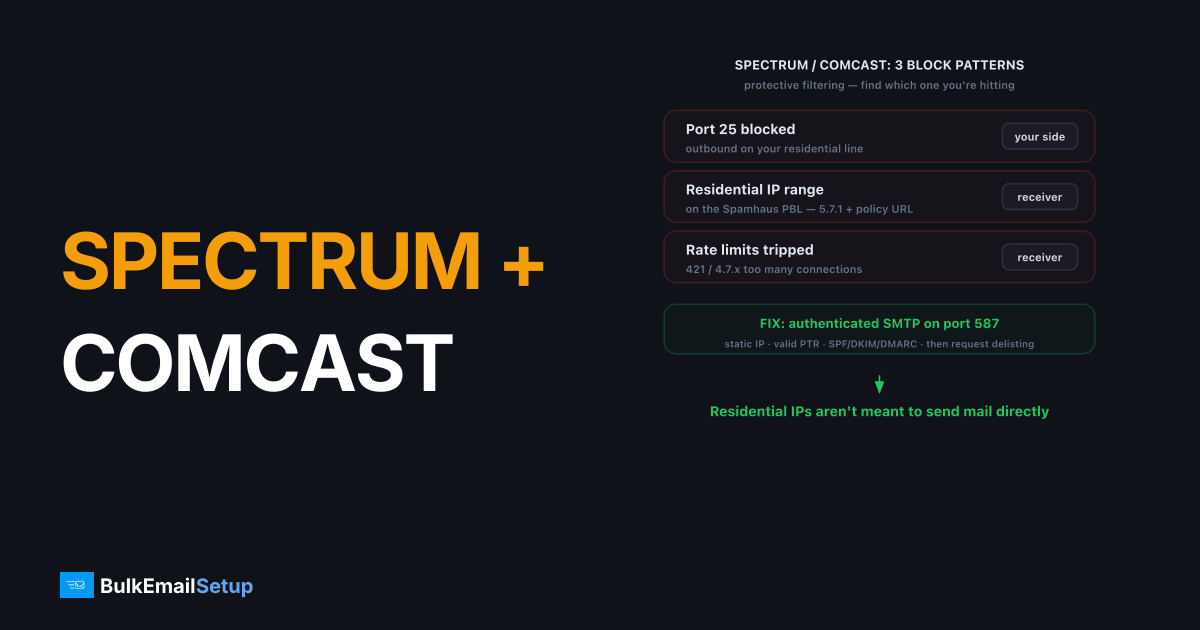
If Spectrum or Comcast is blocking your email, it's almost always one of three causes: outbound port 25 is blocked on your residential connection, your sending IP sits in a residential range these ISPs distrust, or you've tripped their rate limits or block list. The fix is to send through an authenticated SMTP server on port 587 with a static IP, valid PTR, and full SPF, DKIM, and DMARC, then request delisting at the ISP's postmaster page if needed.
Why are Spectrum and Comcast blocking my mail?
Spectrum (Charter, which runs rr.com and roadrunner addresses) and Comcast (comcast.net) reject mail for protective reasons, not personal ones. Both run aggressive inbound filters and both restrict outbound sending on consumer lines. Knowing which of the three patterns you're hitting tells you the fix.
| Symptom | Cause | Where it happens |
|---|---|---|
| Connection times out on port 25 | Outbound port 25 blocked on residential line | Your sending side |
| 5.7.1 with a PBL or policy URL | Sending IP is in a residential / dynamic range | Receiver side |
| 421 or 4.7.x deferrals | Rate limit, too many connections or messages | Receiver side |
| Permanent block / blocklisted | Complaints, spam traps, or poor reputation | Receiver side |
The residential-IP problem is the most common for small senders. Spectrum and Comcast IP ranges, and most consumer ranges, are on the Spamhaus PBL, which says "this IP shouldn't send mail directly." Receivers honor it. The Comcast rejection we see most reads 554 5.7.1 Message rejected... resembles a non-deliverable message or a BL000 block-list code in the bounce; on the Spectrum/Charter side it is usually 5.7.1 pointing at their AUP page.
How do I fix Spectrum and Comcast port 25 blocks?
If your connection times out when sending, port 25 is blocked on your line. Don't fight it, route around it.
- Stop using port 25 for client sending. Residential ISPs block it by design. See why port 25 is blocked.
- Send through an authenticated server on port 587. Use STARTTLS and SMTP AUTH. Port 465 (implicit TLS) works too. Details in SMTP ports 25 vs 465 vs 587 vs 2525.
- Use a static IP outside residential ranges. A proper SMTP server gives you a static IP that isn't on the PBL, so receivers accept the connection.
You can't reliably bulk-send from a home or office consumer connection. The port block and the PBL listing both stand in the way.
How do I fix Comcast and Spectrum rejecting my IP?
If the connection succeeds but the message bounces with a 5.7.1 policy or blocklist URL, the problem is your IP's reputation or range.
- Set a valid PTR record. Every sending IP needs reverse DNS that resolves back to a hostname. Comcast and Spectrum reject mail from IPs with no PTR. See how to set up a PTR record.
- Publish SPF, DKIM, and DMARC. All three. Missing auth is an instant filter hit at both ISPs. Our authentication setup guide covers it.
- Check the PBL. If your IP is on the Spamhaus PBL, follow the PBL delisting steps.
- Request delisting at the ISP. Comcast runs a postmaster block-removal form; Spectrum/Charter routes through its postmaster contact. Submit the IP after you've fixed PTR and auth.
- Slow down on deferrals. A 421 or 4.7.x reply is temporary throttling. Lower your concurrent connections and send rate, then let retries clear.
How do I keep mail flowing to these ISPs?
Keep your complaint rate well under 0.3% (Comcast and Spectrum both feed complaints back), warm a new IP gradually over 4-6 weeks, and clean bounces fast so you don't keep hitting dead addresses. Consistent volume from a static, authenticated IP with clean metrics is what stops Spectrum and Comcast from blocking your email in the first place. For ongoing visibility, monitor your deliverability.
How to find the exact cause and confirm the fix
Before changing anything, identify which of the three blocks you're hitting. The symptom tells you where to look.
- Test the port. Run
telnet gmail-smtp-in.l.google.com 25from your sending host. A hang or timeout means outbound port 25 is blocked, so the problem is on your line, not the receiver. - Read the bounce string. A
5.7.1with a PBL or policy URL is a reputation or residential-range block. A421or4.7.xis temporary throttling. They need different fixes. - Check PTR. Run
dig -x YOUR.SENDING.IP. If it returns no hostname, that alone gets you filtered at both ISPs. - Check the PBL. Look up your IP at Spamhaus. A PBL listing confirms a residential or dynamic range problem.
To confirm the fix, send a test to a comcast.net and an rr.com address you control after correcting PTR and auth. A 250 acceptance in your log, with the message landing in the inbox, means the block is cleared. If a delisting request was needed, the ISP usually processes it within 24 to 72 hours. In the cases we have filed, Comcast's automated block-removal form has cleared a clean IP in well under a day, but only after PTR and SPF, DKIM, DMARC were already correct; submitting before fixing those just gets the IP re-blocked on the next send.
How BulkEmailSetup helps
We give you a dedicated SMTP server on a static IP outside residential ranges, with PTR, SPF, DKIM, and DMARC set up correctly and port 587 ready, so Spectrum and Comcast accept your mail instead of blocking it. We also handle blocklist monitoring and delisting. See plans on our pricing page.
Frequently asked questions
Why is Spectrum or Comcast blocking my email?
Usually one of three reasons: they block outbound port 25 on residential connections, your sending IP sits in a residential range they distrust, or you exceeded their rate limits. All three are fixable with proper sending infrastructure.
Does Spectrum block port 25?
Yes. Spectrum (and most residential ISPs) block outbound port 25 to stop infected machines from spamming. You must send through an authenticated server on port 587 or 465 instead of connecting directly on port 25.
How do I stop Comcast from rejecting my mail?
Send from a static IP with valid PTR and SPF, DKIM, and DMARC, keep your complaint rate low, and request removal from Comcast's block list at their postmaster page if your IP is listed. Sending from a clean dedicated IP avoids most rejections.
Can I send bulk email from a home internet connection?
Not reliably. Residential ISPs block port 25 and their IP ranges are on the Spamhaus PBL, so direct sending fails. You need a proper SMTP server with a static IP outside residential ranges.


