
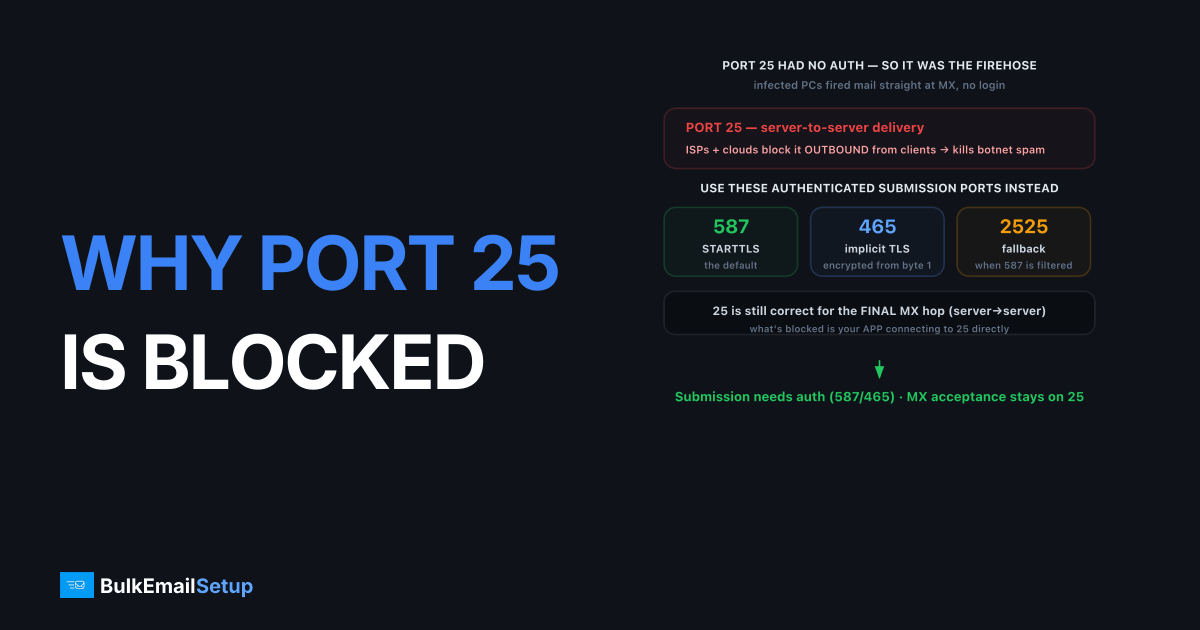
Port 25 is blocked by most ISPs and cloud providers because it is the port spammers and infected machines historically used to fire mail directly at recipient servers, bypassing any authenticated relay. Port 25 was designed for server-to-server delivery, one mail server handing a message to another's MX as described in the SMTP standard, RFC 5321, not for client submission. So blocking outbound 25 from residential and cloud networks kills a huge volume of botnet spam without affecting how legitimate users actually send. For authenticated submission you use port 587 with STARTTLS, port 465 with implicit TLS, or port 2525 as a fallback when 587 is filtered.
Why do providers block outbound port 25?
The block exists because port 25 has no requirement to authenticate, which made it the perfect spam vector. For years, a malware-infected home PC could open a port 25 connection straight to Gmail's servers and send mail with no login, no accountability, and a forged sender. Multiply that by millions of compromised machines and port 25 became the internet's main spam firehose.
So ISPs and cloud platforms (AWS, Google Cloud, DigitalOcean, most residential providers) block outbound port 25 by default. On AWS specifically, the block is account-wide and only liftable through a support request, and even then they often decline, which is the single most common reason we see a freshly launched EC2 mail server send nothing at all while logging a silent Connection timed out on every attempt. The logic is clean: legitimate users submit mail through an authenticated relay, never by connecting to a stranger's port 25 directly. Blocking it stops botnet spam at the source while leaving real email untouched, because real email never needed client-side port 25 in the first place. This is also why a new cloud server cannot send mail out of the box, a symptom covered in SMTP connection timed out, port 25 blocked.
What is port 25 still used for legitimately?
Port 25 is still the correct and only port for server-to-server mail transfer. When a sending mail server delivers a message to the recipient domain's MX server, that final hop happens on port 25. That part of the system has not changed and cannot, because MX delivery is unauthenticated by design; the receiving server accepts mail for its own users from anyone.
The distinction is submission versus relay. Client submission is a user, app or website handing mail to its own outbound server, and that must be authenticated, so it uses 587 or 465. Server-to-server relay is one MTA delivering to another's MX, and that uses 25. So your dedicated SMTP server still talks to Gmail's MX on port 25 for the final delivery; what is blocked is your application connecting to port 25 directly. The roles map cleanly onto the SMTP handshake: authenticated AUTH belongs on submission ports, anonymous MX acceptance belongs on 25.
Which port should you use instead?
Use port 587 with STARTTLS as your default, and fall back to 465 or 2525 if it is blocked. All three are submission ports that require authentication, so they are not used by botnets the way port 25 was.
| Port | Encryption | Use case |
|---|---|---|
| 25 | Optional (STARTTLS) | Server-to-server MX delivery only, blocked for clients |
| 587 | STARTTLS (upgrade) | Modern default for authenticated submission |
| 465 | Implicit TLS (from first byte) | Widely supported authenticated submission |
| 2525 | STARTTLS | Alternate submission when 587 is blocked |
Port 587 is the standard. The client connects in plaintext, issues STARTTLS to upgrade the link to TLS, then authenticates. Port 465 wraps the entire session in TLS from the first byte, the difference detailed in STARTTLS vs implicit TLS. Port 2525 is not an official standard but is offered by many relay providers as a workaround when a network blocks 587. The full port-by-port comparison lives in SMTP port 25 vs 465 vs 587 vs 2525. Whichever you pick, authenticate over TLS, never send credentials in plaintext.
One historical note clears up confusion: port 465 was briefly deprecated, then formally reinstated for implicit-TLS submission in RFC 8314, which now recommends implicit TLS over STARTTLS. So both 465 and 587 are current, standards-blessed submission ports. Pick 587 if your provider documents it as the default, and 465 if you want TLS enforced from the first byte with no plaintext negotiation step.
How do you confirm port 25 is blocked, and route around it?
Test the connection directly, because a timeout is the signature of a block. From the affected machine, try telnet smtp.gmail.com 25 or a port-check tool. If it hangs and times out with no 220 banner, port 25 is blocked. If you get a 220 ESMTP greeting, it is open. Then test 587 the same way; it almost always succeeds where 25 fails.
A blocked port 25 looks like this, the connection simply never completes:
$ telnet gmail-smtp-in.l.google.com 25
Trying 142.250.x.x...
telnet: connect to address 142.250.x.x: Connection timed out
The same machine on port 587 usually answers immediately:
$ telnet smtp.provider.com 587
Trying 198.51.100.x...
Connected to smtp.provider.com.
220 smtp.provider.com ESMTP ready
That contrast, a timeout on 25 and a 220 on 587, is the clean confirmation that your network filters outbound 25 but permits authenticated submission. No port-check website needed.
Once confirmed, the fix is to stop trying to deliver directly and instead route all outbound through an authenticated relay on 587 or 465. Point your application or local Postfix at a smart host, set the port to 587, enable TLS and supply credentials. The relay handles the server-to-server port 25 hop on its own clean IP, which it can do because it sits on a network that permits it and has the reverse DNS and reputation to deliver. Your app never touches port 25 again, and deliverability improves as a bonus because the relay's IP is warmed and authenticated.
A common mistake is leaving an application's mail config on the default port 25 and no authentication, then deploying it to a cloud host where 25 is blocked. The send silently times out, queues, and eventually bounces with Connection timed out, with nothing in the app logs pointing at the real cause. The fix is to set three values explicitly in your mailer config: host pointing at the relay, port set to 587 (or 465), and TLS plus username and password enabled. Frameworks like Laravel, Django and Rails all default to port 25 in example config, so this trips up first deploys constantly. Set the submission port deliberately and the timeout disappears.
How BulkEmailSetup helps
A BulkEmailSetup dedicated SMTP server accepts your mail on port 587 or 465 with authentication, so port 25 being blocked on your app server stops mattering. We handle the server-to-server delivery from a clean, warmed IP with reverse DNS already in place. Point your apps at our relay over TLS and outbound just works. See the setup and plans on our pricing page.
Frequently asked questions
Why is port 25 blocked?
ISPs and cloud providers block outbound port 25 to stop infected machines and spammers from sending mail directly to recipient servers. Port 25 is meant for server-to-server delivery, not authenticated client submission, so blocking it cuts off a major source of botnet spam without affecting normal email use.
What port should I use instead of port 25?
Use port 587 with STARTTLS for authenticated submission, which is the modern default. Port 465 with implicit TLS is also widely supported. If both are blocked, port 2525 is a common alternate submission port offered by many providers.
Is port 25 ever used for legitimate email?
Yes. Port 25 is still the correct port for server-to-server (MTA to MTA) delivery, where one mail server hands a message to a recipient's MX server. It is only blocked for client submission, where an app or user device tries to send mail directly.
How do I know if my port 25 is blocked?
Try connecting to a mail server on port 25 with telnet or a port-check tool. If the connection times out with no SMTP banner, port 25 is blocked. A connection that returns a 220 greeting means port 25 is open from your network.


