
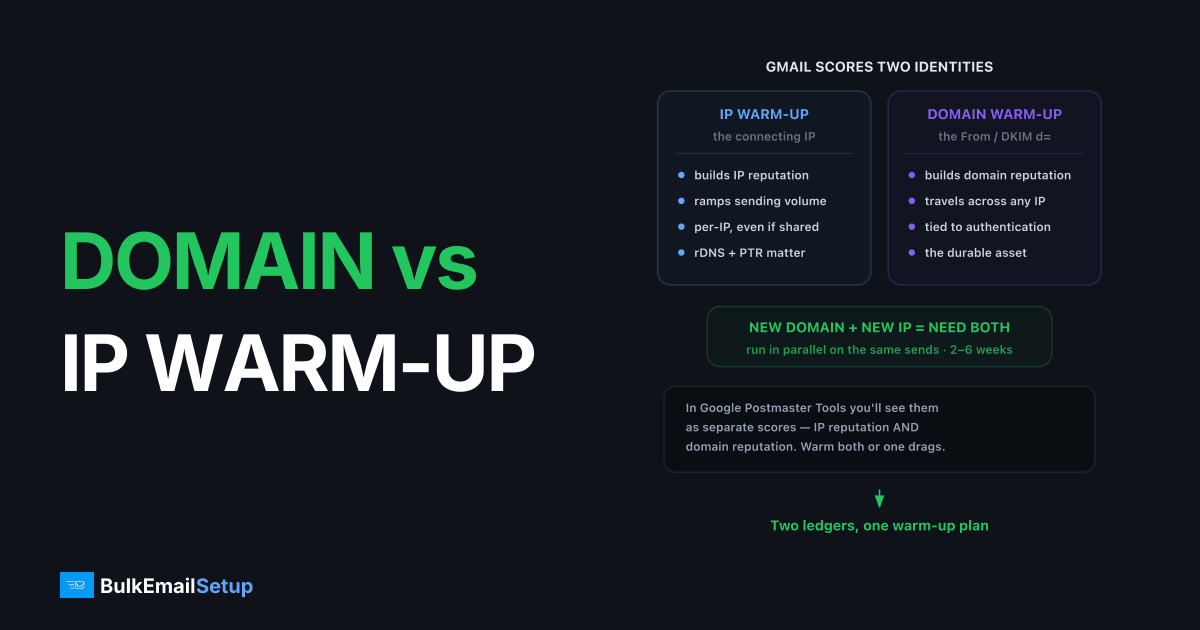
IP warm-up builds the reputation of your sending IP address; domain warm-up builds the reputation of the domain in your From address and DKIM signature. Mailbox providers score these two identifiers separately, so a new domain on a new dedicated IP needs both, done in parallel on the same sends, over roughly 2-6 weeks.
Two reputations, two ledgers
When Gmail receives your message it logs at least two identities: the connecting IP and the authenticated domain (DKIM d= and SPF domain). Each gets its own reputation score, visible separately in Google Postmaster Tools.
That separation is deliberate. Spammers rotate IPs cheaply, so providers shifted weight toward domain reputation, but the IP score never went away, and Microsoft in particular still leans on it.
Side-by-side comparison
| Factor | IP warm-up | Domain warm-up |
|---|---|---|
| What's being scored | The connecting IP address | From/DKIM/SPF domain |
| Who needs it | Anyone on a new dedicated IP | Anyone with a new (or long-idle) domain |
| Typical duration | 2-8 weeks by volume | 2-4 weeks |
| Survives an IP change | No, new IP starts cold | Yes, reputation follows the domain |
| Survives a domain change | Yes, IP score stays | No, new domain starts cold |
| Tracked in Postmaster Tools | IP reputation panel | Domain reputation panel |
| Weighted most by | Microsoft, smaller ISPs | Gmail, Yahoo |
The four scenarios
| Scenario | IP warm-up needed? | Domain warm-up needed? | Notes |
|---|---|---|---|
| New domain + new dedicated IP | Yes | Yes | Both run in parallel; longest combined ramp |
| Established domain + new dedicated IP | Yes | No | Domain history shortens IP ramp ~30-40% |
| New domain + shared IP | No | Yes | Pool reputation covers the IP; domain still cold |
| New subdomain of established domain | No | Partial | Subdomains inherit some parent trust, but Gmail scores them separately, ramp for 1-2 weeks |
The subdomain case trips people up. mail.yourbrand.com gets a head start from yourbrand.com, but it is still a distinct entry in Postmaster Tools and needs its own short ramp.
How to run both at once
You do not send two separate campaigns. One ramp warms both identifiers simultaneously:
- Authenticate first. SPF, DKIM, and DMARC on the new domain before any send. Walkthrough: SPF, DKIM, DMARC setup.
- Start at 50-200 emails/day to your most engaged recipients.
- Increase roughly 1.5-2x every 2-3 days, following a structured warm-up schedule.
- Watch IP and domain reputation separately in Postmaster Tools, they can diverge.
- Hold flat if either score drops, bounces pass 2%, or complaints pass 0.1%.
Timelines for each volume tier are in how long does IP warm-up take.
A combined ramp, day by day
Here is what steps 2 and 3 look like for a new domain on one new dedicated IP, aiming for 25,000 emails a day. It starts at 200 and roughly doubles every two to three days, then slows as volume gets large. Treat it as a worked example, not a quota: hold any step where a metric slips.
| Days | Emails a day | Who gets them |
|---|---|---|
| 1-2 | 200 | opened or clicked in the last 30 days |
| 3-4 | 400 | same group |
| 5-6 | 800 | same group |
| 7-9 | 1,500 | add 30 to 90 day engagers |
| 10-12 | 2,500 | 30 to 90 day engagers |
| 13-15 | 4,000 | add 90 to 180 day engagers |
| 16-18 | 6,500 | full engaged list |
| 19-21 | 10,000 | full engaged list |
| 22-24 | 15,000 | full list, newest signups first |
| 25-28 | 25,000 | full list |
Two lines matter on the way up. The first is Gmail's complaint ceiling: Google asks senders to stay under a 0.1% spam rate and never reach 0.3%, per its sender guidelines. On a 2,500 send that is 2 complaints to stay comfortable and 7 before you are in trouble, so one bad segment shows up fast during warm-up.
The second is the bulk-sender line. Once you send 5,000 or more messages a day to Gmail accounts, Google treats you as a bulk sender and requires SPF, DKIM and DMARC plus one-click unsubscribe. In the ramp above you cross it around day 16, which is why step 1, authenticate first, comes before any send rather than when volume gets serious.
If both reputations hold through day 28, the domain and the IP have each logged four weeks of clean history at rising volume. That is the point where you can stop holding back and send the full list on your normal schedule.
When the two scores diverge
Divergence is diagnostic. High domain reputation with low IP reputation usually means the IP has bad history (previous tenant) or you ramped volume too fast, the fix is slowing the IP ramp, not changing content.
Low domain reputation with a healthy IP points at content, complaints, or list quality tied to your brand. Swapping IPs will not fix it; spam-folder placement persists because the domain follows you. That failure mode is covered in why emails go to spam instead of inbox.
Common mistakes
- Warming the IP with a throwaway domain, then switching. The real domain arrives cold and you re-warm anyway.
- Buying an "aged" domain for instant reputation. Idle domains decay to neutral within months; aged ≠ warmed.
- Treating subdomains as free. Each sending subdomain is a separate ledger at Gmail.
- Pausing 30+ days after warm-up. Both reputations decay; long-idle senders re-warm from a reduced baseline.
How BulkEmailSetup helps
Our dedicated SMTP servers come with a warm-up plan that ramps your IP and domain together: a written manual schedule on the Basic plan ($549 once, 25,000 a day), and automatic warm-up across all 15 IPs on Advance ($1,199 once, 200,000 a day). You get a clean reputation on both ledgers without babysitting the schedule. See pricing.
Frequently asked questions
Do I need domain warm-up if I'm using a shared IP?
Yes. On a shared IP the IP reputation is already established, but your domain still starts at zero. A brand-new domain needs 2-4 weeks of gradual volume regardless of IP type.
Which matters more, domain reputation or IP reputation?
Gmail weights domain reputation more heavily because domains are harder to swap than IPs. Microsoft still leans on IP reputation. In practice you need both healthy, a strong domain cannot fully compensate for a blocked IP, or vice versa.
Can I warm up a domain and IP at the same time?
Yes, and if both are new you should, they warm in parallel on the same sends. The combined ramp just runs slightly slower than warming only one, because providers see two unknown identifiers at once.
Does moving an old domain to a new IP require a full re-warm?
The domain keeps its reputation, but the new IP starts cold. You still run an IP warm-up, though it usually completes faster, often 30-40% faster, because the established domain vouches for the traffic.


