
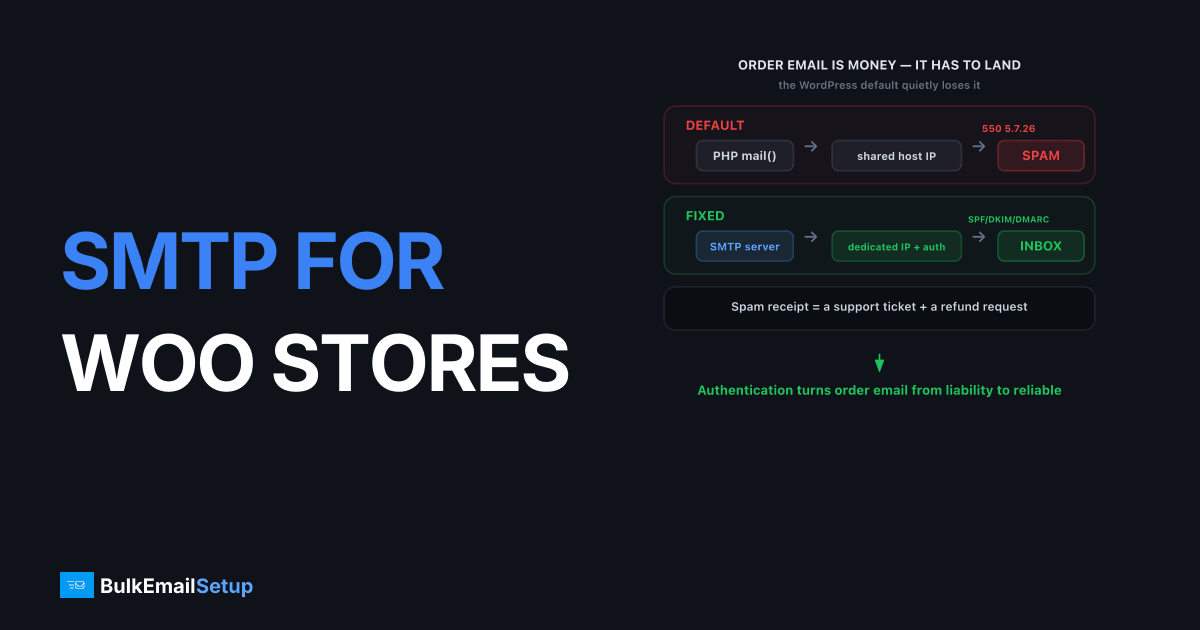
SMTP for WooCommerce at high volume routes your order confirmations, shipping updates, receipts, and account emails through an authenticated SMTP server with a dedicated IP, instead of the unreliable PHP mail() function WordPress uses by default. At volume, that default sends from a shared server IP with no authentication, and those emails land in spam or vanish. For a busy store, that is lost revenue and a flood of "where's my order?" tickets. An SMTP server with SPF, DKIM, and DMARC turns order email from a liability into something that reliably arrives.
WooCommerce order email is transactional, which means it has to land. A customer who does not get a confirmation assumes the order failed. A missing shipping update becomes a support ticket. The fix is infrastructure, not another plugin tweak.
Why WooCommerce order emails fail
WooCommerce order emails fail mostly because WordPress sends through PHP mail() by default, which has no authentication and uses your web server's IP, often one with weak or no sending reputation. Mailbox providers treat unauthenticated mail from a low-reputation shared IP as suspect, so receipts hit spam or get dropped. Gmail and Yahoo now reject unauthenticated bulk mail outright with 550 5.7.26, as Gmail's bulk sender guidelines require.
The usual culprits:
- No authentication. PHP mail() does not sign messages, so SPF and DKIM checks fail.
- Shared hosting IP. Your store shares an IP with other sites, including any spammers on the same box.
- Volume spikes. A sale generates a burst of order mail that a shared host throttles or queues.
- Mixed streams. Marketing and transactional going out the same unmonitored path drag each other down.
Routing everything through a proper SMTP server with correct SPF, DKIM, and DMARC setup fixes the authentication and reputation problems at the root.
Default WordPress mail vs dedicated SMTP
The difference between PHP mail() and a dedicated SMTP server is the difference between hoping mail arrives and knowing it does. Here is the comparison for a high-volume store.
| Factor | PHP mail() / shared host | Dedicated SMTP server |
|---|---|---|
| Authentication | None | SPF, DKIM, DMARC, PTR |
| Sending IP | Shared web server | Dedicated, yours |
| Reputation | Inherited from host neighbors | Your own |
| Throughput in a sale | Host-throttled | Your IP's capacity |
| Deliverability logs | Minimal | Full visibility |
| Stream separation | None | Transactional vs marketing |
| Setup | Default (broken) | Plugin + credentials |
For a store doing serious volume, the dedicated IP versus shared IP decision usually lands on dedicated, because order email is too important to leave on a shared reputation.
How to set up SMTP for WooCommerce
Setting up SMTP for WooCommerce takes a plugin and correct authentication, and the whole job is usually under an hour. The plugin reroutes WordPress mail; the DNS records make mailbox providers trust it. Both halves matter.
Install an SMTP plugin
Use WP Mail SMTP or FluentSMTP. Enter your SMTP host, port 587 with STARTTLS, and the username and password from your provider. Send a test email from the plugin to confirm the path works before you rely on it. This single step moves all store mail off PHP mail() and onto an authenticated server.
Configure DNS authentication
Add your SPF record, publish the DKIM key your provider gives you, and set a DMARC record at p=none to start. Keep your SPF under the 10-DNS-lookup limit to avoid PermError, especially if you also use marketing tools that add include: entries. Misaligned authentication is the top cause of order email hitting spam.
Separate transactional from marketing
Send order confirmations and shipping updates on a stream that stays clean. If you run abandoned-cart and promotional campaigns from the same store, isolate them so a marketing complaint spike never delays a receipt. Our guide on SMTP for abandoned-cart and receipts covers stream separation for stores in depth.
Common WooCommerce email mistakes
Most WooCommerce email problems trace back to a handful of fixable mistakes, not to WooCommerce itself. Stores that get the basics right rarely see order mail in spam, while those that skip authentication or stack plugins carelessly fight it constantly. Knowing the usual traps saves a busy store a lot of "where's my order?" tickets.
- Leaving the default From address. WooCommerce often defaults to
[email protected], which fails DMARC alignment. Set the From address to a real mailbox on your sending domain. - Stacking multiple SMTP plugins. WP Mail SMTP and another mail plugin both intercepting
wp_mail()causes silent failures. Run one SMTP plugin only. - Blowing the SPF lookup limit. A store platform plus a marketing tool plus a CRM can push SPF past 10 DNS lookups and trigger PermError. Flatten or consolidate.
- Testing only the test button. The plugin's test email proves the connection, not real order flow. Place a live test order and confirm the confirmation lands in the inbox, not spam.
Verify the From-address domain matches the domain you signed with DKIM. Misalignment there is the quiet reason "authenticated" order mail still lands in spam, even after the plugin and DNS look correct.
The stacked-plugin failure is the one we get called about most on WooCommerce stores. A store had WP Mail SMTP installed, then a developer later added a second mail plugin for a contact form, and both hooked wp_mail(). Order confirmations silently stopped sending, with no error in the WordPress logs, because the two plugins fought over the same hook. The store only noticed when "where's my order?" tickets spiked over a weekend. We disabled the second plugin, order mail resumed instantly. One SMTP plugin, never two, is the rule that prevents an entire class of silent failures.
What about busy seasons and sales?
Peak season is exactly when WooCommerce email infrastructure gets tested, and a dedicated IP with clean history handles the surge far better than a shared host. A Black Friday rush can multiply order volume tenfold in hours, and a shared host will throttle or queue that mail. A dedicated IP that has warmed and built reputation negotiates higher per-hour ceilings at Gmail and Yahoo, so confirmations keep flowing when sales spike.
Plan for the peak. Warm your IP before the season, not during it, ramping over four to six weeks following an IP warm-up schedule. An IP you warm in November is already trusted when December hits.
We keep it honest: dedicated SMTP gets your order mail authenticated, isolated, and fast. Whether it lands in the inbox still depends on your sending habits, complaint rate, and list quality. No setup guarantees 100% inbox placement.
How BulkEmailSetup helps
We provide a dedicated SMTP server with a dedicated IP you control, full SMTP access on ports 587, 465, and 2525, and SPF, DKIM, DMARC, and PTR configured correctly for your store. It plugs into WooCommerce with a standard SMTP plugin, and we handle warm-up so your order email lands even during a sale. See plans on our pricing page.
Frequently asked questions
Why do WooCommerce order emails go to spam?
Usually because WordPress sends through PHP mail() by default, which has no authentication and often comes from a server IP with poor reputation. Routing WooCommerce through an authenticated SMTP server with SPF, DKIM, and DMARC fixes most order-email spam problems.
Do I need a plugin to use SMTP with WooCommerce?
Yes, a simple SMTP plugin like WP Mail SMTP or FluentSMTP routes WordPress and WooCommerce mail through your SMTP server instead of PHP mail(). You enter your host, port (usually 587), and credentials, and all store email then sends authenticated through that server.
Does a high-volume WooCommerce store need a dedicated IP?
Once your store sends above roughly 50,000 emails a month across order, shipping, marketing, and account mail, a dedicated IP usually helps. It isolates your reputation so a marketing send or a busy season can't drag down the receipts customers are waiting for.
Which SMTP port should WooCommerce use?
Port 587 with STARTTLS is the modern default and works in nearly all hosting environments. Use 465 for implicit TLS if your host prefers it, or 2525 as a fallback when a host blocks 587. Avoid port 25 for submission; most hosts block it.


