
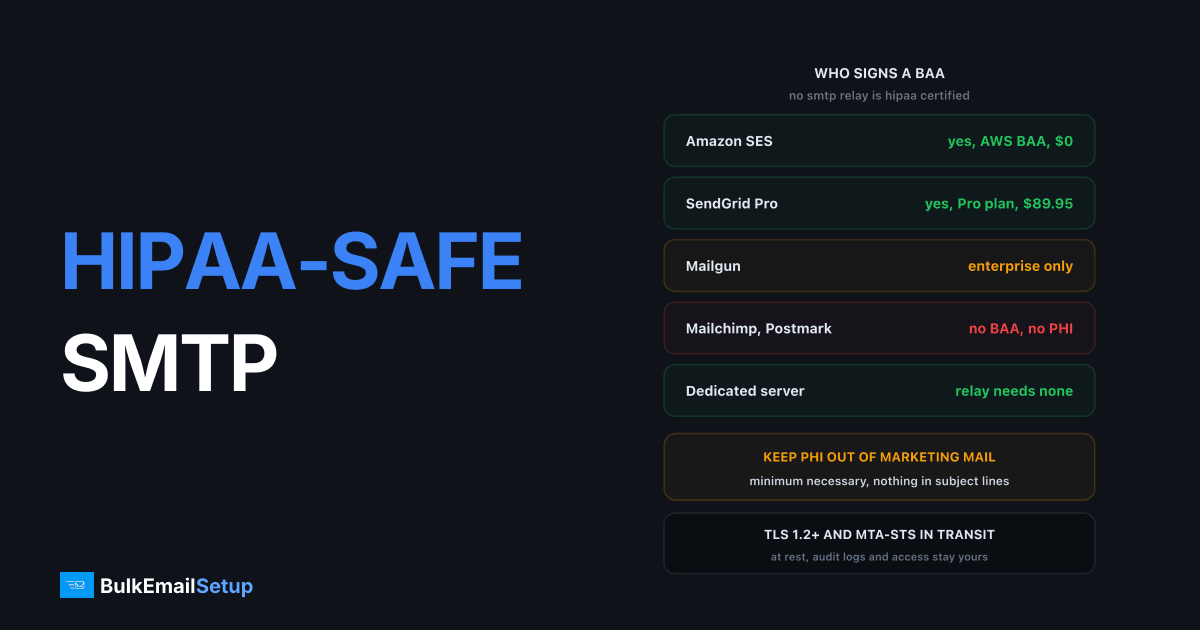
No SMTP relay is HIPAA certified, because HHS certifies nothing. Compliance sits with the covered entity and rests on two things: your own administrative, physical and technical safeguards, plus a signed Business Associate Agreement (BAA) with every vendor that stores or transmits protected health information (PHI). Amazon SES, Twilio SendGrid and Mailgun will sign one on the right plan. Mailchimp and Postmark will not. A dedicated server you control removes the relay from the BAA chain entirely, and hands you every control in exchange.
I've set up mail for clinics, a dental group, a telehealth app and two health insurers. The mistakes repeat. Here is the whole picture, in the order the questions actually come up.
Who signs a BAA
Confirm on the vendor's own legal page before you route anything. These positions move, and "HIPAA eligible" on a sales page sometimes means "on the enterprise tier, after a call".
| Provider | Signs a BAA | Plan requirement | Notes |
|---|---|---|---|
| Amazon SES | yes | any, under the AWS BAA | accept the BAA in AWS Artifact, no extra fee |
| Twilio SendGrid | yes | Pro or Premier | check current terms, not on Free or Essentials |
| Mailgun | yes | enterprise contract | custom pricing, check current terms |
| Google Workspace (Gmail) | yes | paid Workspace | covers mailboxes, not a bulk relay |
| Mailchimp | no | none | states it is not HIPAA compliant, do not send PHI |
| Postmark | no | none | states it does not sign BAAs |
| Dedicated SMTP server | not needed for the relay | any | hosting provider may still need one |
The provider that surprises people is Mailchimp. Plenty of practices run their newsletter there, which is fine as long as the newsletter contains no PHI. The moment a "we missed you at your cardiology follow-up" campaign goes out, that list is a disclosure to a vendor with no BAA. That is a reportable breach, not a marketing mistake.
The rule that matters more than the provider
Marketing email should carry no PHI at all. Get this right and the BAA question shrinks to your transactional stream.
PHI is any individually identifiable health information. Name plus appointment time is scheduling data. Name plus the department, the procedure, the medication or the diagnosis is PHI. Subject lines are the worst offender because they render on lock screens, in shared inboxes and in preview panes.
| Message | Safe version | Version that creates PHI |
|---|---|---|
| Appointment reminder | "Reminder: Tuesday 10:30, 14 Elm Street, Dr Patel" | "Reminder: colonoscopy prep, Tuesday 10:30" |
| Results ready | "A new message is waiting in your patient portal" | "Your HbA1c results are ready" |
| Refill | "Your prescription is ready for collection" | "Your sertraline refill is ready" |
| Newsletter | general health content, sent to an opted-in list | segmented by condition, "for our diabetes patients" |
| Billing | "Statement available, log in to view" | itemised procedures in the body |
The pattern is the same every time. Put the sensitive detail behind a login, send the notification without it. That is the "minimum necessary" standard from the Privacy Rule applied to a subject line, and it does more for your risk than any encryption setting. The HHS HIPAA for Professionals portal has the Privacy Rule, Security Rule and Business Associate guidance in one place.
Segmentation is the trap. A list called "hypertension patients" is itself PHI. If that list lives in a marketing tool with no BAA, you have already disclosed it before sending anything.
TLS in transit, and why STARTTLS alone is not enough
Enforce TLS 1.2 or newer on every hop you control, and publish MTA-STS so receivers cannot be downgraded to plaintext. The Security Rule does not name a protocol, but "reasonable and appropriate" encryption for PHI in transit in 2026 means this.
STARTTLS is opportunistic. The sending server asks for encryption and falls back to plaintext if the answer is no, which an attacker on the path can force. MTA-STS, defined in RFC 8461, lets a receiving domain publish a policy saying "TLS with a valid certificate, or refuse". The how and why is in TLS for email explained and the setup is in the MTA-STS setup guide.
Three settings to check on the sending side:
- Submission (port 587 or 465) requires TLS 1.2 or 1.3, with TLS 1.0 and 1.1 disabled.
- Outbound delivery on port 25 prefers TLS and logs every session that fell back to plaintext, so you can see which receivers are the problem.
- TLS-RPT is published at
_smtp._tls.yourdomain.comso you receive daily failure reports.
Gmail, Microsoft and the big US health systems all support TLS inbound. The plaintext fallbacks you will see are small practices on old on-premise Exchange, and the fix there is to send the notification without PHI, which you were doing anyway.
One thing TLS does not do: protect the message once delivered. It sits in the patient's Gmail in the clear. HIPAA accepts that when the patient has been told the risk and still wants email, which is why portal notifications beat content in the body.
Encryption at rest, logs, access and retention
This is where most SMTP setups fail an audit, and it has nothing to do with the relay you picked. Your MTA logs, bounce store and campaign database hold recipient addresses next to message metadata, and on some systems the full message body.
| Control | What it means for a mail server | Common gap |
|---|---|---|
| Encryption at rest | disk encryption on the server and on backups, encrypted database for the campaign tool | backups copied to an unencrypted bucket |
| Log minimisation | log envelope data, not subject lines or bodies, for PHI streams | default MTA config logs subjects |
| Audit logging | who logged in, who exported a list, who changed a template, kept 6 years | SSH shared root account, no trail |
| Access control | named accounts, MFA, least privilege, offboarding within 24 hours | the ex-contractor still has SMTP credentials |
| Retention | a written schedule, mail logs typically 90 days to 1 year, audit logs 6 years | logs kept forever, or deleted before an investigation |
| Risk analysis | documented, reviewed annually, covers the mail path end to end | done once in 2021 |
| BAA inventory | one for every vendor in the chain, relay, hosting, CRM, scheduling, analytics | the tracking pixel vendor was forgotten |
| Incident response | a procedure for a mis-sent message, with the 60-day breach notification clock | nobody knows who to tell |
The 6-year figure is the HIPAA documentation retention requirement and it applies to your policies and audit records, not to every mail log line. Keep the mail logs long enough to investigate a complaint and short enough that a breach of the log server exposes months rather than years.
Access control is the one I see failed most. Shared SMTP credentials pasted into three tools, no rotation, and one of the tools belongs to an agency that left last year. Named credentials per integration, rotated on a schedule, revoked on offboarding. Boring, and it is what the investigator asks for first.
What a dedicated server changes
The relay drops out of the BAA chain, because no vendor stores or forwards your message content. That is the whole advantage, and it is a real one. Every BAA is a negotiation, a renewal and a vendor you have to audit.
| Factor | Amazon SES under AWS BAA | SendGrid Pro with BAA | Dedicated server you control |
|---|---|---|---|
| BAA for the relay | AWS signs | Twilio signs | not needed, no third party sees content |
| BAA for hosting | included in the AWS BAA | n/a | needed if PHI touches the host's disk |
| Who runs the technical safeguards | AWS for the platform, you for config | Twilio for the platform, you for config | you, all of it |
| Log control | CloudWatch, your retention settings | SendGrid retains event data 30 days | your logs, your schedule |
| Content stored by vendor | transiently during delivery | transiently, plus event metadata | none |
| Audit evidence | AWS Artifact reports | Twilio compliance docs | your own documentation |
| Deliverability control | shared or dedicated IP at $24.95 | dedicated IP included on Pro | dedicated IPs, your reputation only |
Read the middle row honestly. On SES or SendGrid the vendor carries the platform controls and you carry configuration. On your own server you carry both. For a 40-person practice with no ops staff, that is a reason to stay on SES. For a health app already running its own infrastructure with an engineer who owns security, the dedicated server removes a vendor and gives you log control you cannot get from a relay.
The hosting BAA is the detail people miss. If the server sits at a cloud provider and PHI touches its disk, that provider is a business associate. AWS, Google Cloud and Azure all sign. Many cheap VPS hosts will not, so pick the host before the server.
What it costs at 100K a month
Prices ex tax from the vendors' own pricing pages. The relay cost is the small number. The controls work is 20 to 40 hours on any option.
| Line item | Amazon SES + AWS BAA | SendGrid Pro + BAA | Dedicated server |
|---|---|---|---|
| Sending, 100,000/month | $10 | $89.95 | $0 marginal |
| Dedicated IP | $24.95 optional | included | 3 included |
| BAA fee | $0 | $0, Pro plan required | none needed for relay |
| Hosting | n/a | n/a | $40 to $80 |
| Setup | your time | your time | $549 one-time |
| Year one total | $120 to $420 | about $1,080 | $1,030 to $1,510 |
| Year two total | $120 to $420 | about $1,080 | $480 to $960 |
SES is cheapest by a wide margin and the BAA costs nothing extra. If your volume is 100K a month and you have nobody to run a server, that is the answer. SendGrid Pro is fair value and the BAA is straightforward on that tier, with the caveat that Twilio's terms move and you should check them at renewal. The dedicated server beats SendGrid from year two and never beats SES on price. You buy it for vendor reduction and log control, not savings.
At 500K a month the picture changes, because SendGrid Pro runs to about $250 and a single dedicated server still costs the same. The volume breakdown is in what 100,000 emails a month costs, and the transactional side, which is most healthcare mail, is in SMTP for SaaS transactional email.
What HHS penalties look like
The civil penalty structure has four tiers, set by how much the organisation knew and whether it fixed the problem. The statute set the ranges at $100 to $50,000 per violation with a $1.5 million cap per year for identical violations of one provision. HHS adjusts those amounts for inflation annually, so the published figures for a given year are higher, with the annual cap now above $2 million. Quote the current HHS table, not this paragraph, if you are writing policy.
| Tier | Culpability | Statutory range per violation |
|---|---|---|
| 1 | did not know and could not reasonably have known | $100 to $50,000 |
| 2 | reasonable cause, not wilful neglect | $1,000 to $50,000 |
| 3 | wilful neglect, corrected within 30 days | $10,000 to $50,000 |
| 4 | wilful neglect, not corrected | $50,000 |
Two things about how this lands on email. First, "per violation" can mean per affected individual, so one campaign to 8,000 patients through a vendor with no BAA is not one violation. Second, wilful neglect is the tier that hurts, and "we knew Mailchimp had no BAA and used it anyway" is the textbook example. Breach notification runs on a 60-day clock, and breaches over 500 people are published on the HHS portal. State attorneys general can also bring their own actions, and several states have added privacy laws on top.
Deliverability specifics for healthcare
Healthcare mail is transactional-heavy and the audience wants it, so complaint rates are usually low. The problems are elsewhere.
Separate streams. Reminders and portal notifications on one subdomain and set of IPs, newsletters on another. A patient who unsubscribes from the wellness newsletter still needs the appointment reminder, and the law treats the two differently, so the infrastructure should too.
Authenticate fully. SPF, DKIM, DMARC at p=reject once aligned, PTR matching HELO. Healthcare domains are phishing targets because patients trust them. A DMARC policy at p=none on a hospital domain is an open invitation.
Warm up anyway. New IPs take 4 to 8 weeks to full volume regardless of your history at SendGrid. Start with the reminder stream, which gets opened, and ramp roughly 30% every two days.
Watch deferrals from health systems. Large hospital networks run strict inbound filtering. A 4xx spike from one domain usually means a TLS or authentication mismatch on their side, and TLS-RPT tells you within a day.
How BulkEmailSetup helps
We build dedicated SMTP infrastructure you own: your own server, your own IPs, full SPF/DKIM/DMARC/PTR configuration, TLS 1.2+ enforcement, MTA-STS and TLS-RPT, MTA tuning, bounce handling and a warm-up plan, with transactional and marketing streams separated onto different subdomains and IPs from day one. No third party stores your message content, so the relay drops out of your BAA inventory. The Security Rule controls, the risk analysis and the hosting BAA stay yours, and we will tell you plainly where they sit.
Basic starts at $549 one-time, covering 1 SMTP server, 3 dedicated IPs, 25,000 emails/day and unlimited contacts. Higher tiers scale to 15 IPs and 200,000 emails/day. See pricing.
Frequently asked questions
Is there a HIPAA certified SMTP provider?
No. HHS does not certify any product or vendor. HIPAA compliance belongs to the covered entity, meaning the clinic, insurer or health app, and rests on its own safeguards plus a signed Business Associate Agreement with every vendor that stores or transmits protected health information. A provider can be HIPAA eligible, which only means it is willing to sign a BAA and supports the required controls.
Which SMTP providers will sign a BAA?
Amazon SES is covered by the AWS BAA at no extra charge. Twilio SendGrid offers a BAA on its Pro and Premier plans. Mailgun offers one on enterprise contracts. Mailchimp and Postmark state they do not sign BAAs and ask you not to send PHI through them. Terms change, so confirm on the vendor's own legal page before you route a single message.
Can I send appointment reminders through a normal SMTP relay?
Yes, if the message carries only the minimum necessary information and the relay has signed a BAA. A reminder that says Dr Patel, Tuesday 10:30, 14 Elm Street is fine. A reminder that names the department, the procedure or the diagnosis turns a scheduling note into PHI in a subject line that shows on a lock screen, which is the kind of disclosure HHS fines.
Does TLS make email HIPAA compliant?
TLS is necessary and nowhere near sufficient. It encrypts the hop between mail servers, which the Security Rule expects for PHI in transit, but the message sits unencrypted in the recipient's mailbox and in your own logs afterwards. Enforce TLS 1.2 or newer, publish MTA-STS, and then handle at-rest encryption, access control, audit logging and retention separately.
What are the HIPAA penalties for an email breach?
HHS civil penalties run in four tiers by level of culpability. The statute set them from $100 to $50,000 per violation with a $1.5 million annual cap per identical provision, and HHS adjusts those figures for inflation each year, so the current caps sit above $2 million. Wilful neglect that is not corrected sits in the top tier, and state attorneys general can bring separate actions.
Does a dedicated SMTP server remove the need for a BAA?
It removes the BAA question for the relay, because no third party stores or forwards your message content. You still need a BAA with the hosting provider if PHI sits on their disk, and with any CRM or scheduling tool that feeds the mail. What you gain is fewer vendors in the chain. What you take on is every technical safeguard yourself.
What does HIPAA-safe sending cost at 100,000 emails a month?
Roughly $10 to $35 a month on Amazon SES under the AWS BAA, about $90 a month on SendGrid Pro with a BAA added, and a dedicated server at $549 one-time plus $40 to $80 a month hosting. The real cost is the controls work, which is 20 to 40 hours to set up properly on any of the three.


