
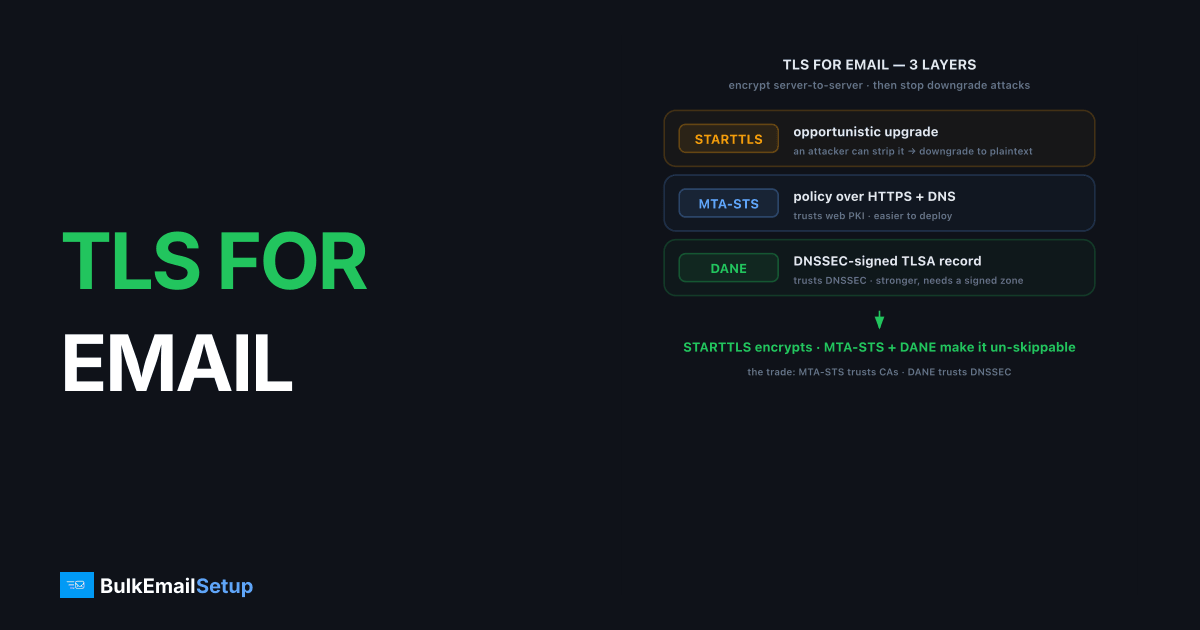
TLS for email is Transport Layer Security applied to the connection between mail servers, encrypting messages in transit so they cannot be read or tampered with on the wire. STARTTLS, MTA-STS, and DANE are three layers of that story: STARTTLS opportunistically upgrades a connection to encryption, while MTA-STS and DANE enforce it so an attacker cannot quietly downgrade you back to plaintext. They differ in mechanism, MTA-STS publishes an HTTPS-hosted policy plus a DNS record, and DANE publishes DNSSEC-signed TLSA records.
What does STARTTLS do, and what is its weakness?
STARTTLS is an SMTP command that upgrades an existing plaintext connection to an encrypted TLS one. The sending server connects on a normal port, issues STARTTLS, and both sides switch to encryption before the message is sent. Most server-to-server email today uses STARTTLS, and it is the default for submission on port 587.
Its weakness is that it is opportunistic. Because the upgrade happens over an initially plaintext connection, an active attacker can strip the STARTTLS advertisement, forcing the connection to stay unencrypted. This is the downgrade attack MTA-STS and DANE exist to prevent. STARTTLS differs from implicit TLS (port 465), where encryption is on from the first byte, covered in STARTTLS vs implicit TLS.
How does MTA-STS enforce TLS?
MTA-STS (Mail Transfer Agent Strict Transport Security), specified in RFC 8461, lets a receiving domain publish a policy that says "always use TLS with a valid certificate to reach me." Senders that support MTA-STS fetch that policy and refuse to deliver over an unencrypted or untrusted connection, closing the STARTTLS downgrade hole.
MTA-STS uses two pieces: a DNS TXT record at _mta-sts.yourdomain.com that signals a policy exists, and the policy file itself hosted over HTTPS at https://mta-sts.yourdomain.com/.well-known/mta-sts.txt. The HTTPS certificate is what authenticates the policy, so no DNSSEC is required. That makes MTA-STS the easier of the two to deploy. The full setup is in MTA-STS setup guide.
How is DANE different from MTA-STS?
DANE (DNS-Based Authentication of Named Entities) also enforces TLS, but it anchors trust in DNSSEC instead of HTTPS. The receiving domain publishes a TLSA record in DNS that specifies which certificate or public key its mail server must present. Because the record is DNSSEC-signed, a sender can verify it has not been forged, and then refuses to connect if the server's certificate does not match.
The core trade-off is what each one trusts. MTA-STS trusts the public web PKI (the same certificate authorities that secure HTTPS). DANE trusts DNSSEC. DANE is stronger because it removes reliance on the CA system, but it only works if your DNS zone is DNSSEC-signed, which many are not. That single prerequisite is why MTA-STS sees wider adoption.
Which should you actually deploy?
Deploy STARTTLS always (it is effectively automatic), then add MTA-STS as the practical enforcement layer, and DANE if your DNS is already DNSSEC-signed. The comparison:
| Factor | STARTTLS | MTA-STS | DANE |
|---|---|---|---|
| Encrypts in transit | Yes | Yes | Yes |
| Prevents downgrade | No | Yes | Yes |
| Trust anchor | None | HTTPS / web PKI | DNSSEC |
| Needs DNSSEC | No | No | Yes |
| Deploy effort | Built in | Moderate | Higher |
Neither MTA-STS nor DANE is required to send mail, and STARTTLS alone satisfies the TLS expectation in Gmail and Yahoo's bulk sender rules. But enforcing TLS signals a well-run domain and protects your recipients. Most senders start with MTA-STS. If you run your own DNSSEC-signed zone, deploy both, since they coexist cleanly.
How do you deploy MTA-STS step by step?
Deploy MTA-STS in three pieces, then move from testing to enforce mode once you confirm nothing breaks. The order matters: publish in testing first so you collect failure reports without bouncing real mail.
- Host the policy file at
https://mta-sts.yourdomain.com/.well-known/mta-sts.txt. It lists your MX hosts, a mode (testingorenforce), and amax_age. The HTTPS certificate must be valid, since that is the trust anchor. - Publish the policy DNS record, a TXT at
_mta-sts.yourdomain.comcontainingv=STSv1; id=.... Change theidwhenever you update the policy so senders refetch it. - Add a TLS-RPT record (optional but recommended), a TXT at
_smtp._tls.yourdomain.compointing to a reporting address. This is how you learn about TLS failures before flipping to enforce.
Start with mode: testing. Watch the TLS-RPT reports for a week or two. If no legitimate senders are failing TLS to your MX, switch the policy file to mode: enforce and bump the id. The full walkthrough lives in MTA-STS setup guide.
How do you verify TLS is actually working?
Verify TLS by checking the SMTP transaction directly and by reading your TLS-RPT reports. A quick manual test: connect to your MX on port 25, issue EHLO, and confirm the server advertises 250-STARTTLS in its response. If that line is missing, STARTTLS is not offered, and no enforcement layer can help.
For ongoing assurance, TLS-RPT is the monitoring channel. Receivers that support it email you (or your reporting endpoint) a daily summary of successful and failed TLS connections to your domain. A spike in failures usually means an expired certificate or a misconfigured MX, both of which silently break enforcement. The most common real-world break we see is an MTA-STS policy left in enforce while a certificate quietly expired, which blocks inbound mail until someone notices. TLS-RPT is what tells you within a day instead of a week.
Which TLS version and ciphers should your server offer?
The TLS version matters as much as having TLS at all. Offer TLS 1.2 and TLS 1.3, and disable the long-dead SSLv3, TLS 1.0, and TLS 1.1, which carry known weaknesses and signal a neglected server. TLS 1.3 is the current target: it is faster, drops the broken ciphers by design, and is widely supported across major mailbox providers in 2026.
One nuance trips people up, and we have been burned by it directly. After tightening an MX to TLS 1.2 and 1.3 only, we watched a handful of legitimate senders on old appliance software drop to plaintext delivery instead of negotiating up, because their stack had no 1.2 support and SMTP fell back rather than failing. The mail still arrived, just unencrypted, which defeats the point. Server-to-server SMTP usually negotiates TLS opportunistically, so if you disable older versions too aggressively on the receiving side, a sender stuck on ancient software may fall back to plaintext rather than fail, which is worse than a slightly older cipher. The balance most senders strike: require modern TLS on submission (port 587 and 465) where you control both ends, and keep MX-side negotiation permissive enough to stay encrypted with the wider internet while still preferring 1.2 and 1.3. Enforcement layers like MTA-STS sit on top of this to stop the downgrade entirely.
How BulkEmailSetup helps
Getting TLS, authentication, and DNS records right is fiddly, and downgrade protection is easy to skip. Our dedicated SMTP setup configures STARTTLS correctly and helps you publish MTA-STS (and DANE where your DNS supports it), alongside SPF, DKIM, DMARC, and PTR. That is one less security gap to leave open. See plans on our pricing page.
Frequently asked questions
What is TLS in email?
TLS (Transport Layer Security) encrypts the connection between mail servers so messages cannot be read or altered in transit. It does not encrypt the message at rest, only the hop between servers. Most modern email uses TLS by default.
What is the difference between STARTTLS, MTA-STS, and DANE?
STARTTLS opportunistically upgrades a plaintext connection to TLS but can be stripped by an attacker. MTA-STS and DANE both enforce TLS so it cannot be downgraded. MTA-STS uses an HTTPS-hosted policy, while DANE uses DNSSEC-signed TLSA records.
Do I need MTA-STS or DANE to send email?
No, neither is required to send mail, and STARTTLS alone works. But Gmail and Yahoo expect TLS, and enforcing it with MTA-STS or DANE improves security and signals a well-run sending domain to receivers.
Is MTA-STS or DANE better?
Neither is strictly better; they solve the same problem differently. MTA-STS is easier to deploy because it does not require DNSSEC. DANE is stronger because it ties certificates to DNSSEC, but it depends on your DNS being DNSSEC-signed.


