
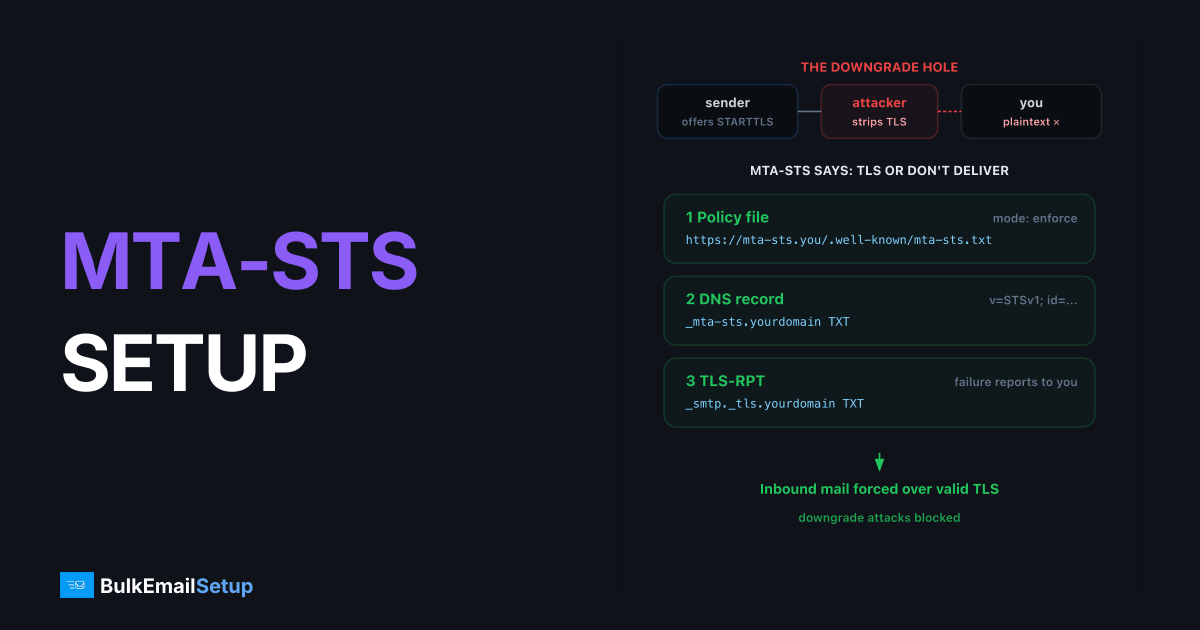
MTA-STS (RFC 8461) lets your domain publish a policy telling sending mail servers: deliver to us over TLS with a valid certificate, or don't deliver at all. It closes the STARTTLS downgrade hole, where an on-path attacker strips the encryption offer and reads mail in plaintext. Setup is three pieces: a policy file served at https://mta-sts.yourdomain.com/.well-known/mta-sts.txt, a _mta-sts TXT record in DNS, and (strongly recommended) a TLS-RPT record so senders can tell you when delivery fails.
Why opportunistic STARTTLS isn't enough
Classic SMTP encryption is opportunistic: the receiving server advertises 250-STARTTLS, and the sender upgrades if it feels like it. Two failure modes:
- Downgrade: an active attacker strips the STARTTLS capability from the banner; both sides shrug and continue in plaintext.
- No validation: even when TLS happens, senders historically accepted any certificate, self-signed, expired, wrong hostname.
MTA-STS fixes both. A compliant sender (Gmail and Outlook.com both are) fetches your policy over HTTPS, caches it, and from then on refuses plaintext delivery and refuses invalid certificates for your MX hosts.
The three components
| Component | Where it lives | What it does |
|---|---|---|
| Policy file | https://mta-sts.yourdomain.com/.well-known/mta-sts.txt | The actual rules: mode, allowed MX hosts, cache lifetime |
_mta-sts TXT record | DNS | Signals a policy exists; its id= changing tells senders to re-fetch |
_smtp._tls TXT record (TLS-RPT) | DNS | Where senders send failure reports |
Step 1, Write the policy file
Plain text, exact filename mta-sts.txt:
version: STSv1
mode: testing
mx: mail.yourdomain.com
max_age: 86400
Field by field:
mode,none(policy exists but does nothing),testing(senders report failures via TLS-RPT but still deliver),enforce(failures = no delivery). Start withtesting.mx, one line per MX hostname. Wildcards cover server fleets:mx: *.mail.protection.outlook.comfor Microsoft 365. These must match your actual MX records.max_age, policy cache lifetime in seconds. Use 86400 (1 day) while testing; raise to 604800-1209600 (1-2 weeks) once enforcing. Longer caching = longer protection if your web host hiccups, but slower policy changes.
Step 2, Serve it over HTTPS
The file must be reachable at exactly:
https://mta-sts.yourdomain.com/.well-known/mta-sts.txt
Requirements: valid certificate for mta-sts.yourdomain.com, no redirects, Content-Type: text/plain. Senders that can't fetch it (and have no cached policy) just fall back to opportunistic TLS, but a fetch failure while a policy is cached, in enforce mode, can block delivery, so host it somewhere boring and reliable.
Cloudflare Pages, a tiny nginx vhost, or an S3+CloudFront bucket all work. With nginx:
server {
    listen 443 ssl;
    server_name mta-sts.yourdomain.com;
    location = /.well-known/mta-sts.txt {
        default_type text/plain;
        return 200 "version: STSv1\nmode: testing\nmx: mail.yourdomain.com\nmax_age: 86400\n";
    }
}
Step 3, Publish the DNS records
; Policy discovery - id is an arbitrary version token
_mta-sts.yourdomain.com.   TXT  "v=STSv1; id=20260617T120000"

; TLS failure reporting
_smtp._tls.yourdomain.com. TXT  "v=TLSRPTv1; rua=mailto:[email protected]"
The id value is opaque, senders only compare it to the cached value. Change it every time you change the policy file, or senders will keep using their cached copy until max_age expires. A timestamp makes a convenient id.
Step 4, Verify
# DNS records present?
dig +short TXT _mta-sts.yourdomain.com
dig +short TXT _smtp._tls.yourdomain.com

# Policy fetchable with a valid cert?
curl -s https://mta-sts.yourdomain.com/.well-known/mta-sts.txt

# Does the MX actually do TLS with a matching cert?
openssl s_client -starttls smtp -connect mail.yourdomain.com:25 \
  -servername mail.yourdomain.com </dev/null 2>/dev/null | openssl x509 -noout -subject -dates
The openssl check matters most: in enforce mode, the certificate presented by each MX must be valid (trusted CA, unexpired) and match the MX hostname. A Let's Encrypt cert on the mail server solves this for free.
Step 5, Testing mode, then enforce
Run mode: testing for two to four weeks and read the TLS-RPT reports (daily JSON summaries from Gmail and others). They list every session that would have failed under enforcement: certificate mismatches, expired certs, policy fetch errors.
When reports run clean:
- Edit the policy file:
mode: enforce, raisemax_ageto 604800+. - Bump the
id=in the_mta-stsTXT record.
Operational gotchas
- Changing MX providers while enforcing. Senders may cache your policy for up to
max_age. Before migrating MX, drop tomode: noneor add the new MX hosts to the policy, bumpid, and wait out the oldmax_age. - Letting the mail server cert expire. Under enforce, an expired cert stops compliant senders cold. Automate renewal (certbot) and monitor expiry.
- Forgetting the policy host's cert. The
mta-sts.subdomain needs its own valid HTTPS cert too. - Expecting MTA-STS to fix spam placement. It's transport security, not reputation. Inbox placement is the domain of authentication and sending practices, see why mail lands in spam and the SPF/DKIM/DMARC guide.
MTA-STS pairs naturally with a tight DMARC policy: DMARC authenticates who sent the mail, MTA-STS guarantees nobody read or altered it in transit to you.
How BulkEmailSetup helps
We set up MTA-STS, TLS-RPT, SPF, DKIM, DMARC, and PTR as part of every dedicated SMTP server deployment, policy hosting, certificates, and the testing-to-enforce transition included. See pricing for managed plans.
Frequently asked questions
What does MTA-STS do?
MTA-STS lets a domain publish a policy requiring that inbound mail be delivered over TLS to specific MX hosts with valid certificates. Sending servers that support it refuse to deliver in plaintext, blocking STARTTLS downgrade attacks.
Do I need MTA-STS if my server already supports STARTTLS?
Yes, if you care about active attackers. STARTTLS is opportunistic, a man-in-the-middle can strip the STARTTLS offer and force plaintext. MTA-STS makes encryption mandatory instead of best-effort.
What's the difference between MTA-STS and DANE?
Both enforce TLS for SMTP. DANE relies on DNSSEC and TLSA records; MTA-STS relies on HTTPS and a policy file, so it works without DNSSEC. Gmail and Outlook.com support MTA-STS; DANE adoption is strongest among DNSSEC-enabled European providers.
What is TLS-RPT?
TLS-RPT (RFC 8460) is a companion standard: a TXT record at _smtp._tls.yourdomain.com where senders report TLS delivery failures, including failed MTA-STS policy fetches. It's how you find out your policy is breaking delivery.
Does MTA-STS affect the mail I send?
No. MTA-STS protects mail coming to your domain. Your outbound mail is governed by the recipient domains' policies. Gmail publishes one in enforce mode, so your server must already deliver to Gmail over valid TLS.


