SMTP for SaaS transactional email is a sending setup tuned for speed and reliability: password resets, receipts, verification codes, and alerts that must reach the inbox within seconds, not minutes. At scale, that means full SMTP access, correct SPF, DKIM, and DMARC, a dedicated IP you control once volume justifies it, and transactional traffic kept separate from marketing. Get those right and your "reset your password" email lands before the user tabs back to your app.
Transactional email is different from everything else you send. A user is sitting there, waiting. If the verification code is late or in spam, they churn before they finish signup. So the bar is higher than for a newsletter, and the infrastructure has to match.
Why transactional email breaks at SaaS scale
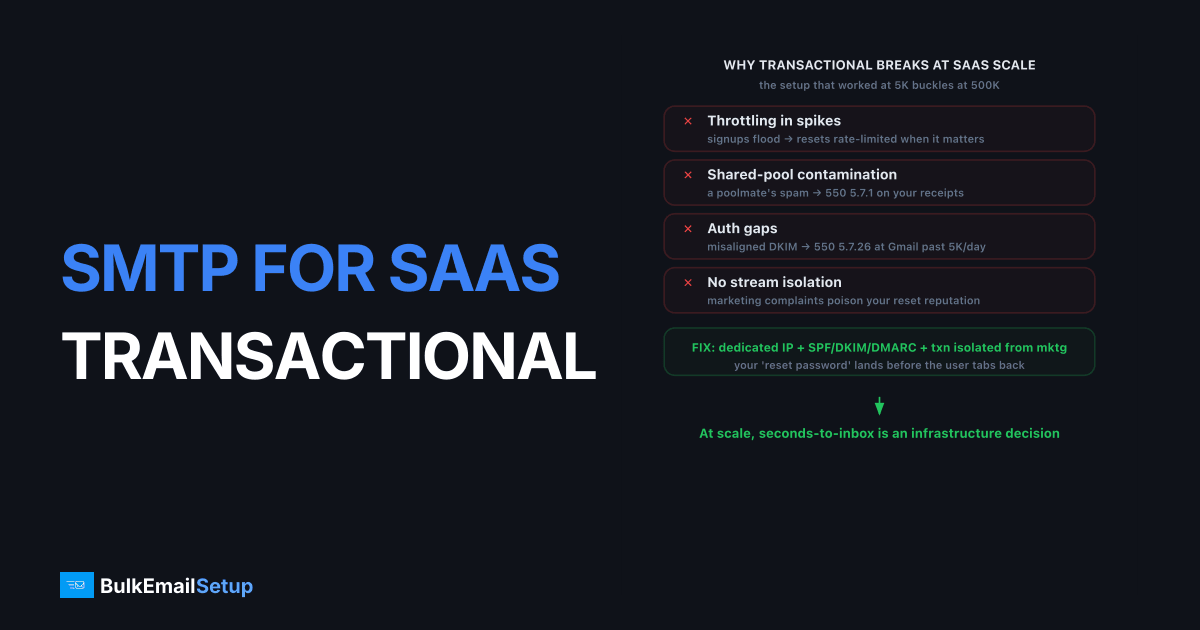
Transactional email fails at scale for one main reason: the sending setup that worked at 5,000 messages a month buckles when you hit 500,000. Shared ESP pools throttle, rate limits bite during signup spikes, and you inherit blocklist hits from other tenants. Gmail and Yahoo now enforce strict bulk-sender rules above 5,000 messages a day, set out in Gmail's bulk sender guidelines and Yahoo's sender best practices, so authentication gaps that were tolerated suddenly bounce.
The most common failure modes:
- Throttling during spikes. A product launch or a marketing email drives a flood of signups, and your transactional stream gets rate-limited right when it matters most.
- Shared-pool contamination. On a cheap shared IP, someone else's spam run gets the pool listed on Spamhaus, and your receipts start hitting
550 5.7.1. - Auth gaps. Missing or misaligned DKIM triggers
550 5.7.26(unauthenticated) at Gmail once you cross the bulk threshold. - No stream isolation. Marketing complaints poison the reputation that delivers your resets.
Shared ESP vs dedicated SMTP for transactional SaaS
The honest comparison: a shared ESP is fine early, and dedicated SMTP wins once volume and reliability demands grow. Below is how the two stack up for a SaaS sender pushing meaningful transactional volume.
| Factor | Shared ESP plan | Dedicated SMTP server |
|---|---|---|
| Reputation | Shared with other tenants | Yours alone |
| Blocklist risk | Inherited from poolmates | Only your own sending |
| Rate limits | Plan tier caps you | Your IP, your throughput |
| Cost model | Per-email, overage fees | Flat monthly |
| Stream isolation | Limited | Full (separate IPs/subdomains) |
| SMTP access | Often restricted | Full credentials, ports 587/465/2525 |
| Setup effort | Low | Moderate (we handle warm-up) |
The break point is roughly 50,000 consistent sends a month. Below it, a good shared pool stays warm for you and skips the warm-up burden. Above it, the dedicated IP versus shared IP tradeoff tilts toward control.
How to set up SMTP for transactional reliability
Reliable transactional SMTP rests on three pillars: correct authentication, stream separation, and a warmed sending IP. Skip any one and inbox placement gets shaky exactly when your users are watching.
Get authentication right first
Configure SPF, DKIM, and DMARC before you send a single production message. Gmail and Yahoo require all three above 5,000 messages a day, and a misaligned DKIM signature is the fastest route to spam. Use 2048-bit DKIM keys, keep your SPF record under the 10-lookup limit to avoid PermError, and start DMARC at p=none to monitor before you enforce. Our SPF, DKIM, and DMARC guide walks through each record.
Separate transactional from marketing
Send password resets and receipts from a dedicated IP or a transactional subdomain like notify.yourapp.com. This protects the stream that absolutely must arrive. A bad marketing send can tank a reputation in a day; you do not want that reputation delivering your two-factor codes.
Warm the IP, then hold it steady
A new dedicated IP starts with zero history. Ramp it from roughly 50 to 100 messages a day up to full volume over four to six weeks, following an IP warm-up schedule. Transactional volume tends to be steady, which is ideal: mailbox providers reward consistency, and your reputation stabilizes faster than a bursty marketing sender's would.
What about latency and throughput?
Transactional email needs low latency and headroom for spikes, and SMTP delivers both when the path is clean. The protocol itself adds milliseconds; real delays come from greylisting (451 4.7.1), connection throttling (421 4.7.0), or reputation-driven deferrals. A dedicated IP with clean history negotiates higher per-hour ceilings at Microsoft and Yahoo than a shared sender can reach, so signup floods clear faster.
Plan for your peak, not your average. If a launch can trigger 10x normal signups in an hour, your sending path has to absorb that without queuing resets for ten minutes. Full SMTP access plus a dedicated IP means the throughput ceiling is yours to grow, not a plan tier someone else sets.
A concrete example from a setup we ran: a SaaS sender on a shared ESP plan saw password resets accepted by the relay in under 100 milliseconds on a normal day, but during a Product Hunt spike the same resets queued for six to eight minutes because the plan tier capped concurrent connections. Moving the transactional stream to a dedicated IP they controlled put accept-to-relay time back under a second through the spike. The protocol was never slow. The plan-tier connection cap was the bottleneck, and it only showed up under load.
Honesty matters here: infrastructure gets you fast, authenticated, isolated delivery. Inbox placement still depends on your sending behavior, your complaint rate (keep it under 0.3%, ideally under 0.1%), and clean lists. No provider can promise 100% inbox.
What should SaaS teams monitor in production?
Monitor the signals that predict a transactional failure before users feel it: bounce codes, deferral patterns, complaint rate, and authentication pass rates. Transactional mail is steady, so a sudden change in any of these is a real signal, not noise. The earlier you catch a reputation dip, the less likely a password reset ever lands in spam.
What to watch, and the threshold that should worry you:
| Signal | Watch for | Why it matters |
|---|---|---|
| Complaint rate | Creeping toward 0.3% | Above it, Gmail and Yahoo start throttling |
Deferrals (421 4.7.0, 421 4.7.28) | A sudden rise | IP being rate-limited, resets queuing |
Auth failures (550 5.7.26) | Any at all | DKIM/SPF broke, often after a DNS change |
Hard bounces (550 5.1.1) | Climbing rate | List or address quality slipping |
| Blocklist status | New listings | Shared-pool contamination or your own send |
The failure we see most often isn't dramatic. It's a quiet DNS change that breaks DKIM alignment, and nobody notices until receipts start failing authentication days later. A simple alert on auth pass rate would have caught it the same hour. Transactional streams are steady enough that monitoring them is genuinely effective: deviations stand out because the baseline is so flat. Pair that with Google Postmaster Tools for Gmail-side reputation visibility, and most problems surface before a user ever does.
How BulkEmailSetup helps
We give SaaS teams a dedicated SMTP server with a dedicated IP you control, full SMTP access on ports 587, 465, and 2525, and SPF, DKIM, DMARC, and PTR configured correctly from day one. We run the warm-up and monitor reputation so your transactional stream stays fast and isolated as you scale. See plans on our pricing page.
Frequently asked questions
Do I need a dedicated IP for SaaS transactional email?
Once you consistently send above roughly 50,000 transactional emails a month, a dedicated IP usually pays off. It isolates your reputation from other senders so a stranger's spam run can't delay your password resets. Below that volume, a quality shared pool often delivers better.
Should transactional and marketing email share an IP?
No. Keep them separate. A marketing campaign that triggers complaints can drag down the reputation that delivers your receipts and resets. Most serious SaaS teams run transactional on one dedicated IP or subdomain and marketing on another.
What latency should I expect from SMTP for transactional email?
A healthy SMTP path accepts and relays a message in well under a second, with the email arriving in the recipient inbox in seconds. Delays usually come from greylisting, throttling, or reputation problems, not the SMTP protocol itself.
SMTP or API for transactional email?
Both work. SMTP is universal, every language and framework speaks it, and it needs no vendor SDK. An API can be slightly faster to integrate and gives richer event data. Many teams start on SMTP and add API webhooks later for event tracking.