
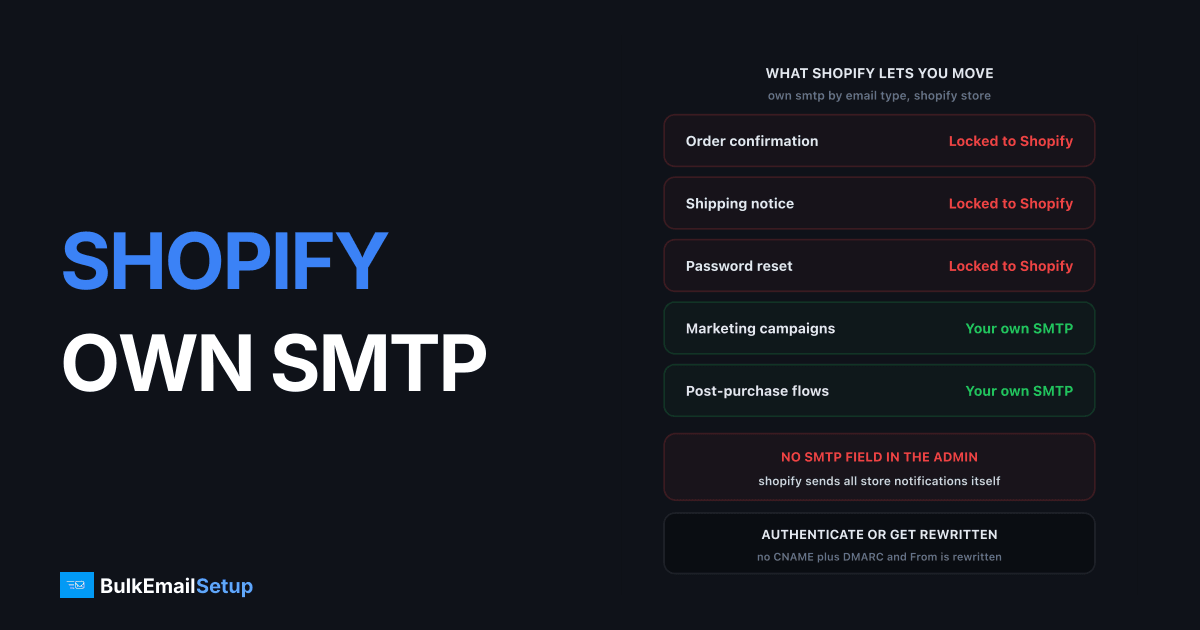
Shopify does not let you point store notifications at your own SMTP server. There is no host, port, or password field in the admin, and order confirmations, shipping updates, and refund notices all leave from Shopify's own infrastructure. What you do control is the sender address and the DNS authentication behind it, which is the difference between a customer seeing [email protected] and seeing [email protected]. Everything outside store notifications, meaning marketing, newsletters, and post-purchase flows, can move to a mailer you run.
This is the single biggest difference between Shopify and WooCommerce. On WooCommerce you install an SMTP plugin, type in credentials, and every store email routes through your server. Shopify is a hosted platform, and the mail path is part of what it hosts.
What you can and cannot move off Shopify
Shopify splits into two halves, and only one of them is yours to route.
| Email type | Sent by | Can you use your own SMTP |
|---|---|---|
| Order confirmation | Shopify | No |
| Shipping and fulfillment notice | Shopify | No |
| Refund and cancellation notice | Shopify | No |
| Abandoned checkout (Shopify native) | Shopify | No |
| Customer account invite, password reset | Shopify | No |
| Marketing campaigns and newsletters | Shopify Email or an app | Yes, via export or headless |
| Abandoned cart via a third-party app | The app's infrastructure | Depends on the app |
| Post-purchase and win-back flows | Whatever you point at them | Yes |
The locked half is small in volume and large in importance. A store doing 3,000 orders a month sends maybe 9,000 notification emails, all of which have to land. The movable half is where volume and cost live: a 60,000-contact list mailed four times a month is 240,000 sends, none of which Shopify has to touch.
I would not fight the locked half. Shopify's sending reputation for order mail is good, and the failure mode people actually hit is not Shopify's IPs, it is an unauthenticated domain producing a rewritten From address.
Authenticate the domain so Shopify sends as you
The one lever you have on Shopify's own sending is domain authentication, and it is not optional any more. Since 1 February 2024, if your sender domain is not authenticated with a DMARC record present, Shopify rewrites your From address to [email protected] so the mail still passes Gmail and Yahoo bulk sender rules. Your customers get their order confirmation from a Shopify address instead of yours.
The setup, from Shopify's own sender email documentation:
- Set your sender email in Settings, Notifications to an address on a domain you control.
- Add every CNAME record the admin modal shows you. The count varies, so add all of them, not the first two.
- Publish a DMARC record of at least
v=DMARC1; p=noneon_dmarc.yourstore.com.
_dmarc.yourstore.com. TXT "v=DMARC1; p=none; rua=mailto:[email protected]"
Shopify's docs state that the CNAMEs handle SPF for that sender address, so you do not add a separate SPF include for Shopify. If your domain was bought through Shopify, or is on Cloudflare, GoDaddy, or IONOS, Shopify can write the records itself.
One thing worth planning before you type anything: which domain you authenticate. Sending Shopify notifications from the root domain and your marketing from a subdomain keeps the two reputations apart, which is the same argument as root domain versus subdomain for sending.
Why alignment matters even when Shopify sends the mail
Domain alignment is worth doing precisely because you cannot control the IP. Gmail and Yahoo score the sending domain separately from the sending IP, so an authenticated yourstore.com builds a reputation that follows you to whatever you send from next, including the mailer you run yourself.
| Signal | Unauthenticated Shopify sending | Authenticated Shopify sending |
|---|---|---|
| Visible From address | [email protected] | [email protected] |
| DKIM alignment to your domain | No | Yes |
| SPF handled | By Shopify's own domain | By Shopify CNAMEs, aligned |
| DMARC pass on your domain | Fails alignment | Passes |
| Domain reputation built | Shopify's, not yours | Yours |
| Reply-to a real mailbox | Awkward | Works |
| Brand recognition in inbox list | Low | High |
The domain reputation row is the one people undervalue. Two years of clean order mail on yourstore.com is an asset when you later warm your own IPs for marketing, because Gmail already trusts the domain even though the IP is new. Skip authentication and you spend two years building reputation for shopifyemail.com.
Gmail's bulk sender guidelines require SPF, DKIM, DMARC, one-click unsubscribe, and a spam complaint rate under 0.3% once you cross 5,000 messages a day to Gmail. Order confirmations count toward that 5,000.
Shopify Email as the bundled option
Shopify Email, now branded Shopify Messaging, is the default marketing path and it is cheap at small volume and dull at large volume. Every store on Basic, Grow, Advanced, or Plus gets 10,000 free emails a month, and abandoned checkout automations are free on top and do not count against the allowance.
Past the free block, per Shopify's email pricing page:
| Volume band | Rate per 1,000 |
|---|---|
| First 10,000 a month | Free |
| Up to 300,000 | $1.00 |
| 300,000 to 750,000 | $0.65 |
| Above 750,000 | $0.55 |
Unused emails do not roll over. At $1 per 1,000 it undercuts most ESPs on the raw send, and there is no contact-count charge, which is the fee that makes Klaviyo bills climb. The catch is the same as any bundled tool: no dedicated IP, no control over the sending reputation, limited automation depth, and the same shared-pool policy exposure as any relay. For a store sending 30,000 marketing emails a month, that is a $20 bill and not worth thinking about.
The app route, and what it does not give you
Klaviyo, Omnisend, Mailchimp, and the rest send through their own infrastructure. Installing one does not put your SMTP server in the path. This trips people up because the apps talk about "your sending domain" and "your dedicated IP", both of which mean something narrower than owning the server.
| Route | Who runs the MTA | Whose IP | Contact-based billing |
|---|---|---|---|
| Shopify Email | Shopify | Shopify's pool | No, per email only |
| Klaviyo | Klaviyo | Shared, dedicated on request | Yes |
| Omnisend | Omnisend | Shared pool | Yes |
| Mailchimp | Intuit Mailchimp | Shared pool | Yes |
| Your own SMTP server | You | Yours, dedicated | No |
Klaviyo will sell you a dedicated IP and generally suggests one above roughly 100,000 sends a month, but it stays inside Klaviyo's stack. That is fine until the bill is the problem, which is the usual trigger for looking at Klaviyo alternatives when the bill gets too high. Contact-based pricing means an inactive 80,000-address list costs the same as an engaged one.
The genuinely-your-own-SMTP route
There are two ways to get Shopify data onto your own mail server, and both keep order notifications on Shopify.
Export and mail from your own stack. Pull customer and order data out of Shopify by CSV or the Admin API, load it into a mailer you run (Mautic, Mailwizz, Sendy, or your own code), and point that at your SMTP server on port 587. You own the IPs, the reputation, the logs, and the suppression list. You take on the list hygiene and the warm-up. This covers newsletters, win-back, post-purchase education, and cross-sell.
Headless. With a headless storefront you write your own checkout and post-purchase flows, so anything you generate yourself can go through your SMTP server. Shopify still sends the notifications tied to its order objects, so this narrows the locked half rather than removing it.
Neither one gets you order confirmations. Anyone telling you a plugin will reroute Shopify's order emails to your relay is describing something Shopify does not expose. The honest version is that you move the 90% of volume that is marketing and leave the 10% that is notifications where it is.
Cost at 100K and 500K a month
Marketing volume is where the decision has money in it. Two scenarios, assuming a 50,000-contact list, at 100,000 and 500,000 sends a month.
| Route | 100K/month | 500K/month | Notes |
|---|---|---|---|
| Shopify Email | ~$90 | ~$420 | 10K free, then tiered |
| Klaviyo (50K contacts) | ~$720+ | ~$720+ | Contact-tier priced, sends bundled |
| Mailchimp Standard (50K) | ~$450+ | Overage charged | Contact-tier priced |
| Amazon SES | ~$10 | ~$50 | $0.10 per 1,000, no support or UI |
| Own SMTP server (BulkEmailSetup) | one-time | one-time | Server plus IPs, no per-email fee |
Shopify Email is genuinely hard to beat on raw send price for a store under about 300,000 a month, and I say that as someone selling the alternative. The reasons to move are control, not cents: your own IP so a bad campaign does not sit in a shared pool, full logs, no policy team, and no per-email meter as you grow. Once you are sending seven figures a year, a one-time server cost against a recurring per-1,000 charge changes the arithmetic. There is a fuller breakdown in what 100,000 emails a month actually costs.
Decision guide
| Your situation | What to do |
|---|---|
| Under 10,000 marketing emails a month | Shopify Email, free tier, authenticate the domain |
| 10,000 to 100,000, no flow complexity | Shopify Email at $1 per 1,000 |
| Need deep segmentation and flows | Klaviyo or Omnisend, accept their infrastructure |
| Klaviyo bill above ~$700 a month | Export to your own mailer on your own SMTP |
| Above 300,000 marketing sends a month | Own SMTP for marketing, Shopify keeps notifications |
| Order emails landing in spam | Fix domain authentication, not the sending path |
That last row is the common one. A store convinced it needs custom SMTP for order confirmations almost always has an unauthenticated sender domain and a rewritten From address instead. Fix the CNAMEs and the DMARC record first, then decide about marketing.
If you also run WooCommerce or are weighing a move, the routing story there is completely different, since WooCommerce lets you swap the SMTP path outright. That is covered in SMTP for WooCommerce at high volume, and the stream separation logic that applies to any store is in SMTP for ecommerce abandoned-cart and receipts.
We keep it honest: nothing here replaces Shopify's order-notification sender, because Shopify does not offer that. What a dedicated server changes is the marketing half, where the volume, the cost, and the reputation risk actually live.
How BulkEmailSetup helps
We build the dedicated SMTP infrastructure for the half of your Shopify email you can actually move: your own server, your own IPs, SPF, DKIM, DMARC, and PTR configured correctly, plus warm-up before your peak season. Your Shopify order notifications stay on Shopify, authenticated to your domain, while campaigns and post-purchase flows run from a mailer you control with no per-email meter.
Basic is $549 one-time, covering 1 SMTP server, 3 dedicated IPs, 25,000 emails/day and unlimited contacts. Higher tiers scale to 15 IPs and 200,000 emails/day. See pricing, or read Klaviyo vs a dedicated SMTP server for the direct comparison.
Frequently asked questions
Can I use my own SMTP server for Shopify order confirmation emails?
No. Shopify sends order confirmations, shipping updates, and every other store notification from its own infrastructure, and the admin has no SMTP host, port, or credentials field. What you control is the sender address and the DNS authentication behind it. Marketing and post-purchase flows are a different story and can be moved.
What does Shopify domain authentication actually do?
You add the CNAME records Shopify shows you in the admin, which point at Shopify's SPF and DKIM infrastructure, plus a DMARC record of at least `v=DMARC1; p=none`. That makes Shopify's mail pass authentication aligned to your domain, so your customers see your address instead of a Shopify one. Shopify's docs say the CNAMEs handle SPF, so no separate SPF TXT record is needed for it.
What happens if I skip Shopify domain authentication?
Since 1 February 2024, Shopify rewrites your sender address to `[email protected]` if the domain is not authenticated with a DMARC record in place. Mail still goes out, but every order confirmation shows a Shopify address instead of yours, which hurts brand trust and reply rates.
How much does Shopify Email cost at high volume?
Every Basic, Grow, Advanced, and Plus store gets 10,000 free emails a month. Past that it is $1 per 1,000 up to 300,000, then $0.65 per 1,000 to 750,000, then $0.55 per 1,000. Abandoned checkout automations are free and do not count against the allowance. At 500,000 marketing emails a month that is roughly $420.
Do Klaviyo and Omnisend send through my own SMTP server?
No. Both send through their own sending infrastructure and shared or dedicated IP pools that they operate. You can buy a dedicated IP from Klaviyo, usually recommended above roughly 100,000 sends a month, but the MTA is still theirs. Genuinely your-own-SMTP means exporting the list to a mailer you run.
Does a dedicated SMTP server help a Shopify store at all?
Yes, for everything outside store notifications. Marketing campaigns, newsletters, win-back and post-purchase flows can run from a mailer you control on your own IPs, which is where the per-email cost and the reputation risk actually sit. Order confirmations stay on Shopify's path and stay authenticated to your domain.


