
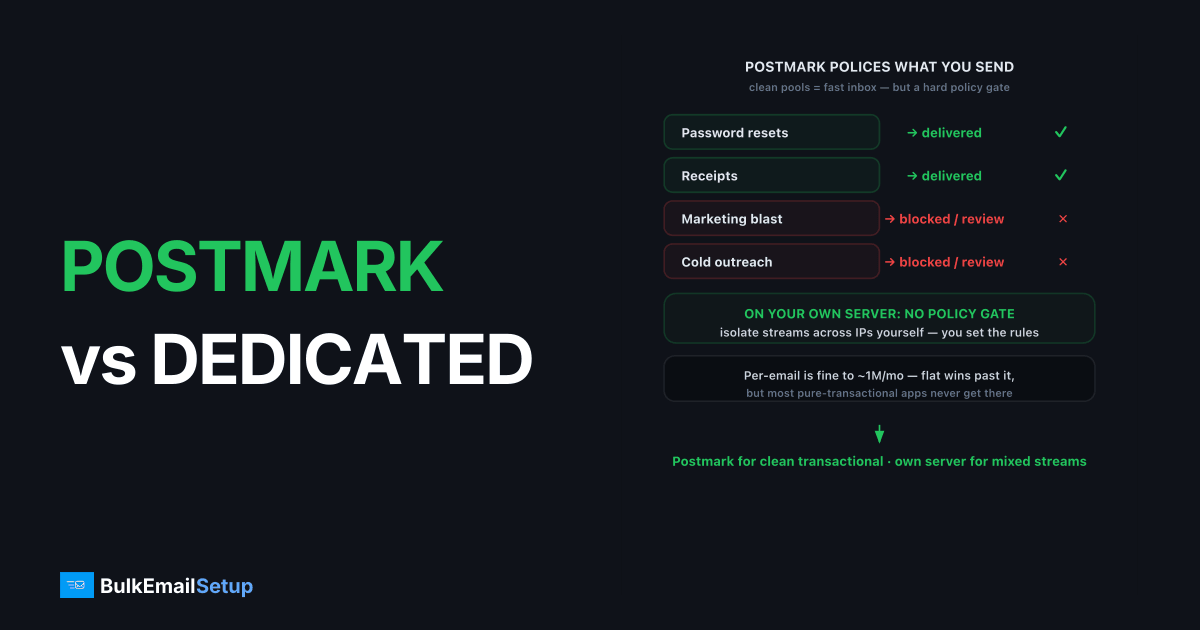
Postmark is the better choice for pure transactional email at low to moderate volume; a dedicated SMTP server wins for high-volume sending, mixed transactional plus marketing, or cold outreach Postmark won't allow. Postmark charges per email and keeps its pools clean by limiting what you send, which is why it delivers so reliably. A dedicated SMTP server gives you a flat monthly cost, full control of the IP and streams, and no policy ceiling on volume, in exchange for owning more of the setup.
What is Postmark built for?
Postmark is a transactional-first email service known for speed and deliverability, with strict separation between transactional and broadcast message streams. It bills per email and deliberately avoids being a bulk-marketing or cold-email platform. As of early 2026, Postmark's pricing scales by monthly email count, with a modest free allowance for testing.
That focus is its strength. Postmark polices senders aggressively, so its shared reputation stays clean and password resets land in milliseconds. The flip side: if you need volume marketing or outreach, you'll hit policy friction fast.
How do Postmark and a dedicated SMTP server compare?
| Factor | Postmark | Dedicated SMTP server |
|---|---|---|
| Price model | Per-email | Flat monthly |
| Best for | Transactional, low-moderate volume | High volume, mixed streams |
| Marketing / cold email | Discouraged or disallowed | Allowed, you control policy |
| Dedicated IP | Add-on, higher volume | Included, you control it |
| Setup effort | Minutes | Hours to days (or managed) |
| Deliverability control | Provider-managed, strict | Full: IP, warm-up, DNS, MTA |
| Support | Strong, plan-based | Provider or self-managed |
Figures are directional as of early 2026. Confirm current tiers on the Postmark pricing page.
When should you move from Postmark to a dedicated server?
Move when per-email cost dominates your bill, when you need bulk or marketing sends Postmark restricts, or when you want multiple isolated IPs. Per-email pricing is fine at 100K/month and gets expensive past 1M/month, because the cost rises with every send while a dedicated server stays flat. We compare the curve in cost per email: SMTP vs ESP.
Keeping transactional separate still matters. On a dedicated server you isolate streams yourself, one IP for password resets, another for campaigns, so a marketing mistake never delays a receipt. The same logic Postmark applies, but on infrastructure you own.
What about deliverability control?
Postmark's deliverability comes from discipline you don't manage; a dedicated server hands you that discipline directly. You configure SPF, DKIM, and DMARC, set the PTR record, and warm the IP yourself. That's more work and more control. When a block hits, you delist from your own logs instead of opening a ticket.
Deliverability is never guaranteed by the platform. A clean list, a complaint rate under 0.1%, and steady volume do more than any provider badge. No IP rescues a bad list.
What does the cost look like at volume?
Postmark's per-email model is fair for transactional bursts and gets heavy when volume turns steady and high. Because the bill scales with each message, doubling your sends roughly doubles your cost, while a flat dedicated plan stays put. Here's a directional comparison as of early 2026.
| Monthly volume | Postmark (per-email) | Dedicated SMTP server (flat) |
|---|---|---|
| 100K | Competitive, easy | Flat plan, likely more per email |
| 500K | Climbing, still fine | Roughly break-even territory |
| 1M | Notable line item | Flat plan usually cheaper per email |
| 5M+ | Largest cost driver | Flat plan, clearly cheaper per email |
The honest read: at pure transactional volumes most apps never reach the crossover, and Postmark stays a great deal. The math flips when you add high-volume marketing or product email that Postmark would rather you send elsewhere. At that point you're paying premium transactional rates for bulk traffic. We map the full curve in cost per email: SMTP vs ESP and cost to send 1 million emails per month.
Where is Postmark the better choice?
Postmark wins for pure transactional email where speed and inbox placement matter more than price. Password resets, receipts, and order confirmations land fast because Postmark keeps its pools clean and polices senders hard. If your volume is moderate and entirely transactional, that discipline is doing free work for you.
It's also the safer pick when you have no email engineer and can't babysit reputation. Postmark's strict separation of transactional and broadcast streams means you inherit a well-managed reputation without warming an IP or reading bounce logs. For a SaaS that sends 200K critical emails a month and nothing else, that hands-off reliability is worth the per-email rate.
Where does a dedicated SMTP server win?
A dedicated SMTP server wins when you need volume, mixed streams, or sends Postmark restricts. Cold outreach, large promotional campaigns, and high-volume marketing all sit outside Postmark's comfort zone, and pushing them through it invites policy friction or account review. On your own server, you set the policy.
Control is the other win. You isolate streams across separate IPs yourself, warm them on your own cadence, and read raw SMTP responses when something defers. A 421 4.7.0 too many connections or a destination throttle is something you tune directly, not a ticket you file. For senders mixing transactional and marketing at scale, owning that separation is cheaper and faster than splitting across two managed vendors.
How do you migrate from Postmark to a dedicated server?
Migration is a DNS-and-warm-up exercise, not a rewrite. Since both speak standard SMTP on ports 587 or 465, swapping host and credentials is the easy part. The careful part is reputation: a new dedicated IP starts cold and must warm over four to six weeks.
Run it in stages. Stand up the server with SPF, DKIM, DMARC, and PTR set correctly. Then split traffic: keep time-critical transactional mail on Postmark while you ramp marketing and bulk on the new IP using a warm-up schedule. Move the rest only once placement holds steady. Many teams keep Postmark for receipts and run their own server for everything else, which is a perfectly sensible end state.
Who should pick which?
| Your situation | Better pick |
|---|---|
| Pure transactional, moderate volume | Postmark |
| Speed-critical receipts and resets | Postmark |
| No email engineer | Postmark |
| Cold email or bulk marketing | Dedicated SMTP server |
| Mixed transactional plus marketing at scale | Dedicated SMTP server |
| Need multiple isolated IPs | Dedicated SMTP server |
| Per-email cost is your top line | Dedicated SMTP server |
What deliverability rules carry over no matter which you pick?
Leaving Postmark doesn't change what receivers demand. Gmail and Yahoo's bulk sender rules (5,000+ recipients a day) require SPF, DKIM, and DMARC all passing, one-click unsubscribe per RFC 8058, TLS, valid PTR or reverse DNS, and a spam complaint rate under 0.3%, ideally under 0.1%. Postmark enforces clean sending by policy; on a dedicated server you own that discipline yourself. Neither path lets you skip the thresholds.
The records carry technical floors. Your DKIM key should be 2048-bit, with 1024 the weak minimum. Your SPF must resolve in 10 DNS lookups or fewer, or receivers return a PermError and fail the check. DMARC steps through none, quarantine, then reject as authentication proves stable. The same discipline that makes Postmark reliable is the discipline you take on when you run your own server.
What goes wrong when senders switch badly?
The classic mistake is cutting all traffic to a cold IP at once. A new dedicated IP that suddenly pushes high volume looks like a spam cannon to Gmail, which answers with a 421 4.7.28 rate limit or a soft block to the spam folder. The fix is patience: ramp from roughly 50 to 100 a day and double every few days while watching placement.
The second mistake is losing Postmark's stream separation in the move. Postmark keeps transactional and broadcast pools strictly apart, which is why receipts always land. If you collapse everything onto one IP, a marketing complaint spike can delay password resets. Recreate the separation yourself: one IP for transactional, another for marketing, so a campaign mistake never touches time-critical mail. A switch is the worst moment to skip that design.
We watched exactly this play out on a customer who merged both streams onto one fresh IP to save the cost of a second. One promotional send pushed the complaint rate to roughly 0.5 percent for a day, and within hours Gmail started deferring their password-reset mail with 421 4.7.28. Splitting the streams back onto two IPs and re-warming took most of two weeks. The second IP would have cost a fraction of that.
How much volume justifies leaving Postmark?
For pure transactional sending, the honest answer is often never. Postmark's discipline and speed are worth the per-email rate, and most apps never reach a cost crossover on transactional mail alone. The trigger isn't a raw number; it's adding sends Postmark restricts, like bulk marketing or cold outreach, or watching per-email cost balloon when you push high marketing volume through a premium transactional service.
When that happens, consistency still rules the move. A dedicated IP needs steady volume to stay warm, with a rough floor near 50K a month. There's a staffing factor too: a dedicated server's controls only help if someone will read logs, tune warm-up, and manage DNS. Many teams reach a sensible split, keeping Postmark for receipts and resets while running their own server for everything high-volume. If you're weighing the line, how many emails before you need dedicated infrastructure covers the signals.
How BulkEmailSetup helps
If you've outgrown Postmark's transactional focus, or its per-email pricing, a dedicated SMTP server gives you flat-rate sending with full stream and IP control. We provision clean dedicated IPs, configure authentication correctly, and run the warm-up so transactional and marketing each get a clean lane. See plans on our pricing page.
Frequently asked questions
Is Postmark cheaper than a dedicated SMTP server?
For small to moderate transactional volume, Postmark's per-email pricing is competitive and easy. At high volume, especially mixed transactional plus marketing, a flat-rate dedicated SMTP server usually costs less per email and gives you more control over IPs and streams.
Can I send marketing email through Postmark?
Postmark focuses on transactional email and runs separate message streams for broadcasts. It actively discourages cold outreach and large promotional sends. For high-volume marketing or cold email, a dedicated SMTP server is a better fit.
Does Postmark give you a dedicated IP?
Postmark offers dedicated IPs on higher-volume plans, typically as an add-on. A dedicated SMTP server includes the IP and full DNS plus MTA control, so you own warm-up and reputation end to end.
Why is Postmark known for deliverability?
Postmark keeps its transactional and broadcast pools strictly separated and polices senders hard, which keeps shared IP reputation clean. That discipline is exactly why it limits the kind of bulk sending a dedicated SMTP server is built to handle.


