
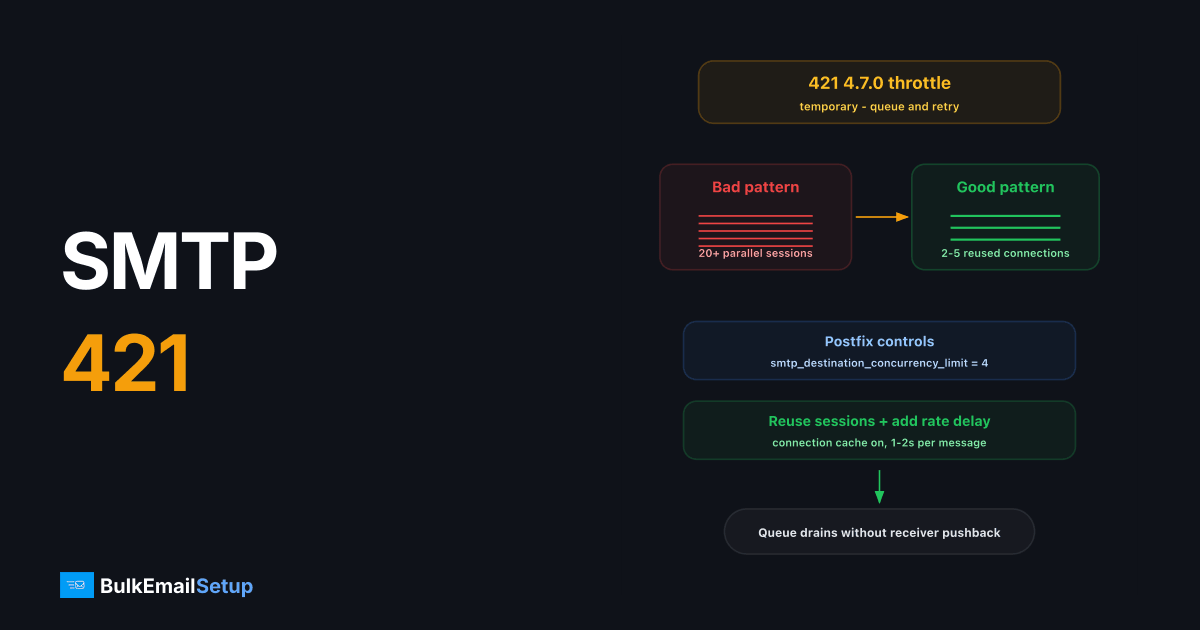
SMTP 421 4.7.0 is a temporary rejection meaning the receiving server is throttling you, most often because your server opened too many simultaneous connections or pushed messages faster than the receiver allows from one IP. The fix is to lower your MTA's per-destination concurrency (2-5 connections), send multiple messages per connection, and let the queue retry; the error clears on its own once your sending rate fits the receiver's limits.
Temporary vs permanent: why the 4 matters
The leading 4 makes this a soft failure. Your MTA keeps the message in its queue and retries on a backoff schedule, nothing is lost yet. It only becomes a problem when 421s persist for days (messages expire from the queue, default 5 days in Postfix) or when the receiver escalates a chronic offender to a permanent 550 block.
Common variants by provider
| Provider | Typical message | Usual cause |
|---|---|---|
| Gmail | 421 4.7.0 Try again later, closing connection | IP reputation throttle or connection flood |
| Microsoft 365 | 421 4.3.2 STOREDRV; mailbox server is too busy / connection-limit deferrals | Receiver-side load or per-IP connection cap |
| Yahoo | 421 Max message per connection reached | Too many messages on one session |
| Generic MTAs | 421 4.7.0 Too many connections from your IP | Exceeded smtpd_client_connection_count_limit-style caps |
Yahoo's volume-based deferrals (TS03/TS04) look similar but are reputation-driven, covered separately in our Yahoo 421 deferral guide.
Diagnose: are you actually flooding them?
Check what your server is doing right now:
# Postfix: deferred messages and the reason
mailq | head -40
grep "status=deferred" /var/log/mail.log | grep "4.7.0" | tail -20

# How many connections you have open to a destination
ss -tn state established '( dport = :25 )' | awk '{print $5}' | cut -d: -f1 | sort | uniq -c | sort -rn
If you see 20+ established connections to one provider's MX from a single IP, that's your answer. Big mailbox providers expect a handful of long-lived connections delivering many messages each, not a connection per message.
Fix: tune per-destination concurrency in Postfix
These are the settings that matter, in /etc/postfix/main.cf:
# Max parallel connections per destination domain (default 20 - too high for big ISPs)
smtp_destination_concurrency_limit = 4

# Deliver multiple messages per connection instead of reconnecting
smtp_connection_cache_on_demand = yes
smtp_connection_reuse_time_limit = 300s

# Slow down when a destination starts deferring
smtp_destination_rate_delay = 1s
For finer control, define per-provider transports in master.cf and route Gmail/Microsoft/Yahoo domains through them with their own concurrency and rate settings, 2 connections and a 1-2s rate delay per message is a safe baseline for a warming IP.
Reload and watch the queue drain:
postfix reload && postqueue -f
watch -n 30 'mailq | tail -1'
The 4xx class is defined as a transient failure in RFC 5321, which is why the correct response is to slow down and let the queue retry rather than to reconnect harder.
When 421 means reputation, not concurrency
If you get 421 4.7.0 Try again later from Gmail at low concurrency, the throttle is reputational: the IP is new, recently quiet, or has a complaint problem. Receivers use 421s as a probation mechanism, they accept some mail, defer the rest, and watch how the accepted portion performs.
The correct response is the same as a warm-up: respect the throttle, keep volume modest and consistent, and ramp gradually. Hammering retries every 60 seconds reads as bot behavior and prolongs the throttle. A proper IP warm-up schedule avoids this entire class of error by never exceeding what the IP's reputation supports.
Sometimes it's the receiver's own limit, not you
Small corporate mail servers and budget hosting MXs cap total inbound connections, not just yours. If 421s come from one small domain while Gmail and Microsoft accept everything, the receiver is simply busy, your queue will deliver on retry, and there's nothing to tune. The tell: the 421 appears at connection time before any SMTP command, and your concurrency to that host is already 1.
The reverse also applies if you run the receiving side: Postfix's smtpd_client_connection_count_limit (default 50) and anvil rate limits produce exactly this error for your inbound senders. Raise them deliberately, not reflexively, they're your own anti-flood protection.
Checklist
- Read the full 421 text in your mail log, concurrency wording vs "try again later" wording points to different fixes.
- Count open connections per destination; cap at 2-5 per IP.
- Enable connection reuse so each session delivers many messages.
- Add a per-destination rate delay if deferrals continue.
- If the IP is new or ramping, slow the ramp, 421s during warm-up mean the curve is too steep.
- Confirm queue lifetime (
maximal_queue_lifetime) is long enough that deferred mail survives a day or two of throttling.
How BulkEmailSetup helps
Our dedicated SMTP servers come pre-tuned with per-provider concurrency limits, connection caching, and warm-up-aware rate controls, the exact configuration this article describes, done before you send message one. See pricing for server options.
Frequently asked questions
What does SMTP error 421 4.7.0 mean?
The receiving server is temporarily refusing your connection, usually because you've opened too many simultaneous connections or sent too fast from one IP. The 4.x.x class means temporary, your server should queue and retry.
Will mail that hit a 421 error be lost?
No. Any correctly configured MTA queues the message and retries automatically, typically for up to 5 days. The message only bounces if every retry fails for the full queue lifetime.
How many SMTP connections should I open to Gmail?
Keep it conservative: 2-5 concurrent connections per sending IP, with multiple messages sent per connection. Gmail throttles aggressively when dozens of parallel connections arrive from one IP.
Is 421 4.7.0 a reputation problem?
Sometimes. Gmail's '421 4.7.0 Try again later' variant often indicates IP reputation throttling rather than pure concurrency, especially on new or recently quiet IPs. Persistent 421s during a volume ramp mean you're warming up too fast.


