
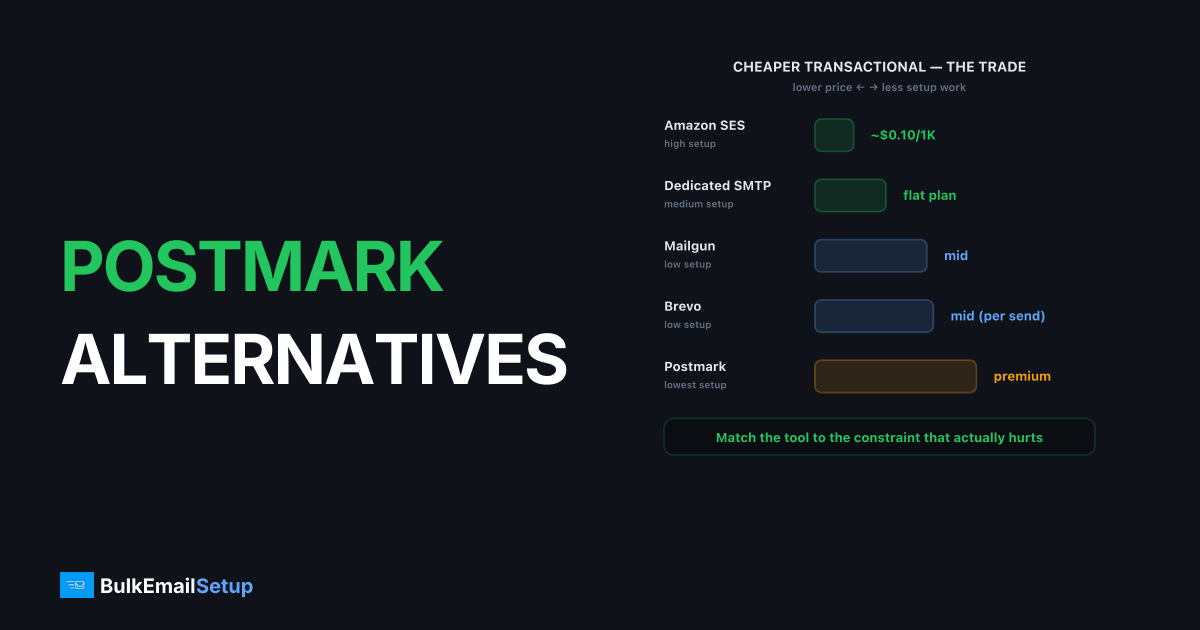
The best cheaper Postmark alternatives are Amazon SES for the lowest raw cost, Mailgun and Brevo for a balance of price and tooling, and a dedicated SMTP server for flat pricing with a dedicated IP you control. Postmark is one of the best transactional email services, but you pay a premium per email for its polish and support. If transactional volume is high and you want to cut cost without wrecking deliverability, several alternatives deliver well for less.
Why look for a Postmark alternative?
Senders leave Postmark mainly over price, since its per-email rate sits well above commodity relays like Amazon SES. Postmark earns that premium with fast support, a tightly policed transactional pool, and clean separation between transactional and broadcast streams. The question is whether your sending justifies paying for that polish.
You likely want an alternative if:
- Per-email cost dominates your bill. At high volume, Postmark's rate is many times that of SES.
- You can absorb some setup work. Cheaper tools trade convenience for unit cost.
- You want a dedicated IP you control. Postmark's dedicated IP is an add-on inside its platform, not infrastructure you own.
Postmark alternatives compared
Here is how the main cheaper options stack up for transactional sending. The trade across the table is consistent: lower cost means more setup and less hand-holding.
| Option | Price per 1,000 | Setup effort | Dedicated IP | Best for |
|---|---|---|---|---|
| Postmark | Higher (premium) | Low | Add-on (~$50/mo) | Time-poor teams |
| Amazon SES | ~$0.10 | High | Add-on (std/managed) | Lowest cost |
| Mailgun | Mid | Low | Add-on (higher plans) | Tooling + balance |
| Brevo | Mid (per send) | Low | Add-on (higher tiers) | Mixed marketing + transactional |
| Dedicated SMTP server | Flat plan | Medium | Included, you control it | Flat cost + control |
For the head-to-head with the cheapest option, see Postmark vs Amazon SES.
Which alternative fits your situation?
The right pick depends on whether your priority is the lowest cost, the least setup, or the most control. Match the tool to the constraint that actually hurts, rather than chasing a single best option.
- Lowest cost, has engineers: Amazon SES. Roughly $0.10 per 1,000 emails, but you assemble bounce handling, suppression, and warm-up yourself.
- Cheaper than Postmark with tooling intact: Mailgun. Logs, validation, and analytics built in, at a mid-tier price.
- Mixed transactional and marketing: Brevo. Send-based pricing and a transactional API in one place.
- High, steady volume, control matters: A dedicated SMTP server with a dedicated IP you own and flat pricing.
The common thread is that Postmark's premium buys convenience. Every cheaper option recovers some of that cost by handing work back to you, whether that is SES setup, Brevo's leaner tooling, or running your own server. The right trade is the one where the work you take on is cheaper than the premium you were paying.
The cost difference scales with volume, which is why the answer changes as you grow. At 100K transactional emails a month, Postmark's premium is small in absolute dollars and the included support and stream separation often justify it. By 500K and beyond, the per-email gap against SES or a flat dedicated plan becomes a real line item, large enough that taking on some setup work pays for itself. Model your actual volume, not the headline rate, since a tool that looks expensive per email can still be cheaper than the engineering hours a raw relay demands.
What to look for in a Postmark alternative
The features worth checking in any Postmark alternative are the ones you are paying a premium for today: transactional deliverability, stream separation, and fast diagnosis. A cheaper tool only wins if it covers enough of that ground for your sending. Score each option against these before you move.
- Stream separation. Postmark isolates transactional from broadcast by default, so marketing complaints never delay a password reset. Confirm the alternative can do the same, natively or with separate IPs.
- Per-email cost at your volume. SES is cheapest by far; Mailgun and Brevo sit in the middle. Model your real volume, not the headline rate.
- Setup and tooling. Cheaper tools trade convenience for unit cost. Decide how much bounce handling, suppression, and warm-up you are willing to build.
- Dedicated IP terms. Some platforms rent an IP inside their system; a dedicated server gives you one you own. The difference shows up when reputation goes wrong.
- Authentication and monitoring. SPF under 10 lookups, DKIM at 2048-bit, DMARC at
quarantineorreject, plus a way to watch your complaint rate against the 0.3% threshold Gmail and Yahoo enforce.
Weight these by what actually hurts. If a delayed transactional email is a support ticket, deliverability and stream isolation outrank a few cents per thousand.
Why a dedicated SMTP server is the strongest option at volume
For high, steady transactional volume, a dedicated SMTP server is the strongest Postmark alternative because it removes the premium metering while giving you a dedicated IP you fully own. Postmark charges for polish and support on every email. A dedicated server charges a flat plan, so the per-email premium disappears and the IP and MTA are yours.
The trade only pays off past roughly 50K-100K transactional emails/month sent consistently. Below that, Postmark's convenience is worth more than the savings. Above it, owning the infrastructure lets you isolate transactional from any marketing traffic across separate dedicated IPs, tune connection limits, and read your own logs the instant a 550 5.7.1 block appears, instead of waiting in a vendor queue. The teams we move off Postmark are almost always sending past 300K transactional emails a month, where the per-email premium has grown into a bill they notice every month. Below roughly 50K we usually tell them to stay put, the savings would not cover the warm-up weeks. The responsibility you take on is warm-up and reputation monitoring, which a managed dedicated provider can run for you, closing most of the convenience gap that made Postmark attractive in the first place.
How to switch without losing inbox placement
You keep inbox placement on any switch by moving your authentication intact and warming new IPs before full volume. Domain reputation is portable: your SPF, DKIM, DMARC, and sending history travel with the domain. IP reputation does not, which is the one thing that breaks careless migrations.
Before you cut over, confirm your records are correct: SPF aligned and under the 10-DNS-lookup limit (or you get PermError), DKIM signing at 2048-bit, and DMARC at quarantine or reject. Then ramp the new platform or IP from roughly 50-100 emails/day over 4-6 weeks. Skip the ramp and Gmail answers with 421 4.7.28 rate-limit deferrals. Our Gmail bulk sender requirements for 2026 and SPF, DKIM, and DMARC guide cover the checklist.
A safer pattern for transactional mail is a gradual cutover rather than a hard switch. Keep Postmark live while you warm the new platform with a slice of traffic, watch bounce and complaint rates on the new IP, and shift more volume each week as the reputation builds. Transactional email is the worst place for a deliverability gamble, since a delayed password reset is an instant support ticket. The overlap costs a little in double billing for a few weeks, which is cheap insurance against a placement drop on mail that has to arrive.
The most common mistake when leaving Postmark is moving transactional and marketing mail onto the same new IP to save money. Postmark kept those streams apart for a reason. The instant a marketing blast spikes complaints, that reputation bleeds into your receipts and resets, and a single bad campaign starts delaying the mail you cannot afford to delay. The second common mistake is copying your old DNS without re-checking it. People migrate an SPF record that already sits near the 10-lookup limit, add the new platform's include, and tip straight into PermError, which fails SPF for every message regardless of which IP it left from. Re-flatten the record and re-test before you send a single production email on the new setup.
When a dedicated SMTP server is the right alternative
A dedicated SMTP server is the right Postmark alternative when your transactional volume is high and steady and you want flat pricing plus a dedicated IP you fully control. Instead of paying Postmark's premium per email or assembling SES yourself, you rent the sending infrastructure on a flat plan and own the IP and MTA.
This fits senders past roughly 50K-100K transactional emails/month who want to isolate streams across dedicated IPs and diagnose problems in their own logs. The trade is that you run warm-up and reputation monitoring, or use a managed provider. If you are unsure whether your volume justifies it, when you need a dedicated SMTP server and Postmark vs a dedicated SMTP server walk through the decision.
How BulkEmailSetup helps
If Postmark's premium per-email pricing no longer fits your transactional volume, a dedicated SMTP server gives you a one-time setup fee ($549 on the Basic plan, 25,000 emails a day on 3 dedicated IPs) plus about $11 a month hosting paid to your own host, with no monthly fee to us, and a dedicated IP you control with full SMTP access. We set up SPF, DKIM, DMARC, and PTR correctly, and include a 4-6 week warm-up plan so receipts and resets keep hitting the inbox. See plans on our pricing page.
Frequently asked questions
What is the cheapest Postmark alternative?
Amazon SES is the cheapest, at roughly $0.10 per 1,000 emails as of early 2026, but it ships as a raw relay you must wire up yourself. For cheaper transactional email with less setup, Mailgun and Brevo sit between SES and Postmark on both price and convenience.
Is Postmark worth the premium price?
For teams that value fast support, strong transactional deliverability, and built-in stream separation, often yes. The premium buys escape from infrastructure work. If your scarce resource is budget rather than engineering time, a cheaper alternative usually makes more sense.
Can a dedicated SMTP server replace Postmark?
Yes, for senders at consistent volume who want flat pricing and a dedicated IP they control. You take on warm-up and reputation management in exchange for removing per-email metering. Below roughly 50K emails/month, a managed service like Postmark is usually simpler.
Will switching from Postmark hurt my deliverability?
Only if you skip warm-up. Domain reputation (SPF, DKIM, DMARC, history) moves with you. IP reputation does not, so any new platform or dedicated IP needs a 4-6 week ramp. Keep your complaint rate under 0.3% and inbox placement holds.


