
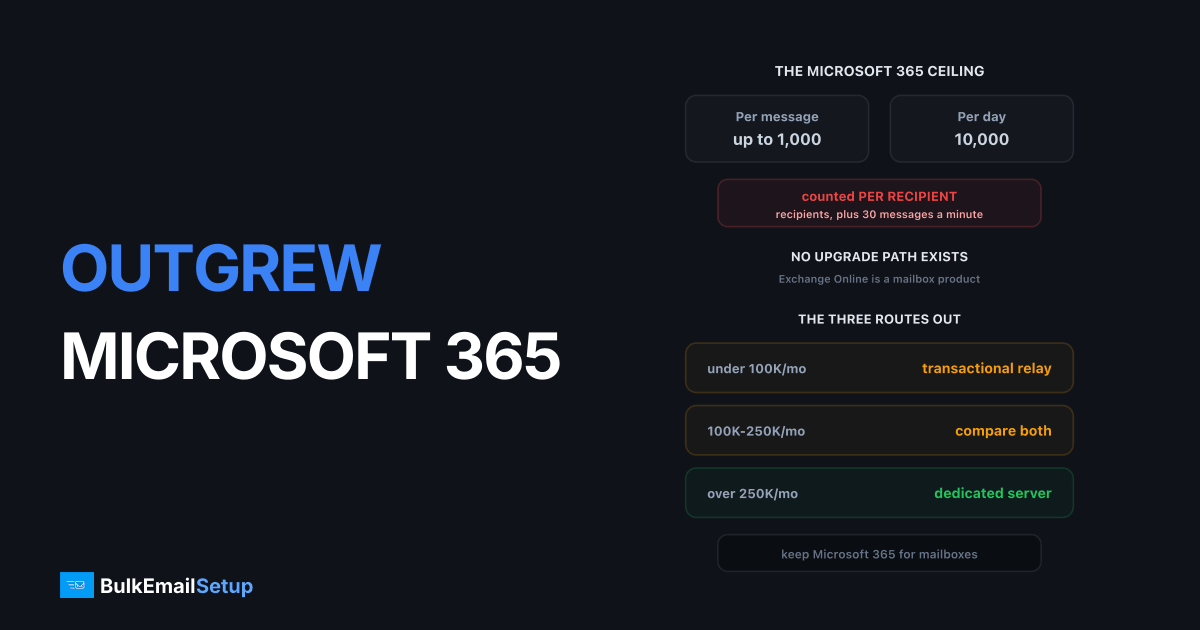
Microsoft 365 caps sending at 10,000 recipients a day per mailbox, 30 messages a minute, and a per-message recipient limit that is customizable between 1 and 1,000. Recipients are counted individually, so one email to 500 people spends 500 of the daily allowance. These are product boundaries, not plan tiers. Business Basic and Enterprise E5 carry the identical numbers, so there is no upgrade that turns Exchange Online into a bulk sender.
The real limits
These are the figures from Microsoft's Exchange Online limits page, and they are identical across Business Basic, Business Standard, Business Premium, Microsoft 365 E3/E5 and Office 365 E1/E3/E5/F3.
| Limit | Value | Scope |
|---|---|---|
| Recipient rate limit | 10,000 recipients per day | per mailbox, rolling 24 hours |
| Recipient limit per message | customizable, 1 to 1,000 | per mailbox, admin sets it |
| Message rate limit | 30 messages per minute | per mailbox, SMTP client submission |
| Recipient proxy address limit | 300 addresses | per mailbox object |
| Recipient limit, encrypted messages | about 200 recipients | per message |
| Tenant External Recipient Rate Limit | scales with licence count | whole tenant, rolling 24 hours |
| onmicrosoft.com domain throttle | 100 external recipients | whole tenant, rolling 24 hours |
Four of those rows are worth reading twice.
The per-message recipient limit is not fixed at 500. Microsoft documents it as customizable between 1 and 1,000, set per mailbox or as a tenant default through the Exchange admin centre and PowerShell. Raising it does nothing for your throughput, because the daily 10,000 counts recipients, not messages. Bigger batches burn the same allowance faster.
The 30 per minute cap is the real throughput ceiling. Microsoft's own footnote says excess submissions are throttled and carried over to following minutes rather than blocking the account, and states plainly that Exchange Online is not suited to bulk-mailing scenarios. At 30 messages a minute you get 1,800 an hour and 43,200 a day of message capacity, which is why a 20,000-recipient send becomes an overnight job even though it sits inside the daily cap.
TERRL is the limit most people have never heard of. The Tenant External Recipient Rate Limit caps external recipients across your whole tenant in a rolling 24 hours and scales with how many licences you hold. Trial tenants are capped at 5,000 external recipients a day. It expands distribution groups first, so mailing a group of 1,000 external addresses counts as 1,000, not 1. Admins find their tenant's figure in the Exchange admin centre under Reports, Mail flow, Tenant Outbound External Recipients.
The onmicrosoft.com throttle catches new tenants. Mail sent from the default onmicrosoft.com domain is limited to 100 external recipients per organisation in 24 hours, and breaching it returns 550 5.7.236. If you see that code, the fix is sending from a custom domain with authentication published, not a support ticket.
Breaching the recipient rate limit stops that mailbox until the rolling window clears. Microsoft's example is exact: a user who mails 5,000 recipients at 09:00, 2,500 at 10:00 and 2,500 at 11:00 hits 10,000 and cannot send again until 09:00 the next day. Repeated breaches escalate to a tenant-level review, and that can restrict outbound mail for the whole organisation, including ordinary business email.
What the limits mean for real sends
| Scenario | Recipients | Fits the 10,000/day cap | Time at 30 messages/min | Verdict |
|---|---|---|---|---|
| 500-person staff announcement | 500 | yes | under a minute at 500 per message | fine |
| 2,000-contact monthly newsletter | 2,000 | yes | about 67 minutes individually | workable, slow |
| 10,000-contact newsletter | 10,000 | exactly at the cap | about 5.5 hours | mailbox locked for 24 hours after |
| 25,000-contact campaign | 25,000 | no, needs 3 days | about 14 hours of send time | not viable |
| 100,000-contact campaign | 100,000 | no, needs 10 days | about 55 hours | not viable |
| Daily app notifications, 3,000/day | 3,000 | yes | about 100 minutes | fine, but use a relay |
The 10,000 row is the trap. It technically fits, and then that mailbox cannot send anything for the rest of the day, including the replies your team needs to write. People discover this on the afternoon of the send.
Why the workarounds fail
Adding licences and rotating mailboxes. The common attempt, and it breaches the acceptable use policy. Microsoft correlates sending patterns across a tenant easily, and enforcement lands on the tenant rather than one mailbox.
The SMTP relay connector. Built for devices and internal applications, not marketing. It has its own throttles and keeps your reputation tied to Microsoft's shared outbound pools, where other tenants' behaviour affects your delivery.
High Volume Email for Microsoft 365. A separate paid feature with its own limits, built for high-volume internal mail such as staff notifications and line-of-business application alerts inside your own organisation. It is not a marketing sending product and it does not lift the external caps that matter for campaigns.
Adding licences to raise TERRL. Buying licences does raise the tenant-wide external ceiling, since TERRL scales with licence count. It does not touch the per-mailbox 10,000 recipients a day or the 30 messages a minute, so your campaign still takes the same number of days. You would be paying for seats to move a limit that is not the one blocking you.
None of these work because the limit is not a resource Microsoft could release. Exchange Online is a mailbox product, and the caps exist so mailboxes do not become bulk senders on shared infrastructure. Microsoft says so directly in the limits documentation, pointing customers who need bulk or high-volume mail to external recipients towards Azure Communication Services email instead of Exchange Online.
That sentence is the whole answer to "how do I raise my Microsoft 365 sending limit". Microsoft's own guidance is to send bulk mail somewhere else.
What Microsoft expects if you do send bulk
Whatever you move to, Microsoft judges the mail arriving at Outlook.com and Hotmail addresses on the same terms it judges everyone. Authentication is mandatory, not advisory: SPF, DKIM and DMARC on your sending domain, valid forward and reverse DNS on the sending IP, a working unsubscribe, and complaint rates held low.
| Requirement | Microsoft consumer mail | Gmail bulk senders |
|---|---|---|
| SPF | required | required |
| DKIM | required | required |
| DMARC | required, at least p=none | required, at least p=none |
| Reverse DNS on sending IP | required | required |
| One-click unsubscribe | required | required |
| Complaint rate ceiling | keep well under 0.3% | under 0.30%, target 0.10% |
| Threshold for bulk rules | 5,000+ per day to the domain | 5,000+ per day to Gmail |
Google publishes its version in the email sender guidelines. The two sets of rules converged in 2024 and they are close enough that meeting one meets the other. Detail in Microsoft Outlook sender requirements and Gmail bulk sender requirements.
The practical point: none of this is optional once you leave Exchange Online. Microsoft was doing your SPF and DKIM. On your own infrastructure you do it, and getting it wrong produces 550 5.7.26 rejections rather than a slow send.
The three routes out
Pick by your real peak day, not your monthly average.
| Volume/month | Peak day | Route | Cost shape | Setup time |
|---|---|---|---|---|
| Under 50K | under 3,000 | Amazon SES or a relay | per email, roughly $0.10 per 1,000 | hours |
| 50K to 100K | 3,000 to 10,000 | relay, shared IP | $10 to $80/month | hours |
| 100K to 250K | 10,000 to 25,000 | relay or dedicated, compare | crossover point | days to weeks |
| Over 250K | over 25,000 | dedicated SMTP server | $549 one-time plus hosting | 2 weeks plus warm-up |
| Over 1M | over 50,000 | dedicated, multiple IPs | one-time build, more IPs | 2 weeks plus warm-up |
| Any volume, needs campaign tooling | any | marketing platform | per stored contact | days |
A transactional relay such as Amazon SES, SendGrid or Mailgun is the smallest step. Keep Microsoft 365 for mailboxes, route bulk sending through the relay. SES is roughly $0.10 per 1,000 emails, so 250,000 a month is about $25 plus data. Shared IPs, immediate setup, no warm-up to run yourself. The trade is that you are back on someone else's pool with someone else's throttles, and pricing is a per-email meter that never stops. Compared in Amazon SES vs a dedicated SMTP server.
A dedicated SMTP server removes the per-email fee and gives you your own IPs. The economics cross somewhere past 100,000 a month, and the technical argument arrives earlier than that if reputation control matters. A $549 one-time build plus $40 to $80 a month of hosting carries 25,000 a day, which is 2.5x the Microsoft mailbox cap with no 30-per-minute throttle. The cost is a 4 to 8 week warm-up you own. See when do you need a dedicated SMTP server and cost per email, SMTP vs ESP.
A marketing platform is right if what you actually outgrew was campaign tooling rather than the send limit. If you have been building newsletters in Outlook and pasting addresses into BCC, the missing piece is a builder, segmentation and unsubscribe handling, not raw throughput.
The three-way comparison at 250,000 a month
| Line item | Microsoft 365 alone | Relay, shared IP | Dedicated SMTP server |
|---|---|---|---|
| Possible at this volume | no, needs 25 days | yes | yes |
| Year one cost for the sending | not applicable | $300 to $1,200 | $549 plus $480 to $960 hosting |
| Year two cost | not applicable | $300 to $1,200 again | $480 to $960 hosting only |
| IP reputation | Microsoft shared pool | provider shared pool | yours alone |
| Throughput ceiling | 30 messages/min | provider throttle | your server, no per-minute cap |
| Warm-up you run | none | none | 4 to 8 weeks |
| Who fixes a blacklisting | Microsoft | the provider | you |
The last two rows are the honest cost of the dedicated route. You get the reputation and the flat bill, and in exchange you own the warm-up and the delisting work. That is a good trade above 250,000 a month and a poor one below 50,000.
Keep the two streams apart
Whatever you move to, do not send campaigns from the same domain as your Exchange mailboxes without separating them. Use a subdomain for marketing, keep the root domain for transactional and human mail, and authenticate both fully.
If a campaign damages reputation, you want that contained to the marketing subdomain rather than affecting invoices, contracts and password resets. This matters more on Microsoft 365 than on Gmail, because a tenant-level restriction hits everything at once. See subdomain vs root domain for email sending.
What to do this week
- Measure your real peak day, not the monthly average. Check the Tenant Outbound External Recipients report in the Exchange admin centre for your actual numbers and your TERRL.
- Pick the route from the table above based on that peak.
- Register a sending subdomain such as
mail.yourdomain.comand keep the root domain on Microsoft 365. - Publish SPF, DKIM and DMARC on the subdomain, and set PTR on the sending IP to match its HELO name.
- Set DMARC to
p=noneand read the aggregate reports for two weeks before enforcing anything. - If you chose dedicated, start warm-up immediately. It is the long pole at 4 to 8 weeks.
- Move one low-risk stream first, such as app notifications, and watch the 4xx deferral rate.
- Leave Microsoft 365 alone for mailboxes. This is a split, not a migration.
Step 1 is the one people skip and then regret. A team that thinks it sends 30,000 a month often sends 18,000 of them on the first Tuesday, and that peak decides the route, not the total.
How BulkEmailSetup helps
We build the dedicated route: your own server, your own IPs, full SPF/DKIM/DMARC/PTR configuration on your sending subdomain, MTA tuning, bounce handling and a warm-up plan, with your Microsoft 365 mailboxes untouched.
Basic starts at $549 one-time, covering 1 SMTP server, 3 dedicated IPs, 25,000 emails/day and unlimited contacts, which is 2.5x the Microsoft daily cap on day one and without the per-minute throttle. Higher tiers scale to 15 IPs and 200,000 emails/day. See pricing, or Microsoft Outlook sender requirements for what Microsoft expects from bulk senders.
Frequently asked questions
What are Microsoft 365's email sending limits?
Per Microsoft's Exchange Online limits page, a mailbox is capped at 10,000 recipients per day, a recipient limit per message that is customizable between 1 and 1,000, and 30 messages per minute. Recipients are counted individually, so one email to 500 people uses 500 of the daily allowance. The same 10,000 and 30-per-minute figures apply across Business Basic, Business Standard, Business Premium and every Enterprise plan.
Can I increase Microsoft 365 sending limits?
Not for marketing email. The caps are product boundaries rather than plan tiers, so there is no upgrade that turns Exchange Online into a bulk sending platform. Adding user licences to spread volume across mailboxes breaches the acceptable use policy and typically gets the whole tenant flagged.
What happens when you hit the Microsoft 365 sending limit?
You get a 550 5.7.1 or similar rejection and sending stops for that mailbox until the rolling 24-hour window clears. Repeated breaches can trigger a tenant-level review, and Microsoft may restrict outbound mail for the whole organisation, which affects your normal business email too.
Is the Microsoft 365 SMTP relay a bulk email option?
No. The SMTP relay connector exists so devices and line-of-business applications inside your organisation can send authenticated mail. It carries its own throttles, ties your reputation to Microsoft's shared outbound pools, and using it for marketing volume breaches the acceptable use policy.
What should I use instead of Microsoft 365 for bulk email?
Keep Microsoft 365 for mailboxes and move bulk sending elsewhere. Below roughly 100,000 emails a month a transactional relay is the simplest step. Above 250,000 a dedicated SMTP server with your own IPs costs less and gives you reputation you control. Either way, send from a separate subdomain.
What is the Tenant External Recipient Rate Limit in Microsoft 365?
TERRL is a tenant-wide cap on how many external recipients your whole organisation can mail in a rolling 24 hours, sitting above the per-mailbox 10,000 limit. It scales with the number of licences you hold, and trial tenants are capped at 5,000 external recipients per day. It counts distribution group members individually after the group is expanded.
Does buying more Microsoft 365 licences raise the sending limit?
It raises the tenant-wide TERRL ceiling, since that limit scales with licence count, but it does not change the per-mailbox 10,000 recipients a day or the 30 messages a minute. Buying licences purely to spread campaign volume across mailboxes breaches the acceptable use policy and gets enforcement applied to the whole tenant.
Why is my Microsoft 365 mail getting 550 5.7.236 errors?
That code means your tenant hit the throttle on the default onmicrosoft.com domain, which Microsoft caps at 100 external recipients per organisation in a rolling 24 hours. The fix is to send from a custom domain you own with SPF, DKIM and DMARC published, not from the onmicrosoft.com address.
Is High Volume Email for Microsoft 365 a bulk marketing product?
No. It is a separate paid feature with its own limits, built for internal bulk mail such as staff notifications and application alerts within your own organisation. Microsoft's own documentation points customers who need external bulk sending towards Azure Communication Services email instead.


