
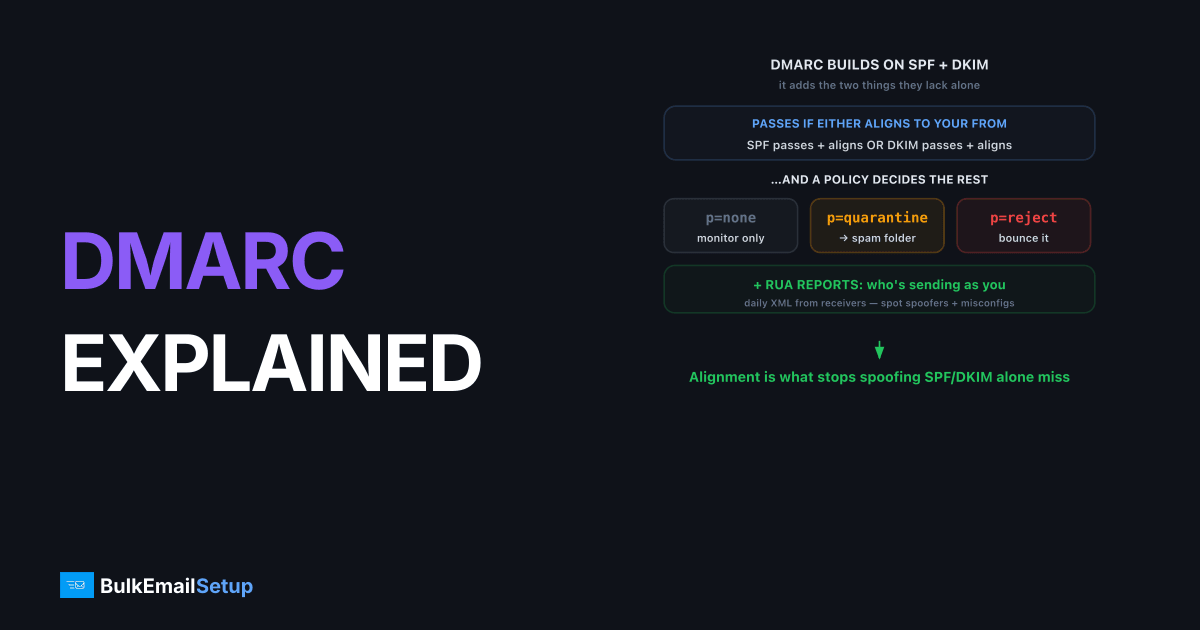
DMARC is an email authentication policy that builds on SPF and DKIM, telling receiving servers what to do when a message fails authentication and asking them to report back on mail sent using your domain. DMARC stands for Domain-based Message Authentication, Reporting and Conformance, defined in RFC 7489. It adds two things SPF and DKIM lack alone: alignment (the authenticated domain must match your visible From) and a published policy (none, quarantine, or reject).
What DMARC adds on top of SPF and DKIM
DMARC's core job is to close the gap that lets attackers pass SPF or DKIM on some unrelated domain while still forging your From address. It does this by requiring alignment: the domain that authenticated must match the domain a human sees in the From field.
A message passes DMARC if either of these is true:
- SPF passes and aligns: the SPF-authenticated domain matches the From domain.
- DKIM passes and aligns: the DKIM
d=domain matches the From domain.
Only one needs to pass and align. If neither does, DMARC fails and your published policy decides the message's fate. Alignment is the whole reason DMARC stops spoofing where SPF and DKIM alone don't, covered fully in DMARC alignment explained.
What does a DMARC record look like?
A DMARC record is a single TXT record published at _dmarc.yourdomain.com. It declares your policy and where reports should be sent. A typical record:
_dmarc.yourbrand.com TXT "v=DMARC1; p=none; rua=mailto:[email protected]; adkim=r; aspf=r"
| Tag | Meaning |
|---|---|
v=DMARC1 | Version, required first |
p= | Policy: none, quarantine, or reject |
rua= | Address for aggregate (daily XML) reports |
ruf= | Address for forensic (per-failure) reports |
adkim= | DKIM alignment mode: r relaxed or s strict |
aspf= | SPF alignment mode: r relaxed or s strict |
pct= | Percent of mail the policy applies to |
The three DMARC policies
The p= tag is the heart of DMARC; it tells receivers what to do with mail that fails authentication and alignment. There are three settings, and the right path is to walk them in order as your confidence grows.
| Policy | Receiver action on failure | When to use |
|---|---|---|
p=none | Deliver normally, just report | Monitoring phase, week 1+ |
p=quarantine | Send to spam folder | After confirming legit mail passes |
p=reject | Block the message entirely | Full enforcement, the end goal |
Start at none, read your reports, fix any legitimate sender that's failing, then move to quarantine, and finally reject. The detailed walk between them is in DMARC none vs quarantine vs reject. Gmail's bulk sender guidelines and Yahoo's 2024+ rules require at least a published DMARC record (p=none satisfies the minimum) for senders above 5,000 messages a day.
How DMARC reporting works
DMARC asks receiving providers to send you reports about mail claiming to be from your domain, and this is where its real value lives. There are two report types, and the aggregate one is what you'll actually use.
- Aggregate reports (RUA): daily XML files summarizing every sending IP, message counts, and SPF/DKIM/alignment results. These show you who sends as your domain, including shadow IT and spoofers.
- Forensic reports (RUF): per-message detail on individual failures. Many providers don't send these for privacy reasons, so don't rely on them.
The XML is dense and not meant to be read by eye. The how to read DMARC aggregate reports guide breaks the structure down field by field.
A worked example: from none to reject
Here's the same record at each stage of a real rollout, so you can see what changes. Start in monitoring mode, collecting reports without touching delivery:
v=DMARC1; p=none; rua=mailto:[email protected]; adkim=r; aspf=r
After a week or two of reports confirm every legitimate IP aligns, move to quarantine, optionally ramping with pct so only a slice is enforced first:
v=DMARC1; p=quarantine; pct=25; rua=mailto:[email protected]; adkim=r; aspf=r
Once quarantine at pct=100 causes no collateral damage, enforce fully:
v=DMARC1; p=reject; rua=mailto:[email protected]; adkim=r; aspf=r
The only thing that changed across the three is the p= value (and a temporary pct). The reporting address and relaxed alignment stay put the whole way.
Common DMARC mistakes and how to read them
A handful of errors account for most broken DMARC setups. Each shows up clearly in your aggregate reports once you know what to look for.
| Mistake | Symptom in reports | Fix |
|---|---|---|
Jumping straight to p=reject | Legitimate mail disposition reject | Drop to none, fix alignment, ramp |
No rua= address | No reports ever arrive | Add rua=mailto: to the record |
| Record at wrong name | DMARC treated as absent | Publish at _dmarc.yourdomain.com |
| Multiple DMARC records | Receivers ignore the policy | Keep exactly one TXT record |
| Strict alignment by accident | Subdomain mail fails DMARC | Use adkim=r; aspf=r (relaxed) |
The most damaging is enforcing too early. If you publish p=reject before confirming every sender aligns, receivers start dropping your own legitimate mail. That's why the monitoring phase isn't optional. Nearly every time we turn on RUA reporting for a customer who thought they had "just one sender," the first week of aggregate reports turns up two or three sending sources nobody mentioned: a billing platform, a help-desk tool, a marketing app a different team signed up for. Each is a source that would have had its mail rejected the moment the policy hit p=reject. Reading a few days of reports before tightening the policy is what catches those, and it is exactly why the jump straight to reject burns people. Walk the policy steps in DMARC none vs quarantine vs reject, and if reject is already bouncing valid mail, see the DMARC reject rejected my mail fix.
Why DMARC matters for deliverability
A published DMARC record does two things for your inbox placement: it satisfies the Gmail and Yahoo bulk-sender requirements, and it protects your domain's reputation from spoofers who would otherwise drag it down. Without DMARC, anyone can send mail forging your domain, and the resulting spam complaints attach to your name.
Moving to enforcement (reject) is also a prerequisite for BIMI, the standard that displays your logo next to authenticated mail. But enforcement only works once SPF and DKIM are aligned for every legitimate sender, which is exactly why the monitoring phase exists. For the full authentication picture, see SPF vs DKIM vs DMARC.
How BulkEmailSetup helps
BulkEmailSetup configures SPF, DKIM, and a DMARC record aligned to your domain on your dedicated SMTP server, then helps you read the aggregate reports and ramp from p=none to p=reject safely without blocking your own mail. See the pricing page for plans.
Frequently asked questions
What is DMARC?
DMARC (Domain-based Message Authentication, Reporting and Conformance) is an email authentication policy that builds on SPF and DKIM. It tells receivers what to do when a message fails authentication and sends reports showing who is sending mail using your domain.
What are the three DMARC policies?
p=none monitors and reports without affecting delivery. p=quarantine tells receivers to send failing mail to spam. p=reject tells receivers to block failing mail outright. Most senders start at none and tighten to reject once aligned.
Do I have to start with p=none?
It's strongly recommended. Starting at p=none lets you collect aggregate reports and confirm every legitimate sender passes before you enforce. Jumping straight to reject risks blocking your own valid mail.
What is a DMARC aggregate (RUA) report?
An RUA report is a daily XML summary sent by receiving providers to the address in your DMARC record. It lists sending IPs, message volumes, and SPF/DKIM/alignment results, so you can see who sends as your domain.


