
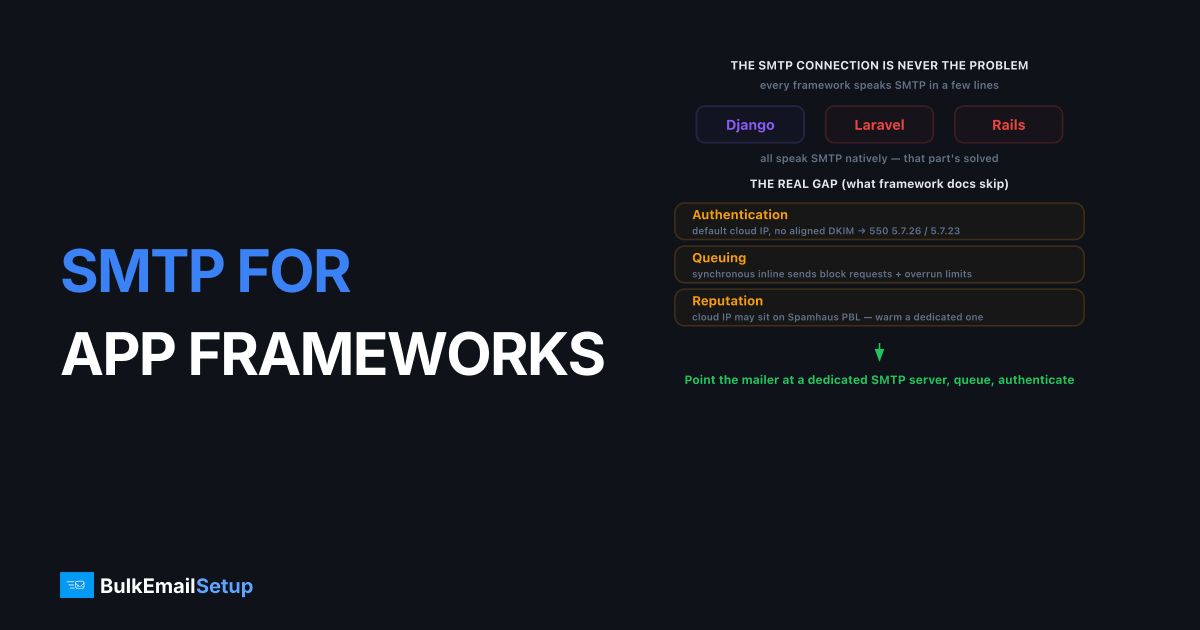
SMTP for Django, Laravel, and Rails apps connects your framework's native mailer to a dedicated SMTP server with a dedicated IP, so app email gets authenticated, queued, and delivered to the inbox at scale. Every major framework speaks SMTP out of the box, so the protocol is never your problem. The problems are authentication, reputation, and queuing: sending from a default cloud IP without aligned SPF and DKIM, or blasting mail inline from web requests. Point your mailer at a proper SMTP server, queue your sends, and authenticate correctly, and app email becomes reliable.
Developers rarely struggle with the SMTP connection itself. The config is a few lines. The struggle is everything around it: alignment, warm-up, queuing, and reputation, the parts the framework docs do not cover.
Why app email lands in spam
App email lands in spam almost entirely because of authentication and reputation, not framework code. A Django, Laravel, or Rails app sending from a default cloud server IP, with no aligned SPF or DKIM, looks untrustworthy to Gmail and Yahoo, which reject unauthenticated bulk mail with 550 5.7.26 under Gmail's bulk sender guidelines. The framework sent the message correctly; the message just had no credibility.
The common root causes:
- Default cloud IP. Your app server's IP may sit in a range mailbox providers distrust, sometimes already on the Spamhaus PBL.
- No DKIM signature. Frameworks do not sign mail by default; your SMTP server must.
- SPF misalignment. Sending from your domain while failing SPF triggers
550 5.7.23. - Synchronous sends. Firing email inline from requests blocks responses and overruns rate limits during spikes.
Routing through a dedicated SMTP server with correct SPF, DKIM, and DMARC solves the authentication problems. Queuing solves the throughput problems.
Framework mailer config at a glance
All three frameworks configure SMTP in a few lines. Here is the shape of each.
| Framework | Where | Key settings |
|---|---|---|
| Django | settings.py | EMAIL_HOST, EMAIL_PORT=587, EMAIL_HOST_USER, EMAIL_USE_TLS=True |
| Laravel | .env | MAIL_HOST, MAIL_PORT=587, MAIL_USERNAME, MAIL_ENCRYPTION=tls |
| Rails | config/environments | ActionMailer smtp_settings: address, port 587, user_name, enable_starttls_auto: true |
All three want port 587 with STARTTLS, your SMTP credentials, and a queue (Celery, Laravel queues, or ActiveJob) in front. The connection is identical in spirit; only the syntax differs. For port choices, see our guide on SMTP ports 25, 465, 587, and 2525.
Real mailer config for each framework
Each framework needs only a few lines to send through your SMTP server, all pointing at port 587 with STARTTLS. The settings below are the minimum each one needs; swap in your host and credentials, and keep secrets in environment variables rather than committed code.
Django, in settings.py:
EMAIL_BACKEND = "django.core.mail.backends.smtp.EmailBackend"
EMAIL_HOST = "smtp.yourprovider.com"
EMAIL_PORT = 587
EMAIL_USE_TLS = True
EMAIL_HOST_USER = os.environ["EMAIL_HOST_USER"]
EMAIL_HOST_PASSWORD = os.environ["EMAIL_HOST_PASSWORD"]
DEFAULT_FROM_EMAIL = "[email protected]"
Laravel, in .env:
MAIL_MAILER=smtp
MAIL_HOST=smtp.yourprovider.com
MAIL_PORT=587
MAIL_USERNAME=your-username
MAIL_PASSWORD=your-password
MAIL_ENCRYPTION=tls
[email protected]
Rails, in config/environments/production.rb:
config.action_mailer.delivery_method = :smtp
config.action_mailer.smtp_settings = {
  address: "smtp.yourprovider.com",
  port: 587,
  user_name: ENV["SMTP_USER"],
  password: ENV["SMTP_PASSWORD"],
  authentication: :login,
  enable_starttls_auto: true
}
Set DEFAULT_FROM_EMAIL, MAIL_FROM_ADDRESS, and your Rails default From to a domain you've signed with DKIM. A From address that doesn't match your DKIM domain breaks DMARC alignment, which is the single most common reason app mail that looks authenticated still lands in spam.
How to set up app SMTP correctly
Setting up app SMTP correctly means configuring the mailer, queuing sends, and authenticating to your own domain. The mailer config is the easy part; queuing and alignment are what make it reliable at scale.
Queue every send
Never send email inline from a web request. Use Celery in Django, queued mailables in Laravel, or ActiveJob in Rails. Queuing keeps requests fast, retries transient failures like greylisting (451 4.7.1), and paces volume so a signup spike does not slam your SMTP server into a 421 4.7.0 too-many-connections error. This single pattern prevents most scaling pain.
Align DKIM to your domain
Your SMTP server should sign mail with a DKIM key on your sending domain, so SPF and DKIM align with your From address under DMARC. Misalignment is the top reason app email that looks authenticated still hits spam. The DMARC alignment guide covers what to verify.
A queued send is one line different from an inline one in each framework. In Laravel, queue a mailable by implementing ShouldQueue:
class OrderShipped extends Mailable implements ShouldQueue
{
    // ...
}
In Rails, swap deliver_now for deliver_later so ActiveJob handles it:
OrderMailer.shipped(order).deliver_later
In Django with Celery, wrap send_mail in a task and call .delay() from the view. The change is small, but it moves email off the request path, which is where every scaling problem starts.
Separate transactional from any marketing
If your app also sends product updates or newsletters, isolate them from password resets and receipts. A marketing complaint spike should never delay the email a user is actively waiting for. The same stream-separation logic applies whether you build in Django, Laravel, or Rails.
Scaling and warming up
App email scales cleanly when you warm the IP and let queuing handle the pace. A new dedicated IP has no history, so ramp it from roughly 50 to 100 messages a day to full volume over four to six weeks, following an IP warm-up schedule. Your queue makes this easy: you control throughput in the worker, not in the request path.
App transactional email tends to be steady, which suits reputation building. Send your most engaged users first during warm-up, since their interactions build positive signals fastest. Once the IP is trusted, your queue absorbs signup floods and launch spikes without overrunning rate limits, because pacing lives in the worker config.
The single most common failure we see on app setups is not the SMTP config at all: it is a Laravel app sending mail synchronously, with no queue worker, so a signup burst opens connections faster than the server accepts them and Gmail returns 421 4.7.0 too many concurrent connections. The app team usually blames the SMTP server. The fix is one line, implements ShouldQueue, plus a running worker. We have watched that single change take a launch-day verification backlog from minutes of delay to under two seconds.
We are honest about the line: dedicated SMTP plus correct config gives your app authenticated, queued, well-paced delivery. Inbox placement still depends on your content, your complaint rate, and your list hygiene. No infrastructure guarantees 100% inbox for app mail.
How BulkEmailSetup helps
We provide a dedicated SMTP server with a dedicated IP you control, full SMTP access on ports 587, 465, and 2525, and SPF, DKIM, DMARC, and PTR configured so your app signs and aligns to your own domain. It drops into Django, Laravel, or Rails with a few mailer settings, and we handle warm-up. See plans on our pricing page.
Frequently asked questions
How do I configure SMTP in Django, Laravel, or Rails?
Each framework has a native mailer. Django uses EMAIL_HOST, EMAIL_PORT, and EMAIL_HOST_USER in settings. Laravel uses the MAIL_ variables in .env. Rails uses ActionMailer's smtp_settings. All three need your host, port 587, username, password, and STARTTLS enabled, then they send through your SMTP server.
Should app email use SMTP or an API?
SMTP is the simplest choice because every framework supports it natively with no extra library. APIs can be marginally faster and give richer event data, but they add a vendor SDK. Many teams start with SMTP for portability and add API webhooks later only if they need detailed event tracking.
Why does my app's email go to spam?
Almost always an authentication or reputation problem, not a framework bug. If your app sends from a default cloud IP without aligned SPF and DKIM, mailbox providers distrust it. Routing through a dedicated SMTP server with SPF, DKIM, and DMARC configured fixes the large majority of app-email spam issues.
Does app transactional email need a dedicated IP?
Once your app consistently sends above roughly 50,000 emails a month, a dedicated IP usually helps. It isolates your reputation so other senders can't affect your password resets and notifications, and it gives you higher throughput ceilings for signup spikes. Below that, a quality shared pool often works fine.
Should I send email synchronously from a web request?
No. Send through a background job or queue, never inline in the request. Each framework supports this: Django with Celery, Laravel with queued mailables, Rails with ActiveJob. Queuing keeps requests fast, retries failed sends, and paces volume so you don't overrun SMTP rate limits during spikes.


