
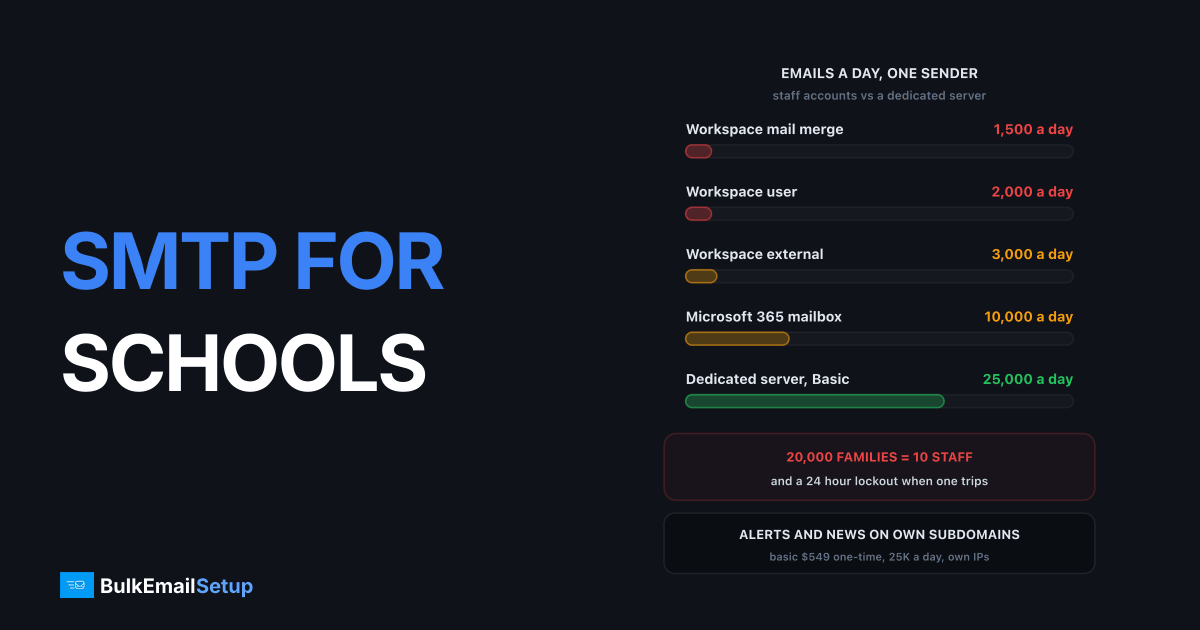
Mass email for schools and universities hits staff mailbox limits fast: Google Workspace allows 2,000 messages a day per user, and Microsoft 365 caps each mailbox at 10,000 recipients a day. A newsletter to 20,000 students and parents breaks both. The setup that works is a split: staff keep Workspace or 365 for one-to-one mail, and mass email and alerts go out through a separate sending server on their own subdomain, with SPF, DKIM and DMARC done.
The limits staff accounts run into
| Platform | Limit | Source |
|---|---|---|
| Google Workspace | 2,000 messages a day per user | Google sending limits |
| Google Workspace | 3,000 external recipients a day | same |
| Google Workspace | 1,500 a day through mail merge | same |
| Google Workspace | 100 recipients per message over SMTP | same |
| Microsoft 365 | 10,000 recipients a day per mailbox | Exchange Online limits |
| Microsoft 365 | 30 messages a minute | same |
Google's page lists no separate limits for Education editions, so a school's Workspace accounts follow the same caps. Go over and the account cannot send for up to 24 hours. Microsoft's own page goes further and points high-volume senders to a separate bulk email service.
One staff account against a school community of 20,000
What schools actually send
School email falls into three streams, and they should not share one sender.
| Stream | Examples | What matters |
|---|---|---|
| Alerts | closures, safety, schedule changes | arrives in minutes, every time |
| Newsletters | weekly updates, term letters, events | reaches every family, lands in the inbox |
| Outreach | admissions, alumni appeals, fundraising | needs opt-in and an unsubscribe |
Alerts are the one that cannot fail. If a fundraising campaign gets spam complaints and drags down the sender's reputation, the next closure alert from the same address can land in spam. That is why each stream gets its own subdomain, such as alerts.school.edu, news.school.edu and alumni.school.edu.
Why staff mailboxes are the wrong tool
Mass mail from staff accounts causes three problems at once:
- Caps. 2,000 a day per Workspace user means a 20,000 family newsletter needs ten accounts.
- Lockouts. When the cap trips, that staff member cannot email anyone for up to 24 hours, including parents with urgent questions.
- Reputation spill. Complaints on a bulk send hurt the main school domain, so normal staff mail starts landing in spam too.
Move mass mail off staff accounts
The mass email setup that works for schools
| Part | What to do |
|---|---|
| Staff mail | keep Google Workspace or Microsoft 365, one-to-one only |
| Sending server | a dedicated SMTP server with its own IPs |
| Subdomains | alerts, news and outreach each on their own |
| Authentication | SPF, DKIM and DMARC on every subdomain, PTR on every IP |
| Lists | separate lists for alerts, newsletters and outreach |
| Unsubscribe | on newsletters and outreach, never cutting off alerts |
With your own server, you also skip per-contact pricing. A university with 40,000 students and alumni pays the same hosting each month whether it sends one newsletter or four.
How much volume a school needs
Daily caps compared with a dedicated server
| Community size | Weekly mail | Fit |
|---|---|---|
| Under 3,000 people | 1 newsletter, rare alerts | Workspace with care, or a small platform |
| 3,000 to 25,000 | newsletters plus alerts | Basic plan, 25,000 a day |
| 25,000 to 200,000 | multi-campus, alumni, admissions | Advance plan, 200,000 a day |
Alerts need speed more than volume. On our plan figures, Basic sends about 1,050 emails an hour and Advance about 8,500, so a 20,000 person alert takes about 2.4 hours on Advance. Custom handles about 41,700 an hour, which gets the same alert out in under 30 minutes. For alerts that must reach everyone within minutes, pair email with SMS.
Consent and privacy
Operational mail like closures and schedules goes to the people you serve and is expected. Marketing mail like fundraising and alumni appeals needs opt-in and an unsubscribe in most countries, under CAN-SPAM in the US and the GDPR in Europe. Keep student record details out of mass email entirely and link to a secure portal instead.
For the unsubscribe details, see our unsubscribe link requirements. If staff are already hitting Workspace limits, outgrew Gmail SMTP and outgrew Microsoft 365 sending limits explain the next step.
Test before you need it
Run a test closure alert each term:
- Send to staff test accounts on Gmail, Outlook and Yahoo.
- Check it lands in the inbox, not spam or promotions.
- Time how long the full list takes to send.
- Check Google Postmaster Tools for the alerts subdomain's reputation.
How BulkEmailSetup helps
We set up a dedicated SMTP server for your school or university, with your own IPs, SPF, DKIM, DMARC and PTR for each sending subdomain, bounce handling, a campaign platform and a warm-up plan. Staff keep Workspace or Microsoft 365 for everyday mail.
| Plan | One-time fee | Emails per day | Per hour | Hosting you pay your host |
|---|---|---|---|---|
| Basic | $549 | 25,000 | about 1,050 | about $11 a month |
| Advance | $1,199 | 200,000 | about 8,500 | about $49 a month |
No monthly fee to us, no contact limit and a 15-day money-back guarantee. See the Basic plan or compare all pricing.
Frequently asked questions
How do universities send mass email?
Most universities split the job. Staff keep Google Workspace or Microsoft 365 for one-to-one mail, and mass email to students, parents and alumni goes out through a separate sending system on its own subdomain. That system is either an email platform or a dedicated SMTP server, so a newsletter to 30,000 people never touches a staff mailbox or its daily limits.
Can schools send bulk email from Google Workspace?
Only in small amounts. Google lists 2,000 messages a day per user, 3,000 external recipients a day and 1,500 a day through mail merge, and Education editions follow the same sending limits. Going over locks the account for up to 24 hours, and repeated spam-like sending can lead to suspension, which is why schools move mass mail elsewhere.
What email setup suits school newsletters?
For a few thousand recipients a week, an email platform with education pricing is fine. Once you mail tens of thousands of students, parents and alumni every week, a dedicated SMTP server is cheaper and gives you your own IPs. BulkEmailSetup's Basic plan sends 25,000 emails a day for $549 one-time, with hosting around $11 a month.
How do schools keep alerts out of spam?
Send alerts from their own subdomain, such as alerts.school.edu, with SPF, DKIM and DMARC set up, and keep them separate from newsletters and fundraising mail. Mail people expect and open builds a good reputation on that stream. Test a closure alert to Gmail, Outlook and Yahoo accounts before you need it, not on the morning of a snow day.
Can Microsoft 365 for Education send mass email?
Not at scale. Exchange Online caps each mailbox at 10,000 recipients a day and 30 messages a minute, and the same limits apply across plans. Microsoft's own documentation points high-volume senders to a separate bulk email service. A campus newsletter to 25,000 students would need three mailboxes and still hit the per-minute limit.
Do schools need consent to email parents?
Operational mail such as closures, schedules and safety alerts goes to the people you serve and is expected. Marketing mail like fundraising, alumni appeals or course promotions needs a clear opt-in and a working unsubscribe link in most countries. Keep the two on separate lists so an unsubscribe from fundraising never stops a safety alert.


