
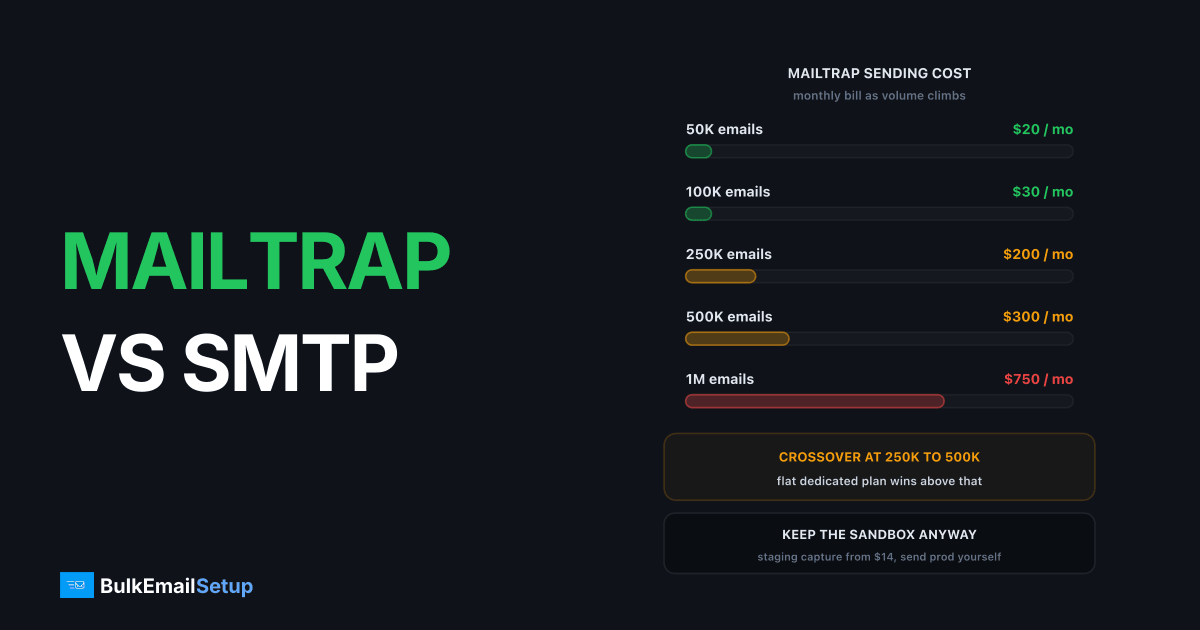
Mailtrap is two products: a staging sandbox that captures test email so it never reaches real users, and a separate sending relay priced from $20/month for 50,000 emails, $300 for 500,000 and $750 for 1.5 million. The sandbox is the reason most teams have an account, and it is genuinely worth paying for. The sending side is a normal shared-pool relay with a dedicated IP locked behind the $85/month Business tier. You can keep the first and replace the second, and past roughly 500K/month you probably should.
What does Mailtrap Email Testing actually do?
Email Testing is a fake SMTP server. Your staging app connects to it with real SMTP credentials, sends a real message, and Mailtrap catches it in a web inbox instead of delivering it. Nothing reaches a real address. That single property is why it exists: the classic disaster is a staging database seeded with a production dump, a "send all invoices" job someone runs to test it, and 40,000 real customers getting duplicate invoices.
It does more than catch mail. It renders the HTML across clients, runs a spam score, checks that your links resolve, and shows the raw source. For a team shipping a new onboarding sequence, that loop is faster than mailing yourself and squinting at Outlook.
The sandbox plans price by test emails per month, not real sends.
| Sandbox plan | Test emails / month | Price / month |
|---|---|---|
| Free | 50 | $0 |
| Basic | 500 | $14 |
| Team | 5,000 | $34 |
| Business | 50,000 | $99 |
| Enterprise | Unlimited | $399 |
Most teams sit on Basic or Team and never think about it again. Fourteen dollars to make an entire class of accident impossible is a good trade.
What does Mailtrap Email Sending cost?
Sending is billed separately by real emails delivered per month. Verified on Mailtrap's pricing page as of this writing.
| Tier | Emails / month | Price / month | Per 1,000 | Dedicated IP | Log retention |
|---|---|---|---|---|---|
| Free | 4,000 | $0 | n/a | No | 3 days |
| Basic | 10,000 | $15 | $1.50 | No | 5 days |
| Basic | 50,000 | $20 | $0.40 | No | 5 days |
| Basic | 100,000 | $30 | $0.30 | No | 5 days |
| Business | 100,000 | $85 | $0.85 | Yes | 15 days |
| Business | 250,000 | $200 | $0.80 | Yes | 15 days |
| Business | 500,000 | $300 | $0.60 | Yes | 15 days |
| Business | 750,000 | $450 | $0.60 | Yes | 15 days |
| Enterprise | 1,500,000 | $750 | $0.50 | Yes | 30 days |
| Enterprise | 2,500,000 | $1,250 | $0.50 | Yes | 30 days |
Two things stand out. Basic at 100,000 emails is $30 while Business at the same 100,000 is $85, and the only difference is the feature set, mainly the dedicated IP and 15-day logs. And there is no tier at exactly 1,000,000: you buy 750,000 for $450 and overflow, or jump to 1,500,000 for $750. If you send a steady million a month you are paying for 1.5 million.
The per-1,000 rate is competitive against SendGrid and Mailgun at small volume and stops improving above 500K. We track every provider's rate in cost per 1000 emails, every provider in 2026.
How do the two stack up feature by feature?
| Feature | Mailtrap Sending | Dedicated SMTP server |
|---|---|---|
| Interface | SMTP relay plus REST API | Standard SMTP, any stack |
| Price model | Per-volume tier | Flat monthly |
| Dedicated IP | Business tier and up, from $85/mo | Included, 3 to 15 IPs |
| Shared pool below that | Yes, with every Basic account | Never |
| Templates | Built in, versioned | Your app or your ESP tool |
| Suppression list | Managed automatically | You run it, full export |
| Log retention | 3 to 30 days by tier | Your logrotate policy |
| Warm-up | Automatic on Business+ | You control the ramp |
| Staging sandbox | Yes, the standout feature | No, pair it with Mailtrap |
| Setup time | Minutes | Hours, or managed for you |
The sandbox row is the honest summary of this whole comparison. Nothing about running your own SMTP server gives you a staging capture inbox, and nothing about Mailtrap's sending tier gives you IP ownership under $85/month.
When does the shared pool stop being enough?
Below the Business tier every Mailtrap send leaves from a pool shared with every other Basic and Free customer. That is fine at 10,000 emails a month for password resets to engaged users. It stops being fine in three situations.
The first is volume. Past roughly 100,000 a month your traffic is a real share of a pool you do not control, and someone else's bad list becomes your deferral. The second is mixed streams: if marketing campaigns and password resets leave on the same shared IPs, a complaint spike on the campaign side delays the resets. The third is policy. Shared pools are policed hard because they have to be, so cold outreach, affiliate offers and re-engagement to a stale list draw a review long before the receiver would have complained.
Complaint thresholds are not vendor opinion. Google's bulk sender guidelines require SPF, DKIM and DMARC all passing, one-click unsubscribe, TLS and a spam complaint rate under 0.3%, ideally under 0.1%, for anyone sending 5,000+ a day to Gmail. On a shared pool you are judged partly on other people's numbers. On your own IPs the number is yours alone.
Keep Mailtrap for testing, send production yourself
This is the recommendation I give most often, and it is not a compromise. The sandbox and the relay are separate products with separate bills. Keep the one that is genuinely hard to replace and replace the one that is not.
The change is two config entries.
# staging / CI  ->  Mailtrap sandbox, mail never leaves
SMTP_HOST=sandbox.smtp.mailtrap.io
SMTP_PORT=2525

# production  ->  your own server, real delivery
SMTP_HOST=smtp.yourdomain.com
SMTP_PORT=587
No SDK swap, no code change, no template rewrite if your templates live in your app rather than in Mailtrap's editor. That last point is the one thing to check before you move: if you built your emails in Mailtrap's template editor, export them first, because moving the SMTP host does not move the templates. Teams that keep templates in the codebase have a five-minute migration.
Cost at that split: $34/month for the Team sandbox plus a flat dedicated plan, versus $300/month for Mailtrap Business at 500K plus the same $34. The sandbox is not what you are paying to escape.
What does the cost crossover look like?
Flat-rate infrastructure does not care how many emails you push through it, so the comparison is a curve against a line.
| Monthly volume | Mailtrap sending | Dedicated SMTP server (flat) | Verdict |
|---|---|---|---|
| 50K | $20 | $549 one-time, then flat | Mailtrap, easily |
| 100K | $30 Basic / $85 Business | Flat plan | Mailtrap unless you need the IP |
| 250K | $200 | Flat plan | Close, depends on stream count |
| 500K | $300 | Flat plan | Dedicated server ahead |
| 1M | $750 for a 1.5M tier | Flat plan, same price at 2M | Dedicated server clearly ahead |
The crossover lands between 250,000 and 500,000 a month for most senders. Below it, $20 to $85 a month for a working relay with a sandbox attached is hard to argue with, and I would not move a team off it just to prove a point. Above it you are paying $300 to $750 a month, recurring, for infrastructure you do not own and logs that vanish in 15 days.
There is a second trigger that has nothing to do with price: the number of streams you need to isolate. If you want password resets on one IP, product notifications on a second and marketing on a third, Mailtrap gives you one dedicated IP on Business. Three IPs means three isolated reputations, which is a structural advantage no shared pool replicates. The same math applies to MailerSend and Postmark, both of which sell the IP as an add-on above a volume floor.
Where Mailtrap genuinely wins
The sandbox, first and last. No dedicated server replaces it, and I have never advised anyone to cancel it. If your team ships email changes weekly, the ability to see the rendered HTML across clients with a spam score attached before anything goes out is worth more than the sending savings at small volume.
The sending product also wins for a SaaS under 100,000 emails a month that wants one vendor, one bill and one dashboard covering both staging and production. At $30/month on Basic, the ops time you would spend running your own MTA costs more than the relay. Suppression handling, bounce processing and template versioning are all included and all real work you skip. If that describes you, read SMTP for SaaS transactional email for how to set the stack up cleanly and stop there.
Where a dedicated SMTP server wins
Cost above 500K, IP ownership at any volume, and logs that outlive the incident. A dedicated server gives you the IP and PTR record from the first email, not from the $85 tier, and you decide the warm-up cadence rather than accepting an automatic ramp. When Gmail defers with a 421 4.7.28, you read the raw response in your own mail log, at whatever age, instead of finding the message aged out of a 5-day window.
Stream isolation is the underrated one. Three or five IPs let you fence marketing off from transactional so a campaign mistake never touches a password reset. Policy is the other: cold outreach and bulk marketing that draw a review on a shared pool are your own call on your own IPs. That does not exempt you from CAN-SPAM, GDPR or receiver rules, and a bad list burns a dedicated IP faster than a shared one because all the damage lands on you. Warm-up is real work too, roughly four to six weeks from 50 a day to full volume.
Who should pick which?
| Your situation | Better pick |
|---|---|
| Need a staging capture inbox | Mailtrap Testing, always |
| Under 100K sends/month, one stream | Mailtrap Sending |
| Want one vendor for staging and production | Mailtrap Sending |
| Sending 500K+/month | Dedicated SMTP server |
| Need 3+ isolated IPs | Dedicated SMTP server |
| Need logs older than 30 days | Dedicated SMTP server |
| Cold outreach or bulk marketing | Dedicated SMTP server |
| Mixed transactional plus marketing at scale | Dedicated SMTP server, keep the sandbox |
How BulkEmailSetup helps
If Mailtrap's sending tiers have become a recurring line item and you want your own IPs, we set up the production half while you keep the sandbox. Basic is $549 one-time and includes 1 SMTP server, 3 dedicated IPs, 25,000 emails per day and unlimited contacts. Higher tiers go to 15 IPs and 200,000 emails per day.
We provision the IPs, set SPF, DKIM, DMARC and PTR correctly, and run the warm-up so your transactional and marketing streams each get a clean lane. Point staging at Mailtrap, point production at us. See plans on our pricing page.
Frequently asked questions
What is the difference between Mailtrap Email Testing and Mailtrap Email Sending?
Email Testing is a fake SMTP inbox for staging: your app sends to it, the mail is captured, and it never reaches a real person. Email Sending is a real relay that delivers to real inboxes, priced separately from $20/month for 50,000 emails. They are two products on one account, and you can pay for one without the other.
How much does Mailtrap sending cost at 500,000 emails a month?
The Business tier is $300/month for 500,000 emails, which works out to $0.60 per 1,000. At 100,000 the Basic tier is $30/month, and Enterprise starts at $750/month for 1.5 million. Check current numbers on Mailtrap's own pricing page, since tiers move.
Does Mailtrap give you a dedicated IP?
Yes, but only from the Business tier upward, which starts at $85/month for 100,000 emails. Below that you sit on a shared pool with every other Basic and Free account. A dedicated SMTP server includes the IP and PTR record from day one at any volume.
Can I keep Mailtrap for testing and send production mail somewhere else?
Yes, and that is the setup I recommend most often. Point your staging and CI environments at the Mailtrap sandbox SMTP host and your production environment at your own SMTP server. It is two entries in one config file, and the sandbox plan starts at $14/month on its own.
At what volume does Mailtrap sending stop making sense?
Around 500,000 emails a month, where the bill hits $300 and a flat-rate dedicated server covers the same volume for less with your own IPs. Below 100,000 a month the convenience is usually worth the price.
How long does Mailtrap keep sending logs?
3 days on Free, 5 days on Basic, 15 days on Business and 30 days on Enterprise. If you need to answer a question about a message sent six weeks ago, only the top tier holds it, whereas Postfix logs on your own server keep whatever your logrotate policy says.


