
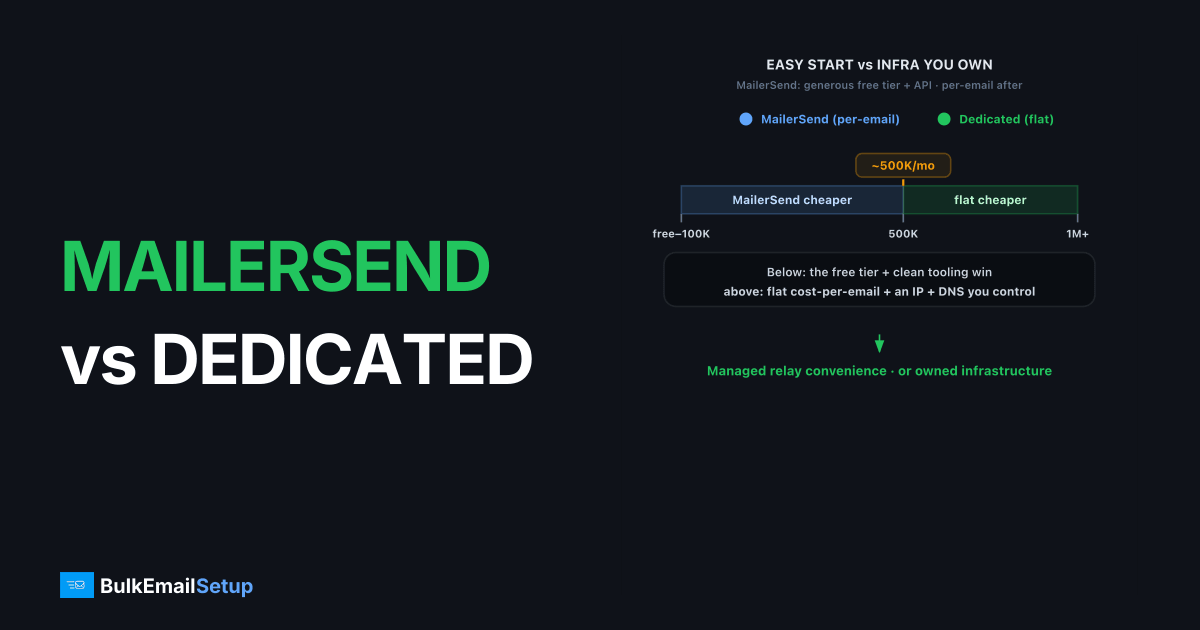
MailerSend is the easier, cheaper start for transactional email at low to moderate volume; a dedicated SMTP server wins on cost-per-email and control once you send consistently past roughly 500K/month. MailerSend (from the MailerLite group) is a developer-friendly relay with a generous free tier, an API, SMTP access, and per-email pricing. A dedicated SMTP server is infrastructure you own: a flat monthly cost, your own IP, full SMTP and DNS access, and throughput limited only by what your IP can carry.
What is MailerSend built for?
MailerSend is a transactional email service with an API, SMTP relay, templating, and a free tier, built for developers and product teams. It bills by monthly email volume. As of early 2026, dedicated IPs are available on higher-volume plans as an add-on.
The free tier and clean tooling make it easy to start. The trade-off is the familiar managed-relay one: per-email billing and a provider-managed sending stack rather than infrastructure you control.
How do MailerSend and a dedicated SMTP server compare?
| Factor | MailerSend | Dedicated SMTP server |
|---|---|---|
| Price model | Per-email tiers | Flat monthly |
| Best for | Transactional, dev teams | High volume, full control |
| Interface | API + SMTP | Standard SMTP (any stack) |
| Dedicated IP | Paid add-on, higher plans | Included, you control it |
| Setup effort | Minutes | Hours to days (or managed) |
| Deliverability control | Provider-managed | Full: IP, warm-up, DNS, MTA |
| Support | Plan-dependent | Provider or self-managed |
Figures are directional as of early 2026. Confirm current tiers on the MailerSend pricing page.
When does a dedicated SMTP server get cheaper?
The crossover is consistent high volume. Per-email pricing is cheap at 100K/month and adds up at 1M/month, because the cost rises with every send while a dedicated server's bill stays flat. We work the numbers in cost to send 100,000 emails per month and compare relays in MailerSend's place among alternatives.
Cost isn't the only trigger. If you need several isolated IPs, your own warm-up cadence, or MTA-level tuning, a dedicated server gives you control MailerSend keeps managed.
What about deliverability and control?
MailerSend manages your reputation; a dedicated server makes it yours. You set SPF, DKIM, and DMARC, the PTR record, and run the warm-up directly. When a 535 5.7.8 auth failure or a block appears, you debug your own setup instead of a vendor's.
A dedicated IP only helps if you keep it warm and clean, roughly 50K+/month consistently. Deliverability still depends on list hygiene and a low complaint rate. No relay rescues a bad list.
What does the cost look like at volume?
MailerSend's generous free tier and per-email pricing are cheap at the volumes most product teams send. But per-email scales with each message while a flat dedicated plan holds, so the crossover arrives as you grow. Here's a directional comparison as of early 2026, under the MailerLite group.
| Monthly volume | MailerSend (per-email) | Dedicated SMTP server (flat) |
|---|---|---|
| 100K | Cheap, free tier helps | Flat plan, likely more per email |
| 500K | Competitive | Roughly break-even territory |
| 1M | Notable line item | Flat plan usually cheaper per email |
| 5M+ | Largest cost driver | Flat plan, clearly cheaper per email |
For mostly transactional sending, MailerSend often stays the better deal because many apps never reach the crossover. The math flips when you add high-volume marketing or notifications that push monthly sends into the millions. We work the numbers in cost to send 100,000 emails per month and compare relays in cheapest SMTP for transactional email.
Where is MailerSend the better choice?
MailerSend wins for transactional and product email where a clean API, templating, and a free tier matter. For a developer team that wants to ship fast without operating infrastructure, the tooling earns its per-email rate. At low to moderate volume, it's an easy default.
It's also a strong pick when you want sending managed and don't want to think about IPs or warm-up. MailerSend handles reputation behind the relay, so a small team without an email engineer gets reliable delivery without running anything. For a product focused team, that hands-off model fits well until volume or marketing needs outgrow it.
Where does a dedicated SMTP server win?
A dedicated SMTP server wins on cost at volume, on IP control, and on sends MailerSend keeps managed. You own the IP, isolate transactional from marketing streams, run your own warm-up, and read raw SMTP responses when something defers. A standard SMTP endpoint also works with any stack without a vendor SDK, so any language or off-the-shelf app can use it.
Control is the deeper win. When a 535 5.7.8 auth failure or a block appears, you debug your own configuration and adjust your own pacing instead of opening a ticket. You shape retry behavior, split streams across separate IPs, and see exactly what each destination returns. For a team that wants to own deliverability as engineering, that direct access is the point.
How do you migrate from MailerSend to a dedicated server?
Migration is DNS plus warm-up, not a rewrite, and SMTP needs no SDK. Point your mailer at the new host, port 587 or 465, and credentials. The careful part is reputation: a fresh dedicated IP starts cold and warms over four to six weeks.
Stage the move. Stand up the server with SPF, DKIM, DMARC, and PTR verified. Keep time-critical transactional mail on MailerSend while you ramp marketing and bulk on the new IP using a warm-up schedule. Shift the rest once placement holds. Many teams keep a managed relay for critical transactional sends and run their own server for high-volume traffic, which is a sensible split.
Who should pick which?
| Your situation | Better pick |
|---|---|
| Transactional, dev-team app | MailerSend |
| Want API, templating, free tier | MailerSend |
| Low to moderate volume | MailerSend |
| Cold email or bulk marketing | Dedicated SMTP server |
| High volume past 1M/month | Dedicated SMTP server |
| Need framework-agnostic SMTP | Dedicated SMTP server |
| Need multiple isolated IPs | Dedicated SMTP server |
What deliverability rules carry over no matter which you pick?
Leaving MailerSend doesn't change what receivers demand. Gmail and Yahoo's bulk sender rules (5,000+ recipients a day) require SPF, DKIM, and DMARC all passing, one-click unsubscribe per RFC 8058, TLS, valid PTR or reverse DNS, and a spam complaint rate under 0.3%, ideally under 0.1%. MailerSend manages much of this behind its relay; on a dedicated server you own each record. Neither path lets you skip the thresholds.
The records carry technical floors worth knowing. Your DKIM key should be 2048-bit, with 1024 the weak minimum. Your SPF must resolve in 10 DNS lookups or fewer, or receivers return a PermError and fail the check. DMARC steps through none, quarantine, then reject as your authentication proves stable. These gate inbox placement whether you send over an API or raw SMTP.
What goes wrong when senders switch badly?
The classic mistake is cutting all traffic to a cold IP at once. A new dedicated IP that suddenly pushes high volume looks like a spam cannon to Gmail, which replies with a 421 4.7.28 rate limit or a soft block to the spam folder. The fix is patience: ramp from roughly 50 to 100 a day and double every few days while watching placement.
The second mistake is moving a dirty list to fresh infrastructure, then blaming the server. A new IP with a 5% bounce rate and rising complaints burns reputation faster than a managed relay would, because all the damage lands on an IP that's entirely yours. Clean the list, suppress hard bounces, isolate transactional from marketing, and let your most engaged contacts lead the warm-up. A switch is the worst moment to skip list hygiene.
In migrations we've run off MailerSend, the teams that keep password resets and receipts on the relay for the first two weeks have the calmest cutover. The reason is concrete: transactional mail to engaged users carries near-zero complaints, so moving it onto a cold IP wastes good warm-up signal on traffic that was never at risk of the spam folder. Ramp the marketing stream on the new IP, where the reputation gain actually matters, and leave the time-critical receipts where they already inbox.
How much volume justifies leaving MailerSend?
For mostly transactional sending, the honest answer is often not yet. MailerSend's free tier and clean tooling are worth its per-email rate, and many apps never reach a cost crossover on transactional mail alone. The trigger is usually adding high-volume marketing or notifications that push monthly sends into the millions, or watching per-email cost become your largest line item.
When that happens, consistency rules the move. A dedicated IP needs steady volume to stay warm, with a rough floor near 50K a month. There's a staffing factor too: a dedicated server's controls only help if someone will read logs, tune warm-up, and manage DNS, though for a developer team that's usually a comfortable fit. Many teams reach a sensible split, keeping a managed relay for critical transactional sends while running their own server for high-volume traffic. If you're weighing the line, how many emails before you need dedicated infrastructure covers the signals.
How BulkEmailSetup helps
If MailerSend's per-email model or transactional focus no longer fits a high-volume operation, a dedicated SMTP server gives you a standard endpoint, your own IP, and a one-time setup plus flat hosting. We provision clean dedicated IPs, configure authentication, and include a warm-up plan so you scale without per-message billing. See plans on our pricing page.
Frequently asked questions
Is MailerSend cheaper than a dedicated SMTP server?
At low to moderate volume, MailerSend's free tier and per-email pricing are cheap and easy. Once you send consistently above roughly 500K emails per month, a flat-rate dedicated SMTP server usually costs less per email because the bill stops scaling with each message.
Does MailerSend offer a dedicated IP?
Yes, MailerSend offers dedicated IPs on higher-volume plans, typically as a paid add-on. A dedicated SMTP server includes the IP plus full DNS and MTA control, so you own warm-up, PTR, and reputation directly rather than through a managed dashboard.
Is MailerSend good for transactional email?
MailerSend is built for transactional and product email, with a clean API, SMTP relay, and templating. For high-volume marketing or cold outreach, or when you want to own your IPs and MTA, a dedicated SMTP server gives more direct control.
When should I move off MailerSend?
Move when per-email cost dominates your bill, when you need multiple isolated IPs you control, or when you want full MTA and authentication control. That usually happens once you send consistently above roughly 500K emails per month.


