
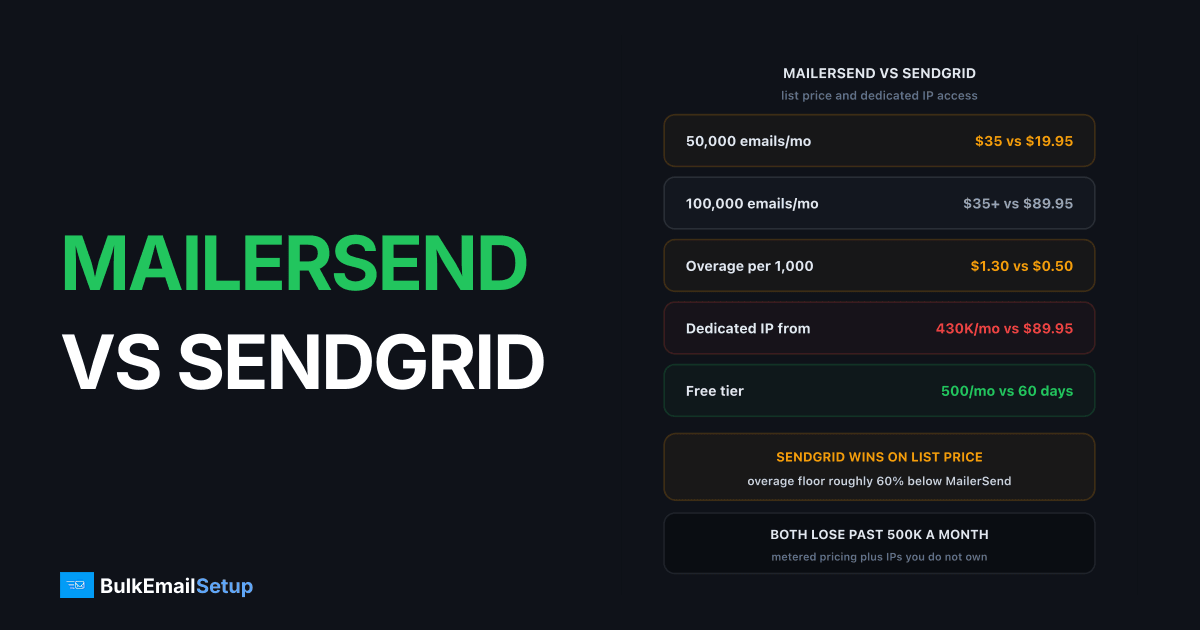
MailerSend and SendGrid are both transactional-first relays, but they are priced for different sizes of sender. MailerSend's Starter plan is $35/month for 50,000 emails, SendGrid Essentials is $19.95/month for the same volume, and SendGrid Pro at $89.95/month covers 100,000 emails plus a bundled dedicated IP that MailerSend only offers on Enterprise above 100,000 emails per week. SendGrid has the deeper feature set and the worse reputation for shared-pool suspensions. MailerSend is cleaner to work with and thinner once you scale.
I've run production mail through both. MailerSend is the better developer experience, SendGrid is the better platform, and neither is the right answer above roughly half a million emails a month.
MailerSend vs SendGrid: the short version
The two products look alike from the outside. Both give you an HTTP API, SMTP on 587 and 2525, templates, webhooks and analytics. The differences show up in what each one gates behind money.
| Factor | MailerSend | SendGrid |
|---|---|---|
| Owner | MailerLite team, launched 2020 | Twilio, launched 2009 |
| Free tier | 500 emails/month, permanent | 100/day for 60 days, then paid |
| Entry paid plan | Hobby $7/mo, 5,000 emails | Essentials $19.95/mo, 50,000 emails |
| Mid plan | Starter $35/mo, 50,000 emails | Pro $89.95/mo, 100,000 emails |
| Dedicated IP | Enterprise only, 100K+/week | Included from Pro, add-ons on all tiers |
| Subaccounts | Domain spaces, $4 per extra domain | Subusers on Pro and Premier |
| Teammates | 5 on Starter, unlimited on Pro | 1 on Essentials, up to 1,000 on Pro |
| Suspension reputation | Fewer reports, smaller user base | Long, well-documented history |
| Best at | Clean API, low-friction setup | Feature depth, IP access, tooling |
SendGrid's numbers come from Twilio's SendGrid pricing page and MailerSend's from MailerSend's plans and limits page. Both were current when this was written. Both vendors have re-priced within the last two years, so check before you commit.
What do they cost at 50K, 500K and 1M a month?
SendGrid is cheaper at every tier I can price publicly, and the gap widens with volume. This surprises people who assume the newer product undercuts the incumbent.
| Monthly volume | MailerSend | SendGrid | Cheaper |
|---|---|---|---|
| 50,000 | Starter $35/mo | Essentials $19.95/mo | SendGrid |
| 100,000 | Starter $35 + overage | Pro $89.95/mo, IP included | Depends on IP need |
| 500,000 | Professional tier, quoted | Pro plan band, quoted | SendGrid on list price |
| 1,000,000 | Professional or Enterprise | Pro band up to 2.5M | SendGrid on list price |
The table gets vague past 100,000 because neither vendor publishes clean per-tier prices above their headline plans. MailerSend's Professional starts at $110/month for 50,000 emails with overage from $1.30 per 1,000. SendGrid's Pro starts at $89.95/month covering 100,000 to 2,500,000 emails, with overage of $0.0005 to $0.0011 per email, which is $0.50 to $1.10 per 1,000.
SendGrid's overage floor is roughly 60% below MailerSend's. At 500,000 emails a month that gap alone is several hundred dollars. MailerSend's $0.90 per 1,000 rate on some bands narrows it, never reverses it at list price.
The honest caveat: both quote high-volume deals privately, and the discount you get depends on your negotiating position more than the published table. Our cost per 1,000 emails across every provider breakdown puts both against the wider market.
Features: where SendGrid is genuinely deeper
SendGrid has 15 years of feature accretion. Most of it you will never touch, but a few pieces matter.
| Feature | MailerSend | SendGrid |
|---|---|---|
| HTTP API | Yes, clean and well documented | Yes, v3, sprawling but complete |
| SMTP relay | Yes, 587 and 2525 | Yes, 587, 2525 and 465 |
| Drag-and-drop templates | Yes, strong editor | Yes, plus HTML and handlebars |
| Inbound routing | All plans, 1 to 100,000 routes | Yes, Inbound Parse webhook |
| Suppression management | Yes, Starter and up | Yes, granular per group |
| Subaccount isolation | Domain spaces, $4/domain | Subusers, Pro and Premier |
| Email validation | Add-on | 2,500 on Essentials, 5,000 on Pro |
| Dedicated IP | Enterprise, 100K+/week only | Pro includes 1, add-ons on any tier |
| Data retention | 1 to 30 days by plan | Longer, plan dependent |
The two lines that decide real deployments are dedicated IP access and subaccount isolation.
Dedicated IP. MailerSend puts it behind Enterprise and a 100,000 emails per week floor, which is about 430,000 a month. If you are sending 150,000 a month and want off the shared pool, MailerSend has no answer for you. SendGrid does, at $89.95/month. That single line is the strongest argument for SendGrid in the mid-volume band.
Subaccounts. For agencies sending on behalf of multiple clients, SendGrid's subusers give each one isolated stats, credentials and suppression. MailerSend's domain spaces do something similar at $4 per extra domain and are less mature. Neither isolates reputation properly on shared IPs, which is the part that bites.
MailerSend's data retention is the quiet trap: one day on Hobby, seven on Starter, thirty on Professional. Debug a three-week-old delivery complaint on Starter and the log is simply gone.
Deliverability and the suspension question
Neither vendor's shared pool is reliably better than the other, because on shared IPs your placement depends on who else is sending from your range that hour. What differs is scale and policing.
SendGrid's pool is enormous and mixed. That gives you warm IPs with long history, and it gives you neighbours you cannot see or influence. SendGrid compensates by policing customers hard. Its internal review trips well below Gmail's published 0.3% complaint threshold, because your complaints land on everyone else's IPs. Google's sender guidelines set 0.3% as the hard line and 0.1% as the target, and SendGrid acts inside that gap.
The practical result is what people complain about: automated holds with no warning. A 3x volume jump can trigger one. So can a single bad segment. Accounts get paused first and reviewed second, and a review takes 24 to 72 hours if you are lucky. We wrote up the process in SendGrid suspended my account, what now.
MailerSend does the same thing on a smaller pool. Fewer public complaints, but that is partly a function of a smaller customer base, not a softer policy.
| Risk | MailerSend | SendGrid |
|---|---|---|
| Automated volume-spike hold | Yes | Yes, widely reported |
| Complaint threshold enforced | Below Gmail's 0.3% | Below Gmail's 0.3% |
| Cold outreach allowed | No | No |
| Warning before suspension | Not guaranteed | Not guaranteed |
| Way to escape shared pool | Enterprise only | Pro plan, $89.95/mo |
That last row is the difference that matters. SendGrid gives you a $90/month exit from shared-pool risk. MailerSend makes you reach roughly 430,000 emails a month before it will sell you one.
Support: what you actually get
Support quality tracks what you pay, at both vendors.
MailerSend gives email support on all paid plans and priority support on Professional. Replies typically land in hours, from people who understand email.
SendGrid's free and Essentials support is ticket-based and slow, often 24 to 48 hours for a first reply. Pro adds chat, Premier adds a technical account manager. On Essentials at $19.95/month, an account held on a Friday means nobody answers until Monday.
Rule of thumb: on entry tiers MailerSend's support is better, on top tiers SendGrid's is, because you are paying enough to get a named human.
What each one is genuinely best at
Pick by constraint, not by brand.
| Your situation | Better pick | Why |
|---|---|---|
| Under 50,000/mo, cost-driven | SendGrid Essentials | $19.95 vs $35 for the same volume |
| Small dev team, values clean API | MailerSend | Better docs, faster setup, better support |
| 100K to 400K/mo, needs own IP | SendGrid Pro | IP included at $89.95; MailerSend won't sell one |
| Agency, many client accounts | SendGrid | Subusers are more mature than domain spaces |
| Already on MailerLite | MailerSend | Shared account, shared templates, one bill |
| Over 500K/mo, sending steadily | Neither | Dedicated server beats both on cost and control |
MailerSend's real strength is that it is pleasant to use. Coherent API, fast dashboard, accurate docs. If you are shipping a product and email is a feature rather than the business, that is worth real money.
SendGrid's real strength is that it has everything, including a dedicated IP you can buy today. Less pleasant, more likely to suspend you, still the more capable platform.
Migrating between them
Moving in either direction is the same job, and the code is the easy half.
- Export your suppression list from the old provider first. Do this before you cancel anything. Hard bounces and complaints you re-mail on the new platform will burn the new IPs in a week.
- Add the new SPF include and DKIM keys alongside the old ones. Keep both live during cutover. Check your SPF stays under the 10 DNS lookup limit or you get a
PermErrorand lose authentication on every message. - Ramp, do not switch. Route 5% of traffic to the new provider, then 10%, then 25%. Full cutover in 4 to 6 weeks. The new IPs have no history with your recipients regardless of what you did elsewhere.
- Send your most engaged segment through the new path first. Opens and clicks build reputation faster than volume does.
- Watch deferrals, not opens. A rising 4xx rate means you are moving too fast. Gmail's
421 4.7.28is the specific signal to slow down.
If you are moving because the bill got out of hand rather than because of a feature gap, read SendGrid bill too high, the alternatives before you move sideways to another metered relay and repeat the problem in eighteen months.
Where both of them lose
Both providers meter per email and both own the IPs. Those two facts set the ceiling.
The cost problem is arithmetic. At $0.50 to $1.30 per 1,000 emails, a million a month is $500 to $1,300 forever, rising with volume. A dedicated SMTP server is a fixed cost that does not care whether you send 200,000 or 2,000,000 this month.
The control problem is the one that actually hurts. On a shared pool you are one policy decision away from being switched off, judged against the risk you pose to other customers rather than against what Gmail tolerates. Even SendGrid's bundled Pro IP is leased to you on their account, under their terms.
Owning the IPs removes both. Flat cost, no policy team deciding your sending is too risky for someone else. The trade is that warm-up, blocklist monitoring and authentication become your job, or the job of whoever you pay to run it.
The crossover is roughly 500,000 emails a month sent consistently. Below that, the convenience of a managed relay usually wins. Above it, you are paying a premium for infrastructure you do not control. The head-to-head detail is in MailerSend vs a dedicated SMTP server and SendGrid vs a dedicated SMTP server.
How BulkEmailSetup helps
We build dedicated SMTP infrastructure you own: your own server, your own IPs, full SPF, DKIM, DMARC and PTR configuration, MTA tuning, bounce handling and a warm-up plan. There is no shared pool to protect, so no policy team decides whether your sending is too risky for someone else's IP reputation, and the cost stops scaling with your volume.
Basic starts at $549 one-time, covering 1 SMTP server, 3 dedicated IPs, 25,000 emails/day and unlimited contacts. Higher tiers scale to 15 IPs and 200,000 emails/day. See pricing for the full range.
Frequently asked questions
Is MailerSend cheaper than SendGrid?
At small volume, no. MailerSend's Starter plan is $35/month for 50,000 emails while SendGrid Essentials is $19.95/month for the same 50,000. MailerSend gets competitive higher up because its Professional overage starts at $1.30 per 1,000 and drops with plan size, but SendGrid Pro at $89.95/month for 100,000 emails plus a bundled dedicated IP is hard to beat on paper.
Does MailerSend offer a dedicated IP?
Only on Enterprise, and only if you send over 100,000 emails per week (roughly 430,000 a month). Below that you are on MailerSend's shared pool with no option to move off it. SendGrid includes one dedicated IP from the Pro plan at $89.95/month, which is a much lower bar.
Which has better deliverability, MailerSend or SendGrid?
Neither vendor's shared pool is reliably better than the other, because on a shared pool your placement depends on the other senders you share an IP with. SendGrid's pool is far larger and more mixed, which cuts both ways: more warm IP history, more chance of a neighbour dragging the range down. Your own authentication and complaint rate matter more than the logo.
Why does SendGrid suspend accounts so often?
SendGrid polices shared IP pools aggressively because one customer's complaints land on every other customer using the same IPs. Its internal review trips well below Gmail's published 0.3% complaint threshold, and a sudden 3x volume jump alone can trigger an automated hold. MailerSend does the same thing on a smaller pool, just with less volume of reported cases.
Is MailerSend good for bulk marketing email?
It handles it, but MailerSend is transactional-first by design, same as SendGrid. Bulk email is available from the Starter plan up. If your main use is large recurring campaigns rather than app-triggered mail, you are paying platform prices for a relay feature set, and per-email costs stack up fast past 500,000 a month.
How hard is migrating from SendGrid to MailerSend?
The code change is small since both offer an HTTP API and standard SMTP on ports 587 and 2525. The real work is DNS and warm-up: new SPF include, new DKIM keys, and 4 to 6 weeks of ramping because the new IPs have no reputation with your recipients. Export your SendGrid suppression list before you cancel, not after.
When do both providers stop making sense?
Around 500,000 to 1 million emails a month sent consistently. At that point per-email metering costs more than a dedicated server, and you still do not own the IPs, so a policy decision by either vendor can stop your sending overnight. Flat-cost owned infrastructure wins on both price and control at that volume.


