
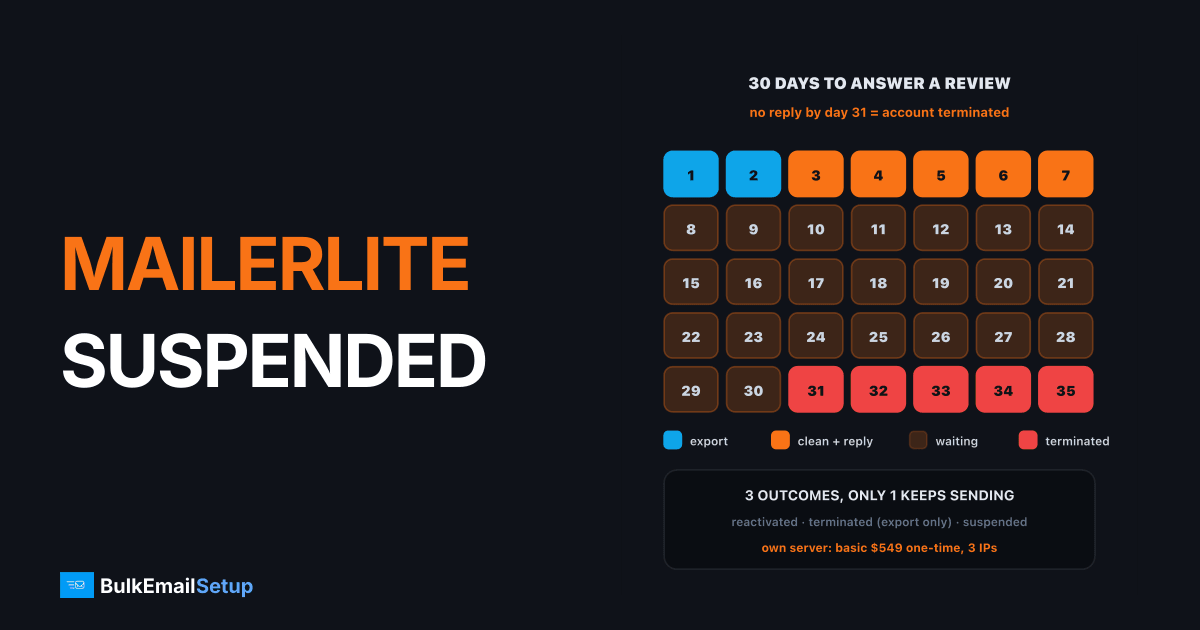
MailerLite ends every account review in one of three ways: reactivated, terminated or suspended. Reactivated means you are back to normal. Terminated means you can log in and export your data but cannot send. Suspended, which MailerLite reserves for malicious activity such as phishing, removes access, sending and export together. So the first job is to read which one you got, export everything you still can, and answer any request within 30 days, because silence turns a review into a termination.
What triggers a MailerLite review
MailerLite's own account review help article lists the triggers. They are worth reading closely, because each one points to a different fix.
| Trigger (MailerLite's wording) | What usually caused it | Fix before you reply |
|---|---|---|
| High bounces, spam complaints or unsubscribes | an old or imported segment | delete hard bounces, drop 12-month inactive |
| Addresses that may be bought, scraped or collected without consent | a purchased list or a scraped lead file | remove the whole source, not part of it |
| An import or activity that trips internal safeguards | a big first import, a sudden volume jump | split the import, show where each part came from |
| Phishing, malware, intellectual property | content or links | remove the content, check every link domain |
| Suspicious payment or a suspected breach | card or login | update payment, reset passwords and 2FA |
MailerLite does not publish numeric limits. The line every inbox provider works to is Gmail's: spam complaints under 0.3%, with 0.1% as the target, from Google's sender guidelines. On a 10,000 email send that is 10 complaints as the target and 30 as the ceiling. A shared platform usually acts before the ceiling, because your complaints land on IPs other customers use.
The three outcomes, and what you keep
This is the part that decides your next move. The outcomes are not equal, and the difference is mostly about your list.
Only reactivated lets you send. Only red takes your list with it.
| Outcome | Why MailerLite uses it | Log in | Send | Export data |
|---|---|---|---|---|
| Reactivated | minor issue, misunderstanding, false positive | yes | yes | yes |
| Terminated | breach of the Terms of Use | yes | no | yes |
| Suspended | malicious activity, such as phishing | no | no | no |
Most senders who land in a review because of list quality end up reactivated or terminated, not suspended. That matters: in both cases your subscribers and their consent records are still yours to take. Our guide to exporting your list before an ESP ban lists exactly which files to pull.
The 30-day reply window
If MailerLite's team asks you for more information, the clock starts. Its help article is blunt: you must respond within 30 days, and if no reply is sent, the account is terminated.
Thirty days sounds long. Spend the first two exporting and the next five cleaning.
A reply that works answers three questions with specifics:
- Where the risky contacts came from. "The 4,000-row webinar import from March" beats "some old contacts".
- What you removed. Counts and dates. "Deleted 4,000 imported rows and 1,200 hard bounces on 14 November."
- What stops a repeat. Double opt-in on forms, a sunset rule for inactive subscribers, no more third-party imports.
Paid plans send this through support inside the account. Free plans go through the self-service centre, which is slower. Send one clear message. Several tickets do not speed anything up.
A note on new-account approval: if you never got past approval, this is a different problem. MailerLite does not publish an approval time, and users report anywhere from a few hours to about a day. A custom-domain sender address, a live website with a real signup form, and a domain that is not brand new are what get approvals through.
Should you reply or move?
| Your situation | Best move |
|---|---|
| Reactivated, cause was one bad import | stay, add an import check and a sunset rule |
| Under review, list is your own opt-ins | reply within the week with the three answers |
| Terminated for a policy breach | export, clean, move |
| List was bought, rented or scraped | do not move it anywhere; rebuild from opt-ins |
| Suspended for malicious activity | contact support about the account, then secure everything |
The trap is moving a list that caused the review to another shared ESP. Brevo, Mailchimp and Kit run the same kind of shared pools with the same kind of safeguards, and a list that tripped MailerLite trips them within a send or two. We covered that pattern in Kit suspended your account and in Brevo's suspension rules.
Where to send next
If your list is your own and the issue was MailerLite's tolerance rather than your consent, you have three realistic routes.
| Route | Good fit | Watch out for |
|---|---|---|
| Another ESP with a free or cheap plan | under 5,000 subscribers, simple newsletters | the same import checks, contact-based pricing |
| A transactional relay (SES, Mailgun) | developers, app mail | sandbox and account reviews, no campaign editor |
| Your own dedicated SMTP server | 25,000+ a day, steady sending | you run warm-up and hygiene yourself |
MailerLite itself is cheap for small lists, and we compared its pricing to owning a server in MailerLite vs a dedicated SMTP server. The case for your own server is control: nobody else's sending can trigger a review of yours, and your list is never locked inside someone else's account.
Wherever you go, the list has to be clean first. Run it through list cleaning, then warm the new sending path from your most engaged subscribers outward. Our IP warm-up schedule has the week-by-week volumes.
The first week after a MailerLite review
Day 1: export subscribers with signup dates and sources, unsubscribes, bounces and complaint lists. Do this before you reply to anything.
Days 2 to 3: find the source that caused it. Delete hard bounces. Drop anyone with no open or click in 12 months. Remove every row from a bought, rented or scraped source.
Days 4 to 5: send your reply if a review is open. Set up the new sending path in parallel, on a subdomain, with SPF, DKIM and DMARC.
Days 6 to 7: start sending to your most engaged segment only, a few hundred a day per IP. Grow about 30% every two days if bounces and complaints stay low.
How BulkEmailSetup helps
We set up a dedicated SMTP server that you own, with your own IPs, SPF, DKIM, DMARC and PTR configured, bounce handling, a campaign platform and a warm-up plan. Your subscribers live on your server, not inside a platform that can lock them.
| Plan | One-time fee | Emails per day | Dedicated IPs | Hosting you pay your host |
|---|---|---|---|---|
| Basic | $549 | 25,000 | 3 | about $11 a month |
| Advance | $1,199 | 200,000 | 15 | about $49 a month |
There is no monthly fee to us and no contact limit. The 15-day money-back guarantee applies until server access is handed over. Our anti-spam policy still applies: opt-in lists only, no purchased, rented or scraped addresses. See the Basic plan or compare all pricing.
Frequently asked questions
Why does MailerLite suspend accounts?
MailerLite opens a review when sends produce a high number of bounces, spam complaints or unsubscribes, when it suspects bought, scraped or non-consented addresses, when an import trips its internal safeguards, or for phishing, malware and payment problems. The review then ends as reactivated, terminated or suspended. Suspended is reserved for malicious activity and removes access, use and data export.
How long does MailerLite account approval take?
MailerLite does not publish a fixed time. Its help centre says automated checks usually finish within minutes and manual reviews take longer. Users commonly report a few hours to about a day for a new account. A custom-domain sender address, a live website and a clear signup form shorten it. A brand-new domain or a free Gmail address slows it down.
Can I appeal a MailerLite suspension?
There is no formal appeal process in MailerLite's help centre. If support asks for more information during a review, you have 30 days to reply, and no reply means the account is terminated. Paid plans contact support inside the account; free plans use the self-service centre. A full suspension for malicious activity is not something a reply usually reverses.
Which providers accept senders MailerLite rejected?
It depends on why you were rejected. If it was a false positive, a new domain or a thin website, another ESP or your own server will usually accept you once those are fixed. If the list was bought, rented or scraped, no reputable provider will take it, including BulkEmailSetup, whose anti-spam policy bans those lists. For a clean opt-in list, its Basic plan is $549 one-time for 25,000 emails a day.
Can I export my subscribers after MailerLite closes my account?
Only if the outcome was reactivated or terminated. MailerLite's help centre says a terminated account keeps access and data export but can no longer send. A suspended account loses access, use and export together. Export as soon as a review starts, while you still can, and keep the consent fields, not just the addresses.
Will opening a new MailerLite account work?
Rarely. Approval checks your domain, website and sender details, and a second account for the same domain and list will hit the same safeguards. It also reads as an attempt to dodge the review, which makes support less willing to help. Fix the cause first, then either answer the review or move the list to infrastructure that fits it.


