
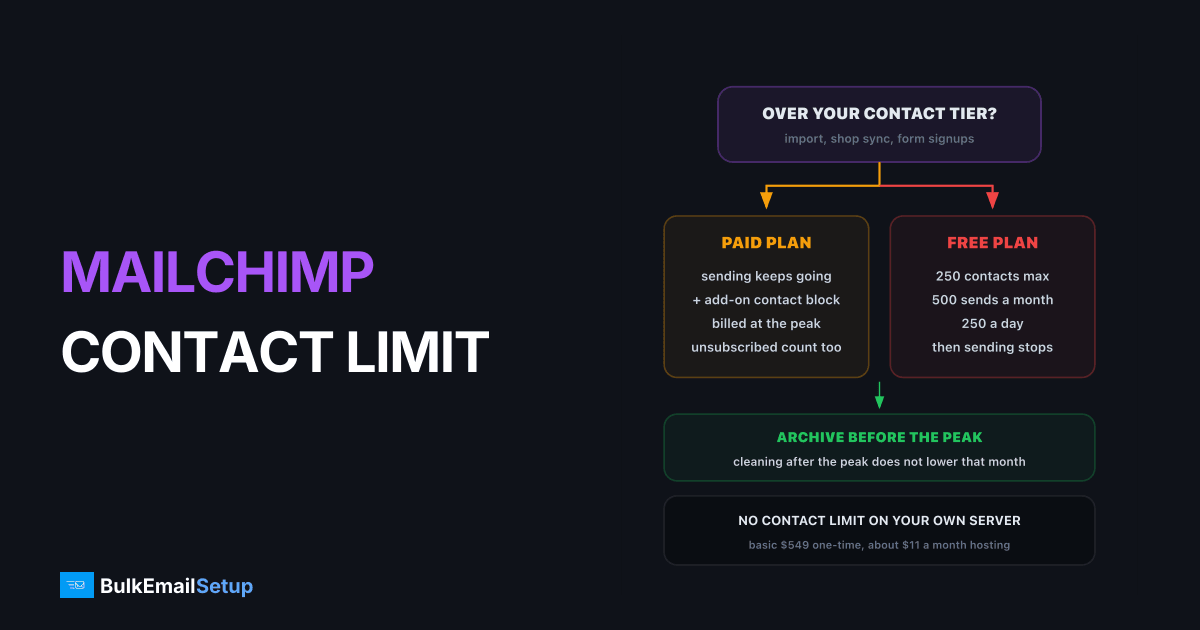
When you pass your Mailchimp contact limit on a paid plan, your sending does not stop, your bill grows: Mailchimp adds an add-on contact block, priced by your plan and tier, and bills it on the highest contact count you reached that month. Unsubscribed and non-subscribed contacts count toward that number. Only cleaned and archived contacts do not. So the first move is almost always to archive, not upgrade. If the list is still growing past about 25,000 real contacts after that, moving off per-contact pricing usually pays back within a few months.
I've watched this exact email arrive for dozens of clients. "You're over your contact limit." Nobody sent more. An import ran, a shop sync added 600 checkout contacts, and the tier flipped.
What Mailchimp counts toward your limit
This is the part most people get wrong, because "contacts" in Mailchimp is not the same as "people who get your newsletter". Mailchimp's contact status help page is clear about which statuses count.
| Contact status | Counts toward limit? | Can you mail them? |
|---|---|---|
| Subscribed | yes | yes |
| Unsubscribed | yes | no |
| Non-subscribed (shop or form records, no marketing consent) | yes | no |
| Cleaned (hard bounced) | no | no |
| Archived | no | no |
Two of the three counted groups are people you cannot legally send a campaign to. On older accounts they are often 15 to 30 percent of the total. You are paying every month to store them.
What happens at the limit
Mailchimp's additional charges page sets out the rules for paid plans, and they are friendlier to your sending than to your budget.
- Service keeps running. Campaigns are not paused.
- An add-on contact block is added to the bill. If you are over by more than one block, you pay for several.
- Billing uses the peak. The charge reflects the highest contact count stored in the billing period, even if you clean the list a week later.
- Sends scale with it. Each block brings sends at your plan's ratio. On Standard, 1,000 extra contacts bring 12,000 extra sends.
Paid plans bill the peak, free plans just stop
Point 3 is the expensive one. Archiving after the overage does not undo it. Archive before an import, before a shop sync, and a few days before the billing date.
The free plan works differently. It caps you at 250 contacts and 500 sends a month (250 a day), with no add-on blocks, so the only ways forward are to cut the audience or start paying.
Send limits by plan
Mailchimp also caps monthly sends as a multiple of your contact tier. This matters when you weigh an upgrade, because you may be buying sending room you never use.
| Plan | Monthly sends | At 15,000 contacts | At 50,000 contacts |
|---|---|---|---|
| Free | 500 (250 a day) | not available | not available |
| Essentials | 10x contact limit | 150,000 | 500,000 |
| Standard | 12x contact limit | 180,000 | 600,000 |
| Premium | 15x contact limit | 225,000 | 750,000 |
A list of 15,000 mailed weekly uses about 60,000 sends a month. Standard gives you 180,000. You pay for the contacts, and the unused sending room comes along whether you want it or not.
Get back under the tier this afternoon
Here is a real shape I see often. An audience reads 15,600 contacts against a 10,001 to 15,000 tier:
| Status | Contacts | Action |
|---|---|---|
| Subscribed | 12,900 | keep |
| Unsubscribed | 2,100 | archive |
| Non-subscribed | 600 | archive, or run a consent campaign first |
| After archiving | 12,900 | back inside the tier |
That is 2,700 contacts, about 17 percent, that were costing money and could never be mailed. Then go one step further:
- Export, then archive anyone with no open or click in 12 months. Export first so you can run a re-permission email later.
- Merge duplicate audiences. The same address in two audiences counts twice.
- Check what syncs in. Shop, CRM and form integrations that push non-subscribed records will refill the count every month.
- Archive before the billing date, not after the warning, because the peak is what gets billed.
If the clean list is still over the tier, the upgrade is real growth. That is the moment to compare.
Upgrade or move: the decision
Archive first, then decide on real list size
| Your situation | Best move | Why |
|---|---|---|
| Under 5,000 real contacts | stay and upgrade | the bill is small and moving costs a warm-up |
| 5,000 to 25,000, heavy automations | stay, archive monthly | rebuilding complex flows costs more than the tier |
| 25,000+ and growing | move off per-contact pricing | every new tier is a recurring cost, forever |
| Mostly a weekly newsletter | move | you are paying for a builder and sends you do not use |
| No one to watch deliverability | stay | shared IPs mean Mailchimp watches reputation for you |
For the tier-by-tier dollar figures and payback math, see why the Mailchimp bill keeps rising. If you decide to move, migrating from Mailchimp to your own SMTP covers exports, suppression lists and DNS. The wider field is in Mailchimp alternatives for high-volume senders.
What moving actually changes
With your own SMTP server and a self-hosted campaign platform, the contact count disappears from the invoice. You pay for the server and IPs, not for how many people sit in the database.
| Cost driver | Mailchimp paid plan | Own SMTP server |
|---|---|---|
| Contacts stored | billed per tier, unsubscribes included | unlimited, not billed |
| Going over a tier | add-on block at peak count | not applicable |
| Monthly sends | 10x to 15x contacts | set by server capacity, 25,000 a day on Basic |
| Ongoing fee | monthly plan | hosting only, about $11 a month on Basic |
| Deliverability work | handled on shared IPs | yours, with a warm-up plan |
The honest trade is the last row. Own IPs start cold and need 2 to 4 weeks of warm-up, and someone should check bounce and complaint rates each week. The IP warm-up schedule shows what that looks like day by day.
How BulkEmailSetup helps
We build the no-contact-limit route: a dedicated SMTP server on hosting you own, 3 dedicated IPs, SPF, DKIM, DMARC and PTR set up, and an email marketing platform with campaign stats, so you import the list and send. No tiers, no add-on blocks, no charge for unsubscribed records in the suppression list.
The Basic plan is $549 one-time for 25,000 emails a day and unlimited contacts. After that you pay only the hosting, about $11 a month, directly to the host. Larger lists fit Advance at $1,199 with 200,000 a day. There is a 15-day money-back guarantee. See the Basic plan or all pricing.
Frequently asked questions
What happens when I hit my Mailchimp contact limit?
On a paid plan, Mailchimp does not stop your sending. It adds an add-on contact block to your monthly bill, sized and priced by your plan and tier, and more than one block if you are far over. The charge is based on the peak contact count during the billing period, so deleting or archiving contacts later in the month does not reduce it.
Does Mailchimp charge for unsubscribed contacts?
Yes. Mailchimp's own help pages list subscribed, unsubscribed and non-subscribed contacts as counting toward your monthly contact limit. Only cleaned and archived contacts are excluded. Archiving unsubscribed contacts keeps their opt-out on record while removing them from the count, which is the fastest legal way to drop a tier.
How much is Mailchimp at 50,000 contacts?
Mailchimp's pricing page shows tier ranges such as 50,001 to 75,000 but asks larger accounts to see the price inside the account or talk to sales, and prices vary by region and discount. Check your own billing page for the exact figure. The Standard plan at any tier includes 12 times your contact limit in monthly sends, so 50,000 contacts allows 600,000 sends.
What is cheaper than upgrading Mailchimp?
First, archive unsubscribed, non-subscribed and long-inactive contacts, which often removes 15 to 30 percent of an audience. If the list is still growing past 25,000 real contacts, a setup with no contact pricing is cheaper. BulkEmailSetup's Basic plan is $549 one-time for a dedicated SMTP server with unlimited contacts and 25,000 emails a day, plus about $11 a month in hosting.
What happens on the Mailchimp free plan when I go over?
The free plan stops at 250 contacts and 500 sends a month, with a daily cap of 250. There is no add-on block on free, so to keep growing you either remove contacts or move to a paid plan. Many senders hit this wall within months of starting a newsletter, and it is the point where comparing options is cheapest.
Does archiving contacts in Mailchimp delete them?
No. Archived contacts keep their history and can be unarchived later, but they no longer count toward your limit and cannot be mailed. Be careful with integrations: if a connected shop or form updates an archived contact, it can come back into the audience and back into the count. Re-check the total a few days before each billing date.


