
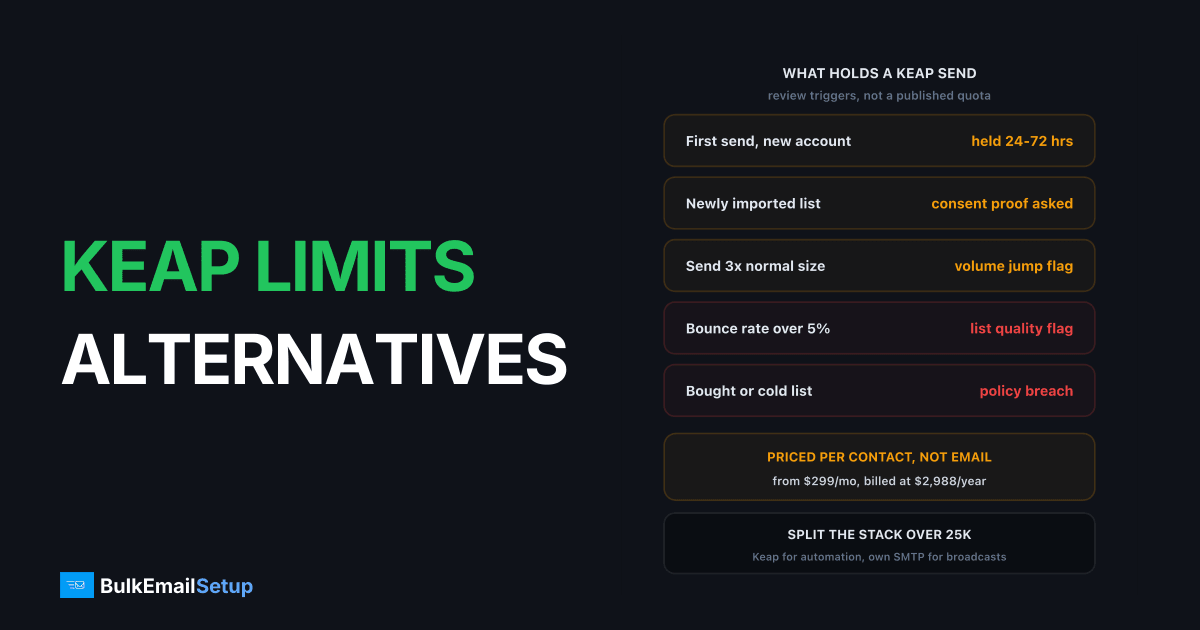
Keap prices per contact rather than per email, and it reviews broadcasts before they leave, so the limit that stops you is usually a compliance hold rather than a published quota. Public pricing starts at $299/mo, billed at $2,988/year, with 2 user licences and contact volume quoted rather than listed. As a list grows past roughly 25,000 contacts, the bill tracks addresses instead of revenue, and the fix most senders land on is a split: Keap keeps the automation, broadcasts move to their own SMTP.
How Keap's pricing and send allowance actually work
Keap is a CRM with automation attached, and the price follows the contact count.
| Line item | What Keap publishes |
|---|---|
| Entry price | $299/mo, billed at $2,988/year |
| Users included | 2 |
| Extra user | $39/month |
| Contact volume | quoted, "chat with us" |
| Free trial send cap | 25 emails |
Check Keap's pricing page before you budget, because the contact tiers are not listed publicly and the quote you get depends on your list size and the sales conversation. That is the first thing to understand about the model: there is no plan page you can read to work out what 40,000 contacts costs you.
There is also no published emails-per-month number. Your monthly send allowance is tied to your plan and your contact tier, and on top of that sits a review process. So two accounts on the same spend can have very different practical ceilings depending on how their sending history looks.
The deliverability review is stricter than most
This is the part that surprises people coming from SendGrid or Mailchimp. Keap runs a compliance and deliverability review on new accounts, and it re-runs judgement on individual broadcasts that look unusual for that account.
The reason is structural. Keap sends on shared infrastructure, and its customer base is small businesses who frequently arrive with a list built somewhere else. One imported list with a 12% bounce rate hurts every other Keap customer on the same IPs. So the policy team gets involved earlier than a self-serve relay would.
| Trigger | What Keap is checking |
|---|---|
| First broadcast on a new account | where the list came from |
| Newly imported list | consent and source |
| Send 3x or more your normal size | sudden volume jump |
| Bounce rate over ~5% on a prior send | list age and quality |
| Bought or rented list | outright policy breach |
| Cold outreach to non opt-ins | outright policy breach |
A hold on a legitimate send usually clears in 24 to 72 hours once you explain the list source. A hold on an imported list you cannot document usually does not clear at all. Same pattern I described in what to do after a SendGrid suspension, except Keap tends to catch it before the send rather than after.
The blunt version: if your list is older than about 18 months and has not been mailed consistently, Keap will notice on your first broadcast. Clean it before you import it, not after you get held.
What triggers a hold, in the order they actually happen
- You import a list Keap has not seen mail flow through before.
- You build the broadcast and schedule it.
- Review flags it because the recipient count is well above your normal pattern.
- Support asks where the addresses came from and how consent was captured.
- You answer with a source and a date, or you segment down to the engaged portion and re-send.
Step 5 is the one worth planning for. If you cannot document the source, the workable answer is almost always to cut the send down to contacts who have opened something in the last 90 days, prove a clean bounce and complaint rate on that, then widen out over the following weeks. That is a warm-up in everything but name.
Gmail's own sender guidelines set the standard Keap is protecting against, including keeping spam complaints under 0.3%. Receivers judge your domain regardless of which platform carries the mail, so a bad broadcast through Keap follows you to whatever you move to next.
The contact-based cost curve
Here is where the model turns against you. Keap charges for a contact whether that contact buys, opens, or does nothing at all.
| List size | What you are paying for | The problem |
|---|---|---|
| 5,000 contacts | mostly engaged buyers | fine, automation earns its keep |
| 10,000 contacts | buyers plus a growing tail | still defensible |
| 25,000 contacts | tail is now the majority | email line becomes the biggest cost |
| 50,000 contacts | most contacts never open | you are renting storage for dead addresses |
Because contact tiers are quoted rather than published, run the audit before you renegotiate. Filter for contacts with no open in 12 months. On most accounts past 25,000 that is 40% to 60% of the database. Deleting or archiving them drops the quoted tier and improves deliverability at the same time, and it costs nothing.
Do that first. It often saves more than switching platforms would, and it is the same advice I give people on HubSpot's marketing contact pricing.
What you lose by leaving Keap
Be honest about this, because the answer stops most full migrations.
| Feature | Replaceable? |
|---|---|
| Campaign builder (visual automation) | yes, but it is a rebuild |
| CRM with contact records | yes, several options |
| Sales pipeline and deal stages | yes |
| Order forms and checkout | painful, often a separate tool |
| Appointment booking | yes, cheap standalone tools |
| Broadcast email sending | yes, easily, this is the easy part |
The last row is the point. The only thing that is genuinely simple to move is the thing costing you the most: the full-list broadcast. Everything above it is tangled together, which is why ripping Keap out wholesale usually costs more in rebuild time than it saves in subscription fees.
The split stack
So most senders in this position do not migrate. They split.
Keap keeps: the CRM, the pipeline, order forms, and every automated sequence that fires off a contact property or a purchase. Low volume, high value, tightly bound to the data.
Your own SMTP takes: the monthly newsletter, product announcements, promotions, re-engagement sweeps, anything that goes to the whole database. High volume, low personalisation, and exactly where per-contact pricing is worst.
The mechanics are straightforward. You cannot point Keap broadcasts at an external relay, so you export the broadcast audience on a schedule, or sync it, and send from a separate system pointed at your own server. There is more detail on the wiring in SMTP for CRM and marketing automation, and the ActiveCampaign version of this workaround covers the same split on a different platform.
One thing to get right: use a subdomain for broadcast sending, separate from whatever Keap sends on. Keeps the reputations independent, so a bad broadcast month does not drag your transactional and automation mail down with it.
Cost at 10K, 25K and 50K contacts
Keap's contact pricing is quoted, so the column below shows the published $299/mo entry point and marks the rest as quoted rather than inventing a number. Get your own quote and drop it in.
| Setup | 10,000 contacts | 25,000 contacts | 50,000 contacts |
|---|---|---|---|
| Keap only | from $299/mo, tier quoted | quoted, rises with contacts | quoted, rises with contacts |
| Split: Keap on engaged + own SMTP | Keap tier for ~4,000 engaged, plus server ~$40/mo | Keap tier for ~9,000 engaged, plus ~$60/mo | Keap tier for ~17,000 engaged, plus ~$80/mo |
| Own SMTP only, no Keap | ~$40/mo plus rebuild time | ~$60/mo plus rebuild time | ~$80/mo plus rebuild time |
The split column assumes you keep roughly 35% of contacts in Keap as the actively engaged segment and let your own server carry the rest. That ratio is what decides the saving, not the server cost, because the server cost barely moves between 10,000 and 50,000 contacts. A dedicated SMTP setup with unlimited contacts is a fixed line item. Keap is a variable one.
Run your own numbers against the SMTP cost calculator by list size before committing.
Migration effort, realistically
| Task | Time |
|---|---|
| Server, IPs, SPF/DKIM/DMARC/PTR | 1 to 2 days |
| Export or sync the broadcast audience | 2 to 5 days |
| Rebuild broadcast templates | 1 week |
| IP warm-up to full volume | 4 to 6 weeks |
| Parallel running both systems | the warm-up window |
The warm-up is the long pole and there is no way around it. New IPs have no history, so you ramp roughly 30% every two days per IP and you keep Keap sending in parallel until the new infrastructure carries your full list without deferrals. Budget 4 to 8 weeks before Keap volume actually drops.
Do not schedule this over a peak sales period. The first three weeks of warm-up is when a mistake costs you the most.
Decision guide by list size
| List size | What I would do |
|---|---|
| Under 10,000 contacts | Stay on Keap. The automation is worth more than the saving. |
| 10,000 to 25,000 | Audit and archive dead contacts first. Re-quote. Then decide. |
| 25,000 to 50,000 | Split. Keap for automation, own SMTP for broadcasts. |
| Over 50,000 | Split, and treat it as urgent. The per-contact curve is now the biggest line. |
| Broadcasts repeatedly held | Fix list quality first. New infrastructure will not fix a bad list. |
That last row matters more than the rest. If Keap is holding your sends because of bounce rates and consent questions, moving to your own server does not make those questions go away. Gmail and Microsoft still apply the same thresholds. What it does remove is the shared-pool policy layer, meaning you are judged on your own numbers rather than on the risk you pose to Keap's other customers.
How BulkEmailSetup helps
We build dedicated SMTP infrastructure you own: your own server, your own IPs, full SPF/DKIM/DMARC/PTR configuration, MTA tuning, bounce handling and a warm-up plan. Because the IPs are yours alone, there is no shared pool to protect and no review team deciding whether a legitimate broadcast to your own list is too risky for other customers.
Basic starts at $549 one-time, covering 1 SMTP server, 3 dedicated IPs, 25,000 emails/day and unlimited contacts. Higher tiers scale to 15 IPs and 200,000 emails/day. See pricing, or read SMTP for CRM and marketing automation for how the split stack wires together.
Frequently asked questions
What are Keap's email sending limits?
Keap does not publish a fixed emails-per-month number the way SendGrid publishes a plan quota. Your practical ceiling is set by your contact tier plus a deliverability review that can hold any broadcast Keap's team considers large or unusual for your account history. Published pricing starts at $299/mo billed annually at $2,988/year with 2 users, and contact volume is quoted rather than listed.
Why is my Keap broadcast on hold?
Keap runs a compliance and deliverability review on new accounts and on sends that break your normal pattern. The common triggers are a first broadcast from a new account, an imported list that has not been mailed from Keap before, a jump of 3x or more over your usual send size, and a bounce rate over about 5% on a previous send. A held broadcast usually clears in 24 to 72 hours once you answer where the list came from.
Can I use my own SMTP server with Keap?
Not for broadcast campaigns. Keap sends marketing and automation email through its own infrastructure so it can enforce its deliverability rules, and there is no setting to point campaigns at an external relay. This is why the usual move is a split stack rather than an SMTP swap: Keap keeps the automation, and a separate system sends the full-list broadcasts.
Why does Keap get more expensive as my list grows?
Keap prices on contacts, not on emails sent. A contact who never opens anything costs the same as a buyer, so the bill tracks list size rather than revenue. At 10,000 contacts the automation is usually worth it. By 50,000 contacts, most of the spend is carrying addresses that generate nothing.
What do I lose if I leave Keap?
The campaign builder, the CRM with its pipeline and deal stages, order forms and checkout, appointment booking, and the automations tied to all of it. That is a large rebuild, which is why most senders do not leave outright. They keep Keap for automation on engaged contacts and move the monthly newsletter and full-list broadcasts elsewhere.
How long does moving broadcasts off Keap take?
Plan for 4 to 8 weeks end to end. Server setup and DNS take a day or two, but new IPs need a warm-up of roughly 4 to 6 weeks before they carry your full broadcast volume. Run both systems in parallel during that window rather than cutting over in one weekend.


