
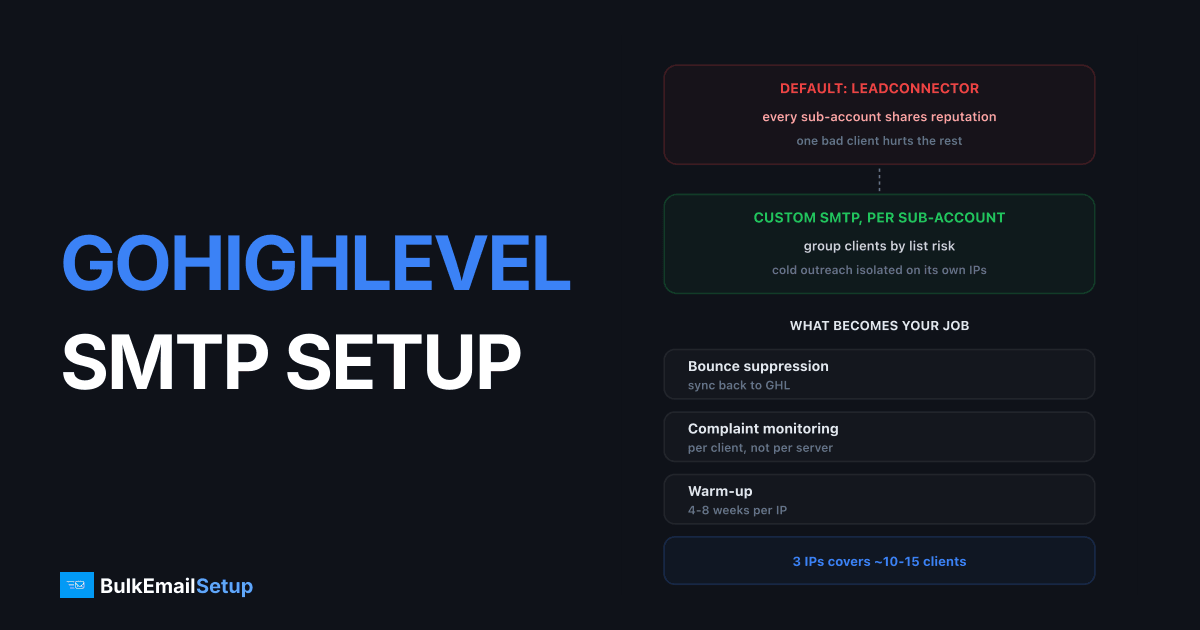
GoHighLevel sends through LeadConnector by default, and that works until agency volume climbs, at which point you hit rate limiting and shared-pool reputation you do not control. Custom SMTP is supported at both agency and sub-account level, and moving to it removes GoHighLevel as the sending bottleneck. What it does not remove is your responsibility for bounces, complaints and warm-up.
When the built-in sending stops being enough
Three signals, usually in this order:
| Signal | What you see |
|---|---|
| Sends start queueing | campaigns take hours to go out |
| Delivery drops at Gmail | shared pool reputation |
| One client damages others | nothing you can isolate |
The third is the one that pushes agencies to move. On the default service every sub-account shares reputation, so a client running an aggressive campaign degrades delivery for your careful clients, and there is nothing in the interface that lets you separate them.
Setting up custom SMTP
In GoHighLevel, Settings then Email Services, then add an SMTP integration. You need host, port, username and password.
| Setting | Value |
|---|---|
| Port | 587 with STARTTLS, or 465 implicit TLS |
| Auth | Your SMTP credentials |
| From domain | Must match an authenticated domain |
| Scope | Agency-wide, or per sub-account |
Set it per sub-account when clients differ in list quality. This is the whole reason to do it. Agency-wide SMTP is simpler but recreates the problem you left, just on your own IPs instead of LeadConnector's.
Before you point anything at it, each sending domain needs SPF, DKIM and DMARC published, and the PTR record on your sending IP has to match the HELO hostname. Missing PTR alone gets you rejected at Gmail and Microsoft regardless of everything else.
What the receiving networks require, per client domain
Every client sending domain is scored on its own, so authentication is per domain, not per agency. Google's bulk sender guidelines apply to anyone sending over 5,000 messages a day to Gmail, and Microsoft has been tightening equivalent rules.
Per client domain you need:
| Record | Purpose |
|---|---|
| SPF | authorises your sending IPs for that domain |
| DKIM | signs the mail, survives forwarding |
| DMARC | tells receivers what to do on failure, start at p=none |
| PTR | reverse DNS on the IP, must match the HELO hostname |
Missing PTR alone gets mail rejected at Gmail and Microsoft regardless of everything else, and it is the one agencies most often skip because it lives on the server rather than in the client's DNS.
Grouping clients across IPs
This is the decision that separates agencies that keep clients from agencies that lose them in month four. Do not group by billing tier. Group by list risk.
| Risk band | Client type | IP handling |
|---|---|---|
| Low | transactional, double opt-in, existing customers | safe to share |
| Medium | newsletters with real signup history | share carefully |
| High | cold outreach, bought or unknown lists | isolate, always |
Mixing a high-risk client onto a low-risk IP means the careful client's mail starts failing because of someone else's campaign. They will not know why. They will just leave, and you will not get a chance to explain.
Cold outreach clients need their own IPs and their own domains. That is a different setup, covered in cold email domain setup.
What becomes your job
Custom SMTP moves four responsibilities from GoHighLevel to you:
Bounce handling. Hard bounces have to be suppressed and fed back into GoHighLevel, or the same dead addresses get mailed every campaign and your complaint rate climbs. This is the one agencies most often skip.
Complaint monitoring. Watch per-client, not per-server. Gmail's threshold is 0.3% and a single client can push a whole IP past it.
Warm-up. New IPs start cold. Four to eight weeks, ramping roughly 30% every two days. You cannot skip this by having a good client list.
IP grouping. Decide which clients share IPs based on list risk. Cold outreach on its own IPs, always.
Sizing for an agency
| Agency shape | Daily peak | IPs |
|---|---|---|
| 5-10 clients, opt-in lists | ~10,000 | 3 |
| 20-30 clients, mixed | ~50,000 | 8-10 |
| Cold outreach clients | varies | isolate each |
A 3-IP build handling 25,000 a day covers most agencies at 10 to 15 clients on normal marketing volume. Cold outreach clients need their own IPs and their own domains, which is a different setup covered in cold email domain setup.
Warm-up when you have clients waiting
The awkward part of moving an agency to custom SMTP: warm-up takes 4 to 8 weeks, and clients expect their campaigns to keep going.
The workable sequence:
1. Keep LeadConnector running. Do not switch everyone at once.
2. Warm the new IPs with your least risky client. Someone with a clean, engaged list and modest volume. Their mail performs well during ramp, which builds reputation faster.
3. Move clients across one at a time, in ascending order of risk, once each IP is carrying its target volume.
4. Keep cold outreach clients last, on IPs that were never used for anything else.
Trying to move a whole book of clients in week one produces deferrals across every account simultaneously, which is worse than the shared-pool problem you left.
The reseller angle
Most agencies moving GoHighLevel to custom SMTP end up reselling the sending as part of their retainer. A one-time build at $549 handling 25,000 a day, resold across 10 clients, pays for itself in the first month and then improves margin on every client after. The structure and the client-grouping rules are covered in white-label email hosting and SMTP for agencies.
Suppression sync, the piece everyone skips
Custom SMTP moves bounce handling to you, and GoHighLevel does not know what your server bounced. Without a sync, the same dead addresses get mailed every campaign, your bounce rate climbs, and the IPs you warmed degrade.
What the loop has to do:
| Step | Where |
|---|---|
| Capture hard bounces | your SMTP server's bounce processing |
| Classify 5xx from 4xx | never suppress on a soft bounce |
| Write back to the sub-account | GoHighLevel contact record or tag |
| Exclude from future sends | campaign filters on that tag |
The classification step matters. A 4xx is temporary, so suppressing on it deletes valid contacts a few percent at a time, every send. Only permanent 5xx failures should suppress. See bounce management for the full rules and SMTP response codes for reading the codes correctly.
Sizing for an agency book
| Agency shape | Daily peak | IPs needed |
|---|---|---|
| 5-10 clients, opt-in lists | ~10,000 | 3 |
| 10-15 clients, mixed | ~25,000 | 3-5 |
| 20-30 clients, mixed | ~50,000 | 8-10 |
| Any cold outreach clients | varies | isolate each |
A 3-IP build handling 25,000 a day covers most agencies at 10 to 15 clients on normal marketing volume. Size for the peak day, not the monthly average, because agency sending clusters around Tuesday and Wednesday mornings.
What still goes wrong
- No suppression sync. Bounces pile up because nothing feeds back into GoHighLevel.
- All clients on one IP. Recreates the shared-pool problem on infrastructure you paid for.
- Skipping warm-up. Sending 20,000 on day one from a cold IP means deferrals, not delivery.
- Unauthenticated client domains. Each client sending domain needs its own SPF, DKIM and DMARC, not only the agency domain.
Vetting clients before you onboard them
On shared LeadConnector sending, a bad client is GoHighLevel's problem. On your own IPs, a bad client is your problem and every other client's problem. That changes what you should ask before taking one on.
Where did the list come from? If the answer is vague, or involves the word "purchased", that client goes on isolated IPs or you decline the work. One bought list can blocklist an IP carrying ten other clients.
How old is it? A list nobody has mailed in two years bounces like a bought one, even though it was collected legitimately.
What is their current complaint rate? If they are coming from another platform, ask for the number. Anyone above 0.3% at Gmail is bringing a problem with them.
Do they have a suppression list? They are legally required to honour prior opt-outs. If they cannot produce one, that is a compliance risk you are inheriting.
What volume, and how spiky? A client sending 50,000 in one burst needs different IP headroom than one sending 2,000 a day.
Agencies that skip this vetting end up rebuilding IP reputation every few months, and the cost of that lands on the clients who did nothing wrong.
How BulkEmailSetup helps
We build the SMTP layer GoHighLevel points at: your own server, your own IPs, full SPF/DKIM/DMARC/PTR configuration for each sending domain, MTA tuning, bounce handling and a warm-up plan, with IPs grouped by client risk rather than lumped together.
Basic starts at $549 one-time, covering 1 SMTP server, 3 dedicated IPs, 25,000 emails/day and unlimited contacts. Higher tiers scale to 15 IPs and 200,000 emails/day for larger agency books. See pricing.
Frequently asked questions
Can you use your own SMTP server with GoHighLevel?
Yes. GoHighLevel supports custom SMTP at the location or agency level, so you can route sending through your own server instead of the built-in LeadConnector service. You configure host, port, username and password under Settings then Email Services, and you can set it per sub-account, which matters for agencies keeping client reputations separate.
What are GoHighLevel's email sending limits?
The built-in LeadConnector sending applies rate limits that vary by account standing and are not published as a fixed number. In practice agencies report throttling once a sub-account pushes past a few thousand a day, showing up as queued or delayed sends rather than errors. Custom SMTP removes GoHighLevel as the bottleneck.
Why do GoHighLevel emails go to spam?
The usual cause is shared IP reputation on the default sending service combined with unauthenticated sending domains. Every agency and sub-account on the shared pool contributes to that reputation. Fixing it means authenticating each sending domain with SPF, DKIM and DMARC, and for volume senders moving to dedicated IPs.
Should each GoHighLevel client have its own IP?
Group by list risk rather than giving every client an IP. Clients running cold outreach or unknown-provenance lists should be isolated on their own IPs, because their complaint rates will damage anyone sharing with them. Careful transactional and opt-in senders can safely share.
Does custom SMTP break GoHighLevel automations?
No. Workflows, triggers and campaigns run the same way, since only the delivery transport changes. What does change is that bounce and complaint handling becomes your responsibility, so you need suppression feeding back into GoHighLevel rather than relying on LeadConnector to manage it.


