

Every email you send comes from an IP address, and that IP address has a reputation score attached to it. Internet service providers like Gmail, Outlook, and Yahoo use that reputation to decide whether your email reaches the inbox or gets routed to spam. The question every serious email sender eventually faces is simple: should you share that IP address with other senders, or should you get your own?
The answer depends on your sending volume, your use case, your tolerance for risk, and your budget. This guide breaks down the dedicated IP decision with real numbers, actual costs, and a clear framework so you can make the right call for your situation.
50K+
monthly emails = dedicated IP territory
12-18%
higher inbox rate vs shared IP
4-6 wks
warm-up time for a new IP
$20-50
monthly cost per dedicated IP
Shared IP vs Dedicated IP: How They Work
Before diving into which one you need, it helps to understand what each option actually means for your email sending.
What is a shared IP?
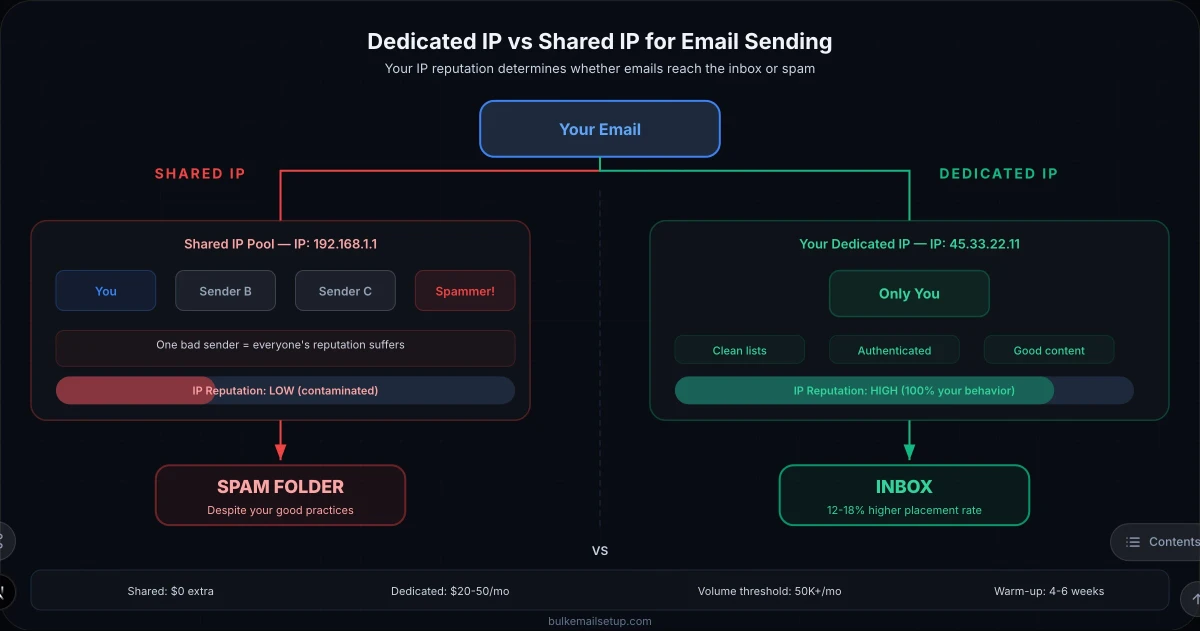
A shared IP is an IP address used by multiple senders on the same email platform. When you sign up for SendGrid, Mailgun, or any SaaS email service on a standard plan, your emails go out from shared IP pools alongside hundreds or thousands of other senders. The IP reputation is a collective score, influenced by every sender on that IP.
What is a dedicated IP?
A dedicated IP is an IP address assigned exclusively to you. No other sender uses it. Your sending behavior alone determines the IP reputation. You build it, you maintain it, and you control it entirely.
The Core Difference
With a shared IP, you inherit other senders' reputation, good or bad. With a dedicated IP, your reputation is 100% yours to build. This is the fundamental tradeoff: convenience and instant reputation vs full control and responsibility.
| Factor | Shared IP | Dedicated IP |
|---|---|---|
| Reputation control | Shared with others | 100% yours |
| Setup effort | None (instant) | Requires warm-up (4-6 weeks) |
| Best for volume | Under 50K/month | Over 50K/month |
| Cost | Included in plan | $20-50/month per IP |
| Risk from others | High, bad neighbors hurt you | Zero, only your behavior matters |
| Deliverability ceiling | Limited by worst sender | Limited only by your practices |
| Warm-up required | No | Yes, critical |
| Ideal use case | Small senders, transactional | High-volume marketing, cold email |
When You Actually Need a Dedicated IP
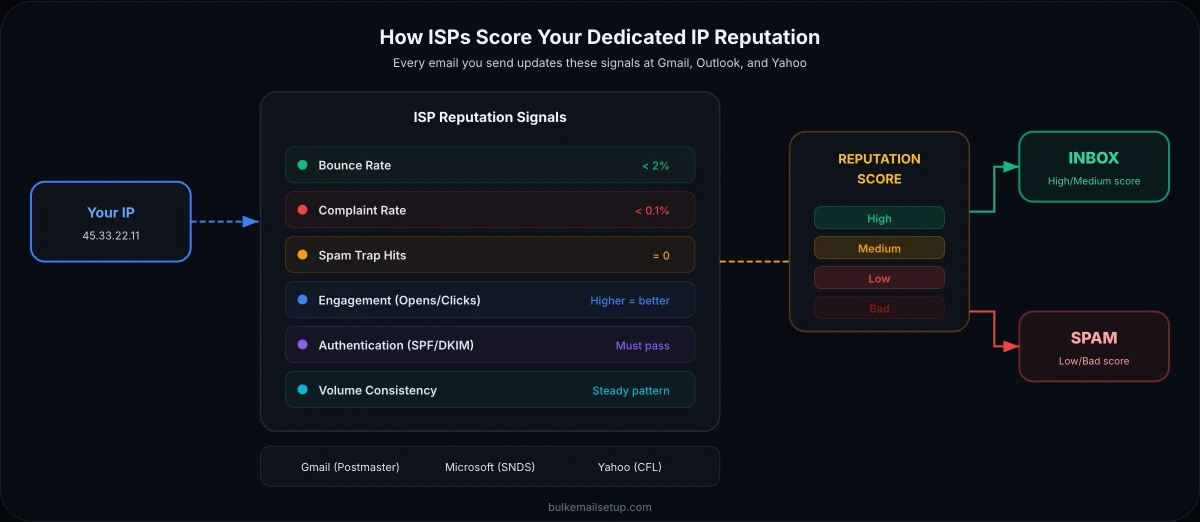
Not every sender needs a dedicated IP. In fact, getting one too early can hurt your deliverability, a low-volume sender on a dedicated IP often performs worse than the same sender on a well-maintained shared pool. Here is how to decide.
You need a dedicated IP when:
- You send more than 50,000 emails per month consistently. Below this threshold, you typically lack the volume to build and maintain a strong IP reputation. ISPs need consistent sending patterns to evaluate senders, and sporadic low-volume sending from a dedicated IP looks suspicious.
- Email is a primary revenue channel. If email directly drives sales, conversions, or customer retention, the inbox placement improvement from a dedicated IP (12-18% on average) translates directly to revenue. The math becomes obvious.
- You are doing cold email outreach. Cold email generates higher complaint rates by nature. On a shared IP, your complaints affect other senders, and their complaints affect you. Most SMTP providers will suspend your account before you build any traction. Dedicated infrastructure is the only sustainable path for cold email at scale.
- Your deliverability is declining despite good practices. If you have proper SPF, DKIM, and DMARC authentication, clean lists, and good content but your inbox placement keeps dropping, shared IP contamination is the likely culprit. Another sender on your shared pool is dragging down the reputation.
- You need predictable, consistent deliverability. Enterprise senders, SaaS companies sending transactional email, and agencies managing multiple brands all benefit from the consistency that comes with owning your IP reputation.
Stick with shared IPs when:
- You send fewer than 25,000 emails per month
- You are just starting out and lack an engaged subscriber list
- You send infrequently (weekly newsletters, occasional campaigns)
- You do not have the patience or process for a 4-6 week IP warm-up
The Low-Volume Trap
A dedicated IP with low sending volume is worse than a shared IP. ISPs need at least 1,000-2,000 emails per day to reliably evaluate sender reputation. If you send 5,000 emails per month total, your dedicated IP will have insufficient data for ISPs to build a reputation profile, leading to inconsistent and often poor inbox placement.
How Dedicated IPs Work for Email Sending
Understanding the mechanics behind dedicated IPs helps you make better decisions about setup, warm-up, and ongoing management.
IP reputation fundamentals
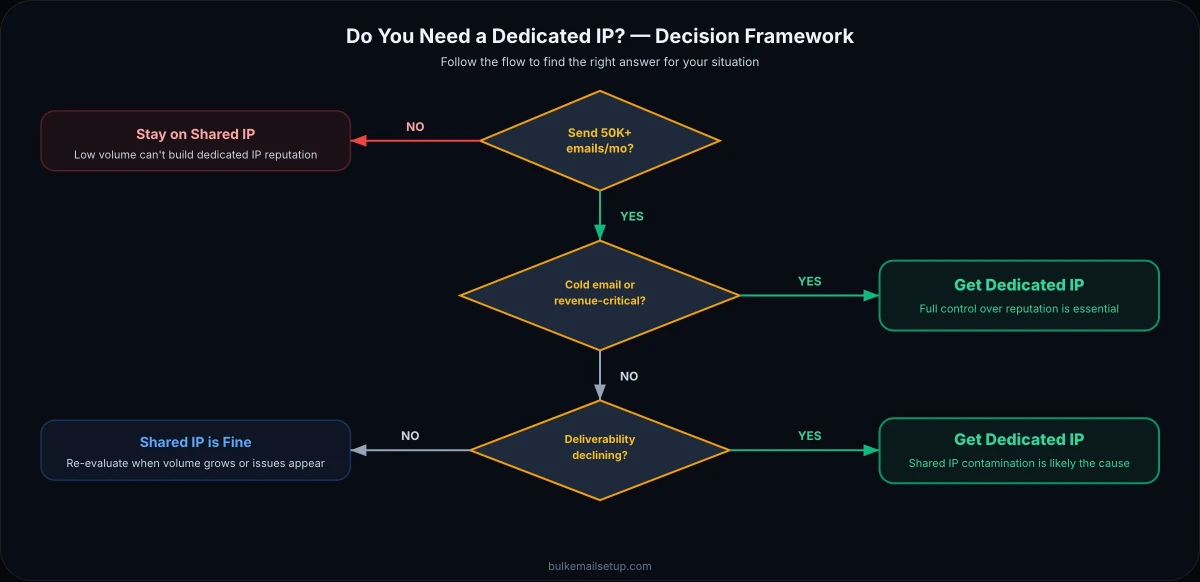
Every IP address that sends email gets scored by ISPs based on several signals: bounce rates, complaint rates, spam trap hits, engagement metrics (opens, clicks, replies), volume patterns, and authentication status. This score determines your inbox placement rate, the percentage of emails that actually reach the inbox instead of spam or being blocked entirely.
On a shared IP, this score reflects the aggregate behavior of all senders. On a dedicated IP, it reflects only you. A sender with a 0.1% complaint rate and 98% valid addresses will build excellent reputation on a dedicated IP. That same sender on a shared IP might see degraded delivery because another sender on the same pool has a 2% complaint rate and is hitting spam traps.
How ISPs evaluate dedicated IPs
Gmail, Microsoft, and Yahoo each maintain their own reputation databases and scoring algorithms. A new dedicated IP starts with a neutral reputation, not good, not bad. The ISPs watch what you do with it during the first few weeks especially closely. This is why IP warm-up is non-negotiable.
| ISP | Reputation Signals | Key Thresholds |
|---|---|---|
| Gmail (Postmaster Tools) | Domain & IP reputation, spam rate, authentication | Spam rate below 0.1% for high reputation |
| Microsoft (SNDS) | IP reputation, Junk mail reporting, trap hits | Complaint rate below 0.3%, green status = good |
| Yahoo (CFL/Complaint Feedback) | Complaint rate, bounce rate, engagement | Complaint rate below 0.1% recommended |
How many dedicated IPs do you need?
The number of IPs depends on your sending volume and the types of email you send. Here is a practical breakdown:
| Monthly Volume | Recommended IPs | Notes |
|---|---|---|
| 50K-100K | 1 IP | Single IP is sufficient; split marketing and transactional if possible |
| 100K-500K | 2-3 IPs | Separate transactional from marketing; consider 1 IP per 100K-200K/month |
| 500K-1M | 3-5 IPs | Dedicated pools for each email type; begin IP rotation strategy |
| 1M+ | 5-10+ IPs | Full rotation strategy; separate by domain, type, and ISP targeting |
Pro Tip
Always keep your transactional email (password resets, order confirmations, account notifications) on a separate dedicated IP from your marketing email. Transactional email has near-100% engagement rates and builds excellent reputation. Marketing email has lower engagement and generates more complaints. Mixing them on one IP drags down your transactional deliverability.
How to Set Up a Dedicated IP for Email Sending
Setting up a dedicated IP involves several steps, whether you are adding one through an existing ESP or configuring your own self-hosted SMTP server. Here is the complete process.
Choose your infrastructure approach
You have two paths: purchase a dedicated IP add-on from your current email service provider (SendGrid, Mailgun, Amazon SES), or set up your own SMTP server on a VPS where you automatically get dedicated IPs. Self-hosted gives you the most control and lowest per-email cost. Provider add-ons are simpler but come with monthly fees and platform restrictions.
Configure DNS records
Set up forward and reverse DNS (rDNS/PTR record) for your dedicated IP. The PTR record should resolve to a hostname that matches your sending domain. Configure SPF records to include the new IP, set up DKIM signing, and ensure DMARC is in place. See our complete authentication guide for step-by-step DNS configuration.
Set up reverse DNS (PTR record)
Contact your IP provider or VPS host to set the PTR record for your dedicated IP. The PTR should point to something like mail.yourdomain.com. ISPs check PTR records as a basic spam filter, IPs without valid reverse DNS are frequently blocked outright. Most VPS providers let you set this in their control panel.
Begin IP warm-up
Start sending from the new IP at low volume and gradually increase. This is the most critical step. A new IP that suddenly sends 50,000 emails will be throttled or blocked by every major ISP. Follow a structured IP warm-up schedule to build reputation safely.
Monitor reputation metrics
Set up monitoring from day one. Register for Google Postmaster Tools, Microsoft SNDS, and Yahoo Complaint Feedback Loop. Track bounce rates, complaint rates, and inbox placement throughout warm-up and beyond. React immediately to any reputation drops.
Validate and scale
After 4-6 weeks of warm-up with good metrics (bounce rate below 2%, complaint rate below 0.1%, no blacklistings), you can begin sending at your target volume. Continue monitoring, reputation is not something you build once and forget.
IP Warm-Up: The Make-or-Break Step
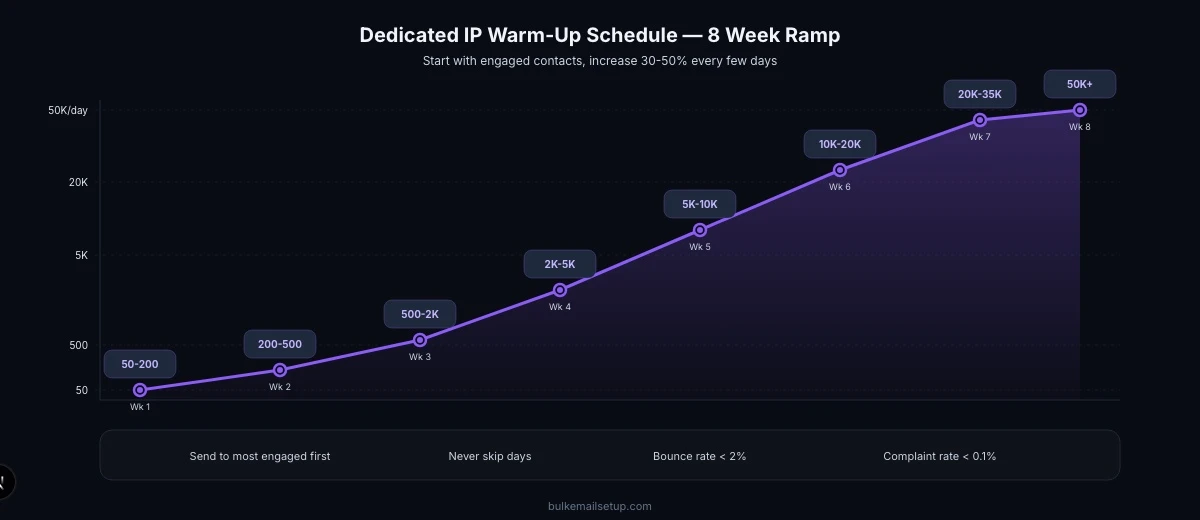
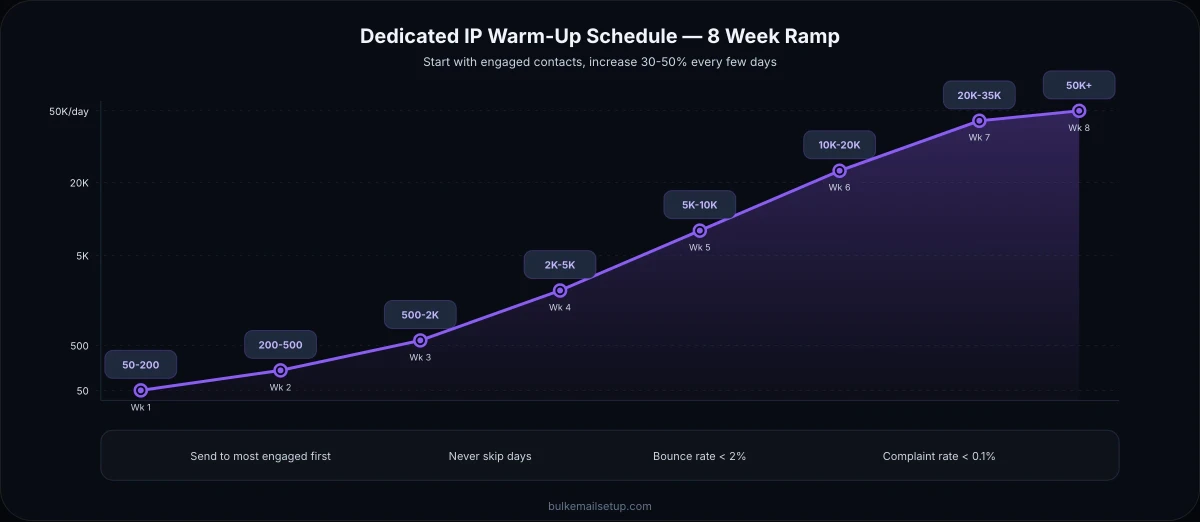
IP warm-up is the process of gradually increasing your sending volume on a new dedicated IP to build trust with ISPs. Skip it or rush it, and your new IP will be flagged as a spam source before you ever reach your target volume. We have a complete IP warm-up schedule with day-by-day targets, but here is the essential framework.
Warm-up schedule overview
| Week | Daily Volume | Cumulative Sent | Focus |
|---|---|---|---|
| Week 1 | 50-200 | 350-1,400 | Send only to most engaged contacts; monitor every metric |
| Week 2 | 200-500 | 1,750-4,900 | Expand to recent openers; watch bounce rates closely |
| Week 3 | 500-2,000 | 5,250-18,900 | Include broader engaged segment; check Postmaster Tools |
| Week 4 | 2,000-5,000 | 19,250-53,900 | Monitor complaint rates; adjust if above 0.1% |
| Week 5-6 | 5,000-20,000 | Up to 193,900 | Approaching target volume; reputation should be established |
| Week 7-8 | 20,000-50,000+ | Full scale | Full volume; ongoing monitoring enters maintenance mode |
Critical Warm-Up Rules
Send to your best contacts first. Start with subscribers who opened or clicked in the last 30 days. High engagement during warm-up signals to ISPs that recipients want your email.
Never skip days. Consistent daily sending is essential. ISPs look for regular patterns. Sending 5,000 one day and zero the next looks suspicious.
Monitor daily. If your bounce rate exceeds 5% or your complaint rate exceeds 0.1% on any day, reduce volume immediately and investigate before continuing.
What to do when warm-up goes wrong
If you see high bounce rates, spam folder placement, or throttling during warm-up, do not panic. Reduce your daily volume by 50%, send exclusively to your most engaged contacts for 3-5 days, and then resume the schedule where you left off. If you get blacklisted during warm-up, check our guide on sending without getting blacklisted for delisting procedures.
Monitoring Your Dedicated IP Reputation
Once your dedicated IP is warmed up, ongoing monitoring is essential. Reputation can degrade quickly, a single bad list import, a sudden spike in complaints, or a spam trap hit can undo weeks of careful warm-up.
Essential monitoring tools
| Tool | What It Monitors | Cost |
|---|---|---|
| Google Postmaster Tools | Gmail domain/IP reputation, spam rate, authentication, encryption | Free |
| Microsoft SNDS | Outlook/Hotmail IP reputation, complaint data, trap hits | Free |
| MXToolbox | Blacklist monitoring (100+ blacklists), DNS health, SMTP diagnostics | Free basic / $99+/mo pro |
| Sender Score (Validity) | IP reputation score 0-100, volume trends, complaint data | Free basic score |
| GlockApps | Inbox placement testing across ISPs, spam filter analysis | From $59/month |
| Talos Intelligence (Cisco) | IP and domain reputation, email volume history, blacklist status | Free |
Key metrics to track
- Bounce rate: Keep below 2% for hard bounces. Above 5% is a red flag that triggers ISP scrutiny. Clean your list regularly.
- Complaint rate: Must stay below 0.1% (Gmail threshold) to 0.3% (Microsoft threshold). Even 0.15% can start degrading your reputation with Gmail.
- Spam trap hits: Zero is the target. Even one recycled spam trap hit signals list hygiene problems. Pristine spam traps (never been valid addresses) are even worse, they indicate purchased or scraped lists.
- Inbox placement rate: Target 90%+ for marketing email, 95%+ for transactional. Test regularly with seed lists or tools like GlockApps.
- Blacklist status: Check daily against major blacklists (Spamhaus, Barracuda, SORBS, SpamCop). Automated monitoring with alerts is ideal.
Pro Tip
Set up automated alerts for reputation changes. Google Postmaster Tools shows reputation as High, Medium, Low, or Bad. Any drop from High to Medium should trigger an immediate investigation. Do not wait for it to reach Low, by then, you are already losing a significant percentage of your emails to spam folders.
Cost Analysis: Dedicated IP Pricing Across Providers
The cost of a dedicated IP varies significantly depending on whether you use a managed email service or self-hosted infrastructure. Here is a realistic cost breakdown.
| Provider | Dedicated IP Cost | Base Plan Required | Total Monthly Cost (100K emails) |
|---|---|---|---|
| SendGrid | $20-90/mo per IP | Pro plan from $89.95/mo | $110-180/mo |
| Mailgun | $59/mo per IP | Scale plan from $90/mo | $149-210/mo |
| Amazon SES | $24.95/mo per IP | Pay per email ($0.10/1K) | $35-50/mo |
| SparkPost | $20/mo per IP | Plan from $75/mo | $95-150/mo |
| Postmark | Included on dedicated plans | From $50/mo | $50-100/mo |
| Self-hosted (VPS) | Included with server | VPS from $10-40/mo | $10-40/mo total |
At 100,000 emails per month, the cost difference is stark. A managed provider with a dedicated IP runs $50-210 per month. A self-hosted setup on a VPS costs $10-40 per month total, and you get full control over your IPs, configuration, and sending policies.
Cost at scale: where self-hosted wins
| Monthly Volume | SendGrid (Dedicated IP) | Amazon SES (Dedicated IP) | Self-Hosted VPS |
|---|---|---|---|
| 100K emails | $110-180/mo | $35/mo | $20/mo |
| 500K emails | $450-750/mo | $75/mo | $40/mo |
| 1M emails | $900-1,500/mo | $125/mo | $60-80/mo |
| 5M emails | $3,000-5,000/mo | $525/mo | $150-200/mo |
The Self-Hosted Advantage
With self-hosted infrastructure, dedicated IPs are included, you are not paying extra for something that should be standard. Every VPS comes with at least one IP address, and additional IPs typically cost $2-5 per month from your hosting provider. Compare that to $20-90 per month per IP from managed email services.
Provider Comparison: Where to Get Dedicated IPs
Your choice of provider affects not just cost but also the quality of the IP addresses you receive, the tools available for monitoring, and how much control you have over your sending infrastructure.
Managed email service providers
Providers like SendGrid, Mailgun, and Amazon SES offer dedicated IP add-ons to their existing plans. The advantage is simplicity, you toggle a setting, pay the fee, and start warm-up. The disadvantage is cost at scale and limited control. Most managed providers restrict certain sending behaviors (especially cold email) and can suspend your account regardless of your dedicated IP status. For a detailed comparison, see our guide to the best dedicated SMTP server providers.
Self-hosted SMTP servers
Running your own SMTP server on a VPS gives you dedicated IPs by default. You control everything: sending speed, authentication, IP rotation, bounce handling, and compliance policies. The tradeoff is that you need technical expertise for setup and maintenance, or a managed service like BulkEmailSetup that handles the infrastructure while giving you full dedicated IP control.
| Feature | Managed ESP (Dedicated IP Add-on) | Self-Hosted SMTP |
|---|---|---|
| IP cost | $20-90/mo per IP | Included ($2-5/mo for additional IPs) |
| IP control | Limited, provider manages pool | Full control over all IPs |
| Cold email support | Usually restricted or banned | No restrictions |
| Account suspension risk | High for aggressive sending | None, you own the server |
| Setup complexity | Low, toggle in dashboard | Medium-High, server configuration needed |
| IP warm-up tools | Built-in automation | Manual or scripted |
| Monitoring | Provider dashboard | Postmaster Tools + third-party |
| Scalability | Pay per IP, per email | Add IPs for $2-5/mo each |
Dedicated IP Best Practices
Having a dedicated IP is only the starting point. Maintaining excellent reputation requires disciplined sending practices.
List hygiene
On a shared IP, poor list hygiene affects everyone. On a dedicated IP, it only affects you, which means the consequences are immediate and undiluted. Validate every email address before adding it to your list. Remove hard bounces after the first occurrence. Suppress addresses that have not engaged in 90 days from marketing campaigns. Run your list through a verification service quarterly.
Consistent sending patterns
ISPs reward consistency. If you normally send 10,000 emails per day, suddenly sending 100,000 looks suspicious, even on a well-established dedicated IP. When you need to increase volume, do it gradually (25-50% increases over several days). Avoid sending nothing for a week and then blasting your entire list.
Separate IPs by email type
As mentioned earlier, keep transactional, marketing, and cold email on separate dedicated IPs. Each type generates different engagement patterns and complaint rates. Separating them protects your highest-priority email (transactional) from being affected by your riskier sending (cold outreach, re-engagement campaigns).
Authentication is non-negotiable
Every dedicated IP must have complete authentication: SPF, DKIM, and DMARC configured correctly. Since 2024, Gmail and Yahoo require these as baseline requirements for any sender doing more than 5,000 emails per day. Without authentication, your dedicated IP reputation will never reach its potential.
The Authentication Stack for Dedicated IPs
- SPF:Add your dedicated IP to your domain's SPF record so ISPs know the IP is authorized to send for your domain
- DKIM: Sign every email with a 2048-bit DKIM key to prove it has not been altered in transit
- DMARC: Set a policy (start with p=none, move to p=quarantine, then p=reject) so ISPs know what to do with unauthenticated email claiming to be from your domain
- rDNS/PTR: Set reverse DNS for your dedicated IP to match your sending hostname, ISPs check this as a basic legitimacy signal
Frequently Asked Questions
How many emails per month do I need to justify a dedicated IP?
The general threshold is 50,000 emails per month minimum. Below that volume, you likely cannot build and maintain sufficient IP reputation, ISPs need consistent volume to evaluate a sender. Between 25,000 and 50,000, it depends on your use case: if email is a critical revenue channel, a dedicated IP can still make sense. Below 25,000, shared IPs are almost always the better choice.
Can I use multiple dedicated IPs for the same domain?
Yes, and you should once your volume exceeds 100,000-200,000 emails per month. Use separate IPs for different email types (transactional vs marketing vs cold outreach) and consider IP rotation for high-volume sending. Just ensure each IP has proper authentication and reverse DNS configured. Your SPF record can include multiple IPs.
What happens if my dedicated IP gets blacklisted?
Since the IP is exclusively yours, you need to identify the root cause (typically a list hygiene issue, spam trap hit, or sudden volume spike), fix the underlying problem, and then request delisting from the specific blacklist. Most blacklists have automated delisting after the offending behavior stops. Spamhaus requires manual delisting requests. The process usually takes 24 hours to 2 weeks depending on the blacklist. See our blacklist prevention and recovery guide.
Is a dedicated IP enough to guarantee inbox placement?
No. A dedicated IP is one piece of the deliverability puzzle. You also need proper authentication (SPF, DKIM, DMARC), clean lists, engaging content, consistent sending patterns, and good subscriber engagement. A dedicated IP gives you control over your reputation, but you still need to maintain that reputation through disciplined sending practices.
How long does it take to warm up a dedicated IP?
Typically 4-6 weeks to reach full sending volume with established reputation. Start with 50-200 emails per day to your most engaged contacts and increase gradually. The exact timeline depends on your target volume, reaching 50,000 per day takes longer than reaching 5,000. Our complete IP warm-up schedule has exact daily targets for each week.
Should I warm up a dedicated IP even if I am moving from a shared IP?
Yes, absolutely. The reputation you built on a shared IP does not transfer to a new dedicated IP. ISPs evaluate each IP independently. Your domain reputation carries over (which helps), but the IP itself starts from neutral. Run both IPs in parallel during warm-up, send your most engaged contacts from the new dedicated IP while keeping the rest on the shared IP, then migrate gradually.
Do I need a dedicated IP if I use Amazon SES?
Amazon SES provides good shared IP pools, but their dedicated IP option ($24.95/month per IP) is worth it if you send more than 100,000 emails per month. Below that, SES shared IPs are well-maintained and typically deliver strong results. Above 100,000, a dedicated IP gives you more control over reputation and removes the risk of shared pool contamination from other SES users.
Conclusion: Make the Switch at the Right Time
A dedicated IP is not a magic bullet, it is a tool that gives you full control over your email sending reputation. That control is worthless if you do not have the volume, the practices, and the monitoring in place to leverage it. Too early, and you lack the sending volume to build reputation. Too late, and you have already suffered months of shared IP contamination dragging down your deliverability.
The sweet spot: move to a dedicated IP when you consistently send 50,000+ emails per month, commit to a proper warm-up process, and set up monitoring from day one. Separate your email types across different IPs, maintain impeccable list hygiene, and keep your authentication bulletproof.
Summary
- Dedicated IPs give you 100% control over your sender reputation, switch when you exceed 50K emails per month
- Below 25K monthly emails, shared IPs typically deliver better results due to insufficient volume for reputation building
- IP warm-up takes 4-6 weeks and is non-negotiable, never skip it, or your new IP will be flagged as spam
- Separate transactional, marketing, and cold email on different dedicated IPs to protect your critical sends
- Self-hosted infrastructure includes dedicated IPs at no extra cost and saves 60-90% vs managed provider dedicated IP add-ons
- Monitor reputation daily using Google Postmaster Tools, Microsoft SNDS, and blacklist monitoring services
- Authentication (SPF, DKIM, DMARC, rDNS) is mandatory, dedicated IPs without authentication will never reach full deliverability
Ready to set up dedicated IP infrastructure for your email sending? Check out BulkEmailSetup plans, we provide fully configured dedicated SMTP servers with dedicated IPs, complete authentication setup, guided IP warm-up, and ongoing deliverability monitoring. No per-email fees, no platform restrictions, and no shared IP risk.


