
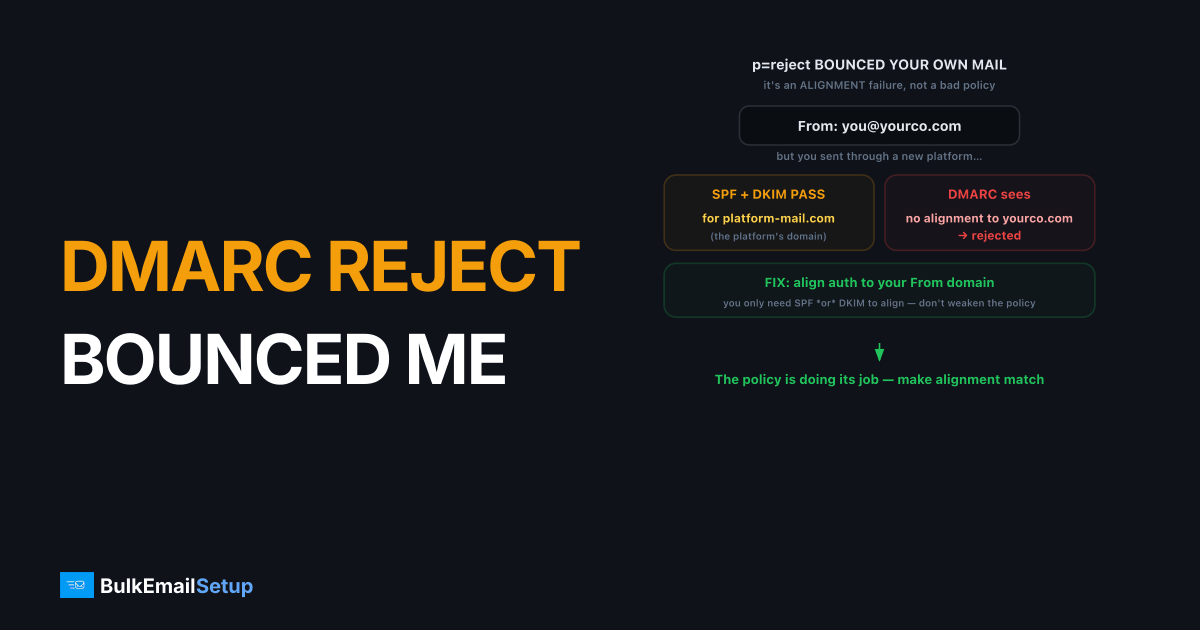
When your own DMARC reject policy bounces your legitimate mail, the cause is almost always an alignment failure, not a problem with the policy itself. DMARC, RFC 7489, requires SPF or DKIM to both pass and align with your visible From domain, and a p=reject policy bounces anything that doesn't. The usual trigger: you send through an ESP or a new tool that authenticates with its own domain, so SPF and DKIM pass for that domain but don't align to yours. The fix is to align authentication to your From domain, not to weaken the policy.
Why a DMARC reject policy bounces legitimate mail
A p=reject DMARC policy tells receivers to bounce any message that fails DMARC, and your own mail fails when SPF and DKIM don't align to your From domain. Passing SPF or DKIM isn't enough on its own, DMARC also checks that the passing domain matches what recipients see in the From field.
The classic scenario:
- You publish
p=rejectonyourco.com. - You start sending through a new platform that signs DKIM as
platform-mail.comand uses its own Return-Path. - SPF and DKIM pass, but for the platform's domain, not yours.
- DMARC sees no alignment to
yourco.comand the message gets rejected.
The mail is legitimate. The authentication is technically valid. But DMARC alignment is the missing piece. Our DMARC alignment explainer covers the mechanics in depth. Don't blame the policy, the policy is doing its job.
The pattern we see most often on onboarding: a customer who has run p=reject cleanly for a year plugs in a new help desk or billing tool, and within hours their rua reports show a fresh source with dkim=pass header.d=helpdesk-mail.net and dmarc=fail. The tool authenticated fine, just not as their domain. Nothing about the existing setup broke. A new unaligned sender simply walked into a reject policy that was already working.
How DMARC alignment actually works
DMARC alignment means the domain that passed SPF or DKIM matches your visible From domain, and you only need one of the two to align. Understanding which one is failing tells you exactly what to fix.
| Check | What aligns | How to fix misalignment |
|---|---|---|
| SPF alignment | Return-Path (envelope) domain vs From domain | Set a custom Return-Path / bounce domain under your domain |
| DKIM alignment | DKIM d= signing domain vs From domain | Configure DKIM to sign with your domain, not the platform's |
Either one aligning makes DMARC pass. So you have two paths to a fix: align SPF by configuring a custom Return-Path on your domain, or align DKIM by signing with a selector under your own domain. Most ESPs support both via a CNAME setup. DKIM alignment is usually the more reliable target because it survives forwarding better than SPF. Use a 2048-bit DKIM key where your DNS host allows it; Google's sender guidelines accept 1024 bits as the minimum for mail to personal Gmail accounts.
Step-by-step: diagnose and fix DMARC rejection
Read your DMARC aggregate reports first, then fix the misaligned mechanism. The reports show, per sending source, whether SPF and DKIM passed and aligned, which points straight at the broken source.
Work this sequence:
- Read the headers of a bounced message. Open the original and find the
Authentication-Resultsline. It showsdmarc=failand whether the failure was SPF or DKIM alignment. - Read your DMARC RUA reports. They list every sending source and its SPF/DKIM alignment status. Identify the source sending unaligned mail. See how to read DMARC aggregate reports.
- Align DKIM. In the offending platform, set up DKIM signing with a selector under your domain (usually a CNAME the platform provides). Confirm the
d=value is your domain. - Or align SPF. Set a custom Return-Path / bounce subdomain under your domain so the envelope domain aligns.
- Re-test. Send to a Gmail account, open "Show original," confirm
dmarc=passwith alignment.
If you need breathing room while you fix this, temporarily set p=none to stop bounces, fix alignment, then restore p=reject. The policy comparison is in DMARC none vs quarantine vs reject.
How to confirm DMARC now passes with alignment
Send a test to a Gmail account you control, open the message, and click "Show original." Read the summary block at the top. You want all three lines green: SPF: PASS, DKIM: PASS, and DMARC: PASS. Then scroll to the Authentication-Results header and verify the detail.
The header should read something like:
Authentication-Results: mx.google.com;
  dkim=pass header.d=yourco.com;
  spf=pass smtp.mailfrom=bounce.yourco.com;
  dmarc=pass (p=REJECT sp=REJECT dis=NONE) header.from=yourco.com
Two things prove alignment, not just authentication. The DKIM header.d= value must be your domain (yourco.com), and dmarc=pass must appear. If you see dkim=pass header.d=platform-mail.com with dmarc=fail, DKIM is signing but not aligning, so go back and fix the signing domain. A dmarc=pass line with your domain in header.from is the confirmation you're done.
Prevent DMARC rejection from coming back
The recurrence trap is adding a new sending tool later and forgetting to align it. Every time you onboard an ESP, a CRM, a help desk, or a billing platform that sends as your domain, it can reintroduce misaligned mail.
- Keep DMARC reporting on. Publish a
rua=address so aggregate reports keep flowing. The default report interval (ri) is 86400 seconds, so most receivers send one report a day. New unaligned sources show up there before they cause visible bounces. - Review reports monthly. Scan for any source with passing SPF or DKIM but failing alignment. See how to read DMARC aggregate reports.
- Align every new sender at onboarding. Make custom Return-Path plus domain-aligned DKIM a checklist item for any tool that sends as you.
- Don't drop to p=none permanently. It removes your spoofing protection. Fix alignment and stay at reject. Gmail has required a DMARC record from senders of 5,000 or more messages a day since February 2024, but
p=noneonly meets the minimum; it does not stop spoofing. - Leave
pctalone. Its default is 100%, which applies the policy to every failing message. Lowering it is a rollout tool, not a fix for misalignment.
How BulkEmailSetup helps
DMARC reject bounces usually come from sending through infrastructure that can't align authentication to your From domain. We provision dedicated SMTP servers with full SMTP access and SPF, DKIM, and DMARC configured to align with your own domain, so a p=reject policy protects you without bouncing your real mail. We also help you read aggregate reports and tighten policy safely. Plans are on our pricing page.
Frequently asked questions
Why is my own DMARC reject policy bouncing my legitimate email?
Because SPF and DKIM aren't aligning to your visible From domain. DMARC requires at least one of them to both pass and align with the From domain. If you authenticate with a different domain, like an ESP's, DMARC sees misalignment and your reject policy bounces the mail. Fix alignment, not the policy.
What is DMARC alignment?
Alignment means the domain that passes SPF or DKIM matches your visible From domain. SPF alignment compares the Return-Path domain to the From domain. DKIM alignment compares the DKIM signing domain to the From domain. DMARC passes only if at least one aligns. Misalignment with a reject policy causes bounces.
Should I downgrade from p=reject to p=none to stop the bounces?
Only as a temporary measure while you fix alignment. Dropping to p=none stops the rejections but also removes your spoofing protection. The correct fix is aligning SPF or DKIM to your From domain, then keeping reject. Use p=none briefly to diagnose, not as the permanent answer.
How do I see why DMARC is failing?
Read your DMARC aggregate (RUA) reports. They show, per source, whether SPF and DKIM passed and aligned. A source passing SPF but failing alignment, or DKIM signing with the wrong domain, points straight to the cause. Open original headers on a bounced message and check the Authentication-Results line too.


