
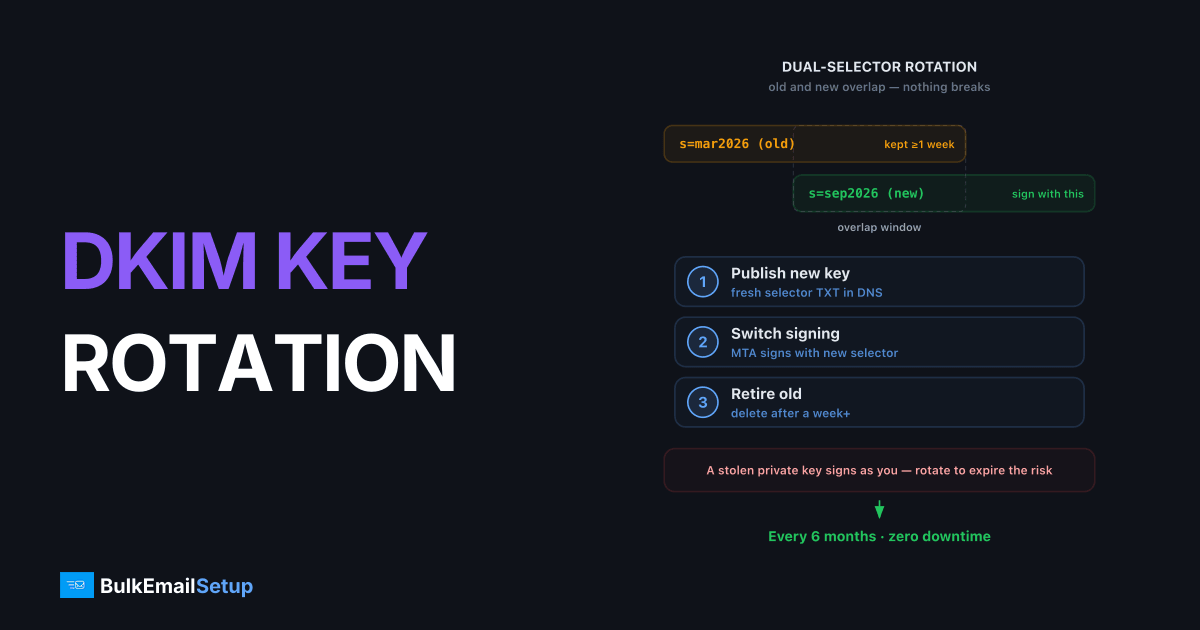
Rotate DKIM keys every 6 months, and do it with two selectors so nothing breaks: publish the new public key under a fresh selector, switch your MTA to sign with it, and keep the old selector's record in DNS for a week or more so messages signed before the cutover still verify. The reason to bother is simple, a stolen DKIM private key lets an attacker send mail that passes DKIM and DMARC as your domain, and rotation puts an expiry date on that risk.
Why rotation matters
The private key sits on your mail server as a file. Anyone who reads it, server compromise, leaked backup, departed contractor, can sign arbitrary mail as your domain from anywhere, and it will pass DKIM and align for DMARC. Unlike a password, you get no "last login" alert; the only defense is limiting how long any one key is valid.
Rotation also shrinks the replay window: old signed messages can be re-sent (DKIM replay) to trade on your reputation, and a retired key ends the usefulness of everything it signed.
| Cadence | Verdict |
|---|---|
| Every 6 months | Best practice (M3AAWG recommendation) |
| Every 12 months | Acceptable minimum for low-risk setups |
| Never (the default everywhere) | One 2019-era key still signing in 2026, common, and the problem |
| Immediately | After any suspected exposure or server compromise |
Selectors make zero-downtime rotation possible
DKIM was designed for this. The selector in the signature (s= tag) tells verifiers which DNS record holds the public key:
DKIM-Signature: v=1; a=rsa-sha256; d=yourdomain.com; s=mail2026a; ...
→ verifier queries mail2026a._domainkey.yourdomain.com. Multiple selectors can exist simultaneously, so old and new keys overlap without conflict. Date-based selector names (mail2026a, mail2026b) make audits trivial.
The rotation sequence
1. Generate the new key pair
opendkim-genkey -b 2048 -d yourdomain.com -s mail2026b
# produces mail2026b.private and mail2026b.txt
2048-bit RSA is the standard. Note the TXT-record quirk: a 2048-bit public key exceeds 255 characters, so the record is published as two quoted strings that resolvers concatenate.
2. Publish the new public key, before touching the signer
mail2026b._domainkey.yourdomain.com.  TXT  ( "v=DKIM1; k=rsa; "
  "p=MIIBIjANBgkqhkiG9w0BAQEFAAOCAQ8AMIIBCgKCAQEA...firstHalf"
  "...secondHalfOfKey" )
Verify propagation before proceeding:
dig +short TXT mail2026b._domainkey.yourdomain.com
Switching the signer before DNS propagates is the classic self-inflicted outage, every message signed in that gap fails verification.
3. Switch signing to the new selector
In OpenDKIM, update the KeyTable/SigningTable entries to point at mail2026b and reload. From this moment, new mail signs with the new key.
4. Keep the old selector live through the overlap
Mail signed with the old key is still in transit: queued retries, greylisting delays, slow forwarders. Leave mail2026a._domainkey in DNS for at least 7 days, longer costs nothing.
5. Revoke the old key
After the overlap, delete the old TXT record, or publish it with an empty key to signal explicit revocation:
mail2026a._domainkey.yourdomain.com. TXT "v=DKIM1; p="
Then delete the old private key from the server. A revoked key in DNS with the private half still on disk is half a rotation.
Don't forget your ESPs
Third-party senders (ESP, CRM, support desk) signing as your domain via CNAME delegation rotate keys on their own schedule, that's the point of the CNAME. But vendors that had you paste a static TXT key never rotate it; track those keys in the same 6-month calendar as your own.
A botched rotation shows up as dkim=fail (no key for signature) or signature failures in your DMARC reports, distinct from body hash failures, which indicate content modification rather than key problems. If DKIM is your only aligned identifier (typical for ESP traffic), a dead key means failing DMARC outright, so rotate carefully if you're at p=reject. New to the stack? Start with the full SPF/DKIM/DMARC setup guide.
How BulkEmailSetup helps
Dedicated SMTP servers from BulkEmailSetup include scheduled DKIM rotation with dual-selector overlap, new keys generated, published, verified, and old ones revoked, without a single failed signature. SPF, DMARC, and PTR management included; see pricing.
Frequently asked questions
How often should DKIM keys be rotated?
Every 6 months is the widely cited best practice (M3AAWG guidance), with 12 months as a reasonable maximum. Rotate immediately if a key may have been exposed or a server was compromised.
Why rotate DKIM keys at all?
A leaked private key lets an attacker sign mail as your domain that passes DKIM and DMARC. Rotation caps the useful lifetime of any stolen key and limits replay of old signed messages.
How do I rotate DKIM without breaking mail in transit?
Use a new selector: publish the new public key at the new selector, switch signing to it, then leave the old selector's key in DNS for at least a week so messages signed before the switch still verify.
What key length should DKIM use?
2048-bit RSA. 1024-bit keys are still seen but are below current security guidance; some DNS panels need the 2048-bit key split into two quoted strings due to the 255-character TXT limit.
How do I revoke an old DKIM key?
After the overlap window, either delete the selector's TXT record or publish it with an empty key (v=DKIM1; p=), the empty p= explicitly signals the key is revoked.


