
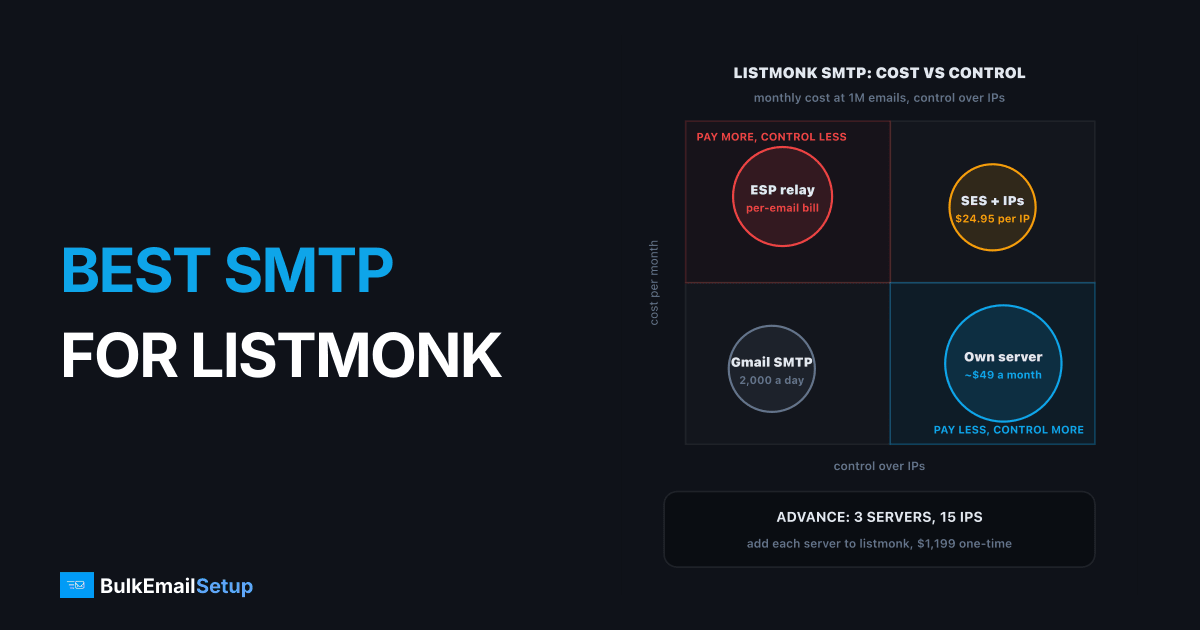
The best SMTP for listmonk depends on volume: Amazon SES under about 100,000 emails a month, your own dedicated SMTP server above that. Listmonk is free, it can send through several SMTP servers at once, and at its default settings it pushes about 100 emails a second. So the SMTP behind it decides two things: what you pay each month and how much of that mail reaches the inbox. Gmail or Workspace SMTP is only good for testing, with a cap of 2,000 messages a day.
This post is about picking the provider. For the actual settings screen, see our listmonk SMTP server setup guide.
The four realistic options
| Option | Cost at 1M emails a month | Daily ceiling | Your own IPs | Setup work |
|---|---|---|---|---|
| Gmail or Workspace SMTP | not possible | 2,000 messages per user | no | low |
| Amazon SES | about $100, plus $24.95 per dedicated IP | grows with your quota | optional, paid | medium, bounces via SNS |
| ESP relay (SendGrid, Mailgun, Postmark) | per-email tiers, rising with volume | plan limit | higher tiers only | low |
| Your own dedicated SMTP server | flat hosting, about $49 a month on Advance | 200,000 a day on Advance | yes, 15 | done for you |
Gmail drops out first. Google lists a 2,000 messages a day limit per Workspace user and 100 recipients per message over SMTP, and bulk mail from a Workspace account is a quick way to get it suspended.
How listmonk actually sends
Listmonk pulls subscribers from Postgres in batches, then pushes messages out over a pool of SMTP connections. The defaults, from listmonk's own source schema, are what most installs run.
| Setting | Default | What it controls |
|---|---|---|
| Concurrency | 10 | workers sending at the same time |
| Message rate | 10 | messages per second per worker |
| Batch size | 1,000 | subscribers fetched per cycle |
| SMTP servers | a list, 2 entries shipped | where mail goes out |
| Max connections per server | 10 | sockets held open per server |
| Retries | 2 | silent retries on other connections |
| Sliding window | off, 10,000 per hour when on | hard cap per time window |
Listmonk's defaults multiply into its real speed
The multiplication is the part to remember. Ten workers at 10 a second is 100 emails a second, or 360,000 an hour. That is far more than one fresh IP should send.
Why several SMTP servers matter
Because the SMTP setting is a list, one campaign can go out through two, three or more servers. That spreads the load across more IPs, so each IP stays under the rate Gmail and Microsoft accept from it.
One listmonk install, several sending servers
This is where a dedicated server setup fits listmonk well. You add each server once, and listmonk handles the split. With Amazon SES you get one endpoint per region instead, and IP spreading happens inside AWS, on IPs you only control if you pay for dedicated ones.
How fast should you send?
Faster is not better. A receiver that sees a sudden flood from a young IP answers with 4xx deferrals, listmonk retries, and the campaign ends up slower than if you had gone gently.
Same campaign, three speeds
| Rate | 500,000 emails take | Good for |
|---|---|---|
| 100 a second | about 83 minutes | well-warmed IPs spread across servers |
| 50 a second | about 2 hours 47 minutes | most established senders |
| 25 a second | about 5 hours 33 minutes | IPs in their first weeks |
A simple rule: set the rate so a campaign finishes in 2 to 4 hours. During warm-up, switch on the sliding window so a big send cannot outrun your IP warm-up schedule.
Which SMTP to pick, by list size
| Your list | Best fit | Why |
|---|---|---|
| Under 5,000, testing | Gmail or Workspace SMTP | free, but 2,000 a day cap |
| 5,000 to 100,000 a month | Amazon SES | $0.10 per 1,000, low bill |
| 100,000 to 1M a month | SES with dedicated IPs, or own server | reputation control starts to matter |
| Over 1M a month | your own dedicated SMTP server | flat cost, many IPs, no per-email bill |
The crossover is about steady volume. If you send 1 million emails every month, a one-time setup and $49 a month in hosting beats a bill that grows with every send. If you send 50,000 now and then, SES is cheaper and simpler.
Bounces and complaints
Whatever you choose, connect bounces before the first big campaign. Listmonk's bounce docs cover POP mailbox polling and webhooks from SES, SendGrid and Postmark. On your own server, a bounce mailbox on the sending domain does the job, as we explain in how a bounce server works.
Skipping this is the most common listmonk mistake we see. Hard bounces keep getting mailed, the bounce rate climbs past 5%, and the IPs lose standing at Gmail within a few campaigns.
How BulkEmailSetup helps
We set up the sending side listmonk needs: dedicated SMTP servers you own, each with its own IPs, SPF, DKIM, DMARC and PTR done, a bounce mailbox, and a warm-up plan. You add the servers to listmonk's SMTP list and it spreads campaigns across them.
| Plan | One-time fee | Emails per day | SMTP servers | Dedicated IPs | Hosting you pay your host |
|---|---|---|---|---|---|
| Basic | $549 | 25,000 | 1 | 3 | about $11 a month |
| Advance | $1,199 | 200,000 | 3 | 15 | about $49 a month |
| Custom | $2,997 | 1,000,000 | 12 | 60 | about $170 a month |
No monthly fee to us, no contact limit and a 15-day money-back guarantee. Compare the Advance plan or see all pricing. If you are still choosing a mailer, best SMTP for MailWizz and best SMTP for Mautic cover the same question for those apps.
Frequently asked questions
What is the best SMTP for listmonk?
For lists under about 100,000, Amazon SES is the cheapest workable choice at $0.10 per 1,000 emails. For steady volume above that, your own dedicated SMTP server is the better fit, because listmonk can spread a campaign across several servers and IPs and the monthly cost stays flat. Gmail or Workspace SMTP is fine for testing only, since it caps at 2,000 messages a day.
Can listmonk use several SMTP servers?
Yes. The SMTP setting in listmonk is a list, and the default install ships with two server entries, one enabled and one disabled. Each server has its own connection limit, 10 by default, and its own retry count. Adding servers lets one campaign go out through several IPs, which keeps each IP under the rate that Gmail and Microsoft accept from it.
How fast can listmonk send?
With the defaults of 10 concurrent workers and a message rate of 10, listmonk pushes about 100 emails a second, so a 500,000 email campaign takes about 83 minutes. The real limit is the receiving side, not listmonk. A young IP pushed at 100 a second collects deferrals, so most senders run slower and finish in 2 to 4 hours.
What does listmonk sending cost at 1M a month?
Listmonk itself is free. The sending side at 1 million emails a month is about $100 on Amazon SES before dedicated IPs, which are $24.95 each a month. BulkEmailSetup's Advance plan is $1,199 one-time with 15 dedicated IPs and about $49 a month hosting, so the monthly bill does not grow if you send 2 or 5 million.
Does listmonk have a sending limit?
No limit is built into the software. Listmonk has an optional sliding window setting, off by default, that caps sends per time window, set to 10,000 per hour when you switch it on. Use it during IP warm-up so a big campaign cannot outrun what your new IPs are ready for.
Does listmonk handle bounces from any SMTP?
Listmonk can process bounces from a POP mailbox or from webhooks sent by Amazon SES, SendGrid and Postmark. With your own server, the bounce mailbox on your sending domain feeds listmonk directly. Whatever you pick, set bounces up before the first large campaign, or hard bounces pile up and damage your sender reputation.


