
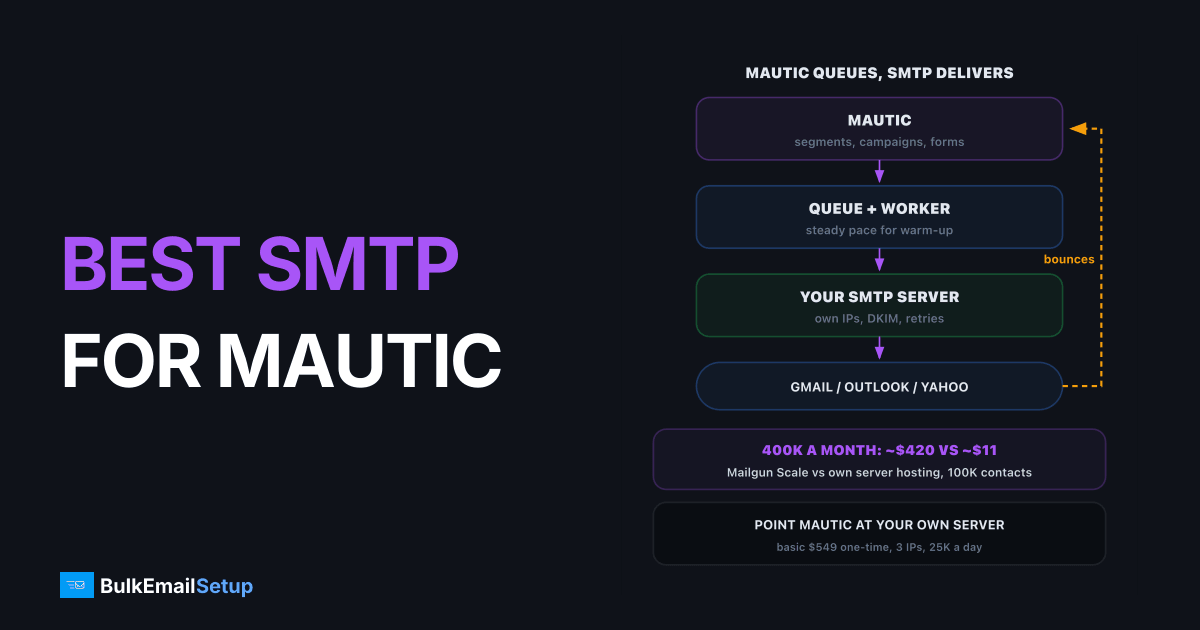
The best SMTP for Mautic depends on volume: Amazon SES is cheapest for small lists, and a dedicated SMTP server is the best fit once you send steadily. Mautic is free, but it does not send mail itself. At 100,000 contacts mailed four times a month, sending costs about $40 on SES, about $420 on Mailgun, or about $11 a month of hosting on your own server after a one-time setup. The right pick also depends on who handles bounces and warm-up, which is where most Mautic deliverability problems start.
How Mautic sends mail
Mautic builds and queues the mail, the SMTP server delivers it
Mautic handles segments, campaigns, forms and tracking. The SMTP side handles everything after "send": the IPs, the reputation, the retry logic and the bounces that come back. That split is why the same Mautic install can land in the inbox for one company and in spam for another.
The setup steps live in our Mautic SMTP configuration guide. This post is about which server to point it at.
The four realistic choices
| Option | Sending cost | IPs | Bounce handling | Best for |
|---|---|---|---|---|
| Amazon SES | $0.10 per 1,000 | shared, or $24.95 per dedicated IP a month | via SNS, you wire it up | small lists, tight budgets |
| Mailgun | $90 a month for 100K on Scale | 1 dedicated on Scale, extra $59 each | webhooks and API | teams already on Mailgun |
| SendGrid | Essentials from $19.95, Pro from $89.95 | dedicated IP on Pro | webhooks | app email plus some campaigns |
| Dedicated SMTP server | hosting only, after one-time setup | your own, about $2 each a month | bounce server on your domain | steady volume, full control |
All four work with Mautic 5's Symfony Mailer DSN, either as plain SMTP or through a provider transport. The real differences are cost at scale, who owns the IPs, and how much of the deliverability plumbing you have to build yourself.
Cost at 100,000 contacts
Assume a list of 100,000 contacts and four campaigns a month, so 400,000 emails.
| Option | Monthly sending cost | Notes |
|---|---|---|
| Amazon SES | about $40 | plus dedicated IPs if you want them |
| Mailgun Scale | about $420 | $90 + 300K overage at $1.10 per 1,000 |
| SendGrid | above $89.95 | Pro tier sized for 400K, check the current price |
| Dedicated server, Basic | about $11 hosting | $549 one-time, 25,000 a day |
400,000 emails a month from a 100,000-contact list
SES looks almost as cheap as your own server, and per email it nearly is. The gap opens on two things. First, dedicated IPs on SES cost $24.95 each a month, so 3 IPs add about $75. Second, SES reviews accounts before production access, and Mautic users with older lists often stall there. Our Amazon SES vs dedicated SMTP comparison covers that trade in depth.
The Mautic app itself needs its own server too. That cost is the same whichever SMTP you choose, so it is left out of the table.
Why Mautic emails go to spam
Most Mautic spam problems are configuration, not the provider.
| Cause | What you see | Fix |
|---|---|---|
| No DKIM or DMARC | Gmail warnings, junk folder | sign with DKIM, publish DMARC |
| Bounces not processed | bounce rate climbs every campaign | run the bounce fetch job, mark Do Not Contact |
| Queue bursts on a cold IP | 421 deferrals, then spam | queue mode, small batches, warm-up |
| Tracking domain mismatch | links flagged | use a tracking subdomain on your own domain |
| No one-click unsubscribe | complaints rise | add List-Unsubscribe headers, required by Gmail for bulk senders |
The bounce one is the quiet killer. Mautic only flags dead addresses if the bounce mailbox is read on a schedule. Skip it, and every campaign mails the same dead addresses again, pushing the bounce rate past the 5% that most providers treat as a warning. Gmail's sender guidelines also require SPF, DKIM, DMARC and one-click unsubscribe for anyone sending 5,000 or more messages a day.
Pick by volume and control
Start from volume, then from what you already pay for
- Under about 50,000 emails a month: SES. The bill is a few dollars and shared IPs are fine.
- Already on Mailgun or SendGrid for app email: stay, and send Mautic campaigns from a separate subdomain.
- Steady sending above a few hundred thousand a month: a dedicated server. Mautic's queue paces the warm-up, and the per-email bill disappears.
- High volume while already on an ESP: split. Keep receipts and app email where they are, and move Mautic campaigns to your own server.
What a good Mautic plus SMTP setup includes
- A sending subdomain such as mail.yourdomain.com, so campaign reputation stays apart from your main domain.
- SPF, DKIM and DMARC on that subdomain, starting DMARC at p=none.
- A bounce mailbox read every 10 to 15 minutes by Mautic's fetch job.
- Queued sending with a batch size that matches your warm-up stage.
- A warm-up plan. New IPs go to engaged contacts first. See the IP warm-up schedule.
How BulkEmailSetup helps
We set up the sending side for Mautic users: a dedicated SMTP server you own, with your own IPs, SPF, DKIM, DMARC and PTR, a bounce server on your domain and a warm-up plan. You point Mautic's DSN at it and keep the queue running.
| Plan | One-time fee | Emails per day | IPs | Hosting you pay your host |
|---|---|---|---|---|
| Basic | $549 | 25,000 | 3 | about $11 a month |
| Advance | $1,199 | 200,000 | 15 | about $49 a month |
No contact limits and no monthly fee to us. A 100,000-contact list mailed weekly fits Basic if each send runs over four days, or Advance if it must go out the same day. See the Basic plan or compare all pricing.
Frequently asked questions
What SMTP works best with Mautic?
For a small list on a budget, Amazon SES is cheapest at $0.10 per 1,000 emails. For steady volume where you want control over IPs and no per-email bill, a dedicated SMTP server is the best match, because Mautic's queue can pace sending to fit your warm-up. Mailgun and SendGrid work well too but cost more per email as the list grows.
Does Mautic work with a dedicated SMTP server?
Yes. In Mautic 5 and later you set the mailer as an SMTP DSN such as smtp://user:[email protected]:587, switch to queued sending and run the messenger worker. Mautic does not care who runs the server. A dedicated server with your own IPs is the most common setup for Mautic users sending more than a few hundred thousand emails a month.
Why are Mautic emails going to spam?
The usual causes are no DKIM or DMARC on the sending domain, bounces never processed so dead addresses keep getting mail, a queue that bursts thousands of emails at once from a cold IP, and a tracking domain that does not match the sender. Fix authentication first, then bounce processing, then the sending rate.
What does Mautic sending cost at 100K contacts?
If you email 100,000 contacts four times a month, that is 400,000 emails. Amazon SES charges about $40 for that, Mailgun's Scale plan about $420 at list overage rates, and a dedicated server on BulkEmailSetup's Basic plan about $11 a month in hosting after a $549 one-time setup. Mautic itself is free, but its own app server is a separate cost.
Can Mautic use Amazon SES?
Yes, either over SES's SMTP interface or through an SES transport for Symfony Mailer. It is the cheapest option per email. The trade-offs are the SES sandbox and account review before you can send at volume, shared IPs unless you pay $24.95 a month per dedicated IP, and bounce handling that needs SNS notifications set up.
Should Mautic send immediately or use a queue?
Always queue for campaigns. Immediate sending pushes mail out during page loads and campaign triggers, which bursts traffic at your SMTP server. Queued mode spools messages and a worker sends them at a steady pace. That pace is what keeps a new IP inside Gmail and Microsoft limits during warm-up.


